


- Posts: 22
- Thank you received: 0
3 Post Moderation Rule for New Boarders (25 Jan 2021)
New boarders will have their posts moderated - Don't worry if you cannot see your post immediately.
Replace an image or video that has a mask
19 Aug 2014 14:55 #51476
by modi0001
Replace an image or video that has a mask was created by modi0001
Hi!
Is it possible to replace a video or image that has an mask with another file and keep the mask settings etc.? Because when I replace it, the mask etc. gets deleted
Is it possible to replace a video or image that has an mask with another file and keep the mask settings etc.? Because when I replace it, the mask etc. gets deleted
Please Log in to join the conversation.
- ronny courtens
-

- Offline
- Moderator
-

Less
More
- Posts: 4455
- Thank you received: 962
19 Aug 2014 16:59 #51486
by ronny courtens
Replied by ronny courtens on topic Replace an image or video that has a mask
- Select the clip that has the mask and press CMD+C to copy the clip.
- Then replace the clip with the new one, select the new clip, press SHIFT+CMD+V and in the Paste Attributes window select the mask to paste it onto the new clip. You can do this when replacing any clip that has effects applied to it.
- Ronny
- Then replace the clip with the new one, select the new clip, press SHIFT+CMD+V and in the Paste Attributes window select the mask to paste it onto the new clip. You can do this when replacing any clip that has effects applied to it.
- Ronny
Please Log in to join the conversation.
19 Aug 2014 18:23 #51492
by modi0001
Replied by modi0001 on topic Replace an image or video that has a mask
Hi!
Thanks but since I use Alex 4D Mask+ 16 (which is an plugin) it doesn't get copied to the other clip. Is it possible to make it appear in the list or copy it in another way?
Thank you very much by the way!
Thanks but since I use Alex 4D Mask+ 16 (which is an plugin) it doesn't get copied to the other clip. Is it possible to make it appear in the list or copy it in another way?
Thank you very much by the way!
Please Log in to join the conversation.
- ronny courtens
-
- Offline
- Moderator
-
Less
More
- Posts: 4455
- Thank you received: 962
19 Aug 2014 18:40 #51494
by ronny courtens
Replied by ronny courtens on topic Replace an image or video that has a mask
Now that's strange. I just did a test with this plugin and it seems to work.
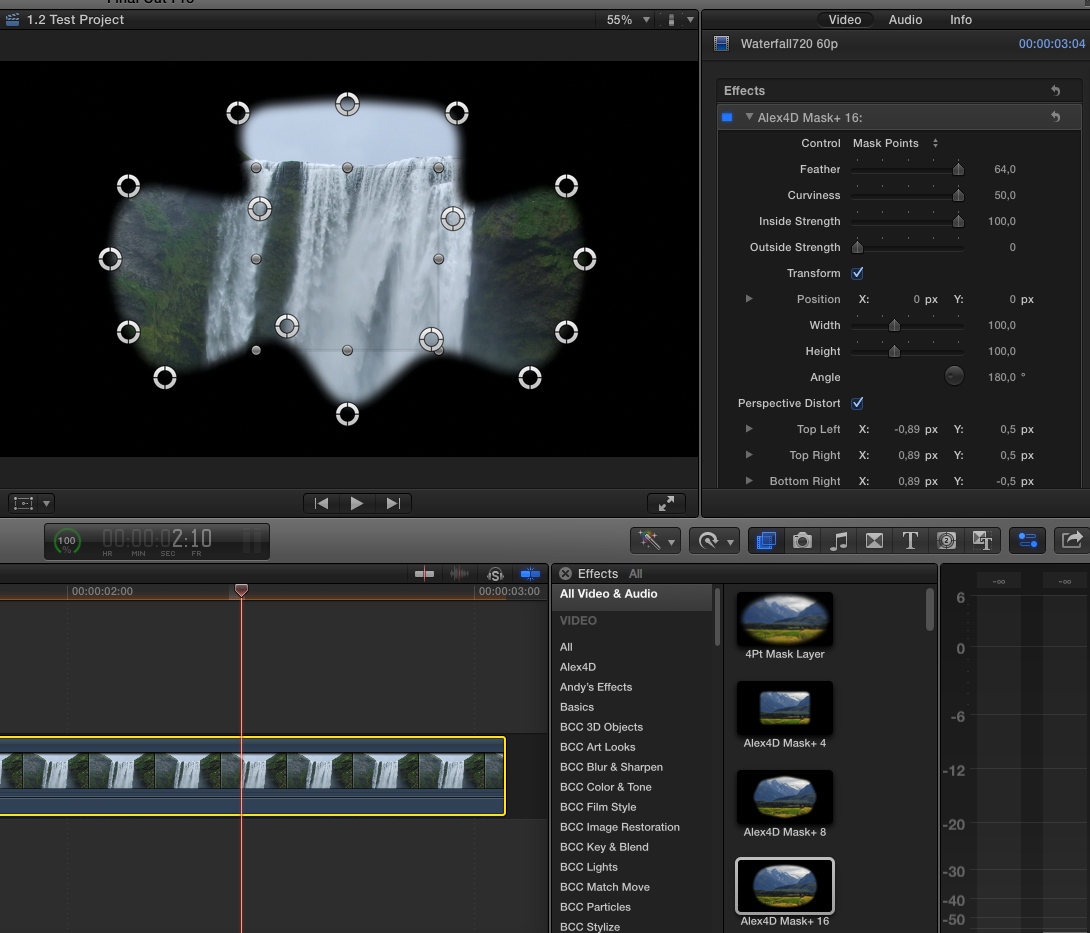
Here's the Alex 4D Mask+ 16 plugin applied to a clip:
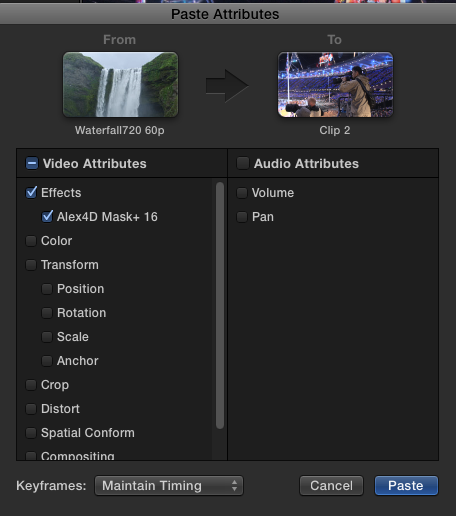
I copy the clip, replace it with a new clip and press SHIFT+CMD+V to open the Paste Attributes window, then I select the mask and press Apply:
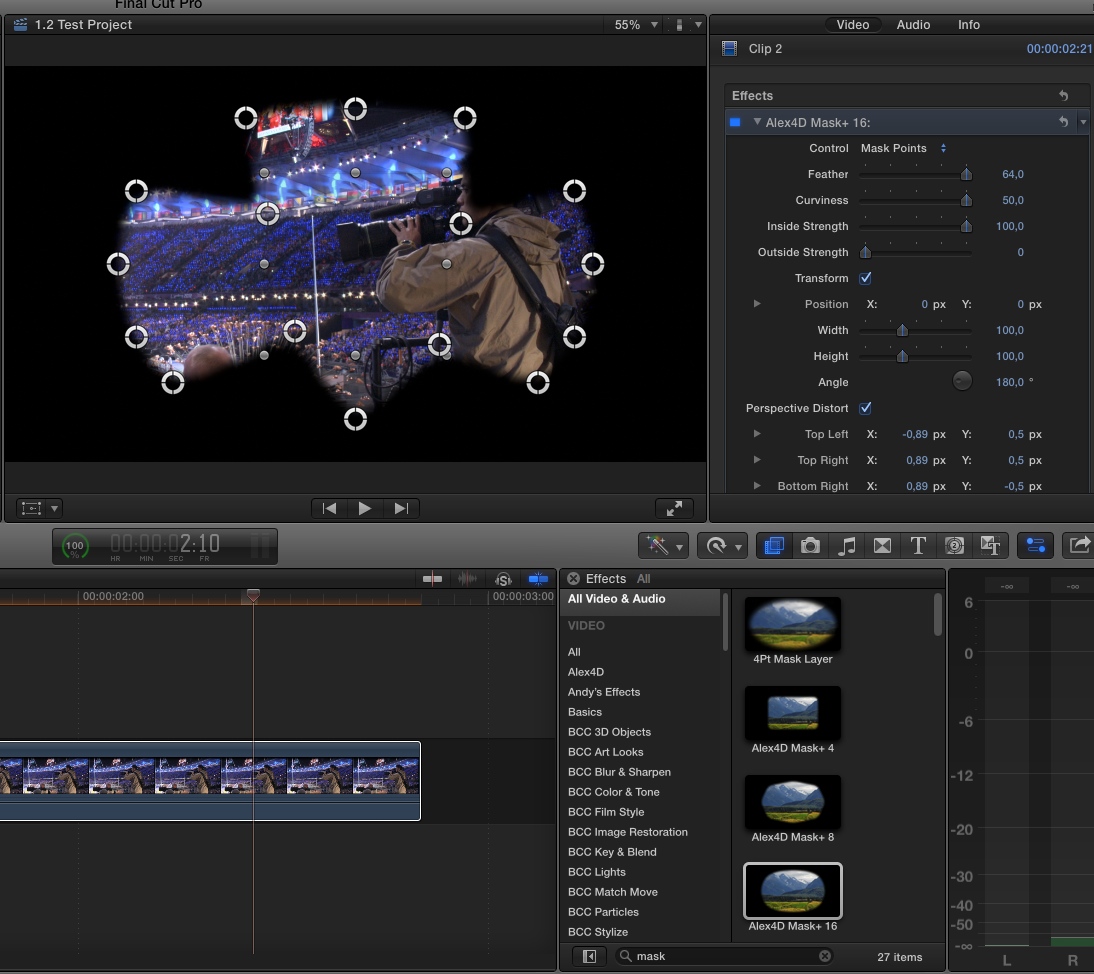
The mask is applied to the new clip, exactly as it was on the first clip:
So please check if you are doing this the same way I do. If this still doesn't work you might consider refreshing your FCP X preferences (launch FCPX while holding the ALT+CMD keys pressed).
- Ronny
Here's the Alex 4D Mask+ 16 plugin applied to a clip:
I copy the clip, replace it with a new clip and press SHIFT+CMD+V to open the Paste Attributes window, then I select the mask and press Apply:
The mask is applied to the new clip, exactly as it was on the first clip:
So please check if you are doing this the same way I do. If this still doesn't work you might consider refreshing your FCP X preferences (launch FCPX while holding the ALT+CMD keys pressed).
- Ronny
Please Log in to join the conversation.
19 Aug 2014 19:14 - 19 Aug 2014 19:14 #51496
by modi0001
Replied by modi0001 on topic Replace an image or video that has a mask
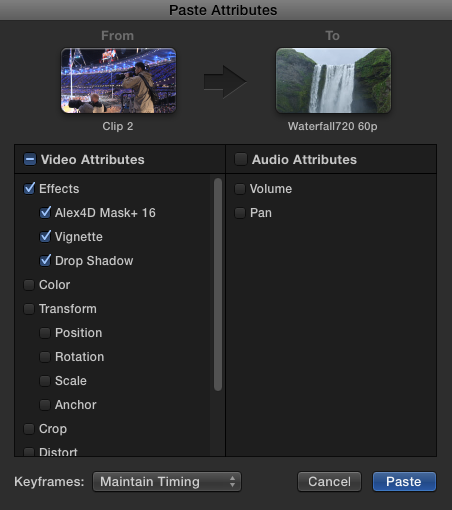
This is the effects I have used on the image, Vignette, Alex 4D Mask + 16, Shadow.

When I later do as you did, I get this window up with only "Vignette":

When I later do as you did, I get this window up with only "Vignette":
Last edit: 19 Aug 2014 19:14 by modi0001.
Please Log in to join the conversation.
- ronny courtens
-
- Offline
- Moderator
-
Less
More
- Posts: 4455
- Thank you received: 962
19 Aug 2014 19:52 #51497
by ronny courtens
Replied by ronny courtens on topic Replace an image or video that has a mask
All of them show up on my system:
Reset your FCP X preferences, then try again.
- Ronny
Reset your FCP X preferences, then try again.
- Ronny
Please Log in to join the conversation.
19 Aug 2014 20:13 #51498
by modi0001
Replied by modi0001 on topic Replace an image or video that has a mask
Hello!
I have tried again with no result.
When I drag in the image to replace it I choose "Replace from Start", should I choose something else?
I have tried again with no result.
When I drag in the image to replace it I choose "Replace from Start", should I choose something else?
Please Log in to join the conversation.
- ronny courtens
-
- Offline
- Moderator
-
Less
More
- Posts: 4455
- Thank you received: 962
19 Aug 2014 20:20 #51499
by ronny courtens
Replied by ronny courtens on topic Replace an image or video that has a mask
No, Replace from start should work.
Try this: instead of SHIFT+CMD+V try ALT+CMD+V to paste the effects on the new clip.
- Ronny
Try this: instead of SHIFT+CMD+V try ALT+CMD+V to paste the effects on the new clip.
- Ronny
Please Log in to join the conversation.
19 Aug 2014 20:24 #51500
by modi0001
Replied by modi0001 on topic Replace an image or video that has a mask
Tried that too, but the Vignette effect only appears to the clip. It's like FCP only detects the Vignette one but not the others for a strange reason :blink:
Please Log in to join the conversation.
- ronny courtens
-
- Offline
- Moderator
-
Less
More
- Posts: 4455
- Thank you received: 962
19 Aug 2014 20:25 - 19 Aug 2014 20:25 #51501
by ronny courtens
Replied by ronny courtens on topic Replace an image or video that has a mask
Just to be sure: did you reset your FCP X preferences?
- Ronny
- Ronny
Last edit: 19 Aug 2014 20:25 by ronny courtens.
Please Log in to join the conversation.
19 Aug 2014 20:27 #51502
by modi0001
Replied by modi0001 on topic Replace an image or video that has a mask
This one right? :dry:

Please Log in to join the conversation.
- ronny courtens
-
- Offline
- Moderator
-
Less
More
- Posts: 4455
- Thank you received: 962
19 Aug 2014 20:33 #51503
by ronny courtens
Replied by ronny courtens on topic Replace an image or video that has a mask
No, that's not it. To reset your FCP X preferences:
1. Quit FCP X
2. Launch FCP X again while holding both the ALT and the CMD keys pressed. You will get a message asking you if you want to delete your preferences. Press OK and FCP X will start up.
When FCP X starts try pasting your effects again using Paste Attributes and see if it works now. It does work on my system with exactly the same effects, so it should work on yours.
- Ronny
1. Quit FCP X
2. Launch FCP X again while holding both the ALT and the CMD keys pressed. You will get a message asking you if you want to delete your preferences. Press OK and FCP X will start up.
When FCP X starts try pasting your effects again using Paste Attributes and see if it works now. It does work on my system with exactly the same effects, so it should work on yours.
- Ronny
Please Log in to join the conversation.
19 Aug 2014 20:42 #51506
by modi0001
Replied by modi0001 on topic Replace an image or video that has a mask
I don't get any window, I have pressed both ALT- CMD while I'm clicking on the FCP icon but I don't get any window..
Please Log in to join the conversation.
- ronny courtens
-
- Offline
- Moderator
-
Less
More
- Posts: 4455
- Thank you received: 962
19 Aug 2014 20:44 #51508
by ronny courtens
Replied by ronny courtens on topic Replace an image or video that has a mask
You are working with the latest version (10.1.2), right?
- Ronny
- Ronny
Please Log in to join the conversation.
19 Aug 2014 20:46 #51509
by modi0001
Replied by modi0001 on topic Replace an image or video that has a mask
I got 10.0.6 so it's not the newest version.
Please Log in to join the conversation.
- ronny courtens
-
- Offline
- Moderator
-
Less
More
- Posts: 4455
- Thank you received: 962
19 Aug 2014 20:57 #51513
by ronny courtens
Replied by ronny courtens on topic Replace an image or video that has a mask
OMG, this explains everything. You really, really, should update the the newest version, which is 10.1.3 now BTW.
But we have come this far, so to get you through this I will tell you how to reset your preferences in this version:
1. Download Preference Manager from Digital Rebellion: www.digitalrebellion.com/prefman/
Click the yellow download button on the web page, then install the application.
2. Open Preference Manager and set it to delete the FCP X preferences.
3. Once that's done, launch FCP X and try again. If this still does not work you will have to update FCP X. The update is free so there is no reason not to do this, especially if you are still on 10.0.6.
- Ronny
But we have come this far, so to get you through this I will tell you how to reset your preferences in this version:
1. Download Preference Manager from Digital Rebellion: www.digitalrebellion.com/prefman/
Click the yellow download button on the web page, then install the application.
2. Open Preference Manager and set it to delete the FCP X preferences.
3. Once that's done, launch FCP X and try again. If this still does not work you will have to update FCP X. The update is free so there is no reason not to do this, especially if you are still on 10.0.6.
- Ronny
Please Log in to join the conversation.
19 Aug 2014 21:42 #51516
by modi0001
Replied by modi0001 on topic Replace an image or video that has a mask
Hehe, I'll see if I can update FCP.
I reseted FCP but It didn't work. Thanks for your help anyways!
I reseted FCP but It didn't work. Thanks for your help anyways!
Please Log in to join the conversation.
30 Aug 2014 10:48 - 30 Aug 2014 10:49 #51969
by modi0001
Replied by modi0001 on topic Replace an image or video that has a mask
Hi!
I have finally found out why it doesn't work as it should. When I for example want to replace a Gordon Ramsay png with The Simpsons it doesn't work because when I paste the attributes it says that I want to "take" the effects from a text instead of the Gordon png (see pictures). Is there a way to fix this?


I have finally found out why it doesn't work as it should. When I for example want to replace a Gordon Ramsay png with The Simpsons it doesn't work because when I paste the attributes it says that I want to "take" the effects from a text instead of the Gordon png (see pictures). Is there a way to fix this?
Last edit: 30 Aug 2014 10:49 by modi0001.
Please Log in to join the conversation.
- ronny courtens
-
- Offline
- Moderator
-
Less
More
- Posts: 4455
- Thank you received: 962
30 Aug 2014 11:02 #51970
by ronny courtens
Replied by ronny courtens on topic Replace an image or video that has a mask
This happens because you have copied the title clip and not the Gordon Ramsey clip.
1. Copy the Ramsey clip (CMD+C)
2. Replace the Ramsey clip with the Simpsons clip
3. Press SHIFT+CMD+V to paste the attributes of the Ramsey clip onto the Simpsons clip
It's really easy. I hope you have updated to 10.1.3 in the meantime?
- Ronny
1. Copy the Ramsey clip (CMD+C)
2. Replace the Ramsey clip with the Simpsons clip
3. Press SHIFT+CMD+V to paste the attributes of the Ramsey clip onto the Simpsons clip
It's really easy. I hope you have updated to 10.1.3 in the meantime?
- Ronny
Please Log in to join the conversation.
30 Aug 2014 11:13 - 30 Aug 2014 11:15 #51971
by modi0001
Replied by modi0001 on topic Replace an image or video that has a mask
Thank you very much, it works now as it should. I didn't copy anything at first so that's why it didn't work at first.
I downloaded the trial since I bought FCP when I were on Holiday from a store so I can't update it to the new version. I am trying the new version to see if I should buy it or not
Thank you Ronny for helping me!
I downloaded the trial since I bought FCP when I were on Holiday from a store so I can't update it to the new version. I am trying the new version to see if I should buy it or not
Thank you Ronny for helping me!
Last edit: 30 Aug 2014 11:15 by modi0001.
Please Log in to join the conversation.
