


- Posts: 7
- Thank you received: 0
3 Post Moderation Rule for New Boarders (25 Jan 2021)
New boarders will have their posts moderated - Don't worry if you cannot see your post immediately.
FCPX Reference Waveform audio levels, but no audio.
19 Aug 2014 14:35 #51475
by sklbaj
FCPX Reference Waveform audio levels, but no audio. was created by sklbaj
Hello. Running FCPX 10.0.8. Can not update as it is not my machine to update.
After importing media (Sony EX cameras I believe), some clips will have no audio, and others will. Opening the non audio producing files in VLC also says there is no audio. However, looking at the Reference Waveforms in FCPX suggest there is audio given I see peaks and valleys. Channel configuration, when set to mono, even suggest two different wave forms, one for each channel. Also if there is no audio, how is FCPX able to generate a reference waveform in the first place?
Any idea what gives and would it possible to get that audio? Thanks.
Final Cut Pro X, OS X Mountain Lion (10.8.4)
After importing media (Sony EX cameras I believe), some clips will have no audio, and others will. Opening the non audio producing files in VLC also says there is no audio. However, looking at the Reference Waveforms in FCPX suggest there is audio given I see peaks and valleys. Channel configuration, when set to mono, even suggest two different wave forms, one for each channel. Also if there is no audio, how is FCPX able to generate a reference waveform in the first place?
Any idea what gives and would it possible to get that audio? Thanks.
Final Cut Pro X, OS X Mountain Lion (10.8.4)
Please Log in to join the conversation.
- ronny courtens
-

- Offline
- Moderator
-

Less
More
- Posts: 4455
- Thank you received: 962
19 Aug 2014 15:55 #51480
by ronny courtens
Replied by ronny courtens on topic FCPX Reference Waveform audio levels, but no audio.
Hi John,
Select your clip in the browser and in the Inspector > Audio tab set Channel configuration to Dual Mono. Then de-select one of the audio channels.
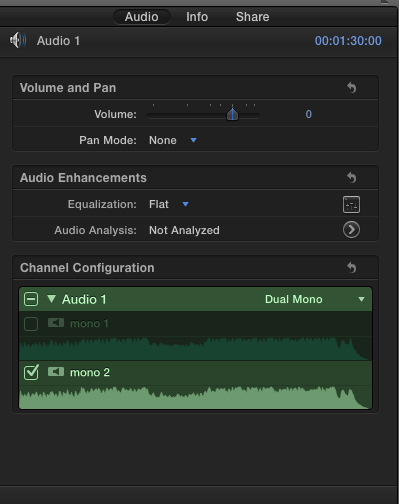
Do you hear audio now?
- Ronny
Select your clip in the browser and in the Inspector > Audio tab set Channel configuration to Dual Mono. Then de-select one of the audio channels.
Do you hear audio now?
- Ronny
Please Log in to join the conversation.
19 Aug 2014 15:57 #51481
by sklbaj
Replied by sklbaj on topic FCPX Reference Waveform audio levels, but no audio.
No I don't.  There is no audio playing back from either channel, and yet the reference waveform shows peaks and valleys.
 Please Log in to join the conversation.
- ronny courtens
-
- Offline
- Moderator
-
Less
More
- Posts: 4455
- Thank you received: 962
19 Aug 2014 16:07 #51482
by ronny courtens
Replied by ronny courtens on topic FCPX Reference Waveform audio levels, but no audio.
Okay, no sweat. At least this rules out phase cancellation due to improperly wired mics.
You say "some clips have audio, others don't". Do all these clips come from the same camera?
- Ronny
You say "some clips have audio, others don't". Do all these clips come from the same camera?
- Ronny
Please Log in to join the conversation.
19 Aug 2014 16:11 #51483
by sklbaj
Replied by sklbaj on topic FCPX Reference Waveform audio levels, but no audio.
Yes, everything is from a single shoot in a 20-30 minute period. I was told by the shooter he turned off recording audio early on, but not during all these instances. He also mentioned there was a issue with the card switching slots during recording saying slot 1 was full when it was not.
Please Log in to join the conversation.
- ronny courtens
-
- Offline
- Moderator
-
Less
More
- Posts: 4455
- Thank you received: 962
19 Aug 2014 17:49 #51488
by ronny courtens
Replied by ronny courtens on topic FCPX Reference Waveform audio levels, but no audio.
Thank you for the extra information. Do you still have the original camera card or do you have a copy stored on your computer? If so you can check in the FCP X import window if you can hear sound on the original clips. If not I'm afraid these clips may be corrupted, if you do hear sound you could try to re-import the clips and see if that helps.
- Ronny
- Ronny
Please Log in to join the conversation.
19 Aug 2014 18:03 #51489
by sklbaj
Replied by sklbaj on topic FCPX Reference Waveform audio levels, but no audio.
Alas, I do not have access to the original card with the files/ I suspect they have been written over a few times already. Everything was converted to a .dmg, and its  cam footage, so to import it into fcpx requires a pluginin to start. I doubt that plugin could be causing the corruption thought because I get no sound when playing the files in VLC.
I did try reimporting the files from the dmg, but I had the same result. Oh well. Guess its just music overlay time. Still I am left puzzled as to how the waveform references exist without actual sound.
cam footage, so to import it into fcpx requires a pluginin to start. I doubt that plugin could be causing the corruption thought because I get no sound when playing the files in VLC.I did try reimporting the files from the dmg, but I had the same result. Oh well. Guess its just music overlay time. Still I am left puzzled as to how the waveform references exist without actual sound.
Please Log in to join the conversation.
- ronny courtens
-
- Offline
- Moderator
-
Less
More
- Posts: 4455
- Thank you received: 962
19 Aug 2014 18:17 #51490
by ronny courtens
Replied by ronny courtens on topic FCPX Reference Waveform audio levels, but no audio.
If you cannot hear the audio in VLC either there probably is something wrong with the clips. If the audio metadata is intact on the files but the actual audio track has been damaged this could explain why FCP X can create the waveforms but the sound won't play.
- Ronny
- Ronny
Please Log in to join the conversation.
19 Aug 2014 18:22 #51491
by sklbaj
Replied by sklbaj on topic FCPX Reference Waveform audio levels, but no audio.
Ronny,
Thank you a billion times over. Someone finally answered how that is possible. Apple discussion had no answer.
Thank you a billion times over. Someone finally answered how that is possible. Apple discussion had no answer.
Please Log in to join the conversation.


19 Aug 2014 21:47 #51517
by cseeman
Replied by cseeman on topic FCPX Reference Waveform audio levels, but no audio.
I'll add from left field.
On FCXP 10.1.2 and I also had files that had silent audio. That was correct. There was no audio recorded.
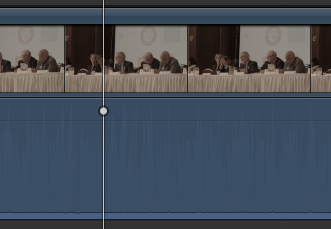
... Yet, Reference Audio Waveforms were drawn. The only thing I can think of is there actually was some sort of bleed through or camera noise that FCPX saw as audio and therefore drew Reference Audio Waveforms.
On FCXP 10.1.2 and I also had files that had silent audio. That was correct. There was no audio recorded.
... Yet, Reference Audio Waveforms were drawn. The only thing I can think of is there actually was some sort of bleed through or camera noise that FCPX saw as audio and therefore drew Reference Audio Waveforms.
Please Log in to join the conversation.
19 Aug 2014 21:51 - 19 Aug 2014 21:52 #51519
by cseeman
Replied by cseeman on topic FCPX Reference Waveform audio levels, but no audio.
You can see it here. You can see the actual audio is about flat line. It seems FCPX was "hearing" camera noise.
Last edit: 19 Aug 2014 21:52 by cseeman.
Please Log in to join the conversation.
19 Aug 2014 21:52 #51520
by sklbaj
Replied by sklbaj on topic FCPX Reference Waveform audio levels, but no audio.
Yup, exact same thing.
Please Log in to join the conversation.
19 Aug 2014 22:43 #51522
by cseeman
Replied by cseeman on topic FCPX Reference Waveform audio levels, but no audio.
Makes FCPX an interesting tool for examining camera noise floor so it seems.
Please Log in to join the conversation.
