


- Posts: 2
- Thank you received: 0
3 Post Moderation Rule for New Boarders (25 Jan 2021)
New boarders will have their posts moderated - Don't worry if you cannot see your post immediately.
External Hard Drive Problem
18 Aug 2014 12:51 #51423
by Jeremy B
External Hard Drive Problem was created by Jeremy B
I have several External Hard Drives that I wanted to use for editing purposes. I have one External hard drive that i use with no problems then I have two more that for some reason I can not get FC to recognize. I have reformatted the two External Hard drives to work on a mac but the I plug them into my computer and FCX does not recognize either one. Hoping someone will be able to help. P.S. I have a Macbook Pro and Final Cut Pro X Version 10.0.9
Please Log in to join the conversation.

18 Aug 2014 13:45 #51428
by VidGreg
Replied by VidGreg on topic External Hard Drive Problem
Jeremy,
When you plug in the hdd, does it show up on your desktop? Should show an icon with name of drive. Make sure you have "Show external disks" checked in Finder > General > Preferences checked…
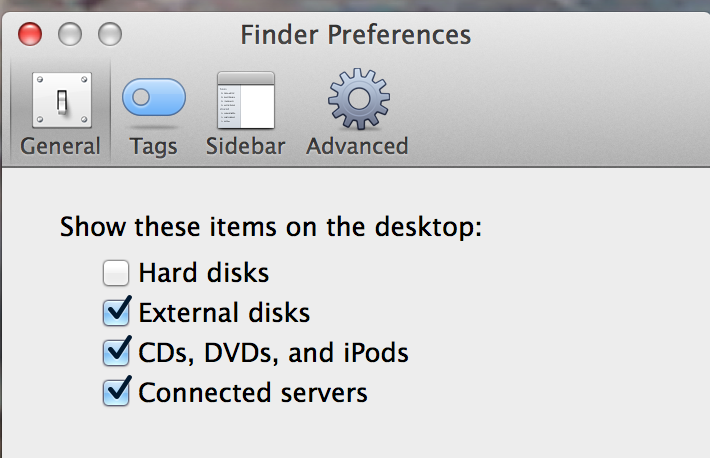
It is the computer that recognizes the hdd, not really FCP.
How did you format(Disk Utility?), what format did you use; Mac OS Extended (Journaled) (?)
What version of OS and FC are you using and how exactly is it not recognized?
What I/O connection is the hdd? USB2/3, Firewire, ThunderBolt?…
More info will help getting a better response.
Hope this helps, Greg
When you plug in the hdd, does it show up on your desktop? Should show an icon with name of drive. Make sure you have "Show external disks" checked in Finder > General > Preferences checked…
It is the computer that recognizes the hdd, not really FCP.
How did you format(Disk Utility?), what format did you use; Mac OS Extended (Journaled) (?)
What version of OS and FC are you using and how exactly is it not recognized?
What I/O connection is the hdd? USB2/3, Firewire, ThunderBolt?…
More info will help getting a better response.
Hope this helps, Greg
Please Log in to join the conversation.
20 Aug 2014 14:17 #51543
by Jeremy B
Replied by Jeremy B on topic External Hard Drive Problem
Greg, yes when I plug in the hdd it does show up on my desktop amd it is formatted to Mac OS Extended (Journaled. I am working on a Macbook Pro. Final Cut Pro X Version 10.0.9. I am connecting via USB 2.0
Please Log in to join the conversation.
22 Aug 2014 00:40 #51613
by VidGreg
Replied by VidGreg on topic External Hard Drive Problem
Hi Jeremy,
If a hdd shows up on the desktop, then FCP should be able to use it. However, FCP needs a reason to "see" the drive, like import media, setting up a library or save location. Unless the drive is used by FCP it really won't show up.
Clicking on Import media or the Modify Settings in the Library inspector pane (Don't remember if 10.0.9 has this inspector pane, may be in FCP preferences, save location) and choose should allow you to see the drive in a pop-up and then you can navigate to the drive. Also Save As or Export may allow you to navigate to external hdd. Been awhile since I used 10.0.9.
Having said all this, USB2 is not a good I/O port for video. It is barely fast enough to do a single stream of SD video. Even Firewire 800 is now showing it's slooooowness but is faster(2X+) than USB2, so if you are doing HD video you really need USB3 or Thunderbolt.
Hope this helps, Greg
If a hdd shows up on the desktop, then FCP should be able to use it. However, FCP needs a reason to "see" the drive, like import media, setting up a library or save location. Unless the drive is used by FCP it really won't show up.
Clicking on Import media or the Modify Settings in the Library inspector pane (Don't remember if 10.0.9 has this inspector pane, may be in FCP preferences, save location) and choose should allow you to see the drive in a pop-up and then you can navigate to the drive. Also Save As or Export may allow you to navigate to external hdd. Been awhile since I used 10.0.9.
Having said all this, USB2 is not a good I/O port for video. It is barely fast enough to do a single stream of SD video. Even Firewire 800 is now showing it's slooooowness but is faster(2X+) than USB2, so if you are doing HD video you really need USB3 or Thunderbolt.
Hope this helps, Greg
Please Log in to join the conversation.


22 Aug 2014 02:54 #51620
by Francois
Replied by Francois on topic External Hard Drive Problem
Hi Jeremy
This could also be caused by having at the top level of hdd a folder that has a camera folder name , this usually happens when dragging this folder from a camera card at the root level of the hdd…
Francois
This could also be caused by having at the top level of hdd a folder that has a camera folder name , this usually happens when dragging this folder from a camera card at the root level of the hdd…
Francois
Please Log in to join the conversation.
