


- Posts: 27
- Thank you received: 1
3 Post Moderation Rule for New Boarders (25 Jan 2021)
New boarders will have their posts moderated - Don't worry if you cannot see your post immediately.
Prevent FCPX from building clip towers when creating several audio crossfades
16 Aug 2014 10:48 #51367
by Speldosa
Prevent FCPX from building clip towers when creating several audio crossfades was created by Speldosa
Let's say that I have three clips, for which I want to create audio crossfades between. When doing this by expanding the video and audio tracks and then draging the audio tracks to overlap each other, FCPX puts the second clip over the first, which is fine. However, when overlaping the third audio track with the second, FCPX once again puts the third clips above the second, even though there now is free room on the same vertical level that the first clip is.
If you want to do, say, 20 consecutive audio crossfades, this means that FCPX builds a form of clip tower that is 20 clips high in height. This makes things extremely confusing and hard to get a good overview of. Can this behavior be circumvented somehow?
(Hopefully, people will understand what I'm talking about here. If not, I can post a screenshot later tonight.)
If you want to do, say, 20 consecutive audio crossfades, this means that FCPX builds a form of clip tower that is 20 clips high in height. This makes things extremely confusing and hard to get a good overview of. Can this behavior be circumvented somehow?
(Hopefully, people will understand what I'm talking about here. If not, I can post a screenshot later tonight.)
Please Log in to join the conversation.
- ronny courtens
-

- Offline
- Moderator
-

Less
More
- Posts: 4455
- Thank you received: 962
16 Aug 2014 11:31 #51368
by ronny courtens
Replied by ronny courtens on topic Prevent FCPX from building clip towers when creating several audio crossfades
I guess you haven't taken this test further than 3 clips?
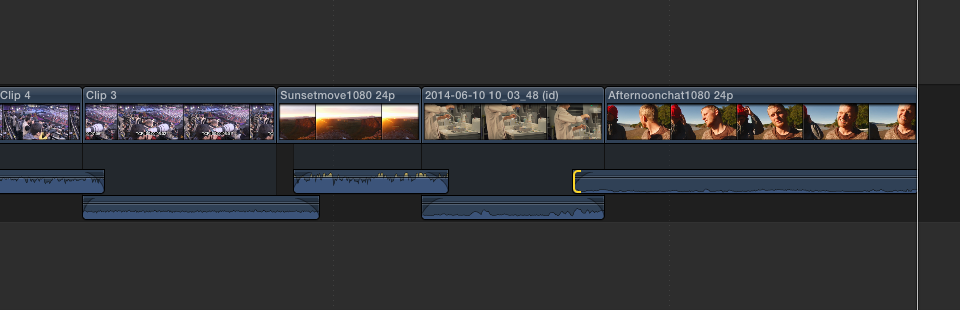
If you expand the Video/Audio to overlap the third audio track with the second, AND you need to extend the incoming audio of the third clip, FCPX once again puts the third clip above the second. That's correct, but that's it. When you continue this procedure with more clips you will see that all clips will remain in the same vertical space:
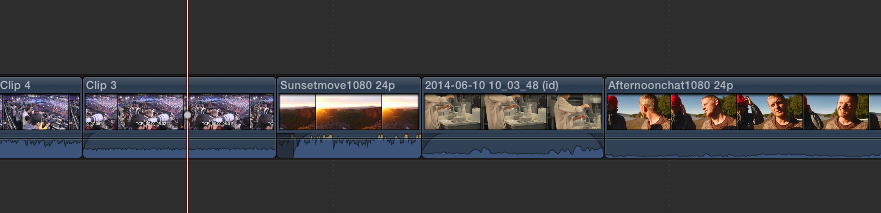
If you don't want to see the overlapping audio anymore after having applied the transitions you simply select all your clips and you enter CTRL+S to un-expand Video/Audio. Your overlap transitions will remain intact, which you can check by expanding the clips again:
If you want to create audio-only transitions without expanding the audio you can use this free plugin from our good friend Alex4D: blog.alex4d.com/2011/07/11/fcpx-transition-sound-only/
This will add a transition between the clips, but it will only affect the audio:

- Ronny
If you expand the Video/Audio to overlap the third audio track with the second, AND you need to extend the incoming audio of the third clip, FCPX once again puts the third clip above the second. That's correct, but that's it. When you continue this procedure with more clips you will see that all clips will remain in the same vertical space:
If you don't want to see the overlapping audio anymore after having applied the transitions you simply select all your clips and you enter CTRL+S to un-expand Video/Audio. Your overlap transitions will remain intact, which you can check by expanding the clips again:
If you want to create audio-only transitions without expanding the audio you can use this free plugin from our good friend Alex4D: blog.alex4d.com/2011/07/11/fcpx-transition-sound-only/
This will add a transition between the clips, but it will only affect the audio:
- Ronny
Please Log in to join the conversation.
16 Aug 2014 12:02 - 16 Aug 2014 12:03 #51369
by Speldosa
Replied by Speldosa on topic Prevent FCPX from building clip towers when creating several audio crossfades
Thanks for the quick and detailed answer! I could have sworn that this isn't the way that my installation of FCPX works, but I will have to double-check when I get home.
Anyhow, the plug-in should come in handy no matter what, so thank you for that link!
Anyhow, the plug-in should come in handy no matter what, so thank you for that link!
Last edit: 16 Aug 2014 12:03 by Speldosa.
Please Log in to join the conversation.
- ronny courtens
-
- Offline
- Moderator
-
Less
More
- Posts: 4455
- Thank you received: 962
16 Aug 2014 12:58 #51372
by ronny courtens
Replied by ronny courtens on topic Prevent FCPX from building clip towers when creating several audio crossfades
Hey Martin,
Yes, please double-check this and if this indeed works differently on your setup I would be interested to know.
- Ronny
Yes, please double-check this and if this indeed works differently on your setup I would be interested to know.
- Ronny
Please Log in to join the conversation.

16 Aug 2014 16:25 - 16 Aug 2014 16:30 #51378
by plysat
If you are working with connected clips, you will see this behavior. To avoid this, put your clips in secondary storylines, then it'll behave as Ronny demonstrated. If you do use secondary's for audio only (music etc), then, by using a dissolve on the collapsed clips and then expanding them, it will create the handles for you. All you need to do then is adjust to taste. A very quick way to A/B dozens of clips with a single click.
Can't sleep? Try this: fcpxpert.net ;-)
Replied by plysat on topic Prevent FCPX from building clip towers when creating several audio crossfades
Speldosa wrote: Thanks for the quick and detailed answer! I could have sworn that this isn't the way that my installation of FCPX works, but I will have to double-check when I get home.
Anyhow, the plug-in should come in handy no matter what, so thank you for that link!
If you are working with connected clips, you will see this behavior. To avoid this, put your clips in secondary storylines, then it'll behave as Ronny demonstrated. If you do use secondary's for audio only (music etc), then, by using a dissolve on the collapsed clips and then expanding them, it will create the handles for you. All you need to do then is adjust to taste. A very quick way to A/B dozens of clips with a single click.
Can't sleep? Try this: fcpxpert.net ;-)
Last edit: 16 Aug 2014 16:30 by plysat.
Please Log in to join the conversation.
- ronny courtens
-
- Offline
- Moderator
-
Less
More
- Posts: 4455
- Thank you received: 962
16 Aug 2014 17:26 #51382
by ronny courtens
Replied by ronny courtens on topic Prevent FCPX from building clip towers when creating several audio crossfades
Great tip, Charlie !
- Ronny
- Ronny
Please Log in to join the conversation.
17 Aug 2014 13:11 #51396
by Speldosa
Replied by Speldosa on topic Prevent FCPX from building clip towers when creating several audio crossfades
@plysat Yeah, this is exactly my problem. I'm usually working with a music track in the primary storyline and putting my connected clips into a secondary storyline works whenever I don't have overlapping video tracks (which secondary storylines doesn't allow).
Please Log in to join the conversation.
