


- Posts: 267
- Thank you received: 24
3 Post Moderation Rule for New Boarders (25 Jan 2021)
New boarders will have their posts moderated - Don't worry if you cannot see your post immediately.
Batch Export Favorites
15 Aug 2014 18:22 #51354
by fcpguru
Batch Export Favorites was created by fcpguru
Forgive me if this has been answered, but I'm wondering if anybody has found a way to batch export sub clips (favorites) in FCPX. I used to do this a lot in FCP7 and now I'm involved in a project where I have to make selects from long 2 hour takes and deliver separate files to the director for each select (which are between 10-60 seconds)
Please Log in to join the conversation.
15 Aug 2014 19:32 - 15 Aug 2014 19:45 #51355
by plysat
Can't sleep? Try this: fcpxpert.net ;-)
Replied by plysat on topic Batch Export Favorites
There is a convoluted way, yes. If you could select all your favorite ranges, and cut them into a project which you can export... that would be easy. If you need separate QT movies for each favorite, You still need to select and edit them into a project (or projects) then see this post for a way to make individual clips using Clip Exporter (free) which you can then batch transcode in compressor if needed...
forums.creativecow.net/readpost/344/31176
And send feedback to Apple.
EDIT: Never needed to do this, but just tried it and it worked great. And easily. Took a KW collection, select all and cut into project, export XML, open XML in clip exporter and select the QT movie export button and run it, done. Read Olivers post above for more detail, but it's painless.
forums.creativecow.net/readpost/344/31176
And send feedback to Apple.
EDIT: Never needed to do this, but just tried it and it worked great. And easily.
Took a KW collection, select all and cut into project, export XML, open XML in clip exporter and select the QT movie export button and run it, done. Read Olivers post above for more detail, but it's painless. Can't sleep? Try this: fcpxpert.net ;-)
Last edit: 15 Aug 2014 19:45 by plysat.
Please Log in to join the conversation.
16 Aug 2014 01:54 #51359
by fcpguru
Replied by fcpguru on topic Batch Export Favorites
Worked perfectly - thanks!
Please Log in to join the conversation.
16 Aug 2014 03:51 #51362
by plysat
Glad to hear it, it's a cool little trick. And thanks to Oliver Peters for posting it on the Cow.
Can't sleep? Try this: fcpxpert.net ;-)
Replied by plysat on topic Batch Export Favorites
fcpguru wrote: Worked perfectly - thanks!
Glad to hear it, it's a cool little trick. And thanks to Oliver Peters for posting it on the Cow.
Can't sleep? Try this: fcpxpert.net ;-)
Please Log in to join the conversation.
- Scrubelicious
-

- Offline
- Platinum Member
-

Less
More
- Posts: 1228
- Thank you received: 114
16 Aug 2014 08:33 #51363
by Scrubelicious
Replied by Scrubelicious on topic Batch Export Favorites
You can't batch capture [strike]yet[/strike], but you can save one step dropping clips in a project just by selecting the clip in Browser and export it.
Please Log in to join the conversation.

16 Aug 2014 09:45 #51364
by Soran
Replied by Soran on topic Batch Export Favorites
Great tip, convoluted way though and It appears that this method involves so many stages...
And the obvious problem in Oliver's method is that you've to use whole whole clip which was favourited.
But anyone have tried assigning roles to favourites or to multiple range selects then bringing them into time-line then exporting them as roles? without using third party softwares? Any success?
It works fantastically well with audio and all within FCPX,
much appreciated for any feedbacks,
-Soran
And the obvious problem in Oliver's method is that you've to use whole whole clip which was favourited.
But anyone have tried assigning roles to favourites or to multiple range selects then bringing them into time-line then exporting them as roles? without using third party softwares? Any success?
It works fantastically well with audio and all within FCPX,
much appreciated for any feedbacks,
-Soran
Please Log in to join the conversation.
- ronny courtens
-

- Offline
- Moderator
-

Less
More
- Posts: 4455
- Thank you received: 962
16 Aug 2014 12:35 - 16 Aug 2014 12:40 #51371
by ronny courtens
Replied by ronny courtens on topic Batch Export Favorites
You don't need any of this, except if you are dealing with hundreds of clips and/or you need to add handles to the exported clips.
It takes a simple setup:
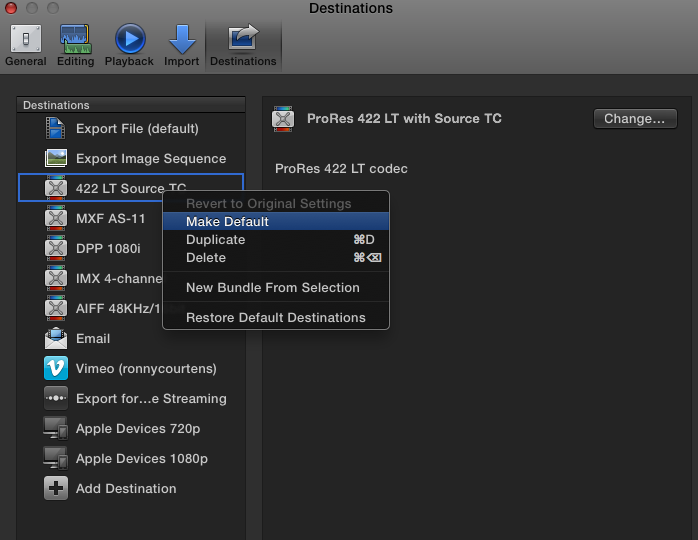
1. In the Destinations window CTRL-click the format to which you want to export your selects and choose "Make Default". Here I choose to export my selects as ProRes LT with source time code (a preset I made in Compressor):
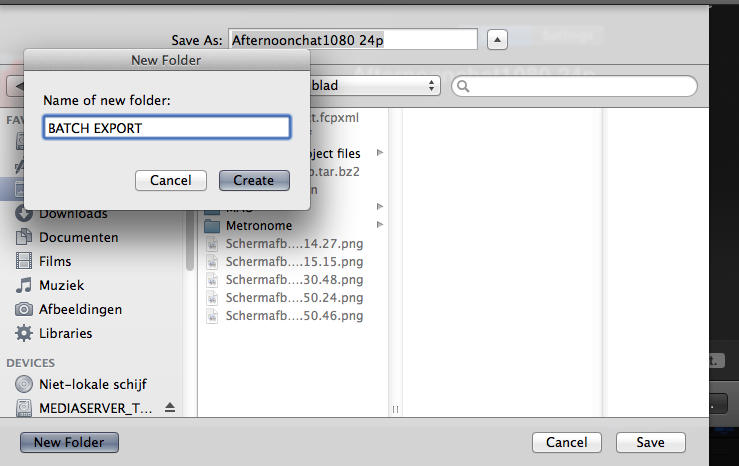
2. Select the first clip or range of a clip you want to export and press CMD+E. This will open the Share menu with your default share destination. Press Enter, set a destination folder and press Enter again. FCP X will now export the clip, or the Range, to your destination folder:
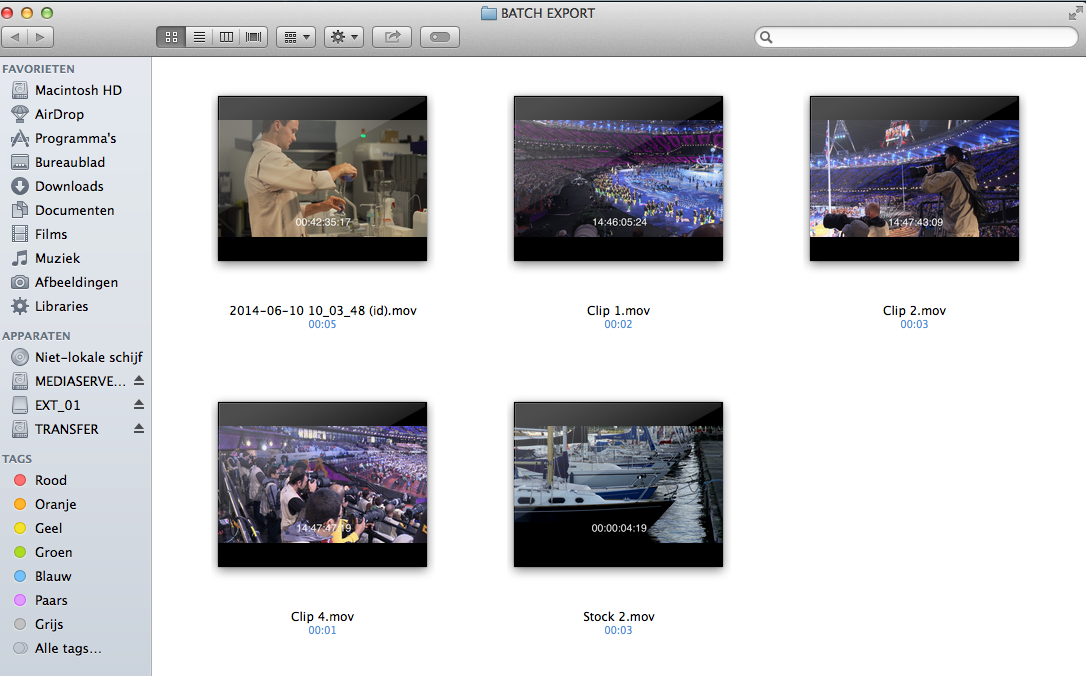
3. From here on it's fast and easy: select a second clip or range, press CMD+E, Enter, Enter; select a third clip a.s.o. FCP X will start batch processing all the clips or ranges you have selected. I have used this method many times before and its works flawlessly. Here you see how the ranges I have selected have been exported to ProRes LT with source time code in no time, perfect for client approval:
As I said if you need to export hundreds of clips or ranges ClipExporter may be faster. And you certainly need it if you want to add handles to the exported clips, that's what it was originally created for. But in all other cases batch sharing using FCP X has many advantages:
- You can set a custom format and frame size for your exports, which you cannot do with ClipExporter.
- You can even use a preset that inserts source time code onto the exported file.
- You don't lose any time opening a third application: while FCP X is exporting the batch you can continue to edit.
- You can use FCP X to batch export smart collections (Media Type, Used Media...), Keyword Collections or filters (Favorites, Unused), and to batch export multiple projects, or ranges within projects, at once.
- If FCP X would allow us to group-select clips, ranges or projects for batch sharing this would be heaven on earth
- Ronny
It takes a simple setup:
1. In the Destinations window CTRL-click the format to which you want to export your selects and choose "Make Default". Here I choose to export my selects as ProRes LT with source time code (a preset I made in Compressor):
2. Select the first clip or range of a clip you want to export and press CMD+E. This will open the Share menu with your default share destination. Press Enter, set a destination folder and press Enter again. FCP X will now export the clip, or the Range, to your destination folder:
3. From here on it's fast and easy: select a second clip or range, press CMD+E, Enter, Enter; select a third clip a.s.o. FCP X will start batch processing all the clips or ranges you have selected. I have used this method many times before and its works flawlessly. Here you see how the ranges I have selected have been exported to ProRes LT with source time code in no time, perfect for client approval:
As I said if you need to export hundreds of clips or ranges ClipExporter may be faster. And you certainly need it if you want to add handles to the exported clips, that's what it was originally created for. But in all other cases batch sharing using FCP X has many advantages:
- You can set a custom format and frame size for your exports, which you cannot do with ClipExporter.
- You can even use a preset that inserts source time code onto the exported file.
- You don't lose any time opening a third application: while FCP X is exporting the batch you can continue to edit.
- You can use FCP X to batch export smart collections (Media Type, Used Media...), Keyword Collections or filters (Favorites, Unused), and to batch export multiple projects, or ranges within projects, at once.
- If FCP X would allow us to group-select clips, ranges or projects for batch sharing this would be heaven on earth
- Ronny
Last edit: 16 Aug 2014 12:40 by ronny courtens.
Please Log in to join the conversation.
16 Aug 2014 13:50 #51373
by Soran
Replied by Soran on topic Batch Export Favorites
That's great Ronny!
Yes, It'll be very smooth batch export, as clearly demonstrated, when your preset "Make Default", it'll also show on the file-share-drop down menu.
However, when one has huge number of clips to batch export this method requires tens of many Ctrl + E clicks and you need Compressor installed to access to presets.
As you say :
'- If FCP X would allow us to group-select clips, ranges or projects for batch sharing this would be heaven on earth'
It's truly the case, a much needed feature request?
-Soran
Yes, It'll be very smooth batch export, as clearly demonstrated, when your preset "Make Default", it'll also show on the file-share-drop down menu.
However, when one has huge number of clips to batch export this method requires tens of many Ctrl + E clicks and you need Compressor installed to access to presets.
As you say :
'- If FCP X would allow us to group-select clips, ranges or projects for batch sharing this would be heaven on earth'
It's truly the case, a much needed feature request?
-Soran
Please Log in to join the conversation.
16 Aug 2014 14:06 #51374
by fcpguru
Replied by fcpguru on topic Batch Export Favorites
Thanks Ronny! Very helpful workflow and I didn't know you could assign a default.
Soran, Clip Exporter does allow you to use just the favorites (ranges) of the clips. I'm exporting about 100 clips at a time, so for me, I think it is still faster (way less clicks). I simply change the view menu to Show Favorites, select all and drop into a sequence named "Pull 1" (or pull 2, etc etc). Then do the Clip exporter thing and drop everything into Compressor which is pretty easy and fast.
Soran, Clip Exporter does allow you to use just the favorites (ranges) of the clips. I'm exporting about 100 clips at a time, so for me, I think it is still faster (way less clicks). I simply change the view menu to Show Favorites, select all and drop into a sequence named "Pull 1" (or pull 2, etc etc). Then do the Clip exporter thing and drop everything into Compressor which is pretty easy and fast.
Please Log in to join the conversation.
- ronny courtens
-
- Offline
- Moderator
-
Less
More
- Posts: 4455
- Thank you received: 962
16 Aug 2014 18:00 #51384
by ronny courtens
Replied by ronny courtens on topic Batch Export Favorites
You are absolutely right that exporting a hundred clips will be easier using ClipExporter. But for anyone who says you cannot batch export multiple clips or projects out of FCP X, CMD+E is the answer. It is even faster than the batch export process in FCP7. Just be aware that you need to set a default export format in the Destinations window first to make CMD+E work.
- Ronny
- Ronny
Please Log in to join the conversation.
16 Aug 2014 20:52 #51386
by souitch
Replied by souitch on topic Batch Export Favorites
If you are dealing with hundreds of clips and/or you need to add handles to the exported clips DaVinci Resolve is also a great (free) toolbox:
Just send your sequence of clips fcpxml to resolve, go to the deliver page and batch export individual clips with lots of options (timecode/clip name burn, handles)..
I also use it to consolidate fcpx projects with handles doing a roundtrip.
Just send your sequence of clips fcpxml to resolve, go to the deliver page and batch export individual clips with lots of options (timecode/clip name burn, handles)..
I also use it to consolidate fcpx projects with handles doing a roundtrip.
Please Log in to join the conversation.
17 Aug 2014 00:34 #51388
by fcpguru
Replied by fcpguru on topic Batch Export Favorites
Ran into a snafu here. Clip Exporter only exported the audio on a handful of clips (has to be because of the weird mixed formats of the source footage).
Ronny's approach works fine, however when you have 40 clips from the same source file, you have to manually rename them all as you export... unless someone else has a way? Renaming one file in the browser technically renames all instances of it. Boooo.
Ronny's approach works fine, however when you have 40 clips from the same source file, you have to manually rename them all as you export... unless someone else has a way? Renaming one file in the browser technically renames all instances of it. Boooo.
Please Log in to join the conversation.
- Scrubelicious
-
- Offline
- Platinum Member
-
Less
More
- Posts: 1228
- Thank you received: 114
17 Aug 2014 12:49 #51394
by Scrubelicious
Replied by Scrubelicious on topic Batch Export Favorites
I wonder if there is a way to use a Automator script for this process?
Please Log in to join the conversation.
- FDPtraining.com
-

- Offline
- New Member
-

Less
More
- Posts: 1
- Thank you received: 0
15 Feb 2015 23:43 #59821
by FDPtraining.com
Replied by FDPtraining.com on topic Batch Export Favorites
Thought this might be helpful.
Please Log in to join the conversation.
