


- Posts: 786
- Thank you received: 21
3 Post Moderation Rule for New Boarders (25 Jan 2021)
New boarders will have their posts moderated - Don't worry if you cannot see your post immediately.
Polyphonic WAV stereo/mono audio in FCPX?
- Jonathan Levin
-
 Topic Author
- Offline
- Platinum Member
-

Less
More
15 Aug 2014 16:18 #51351
by Jonathan Levin
Polyphonic WAV stereo/mono audio in FCPX? was created by Jonathan Levin
Hi all.
Can FCP X open or work with Polyphonic WAV files? From what little I have gathered, polyphonic files are multi-track files. I'm looking at a Sound Devices 633 that has an internal recorder that can do Poly Wav stereo or mono.
Not sure the difference.
Jonathan
Can FCP X open or work with Polyphonic WAV files? From what little I have gathered, polyphonic files are multi-track files. I'm looking at a Sound Devices 633 that has an internal recorder that can do Poly Wav stereo or mono.
Not sure the difference.
Jonathan
Please Log in to join the conversation.
- ronny courtens
-

- Offline
- Moderator
-

Less
More
- Posts: 4455
- Thank you received: 962
15 Aug 2014 21:04 - 15 Aug 2014 21:04 #51357
by ronny courtens
Replied by ronny courtens on topic Polyphonic WAV stereo/mono audio in FCPX?
Hi Jonathan,
Poly WAV files are single files that contain multiple audio tracks (mono or stereo tracks). You could compare them with multichannel QT audio files.
Just like with multichannel QT audio files, FCP X will import poly WAV files without any problems. When you select the imported file in the browser you can see the separate channels in the Inspector > Audio tab and set the Channel Configuration for the file (e.g. 4 stereo or 8 Mono).

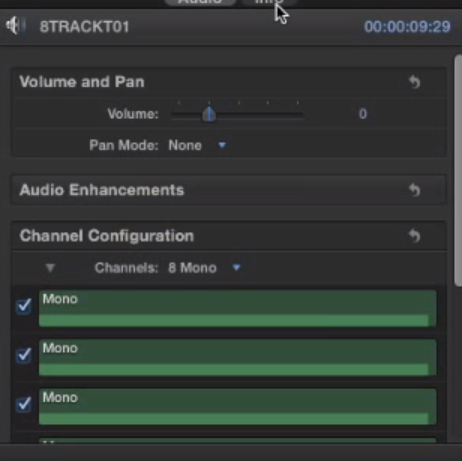
When the clip is in the timeline you can work on the different channels by expanding the audio components (CTRL+ALT+S), which will keep the channels in sync with each other, or you can choose Break Apart Clip Items (SHIFT+CMD+G) to split the poly WAV into stand-alone audio channels.
- Ronny
Poly WAV files are single files that contain multiple audio tracks (mono or stereo tracks). You could compare them with multichannel QT audio files.
Just like with multichannel QT audio files, FCP X will import poly WAV files without any problems. When you select the imported file in the browser you can see the separate channels in the Inspector > Audio tab and set the Channel Configuration for the file (e.g. 4 stereo or 8 Mono).
When the clip is in the timeline you can work on the different channels by expanding the audio components (CTRL+ALT+S), which will keep the channels in sync with each other, or you can choose Break Apart Clip Items (SHIFT+CMD+G) to split the poly WAV into stand-alone audio channels.
- Ronny
Last edit: 15 Aug 2014 21:04 by ronny courtens.
Please Log in to join the conversation.
- Jonathan Levin
-
Topic Author
- Offline
- Platinum Member
-
Less
More
- Posts: 786
- Thank you received: 21
18 Aug 2014 20:35 #51440
by Jonathan Levin
Replied by Jonathan Levin on topic Polyphonic WAV stereo/mono audio in FCPX?
Hi Ronny,
Sorry I didn't get back to you sooner. But as usual thank you so much for sharing your seemingly endless knowledge!
You have obviously worked with these files. From what I understand from the folks at Sound Devices, Poly Wav files are pretty standard files these days.
Is it preferable to work with the four stereo channels or 8 mono? My gut tells me to work with 8 separate mono, and during mix, pan channels to create left and right audio (stereo).
Or am I way off the mark here? My plan is to borrow or rent one of these machines and work the crap out of it and record different types of files to see how they work in FCP.
Thanks again.
Jonathan
Sorry I didn't get back to you sooner. But as usual thank you so much for sharing your seemingly endless knowledge!
You have obviously worked with these files. From what I understand from the folks at Sound Devices, Poly Wav files are pretty standard files these days.
Is it preferable to work with the four stereo channels or 8 mono? My gut tells me to work with 8 separate mono, and during mix, pan channels to create left and right audio (stereo).
Or am I way off the mark here? My plan is to borrow or rent one of these machines and work the crap out of it and record different types of files to see how they work in FCP.
Thanks again.
Jonathan
Please Log in to join the conversation.
- ronny courtens
-
- Offline
- Moderator
-
Less
More
- Posts: 4455
- Thank you received: 962
18 Aug 2014 21:12 #51443
by ronny courtens
Replied by ronny courtens on topic Polyphonic WAV stereo/mono audio in FCPX?
Hi Jonathan,
We sometimes get to deal with such files and yes, they have become quite standard these days. If you work with stereo sources (music) it is best to keep the channels in stereo. However, if your sources are discrete audio channels (multitrack boom or lab mic) it is easier to just keep every channel on its own.
- Ronny
We sometimes get to deal with such files and yes, they have become quite standard these days. If you work with stereo sources (music) it is best to keep the channels in stereo. However, if your sources are discrete audio channels (multitrack boom or lab mic) it is easier to just keep every channel on its own.
- Ronny
Please Log in to join the conversation.
- Jonathan Levin
-
Topic Author
- Offline
- Platinum Member
-
Less
More
- Posts: 786
- Thank you received: 21
19 Aug 2014 17:13 #51487
by Jonathan Levin
Replied by Jonathan Levin on topic Polyphonic WAV stereo/mono audio in FCPX?
Thanks again Ronny! So much to learn, so little time....
Please Log in to join the conversation.
- Jonathan Levin
-
Topic Author
- Offline
- Platinum Member
-
Less
More
- Posts: 786
- Thank you received: 21
27 May 2015 21:54 #65029
by Jonathan Levin
Replied by Jonathan Levin on topic Polyphonic WAV stereo/mono audio in FCPX?
Hi Ronny,
I just got a Sound Devices 633 that records the Poly files.
I have the recorder/mixer set up to record Wav Poly files. I also have the option to record Wav Mono.
I have L/R mix, and two inputs that I have named on the mixer LAV for input 1 and SHOTGUN for input 2.
What I had hope to achieve is being able to bring that Wav recording into FCPX, then into a project, expand audio and see a L/R mix, along with my named individual inputs, LAV and SHOTGUN. I'd also like to be able to delete the L/R and then just use the input LAV and SHOTGUN and do my own mix within FC.
This is not the case. What I see is this:
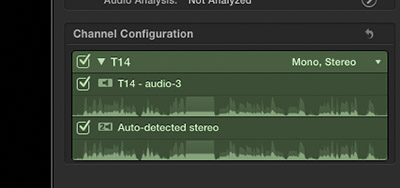
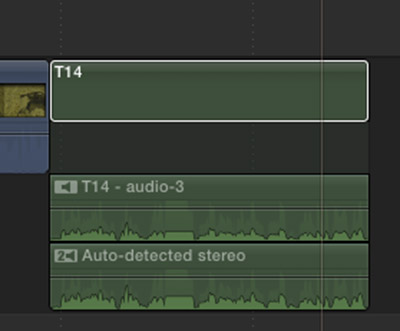
In a program called Wave Agent, I can see my input names, but when I import into FC, I get the above.
I gotta be doing something wrong I'm sure. All help is appreciated.
Jonathan
I just got a Sound Devices 633 that records the Poly files.
I have the recorder/mixer set up to record Wav Poly files. I also have the option to record Wav Mono.
I have L/R mix, and two inputs that I have named on the mixer LAV for input 1 and SHOTGUN for input 2.
What I had hope to achieve is being able to bring that Wav recording into FCPX, then into a project, expand audio and see a L/R mix, along with my named individual inputs, LAV and SHOTGUN. I'd also like to be able to delete the L/R and then just use the input LAV and SHOTGUN and do my own mix within FC.
This is not the case. What I see is this:
In a program called Wave Agent, I can see my input names, but when I import into FC, I get the above.
I gotta be doing something wrong I'm sure. All help is appreciated.
Jonathan
Please Log in to join the conversation.
