


- Posts: 2
- Thank you received: 0
3 Post Moderation Rule for New Boarders (25 Jan 2021)
New boarders will have their posts moderated - Don't worry if you cannot see your post immediately.
Audio offset when exporting to Protools
09 Aug 2014 10:51 #51121
by leeroy
Audio offset when exporting to Protools was created by leeroy
Hello,
I have trouble exporting my edit from FCPx to Protools. I can find back my clips in Protools, but a weird random offset happens, it's not the good parts of the sounds at all...
I noticed my sounds are interpreted as 60fps inside FCPX and I suspect it comes from there.
Anybody have the same situation?
Is there any way to tell FCP to interpret the audio TC differently?
Many Thanks
martin
I have trouble exporting my edit from FCPx to Protools. I can find back my clips in Protools, but a weird random offset happens, it's not the good parts of the sounds at all...
I noticed my sounds are interpreted as 60fps inside FCPX and I suspect it comes from there.
Anybody have the same situation?
Is there any way to tell FCP to interpret the audio TC differently?
Many Thanks
martin
Please Log in to join the conversation.
- ronny courtens
-

- Offline
- Moderator
-

Less
More
- Posts: 4455
- Thank you received: 962
10 Aug 2014 15:38 #51147
by ronny courtens
Replied by ronny courtens on topic Audio offset when exporting to Protools
Hi Martin,
I cannot reproduce your issue. But I see you have posted this question in different forums, have you had any luck finding out what causes the problem?
- Ronny
I cannot reproduce your issue. But I see you have posted this question in different forums, have you had any luck finding out what causes the problem?
- Ronny
Please Log in to join the conversation.

10 Aug 2014 16:37 - 10 Aug 2014 16:55 #51148
by plysat
Hey Martin, I do see the 60fps for audio without TC in the FCP X Browser. Same clip in a project timeline plays at whatever frame rate it's set at. And, while I'm not clear why FCP X does that, I haven't seen the sync issue you're getting. FWIW, audio Timecode doesn't really matter to playback, the sample rate is what matters. And, since fop x projects aren't at a fixed sample rate, that shouldn't make a difference anyway.
Since Resolve interprets it correctly from the fcpxml file (and I assume the same fcpxml re-imported to X is fine?) Then I'd suspect that there's some sort of misinterpretation going on with X2Pro and/or Xto7. As stated elsewhere, try shooting an email to the X2Pro support folks (support@x2pro.net I think?) and to Greg at IA as well. Both are very responsive. And keep us posted if you sort it out. :-)
EDIT: I see on the COW you said fop 7 interprets the files (with no timecode) as 30fps. That actually makes sense because it's likely defaulting to 30i (FCP 7 Playback is always in frames) FCP X is just displaying the TC differently. (30i is 60fps) Again, I really don't think that's the problem, especially as resolve imports the fcpxml correctly. However, I see that exporting XML from resolve causes the problem too. Are you exporting FCP X xml, or FCP 7 XML? Something is clearly getting messed up in translation. What happens if you export AAF or OMF directly from Resolve to ProTools?
Can't sleep? Try this: fcpxpert.net ;-)
Replied by plysat on topic Audio offset when exporting to Protools
leeroy wrote: ...I noticed my sounds are interpreted as 60fps inside FCPX and I suspect it comes from there.
Anybody have the same situation?
Hey Martin, I do see the 60fps for audio without TC in the FCP X Browser. Same clip in a project timeline plays at whatever frame rate it's set at. And, while I'm not clear why FCP X does that, I haven't seen the sync issue you're getting. FWIW, audio Timecode doesn't really matter to playback, the sample rate is what matters. And, since fop x projects aren't at a fixed sample rate, that shouldn't make a difference anyway.
Since Resolve interprets it correctly from the fcpxml file (and I assume the same fcpxml re-imported to X is fine?) Then I'd suspect that there's some sort of misinterpretation going on with X2Pro and/or Xto7. As stated elsewhere, try shooting an email to the X2Pro support folks (support@x2pro.net I think?) and to Greg at IA as well. Both are very responsive. And keep us posted if you sort it out. :-)
EDIT: I see on the COW you said fop 7 interprets the files (with no timecode) as 30fps. That actually makes sense because it's likely defaulting to 30i (FCP 7 Playback is always in frames) FCP X is just displaying the TC differently. (30i is 60fps) Again, I really don't think that's the problem, especially as resolve imports the fcpxml correctly. However, I see that exporting XML from resolve causes the problem too. Are you exporting FCP X xml, or FCP 7 XML? Something is clearly getting messed up in translation. What happens if you export AAF or OMF directly from Resolve to ProTools?
Can't sleep? Try this: fcpxpert.net ;-)
Last edit: 10 Aug 2014 16:55 by plysat.
Please Log in to join the conversation.

10 Aug 2014 17:05 - 10 Aug 2014 17:06 #51149
by BenB
Replied by BenB on topic Audio offset when exporting to Protools
FCPX Project timelines are a fixed sample rate.
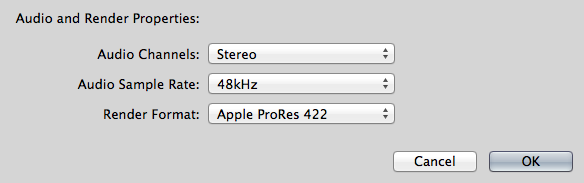
Drop 44.1 clip in a 48 timeline, you'll get audio drift.
Drop 44.1 clip in a 48 timeline, you'll get audio drift.
Last edit: 10 Aug 2014 17:06 by BenB.
Please Log in to join the conversation.
10 Aug 2014 17:11 - 10 Aug 2014 17:13 #51150
by plysat
Point taken, however, I'm pretty sure that wouldn't cause individual, short clips to become offset in the timeline. I suppose a clip that started halfway between frames in the TL (which FCP X can do) might get moved to a frame boundary if the target system (fcp 7 or something) requires that, but a .5 (or less) frame shift would be barely noticeable. I'm guessing the offset Martin seeing is more pronounced. Any ideas?
Can't sleep? Try this: fcpxpert.net ;-)
Replied by plysat on topic Audio offset when exporting to Protools
BenB wrote: FCPX Project timelines are a fixed sample rate.
Drop 44.1 clip in a 48 timeline, you'll get audio drift.
Point taken, however, I'm pretty sure that wouldn't cause individual, short clips to become offset in the timeline. I suppose a clip that started halfway between frames in the TL (which FCP X can do) might get moved to a frame boundary if the target system (fcp 7 or something) requires that, but a .5 (or less) frame shift would be barely noticeable. I'm guessing the offset Martin seeing is more pronounced. Any ideas?
Can't sleep? Try this: fcpxpert.net ;-)
Last edit: 10 Aug 2014 17:13 by plysat.
Please Log in to join the conversation.
10 Aug 2014 20:59 #51151
by leeroy
Replied by leeroy on topic Audio offset when exporting to Protools
Hi guys,
Thanks for your feedbacks and thoughts.
Since I had solid pressure from Production to deliver I had to conform everything manually in AVID (it was easier than FCP 7 since I could have both open simultaneously to checks TCs)
I suspect it does come from the TC interpretation difference. For example if you want to send your FCPx (that reads 60fps) project to FCP7 (that reads 30fps) how could it match?
I will try to reach the guys at X2PRO as soon as I have time.
Too bad, that was the first time I tried FCPX on a real job and since the audio export except some details I was quite seduced.
Curious ton find out where it went wrong...
Thanks for your feedbacks and thoughts.
Since I had solid pressure from Production to deliver I had to conform everything manually in AVID (it was easier than FCP 7 since I could have both open simultaneously to checks TCs)
I suspect it does come from the TC interpretation difference. For example if you want to send your FCPx (that reads 60fps) project to FCP7 (that reads 30fps) how could it match?
I will try to reach the guys at X2PRO as soon as I have time.
Too bad, that was the first time I tried FCPX on a real job and since the audio export except some details I was quite seduced.
Curious ton find out where it went wrong...
Please Log in to join the conversation.
