


- Posts: 3
- Thank you received: 0
3 Post Moderation Rule for New Boarders (25 Jan 2021)
New boarders will have their posts moderated - Don't worry if you cannot see your post immediately.
Timeline Missing in FCPX
- brianganong
-
 Topic Author
- Offline
- New Member
-

Less
More
06 Aug 2014 06:01 #51009
by brianganong
Timeline Missing in FCPX was created by brianganong
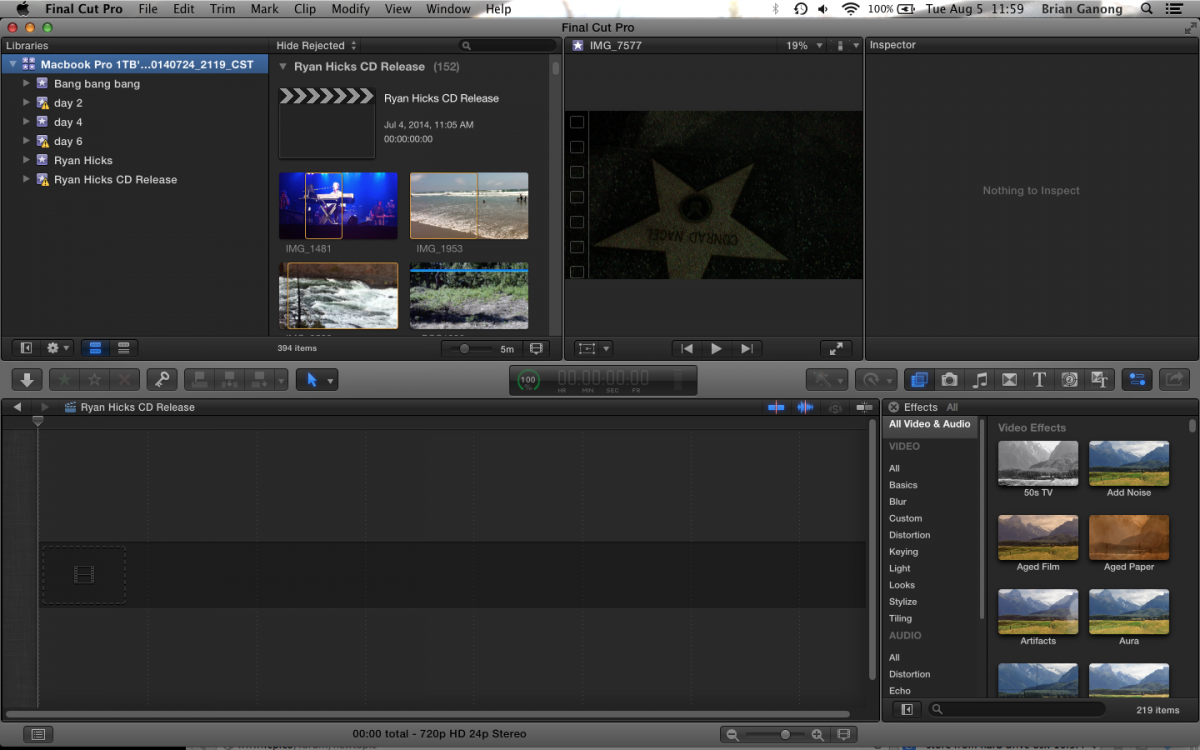
I just finished cutting together 12 music videos to accompany a full album. All of the videos were on one timeline (project) so I could play them directly from my laptop at the cd release show on the screen behind the band. It played perfectly and was a super cool experience. Then then not even a little bit cool part happened. I opened FCPX a few days later to export the vids individually. Library, Project and media were all fine. When I opened the project there was nothing there. It was a blank canvas. My few thousand edits all vanished. The icon for the project timeline was there, but instead of a still image in the icon it was grey. When looking through all my footage the 'in's and out's' were all still marked by the yellow selection indicator, so FCP still knows which parts of the clips I used, but the timeline remains empty. I opened a back up from an external drive that i saved the day after the show. Library and clips were there, as was the project icon, but again a devastatingly blank timeline. Have opened back ups from the days before the show when the project wasn't even complete yet and it's the same thing. Three weeks of cutting has gone poof. I'm running Mavericks on a MacBook Pro 2.3 i7 with 8GB of ram and evidently 16GB of stupid...any ideas?
Please Log in to join the conversation.
- Tom Wolsky
-

- Offline
- Moderator
-

06 Aug 2014 07:38 #51011
by Tom Wolsky
Replied by Tom Wolsky on topic Timeline Missing in FCPX
The most common cause of this problem is that you began by using the open in timeline function on a clip and then proceed to edit inside the clip. Any chance you remember which clip you used first or what you did to start the process?
Please Log in to join the conversation.
- brianganong
-
Topic Author
- Offline
- New Member
-
Less
More
- Posts: 3
- Thank you received: 0
06 Aug 2014 21:47 #51037
by brianganong
Replied by brianganong on topic Timeline Missing in FCPX
Began by creating a new library and dropping media into said library. Then created a new project, started cutting media and arranging in the 'timeline' of the project. Not sure I understand 'editing inside the clip'...is that to say i may have the entire project somewhere inside the first clip i used?
Really appreciate you taking the time to follow up Tom, Thanks!!
Really appreciate you taking the time to follow up Tom, Thanks!!
Please Log in to join the conversation.
- Tom Wolsky
-
- Offline
- Moderator
-
06 Aug 2014 22:06 #51040
by Tom Wolsky
Replied by Tom Wolsky on topic Timeline Missing in FCPX
As long as you didn't use the open in timeline function, then you might want to see if there's a backup you can access that has the edited project.
Please Log in to join the conversation.
06 Aug 2014 22:13 #51041
by Overturf
Replied by Overturf on topic Timeline Missing in FCPX
Tom is right, many "mistakes" happen due to the user not noticing that he's editing inside the clip's own timeline. Maybe it somehow happened to you, too? Take a look at the browser and have the clips sorted by duration. Maybe you find one that is extraordinarily long and contains your edit. Wish you the best of luck!
Please Log in to join the conversation.
- haysoos123
-
- Offline
- Platinum Member
-

Less
More
- Posts: 402
- Thank you received: 72
07 Aug 2014 00:28 #51046
by haysoos123
Replied by haysoos123 on topic Timeline Missing in FCPX
Have you actually checked your auto backups? You say you opened a backup that you saved manually to your external drive, but that may be after the damage was done already. If you check your Movies folder, it should have saved backups of your library there by default. In your browser, select your library, then go to File->Open Library->From Backup, and a window should pop up where you can choose an older backup to restore.
In the future, you should always export a full master when you are done, especially for an exhibition. It's pretty risky to play a timeline directly from the NLE for an exhibition because any number of issues can cause a playback hitch. If you had done this, at least you would have had a visual reference to recreate your project if you wanted. For the record, I've never heard of timelines spontaneously deleting themselves over multiple backups, so surely you must have a viable backup somewhere.
In the future, you should always export a full master when you are done, especially for an exhibition. It's pretty risky to play a timeline directly from the NLE for an exhibition because any number of issues can cause a playback hitch. If you had done this, at least you would have had a visual reference to recreate your project if you wanted. For the record, I've never heard of timelines spontaneously deleting themselves over multiple backups, so surely you must have a viable backup somewhere.
Please Log in to join the conversation.
- brianganong
-
Topic Author
- Offline
- New Member
-
Less
More
- Posts: 3
- Thank you received: 0
07 Aug 2014 00:37 #51047
by brianganong
Replied by brianganong on topic Timeline Missing in FCPX
Tom, Overturf, you nailed it. Somehow was editing inside a clip. Sorted by duration, sure enough there it is. I cannot thank you guys enough. Such a silly little thing that almost made me insane. Exporting the project as we speak. Again, thank you so much!! Total life saver fellas!
Please Log in to join the conversation.
07 Aug 2014 17:49 #51072
by plysat
Can't sleep? Try this: fcpxpert.net ;-)
Replied by plysat on topic Timeline Missing in FCPX
while you're at it, if you haven't already... select your entire timeline/edit, make a compound clip from it (you can break it apart in the timeline right away if you want-don't use undo though). Make a new project, drop the newly created compound into it, and break it apart. Now you have an actual project for your cut. 
Can't sleep? Try this: fcpxpert.net ;-)
Please Log in to join the conversation.
