


- Posts: 786
- Thank you received: 21
3 Post Moderation Rule for New Boarders (25 Jan 2021)
New boarders will have their posts moderated - Don't worry if you cannot see your post immediately.
Re-joining clips after moving freeze frame?
- Jonathan Levin
-
 Topic Author
- Offline
- Platinum Member
-

Less
More
04 Aug 2014 17:25 - 04 Aug 2014 18:01 #50963
by Jonathan Levin
Re-joining clips after moving freeze frame? was created by Jonathan Levin
Hi Everyone.
I was playing around with freeze frames (thanks Larry Jordon) and found that after I create a freeze frame from Edit>Add Freeze Frame, and then move that freeze frame elsewhere, I am unable to re-join, Trim>Join Clips the two clips that the FF came from. There shouldn't be any missing frames, I think.
Am I doing something wrong? I am able to join a Bladed clip.
Thanks.
Jonathan
I was playing around with freeze frames (thanks Larry Jordon) and found that after I create a freeze frame from Edit>Add Freeze Frame, and then move that freeze frame elsewhere, I am unable to re-join, Trim>Join Clips the two clips that the FF came from. There shouldn't be any missing frames, I think.
Am I doing something wrong? I am able to join a Bladed clip.
Thanks.
Jonathan
Last edit: 04 Aug 2014 18:01 by Jonathan Levin.
Please Log in to join the conversation.
- ronny courtens
-

- Offline
- Moderator
-

Less
More
- Posts: 4455
- Thank you received: 962
04 Aug 2014 19:16 - 04 Aug 2014 19:18 #50964
by ronny courtens
Replied by ronny courtens on topic Re-joining clips after moving freeze frame?
Hi Jonathan,
When you blade a clip (CMD+B ) FCP X adds a through-edit indicator (dotted vertical line) on the cut.
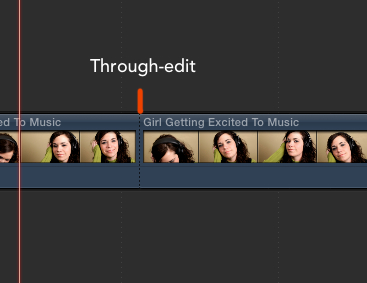
Two parts of a clip separated by a through-edit indicator can be joined together again with the Trim>Join Clips command (Backspace).
When you add a Freeze Frame (ALT+F) in the middle of a clip the clip will be split in two parts with the freeze frame inserted between them.

When you move or remove the freeze frame the two parts of the clip will come together again. The two parts will be separated by a simple cut, not by a through-edit.
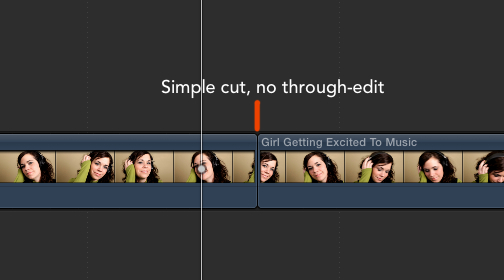
The two parts are continuous, but because there is no through-edit between the clips you cannot join the parts with the Trim>Join Clips (Backspace) command. But there is another way to turn the two parts into one clip again:
Click on the cut between the two parts and press T to enable the Trim tool.

Then drag the cut line completely to the start of the first part or the end of the second part (performing a Roll edit) and release the mouse.
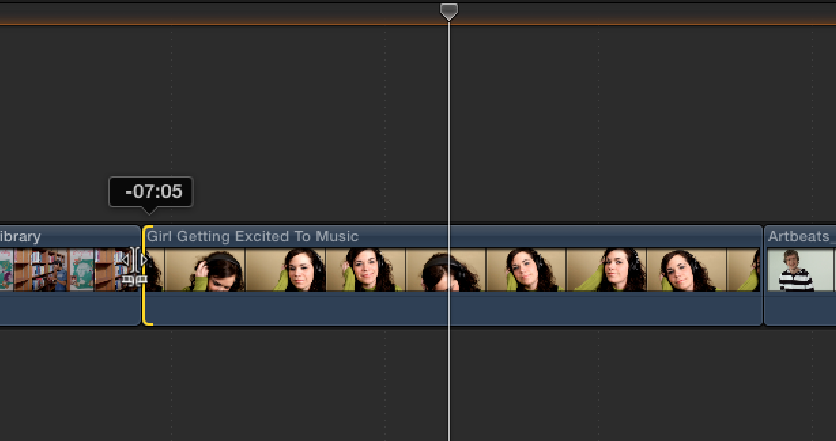
The two parts will be one single clip again.

- Ronny
When you blade a clip (CMD+B ) FCP X adds a through-edit indicator (dotted vertical line) on the cut.
Two parts of a clip separated by a through-edit indicator can be joined together again with the Trim>Join Clips command (Backspace).
When you add a Freeze Frame (ALT+F) in the middle of a clip the clip will be split in two parts with the freeze frame inserted between them.
When you move or remove the freeze frame the two parts of the clip will come together again. The two parts will be separated by a simple cut, not by a through-edit.
The two parts are continuous, but because there is no through-edit between the clips you cannot join the parts with the Trim>Join Clips (Backspace) command. But there is another way to turn the two parts into one clip again:
Click on the cut between the two parts and press T to enable the Trim tool.
Then drag the cut line completely to the start of the first part or the end of the second part (performing a Roll edit) and release the mouse.
The two parts will be one single clip again.
- Ronny
Last edit: 04 Aug 2014 19:18 by ronny courtens.
Please Log in to join the conversation.
- Jonathan Levin
-
Topic Author
- Offline
- Platinum Member
-
Less
More
- Posts: 786
- Thank you received: 21
04 Aug 2014 19:28 #50966
by Jonathan Levin
Replied by Jonathan Levin on topic Re-joining clips after moving freeze frame?
Ronny,
As usual, great info! Thanks for clearing that up. IS this something I should send feedback in for? Is there a purpose that it works this way.
Maybe I'm the only person. My reason for joining the cut where the FF was is to minimize all the cuts, although I don't use a hell of a lot of freeze frames.
Thanks again.
Jonathan
As usual, great info! Thanks for clearing that up. IS this something I should send feedback in for? Is there a purpose that it works this way.
Maybe I'm the only person. My reason for joining the cut where the FF was is to minimize all the cuts, although I don't use a hell of a lot of freeze frames.
Thanks again.
Jonathan
Please Log in to join the conversation.
- Tom Wolsky
-

- Offline
- Moderator
-
04 Aug 2014 19:32 #50967
by Tom Wolsky
Replied by Tom Wolsky on topic Re-joining clips after moving freeze frame?
If you going up lift out the freeze, rather than making it split the timeline use match frame and make the freeze from the browser to the timeline.
Please Log in to join the conversation.
- Jonathan Levin
-
Topic Author
- Offline
- Platinum Member
-
Less
More
- Posts: 786
- Thank you received: 21
04 Aug 2014 19:54 #50969
by Jonathan Levin
Replied by Jonathan Levin on topic Re-joining clips after moving freeze frame?
Thanks Tom.
Just to clarify, I selected the clip in the browser, parked playhead/skimmer at place I want freeze frame then go to Edit>Connect Freeze Frame. This then places FF at playhead position in timeline.
I don't see anything about match frame unless the FF and Match frame are interchangeable.
Thanks again.
Jonathan
Just to clarify, I selected the clip in the browser, parked playhead/skimmer at place I want freeze frame then go to Edit>Connect Freeze Frame. This then places FF at playhead position in timeline.
I don't see anything about match frame unless the FF and Match frame are interchangeable.
Thanks again.
Jonathan
Please Log in to join the conversation.
- Tom Wolsky
-
- Offline
- Moderator
-
04 Aug 2014 20:53 #50971
by Tom Wolsky
Replied by Tom Wolsky on topic Re-joining clips after moving freeze frame?
Put the playhead over the frame you want then match frame Shift-F to take you the same frame in the browser. Then use Option-F to connect the frame to the timeline.
Please Log in to join the conversation.


06 Aug 2014 10:30 #51016
by MrGralich
Replied by MrGralich on topic Re-joining clips after moving freeze frame?
Ronny, I've always found that performing that roll edit in order to get rid of the right (or left) clip results in having one single frame of that clip. In other words, the roll edit can't delete all the clip but keeps one frame.
To workaround this, I select one of the two clips, I Fn-Delete it in order to keep a gap and then perform the roll edit to re-gain all the gap with the surviving clip.
To workaround this, I select one of the two clips, I Fn-Delete it in order to keep a gap and then perform the roll edit to re-gain all the gap with the surviving clip.
Please Log in to join the conversation.
- Tom Wolsky
-
- Offline
- Moderator
-
06 Aug 2014 12:36 #51020
by Tom Wolsky
Replied by Tom Wolsky on topic Re-joining clips after moving freeze frame?
That problem was elimenated a few versions ago.
Please Log in to join the conversation.
06 Aug 2014 13:21 #51021
by MrGralich
Replied by MrGralich on topic Re-joining clips after moving freeze frame?
Thanks Tom, I've got to update my workflow, then... I do that automatically, I never thought to try again with newer versions, besides the fact that I didn't completely consider it as a bug.
Thanks!
MG
Thanks!
MG
Please Log in to join the conversation.
