


- Posts: 20
- Thank you received: 0
3 Post Moderation Rule for New Boarders (25 Jan 2021)
New boarders will have their posts moderated - Don't worry if you cannot see your post immediately.
Shifting audio from Final Cut to Logic - Bug in Logic?
04 Aug 2014 15:06 - 06 Aug 2014 10:00 #50960
by MrGralich
Shifting audio from Final Cut to Logic - Bug in Logic? was created by MrGralich
I have a strange problem when importing FCPX-produced material in Logic.
If I export a multitrack Quicktime movie it's all ok: Logic will import the movie, it asks me if I want to extract the audio tracks, I do that and all is fine.
But if I export separately the video track and then the audio track(s), I find that the audio track is slightly shifted with respect to where it should be. It's about 2-4 frames earlier (or later, I don't remember).
I've also tried to export the multitrack Quicktime movie with all the audio in it, then only one audio track and when I align them in Logic there is this shifting.
I know it seems a problem in Logic rather than in Final Cut, but I'd like to have your opinion and/or your experience. Did you ever try or experience this?
Thanks very much
MrGralich
If I export a multitrack Quicktime movie it's all ok: Logic will import the movie, it asks me if I want to extract the audio tracks, I do that and all is fine.
But if I export separately the video track and then the audio track(s), I find that the audio track is slightly shifted with respect to where it should be. It's about 2-4 frames earlier (or later, I don't remember).
I've also tried to export the multitrack Quicktime movie with all the audio in it, then only one audio track and when I align them in Logic there is this shifting.
I know it seems a problem in Logic rather than in Final Cut, but I'd like to have your opinion and/or your experience. Did you ever try or experience this?
Thanks very much
MrGralich
Last edit: 06 Aug 2014 10:00 by MrGralich. Reason: Refining the title
Please Log in to join the conversation.
04 Aug 2014 21:47 #50973
by rrongman
Replied by rrongman on topic Shifting audio from Final Cut to Logic
I don´t think my last post replied correctly. So here we go again!
Seems like your audio isn´t conformed. Do you have mixed resolutions in your timeline e.g 44.1k and 48k?
Seems like your audio isn´t conformed. Do you have mixed resolutions in your timeline e.g 44.1k and 48k?
Please Log in to join the conversation.
05 Aug 2014 08:00 - 05 Aug 2014 08:54 #50980
by MrGralich
Replied by MrGralich on topic Shifting audio from Final Cut to Logic
Hi rrongman!
Well, this is a good suggestion, but let's see if it fits.
I have indeed mixed audio resolutions, but of course my project setting is at 48khz, so it should be that the resolution the audio is converted when exporting.
To be more specific: I have music ad 48khz (I did it myself in Logic, so I considered the resolution) while I have voiceover and effects files that are at 44.1khz.
When I export as multitrack movie, I find no sync problem, but if I export isolated audio tracks I have this drift. It occurs also to audio that was originally at 48khz, like music.
Moreover in the export page I make sure that it reports "48khz".
By 'conforming' are you implying there's a method to explicitly conform audio files within FCPX before exporting?
Thanks for your support
MG
EDIT: I've tried to 'conform' a 44.1khz audio clip in the timeline. Of course in FCPX 10.1 "Conform" has become "Automatic speed", but in any case nothing happens and the audio clip stays at 100%
Well, this is a good suggestion, but let's see if it fits.
I have indeed mixed audio resolutions, but of course my project setting is at 48khz, so it should be that the resolution the audio is converted when exporting.
To be more specific: I have music ad 48khz (I did it myself in Logic, so I considered the resolution) while I have voiceover and effects files that are at 44.1khz.
When I export as multitrack movie, I find no sync problem, but if I export isolated audio tracks I have this drift. It occurs also to audio that was originally at 48khz, like music.
Moreover in the export page I make sure that it reports "48khz".
By 'conforming' are you implying there's a method to explicitly conform audio files within FCPX before exporting?
Thanks for your support
MG
EDIT: I've tried to 'conform' a 44.1khz audio clip in the timeline. Of course in FCPX 10.1 "Conform" has become "Automatic speed", but in any case nothing happens and the audio clip stays at 100%
Last edit: 05 Aug 2014 08:54 by MrGralich. Reason: Added information
Please Log in to join the conversation.
05 Aug 2014 10:17 #50982
by rrongman
Replied by rrongman on topic Shifting audio from Final Cut to Logic
Hello MrGralich
Have you tried to export the conformed audio as a wav to see if it plays in sync in your DAW? Regarding your music recorded at 48lk. Did you record at the same frame rate as your set frame rate used in FCPX?
Have you tried to export the conformed audio as a wav to see if it plays in sync in your DAW? Regarding your music recorded at 48lk. Did you record at the same frame rate as your set frame rate used in FCPX?
Please Log in to join the conversation.

05 Aug 2014 17:17 #50992
by BenB
Replied by BenB on topic Shifting audio from Final Cut to Logic
"I've tried to 'conform' a 44.1khz audio clip in the timeline."
That is not what conform does in FCPX. Conform is a fast/slow motion effect, and works on frames, not audio samples. It doesn't re-encode files at different frame/sample rates. Just FYI.
That is not what conform does in FCPX. Conform is a fast/slow motion effect, and works on frames, not audio samples. It doesn't re-encode files at different frame/sample rates. Just FYI.
Please Log in to join the conversation.
05 Aug 2014 20:49 - 05 Aug 2014 20:51 #51003
by MrGralich
Replied by MrGralich on topic Shifting audio from Final Cut to Logic
Hi Ben. Yes, I know that, it was just a try to follow the suggestion by rrongman.
In any case I think there is something strange going on, because I've done some more tests.
If I "share" just the audio tracks from FCPX and import them into Logic Pro, I find that they are in sync. In fact, the music track is in sync with the music in the DAW. But if I share a multitrack movie, when I extract the audio tracks from it while importing the movie in Logic Pro, then the music is shifted with respect to the previously imported files (the separately-exported audio tracks) and the music produced in the DAW.
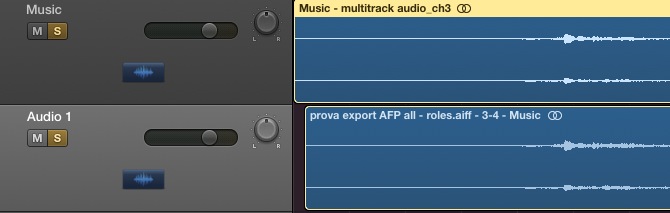
I say "shift" and not "drift" because the delay is fixed to about two frames all through the timeline, and it doesn' grow. In fact, if I move the separately-exported music audio track two frames to the right, it is aligned. See the attachments to better understand.
You'll note that, even if I move the lower track to the right to align, the track is still shorter the the higher track. The lower track is the separately-exported music track from FCPX, while the higher track is the music track extracted from the multitrack movie imported in Logic.
In a word, I'm stuck...
In any case I think there is something strange going on, because I've done some more tests.
If I "share" just the audio tracks from FCPX and import them into Logic Pro, I find that they are in sync. In fact, the music track is in sync with the music in the DAW. But if I share a multitrack movie, when I extract the audio tracks from it while importing the movie in Logic Pro, then the music is shifted with respect to the previously imported files (the separately-exported audio tracks) and the music produced in the DAW.
I say "shift" and not "drift" because the delay is fixed to about two frames all through the timeline, and it doesn' grow. In fact, if I move the separately-exported music audio track two frames to the right, it is aligned. See the attachments to better understand.
You'll note that, even if I move the lower track to the right to align, the track is still shorter the the higher track. The lower track is the separately-exported music track from FCPX, while the higher track is the music track extracted from the multitrack movie imported in Logic.
In a word, I'm stuck...

Last edit: 05 Aug 2014 20:51 by MrGralich.
Please Log in to join the conversation.
06 Aug 2014 03:52 #51005
by BenB
Replied by BenB on topic Shifting audio from Final Cut to Logic
First, report it to Apple via both the FCPX and Logic Pro X feedback pages.
Second, have you tried using an FCPXML round trip?
Second, have you tried using an FCPXML round trip?
Please Log in to join the conversation.
06 Aug 2014 10:11 #51014
by MrGralich
Replied by MrGralich on topic Shifting audio from Final Cut to Logic
Hi everybody. I've done some more test.
I now really think that it's a Logic Pro X bug, and I'll explain why.
That's what I've done FCPX-side:
1) Shared just audio tracks with no video
2) Shared a multitrack video
3) Exported the XML of the original project
4) Imported in FCPX the multitrack video created by FCPX itself, created a new fresh project, exported the XML of that project
At point 4), I've checked that the audio track was in the correct place (no shift): it was. So FCPX didn't mess with the placement of the audio when creating the multitrack movie.
What I've done Logic Pro X - side.
1) Imported separately the video track and the audio tracks: no shift, all is aligned (with respect to the music produced in the DAW)
2) Imported the XML of the original project (so all separate files, before the creation of the multitrack movie): all is in place
3) Imported the multitrack movie: after the extraction of audio tracks, these new tracks are shifted two frames to the right with respect to the music created in the DAW and also to the previously imported audio tracks (separated from video)
4) Imported the XML of the project in which I had put the multitrack movie: same error as point 3! Audio shifted two frames to the right.
The shifting remains the same all throughout the movie.
Ergo: Logic Pro X bug (or my miscomprehension of its settings, but I don't think so because at point 1 and 2 all is fine).
What do you think about that?
Regards
MG
I now really think that it's a Logic Pro X bug, and I'll explain why.
That's what I've done FCPX-side:
1) Shared just audio tracks with no video
2) Shared a multitrack video
3) Exported the XML of the original project
4) Imported in FCPX the multitrack video created by FCPX itself, created a new fresh project, exported the XML of that project
At point 4), I've checked that the audio track was in the correct place (no shift): it was. So FCPX didn't mess with the placement of the audio when creating the multitrack movie.
What I've done Logic Pro X - side.
1) Imported separately the video track and the audio tracks: no shift, all is aligned (with respect to the music produced in the DAW)
2) Imported the XML of the original project (so all separate files, before the creation of the multitrack movie): all is in place
3) Imported the multitrack movie: after the extraction of audio tracks, these new tracks are shifted two frames to the right with respect to the music created in the DAW and also to the previously imported audio tracks (separated from video)
4) Imported the XML of the project in which I had put the multitrack movie: same error as point 3! Audio shifted two frames to the right.
The shifting remains the same all throughout the movie.
Ergo: Logic Pro X bug (or my miscomprehension of its settings, but I don't think so because at point 1 and 2 all is fine).
What do you think about that?
Regards
MG
Please Log in to join the conversation.
06 Aug 2014 13:36 #51022
by rrongman
Replied by rrongman on topic Shifting audio from Final Cut to Logic
Hi MrGralich
a quick question. What´s the codec of the video used. Is it ProRes all way or is it H264 or other?
Regards
a quick question. What´s the codec of the video used. Is it ProRes all way or is it H264 or other?
Regards
Please Log in to join the conversation.
06 Aug 2014 14:01 - 06 Aug 2014 14:01 #51024
by MrGralich
Replied by MrGralich on topic Shifting audio from Final Cut to Logic
H264. At this phase I didn't need great video quality. Do you think LPX could dislike H264?
In the meantime, I've found this post in LPX forum: www.logicprohelp.com/forum/viewtopic.php?f=42&t=100336
Even if it talks about exporting, it looks a lot like the same problem...
In the meantime, I've found this post in LPX forum: www.logicprohelp.com/forum/viewtopic.php?f=42&t=100336
Even if it talks about exporting, it looks a lot like the same problem...
Last edit: 06 Aug 2014 14:01 by MrGralich.
Please Log in to join the conversation.
06 Aug 2014 14:26 #51027
by rrongman
Replied by rrongman on topic Shifting audio from Final Cut to Logic
Why I ask is because I´ve seen similar trouble you´ve been having. I use ProTools as main DAW and when I receive h264 or other GOP based codec I do transfers to ProRes. Just to be sure that a frame that I sync to, actually is the frame spotting to. Another way if you prompt want to stay with H264 codes is to enable "force header for every GOP" in your H264 file. This will make the file clearly bigger in size. But you will be able to spot audio on a frame level that you can trust. Thou I recommend to go ProRes instead since the ProRes codec will tax your processing less. And processing power you want for plug-ins, tracks etc.
Please Log in to join the conversation.
06 Aug 2014 15:11 #51028
by MrGralich
Replied by MrGralich on topic Shifting audio from Final Cut to Logic
That was a good idea, but even with the ProRes codec I've had the same issue.
Thanks anyway
Thanks anyway
Please Log in to join the conversation.
