


- Posts: 6
- Thank you received: 0
3 Post Moderation Rule for New Boarders (25 Jan 2021)
New boarders will have their posts moderated - Don't worry if you cannot see your post immediately.
trouble playing synchronized clips smoothly
04 Aug 2014 10:51 - 04 Aug 2014 10:51 #50941
by Amelia
trouble playing synchronized clips smoothly was created by Amelia
Hello friends,
I have trouble playing synchronized clips - they falter on the video line, the audio is fine. Once I export the whole project, the video plays correctly but the audio falters. Either way, I cannot edit them if I cannot see the transitions from one clip to the next.
I use fcp 10.0.9 and I have imported the video and audio files with optimized settings, 25 fp. Here is what I have already tried:
I cleaned up all the projects I do not use at the moment and exported them, so fcpx is definately not overstrained. I tried to change the playback options in the settings from better to good and vice versa, I checked my computer working storage (700 GB from 900 free).
I cannot update my fcpx version - as it is a working computer and the higher version needs a new ios version, which would imply more that 1000 Computers in the house to update (individual updates are not possible).
Has anybody ever had the same problem or knows how to fix it?
Thank you for your comments,
Amelia
I have trouble playing synchronized clips - they falter on the video line, the audio is fine. Once I export the whole project, the video plays correctly but the audio falters. Either way, I cannot edit them if I cannot see the transitions from one clip to the next.
I use fcp 10.0.9 and I have imported the video and audio files with optimized settings, 25 fp. Here is what I have already tried:
I cleaned up all the projects I do not use at the moment and exported them, so fcpx is definately not overstrained. I tried to change the playback options in the settings from better to good and vice versa, I checked my computer working storage (700 GB from 900 free).
I cannot update my fcpx version - as it is a working computer and the higher version needs a new ios version, which would imply more that 1000 Computers in the house to update (individual updates are not possible).
Has anybody ever had the same problem or knows how to fix it?
Thank you for your comments,
Amelia
Last edit: 04 Aug 2014 10:51 by Amelia.
Please Log in to join the conversation.
- Tom Wolsky
-

- Offline
- Moderator
-

04 Aug 2014 11:05 #50943
by Tom Wolsky
Replied by Tom Wolsky on topic trouble playing synchronized clips smoothly
Are you working off the system drive? Sync clips means playing back to source files simultaneously, and if the video is optimized it's high data rate ProRes. That's a lot of work for the system drive running the application and the OS as well.
Please Log in to join the conversation.
04 Aug 2014 11:53 #50950
by Amelia
Replied by Amelia on topic trouble playing synchronized clips smoothly
Hello Tom,
hm, I guess, how can I check and change that?
hm, I guess, how can I check and change that?
Please Log in to join the conversation.
- Tom Wolsky
-
- Offline
- Moderator
-
04 Aug 2014 12:29 - 04 Aug 2014 12:30 #50953
by Tom Wolsky
Replied by Tom Wolsky on topic trouble playing synchronized clips smoothly
Is your library in your Movies folder? Select the library in FCP and use Shift-Cmd-R. What are you using for media storage.
Last edit: 04 Aug 2014 12:30 by Tom Wolsky.
Please Log in to join the conversation.
04 Aug 2014 12:36 #50954
by Amelia
Replied by Amelia on topic trouble playing synchronized clips smoothly
Yes my media is stored in my movies folder.
Please Log in to join the conversation.
- Tom Wolsky
-
- Offline
- Moderator
-
04 Aug 2014 12:46 #50955
by Tom Wolsky
Replied by Tom Wolsky on topic trouble playing synchronized clips smoothly
You need a separate storage drive for your media. Either a separate internal drive or a fast external USB 3 or Thunderbolt.
Please Log in to join the conversation.
04 Aug 2014 12:53 #50956
by Amelia
Replied by Amelia on topic trouble playing synchronized clips smoothly
I will try that, though now that I have tried to play the pure video not synchronized with the audio file, fc still falters when playing it in the timeline.
Please Log in to join the conversation.
- Tom Wolsky
-
- Offline
- Moderator
-
04 Aug 2014 12:55 #50957
by Tom Wolsky
Replied by Tom Wolsky on topic trouble playing synchronized clips smoothly
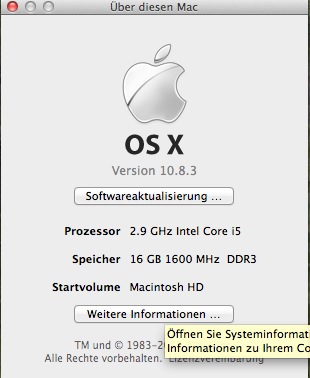
That's surprising. What are your computer specs?
Please Log in to join the conversation.
04 Aug 2014 12:57 #50958
by Amelia
Replied by Amelia on topic trouble playing synchronized clips smoothly
These:
Please Log in to join the conversation.
- Tom Wolsky
-
- Offline
- Moderator
-
04 Aug 2014 13:25 #50959
by Tom Wolsky
Replied by Tom Wolsky on topic trouble playing synchronized clips smoothly
iMac? Standard hard drive not SSD? Should be enough you might try making a new user and seeing how it performs there. You really do need to always use a dedicated media drive.
Please Log in to join the conversation.
12 Aug 2014 13:08 - 12 Aug 2014 13:09 #51205
by Amelia
Replied by Amelia on topic trouble playing synchronized clips smoothly
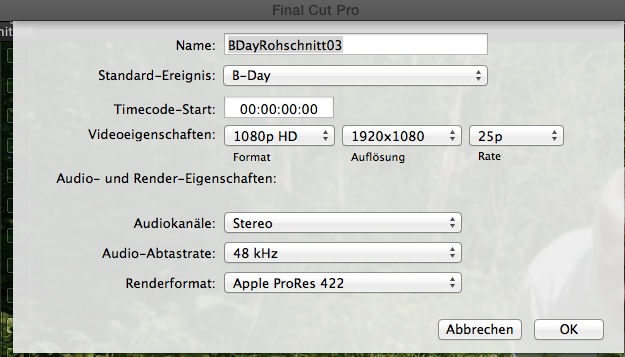
The problem does not seem to be with the synchronized clips, but with the audio. I changed the sample rate from 48 kHz to 32/ 44,1 / 88,2 and back to 48 kHz but it still won't play smoothly. It will still drop out audio frames when I export it, though while in the timeline video and audio is now fine apart from one short passage.
It's weird, I don't get the problem.
It's weird, I don't get the problem.
Last edit: 12 Aug 2014 13:09 by Amelia.
Please Log in to join the conversation.
- ronny courtens
-

- Offline
- Moderator
-
Less
More
- Posts: 4455
- Thank you received: 962
12 Aug 2014 18:39 #51215
by ronny courtens
Replied by ronny courtens on topic trouble playing synchronized clips smoothly
You should check the original video file and the original audio file that you have synchronized.
What is the source format of the original video file ? (codec, frame rate)
Does the original video file also have an audio track?
What is the source format of the external audio file? (codec, audio sample rate)
You can check the source formats of the original video file and the original audio file in the Inspector > Info tab.
My guess is that you have been synchronizing video clips that contain AIFF 48 KHz audio with external MP3 audio clips that have a 44.1 KHz sample rate. Any sample rate mismatch can cause audio drift or audio drops.
- Ronny
What is the source format of the original video file ? (codec, frame rate)
Does the original video file also have an audio track?
What is the source format of the external audio file? (codec, audio sample rate)
You can check the source formats of the original video file and the original audio file in the Inspector > Info tab.
My guess is that you have been synchronizing video clips that contain AIFF 48 KHz audio with external MP3 audio clips that have a 44.1 KHz sample rate. Any sample rate mismatch can cause audio drift or audio drops.
- Ronny
Please Log in to join the conversation.
