


- Posts: 730
- Thank you received: 26
3 Post Moderation Rule for New Boarders (25 Jan 2021)
New boarders will have their posts moderated - Don't worry if you cannot see your post immediately.
FCPX and 2:39 aspects
- DmitriZigany
-
 Topic Author
- Offline
- Platinum Member
-

Less
More
01 Aug 2014 13:10 #50826
by DmitriZigany
FCPX and 2:39 aspects was created by DmitriZigany
Hey!
So, I made a project with a 1920x800 aspect ratio. But when I put 1920x1080 footage onto the timeline, it retains it's 16:9 ratio and doesn't fill the width. I then have to increase the size to 135%, and I don't know if it's my imagination, but it feels like it's degrading the image.
Is there any way to get the footage to the timeline at 100% to start with so it covers the frame/width?
Or what's the proper way to go about this?
So, I made a project with a 1920x800 aspect ratio. But when I put 1920x1080 footage onto the timeline, it retains it's 16:9 ratio and doesn't fill the width. I then have to increase the size to 135%, and I don't know if it's my imagination, but it feels like it's degrading the image.
Is there any way to get the footage to the timeline at 100% to start with so it covers the frame/width?
Or what's the proper way to go about this?
Please Log in to join the conversation.
- ronny courtens
-

- Offline
- Moderator
-

Less
More
- Posts: 4455
- Thank you received: 962
01 Aug 2014 13:24 #50827
by ronny courtens
Replied by ronny courtens on topic FCPX and 2:39 aspects
Hey Dmitri,
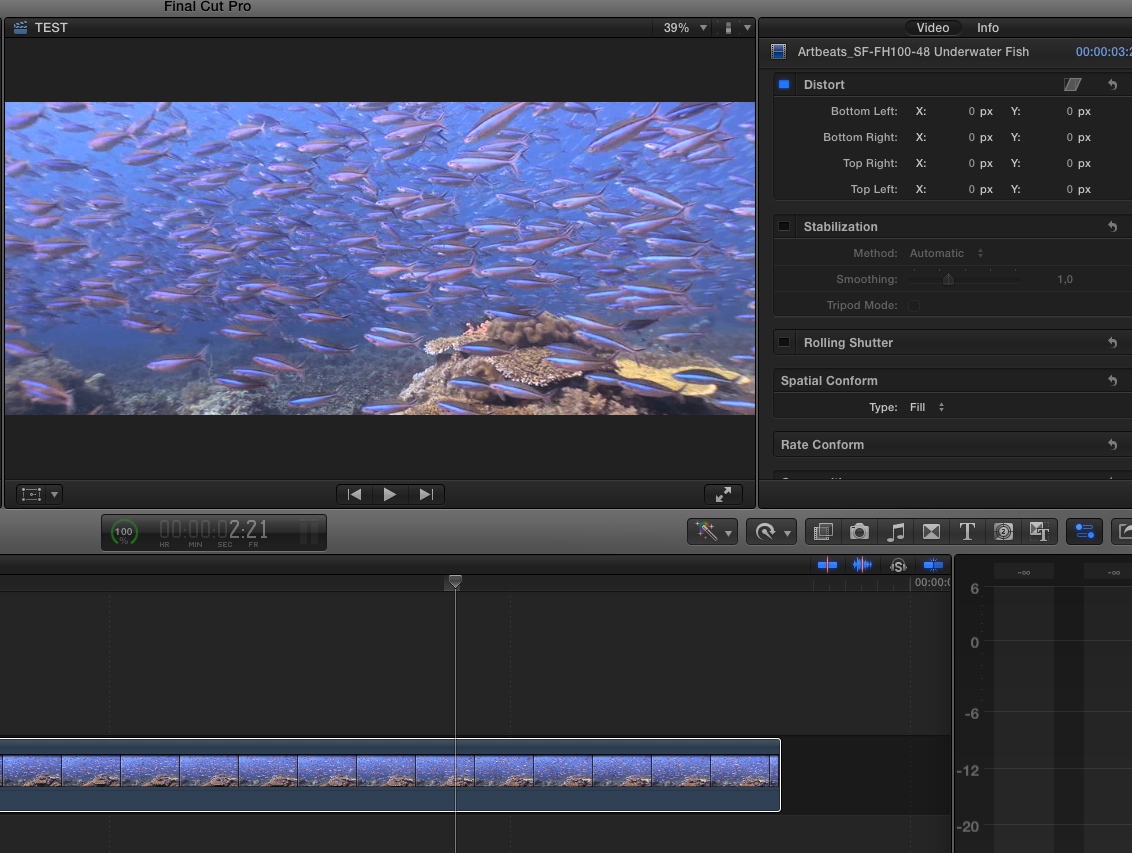
Select the clip in the timeline and in the Inspector > Vide tab set Spatial Conform to "Fill".
Your 1080 clip will fill the width of your 1920x800 frame. If you want to vertically reframe the image you can change the y position parameter in the Transform section of the Inspector.
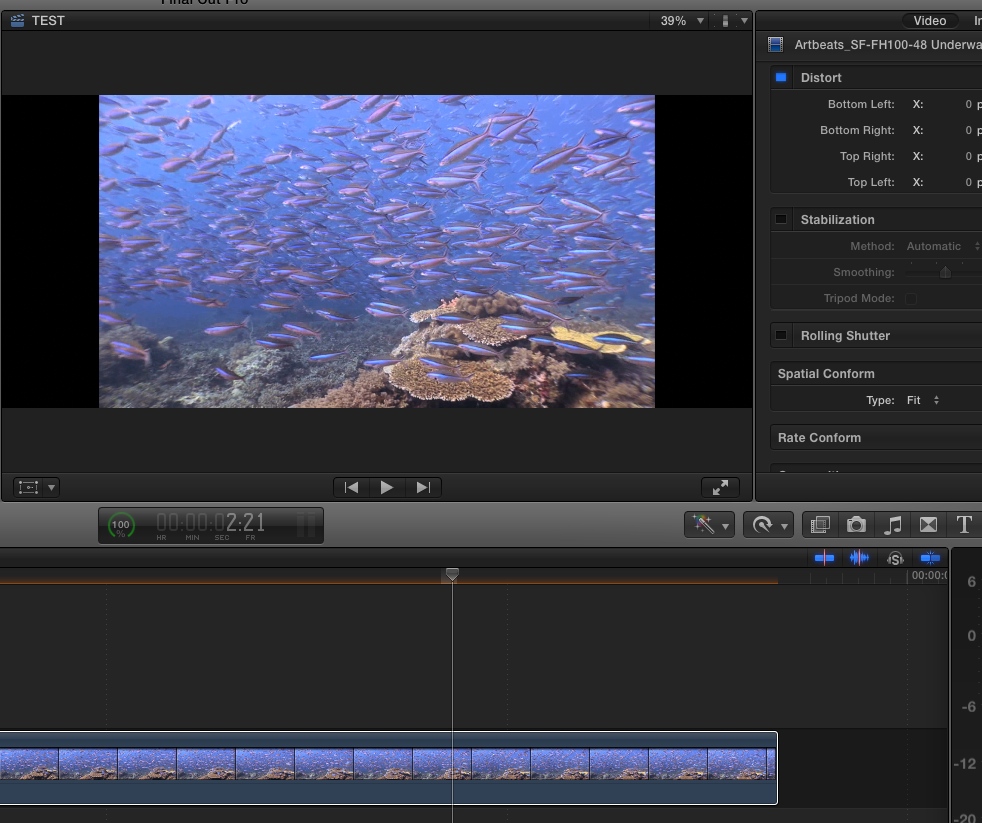
Here's a 1080p clip droppend into a 12920x800 timeline, notice the render bar because your clip is getting scaled to fit it into the frame:
Set Spatial Conform to Fill and the clip will fill the width of your farm, also notice how the render bar goes away:
- Ronny
Select the clip in the timeline and in the Inspector > Vide tab set Spatial Conform to "Fill".
Your 1080 clip will fill the width of your 1920x800 frame. If you want to vertically reframe the image you can change the y position parameter in the Transform section of the Inspector.
Here's a 1080p clip droppend into a 12920x800 timeline, notice the render bar because your clip is getting scaled to fit it into the frame:
Set Spatial Conform to Fill and the clip will fill the width of your farm, also notice how the render bar goes away:
- Ronny
Please Log in to join the conversation.
- DmitriZigany
-
Topic Author
- Offline
- Platinum Member
-
Less
More
- Posts: 730
- Thank you received: 26
01 Aug 2014 13:32 #50828
by DmitriZigany
Replied by DmitriZigany on topic FCPX and 2:39 aspects
Once again Ronny comes to the rescue! Thanks!
Is there a way to make the Spatial Conform: Fill the default setting?
Is there a way to make the Spatial Conform: Fill the default setting?
Please Log in to join the conversation.
- ronny courtens
-
- Offline
- Moderator
-
Less
More
- Posts: 4455
- Thank you received: 962
01 Aug 2014 13:37 #50829
by ronny courtens
Replied by ronny courtens on topic FCPX and 2:39 aspects
Nope, and this would not be a bad idea. Some people (especially photographers) would like the default setting to be set to "None". So I think it would be a nice little feature addition if in Preferences we could set the default Spatial Conform behavior to whatever we personally use most. File a feature request using the feedback form.
- Ronny
- Ronny
Please Log in to join the conversation.
