


- Posts: 136
- Thank you received: 0
3 Post Moderation Rule for New Boarders (25 Jan 2021)
New boarders will have their posts moderated - Don't worry if you cannot see your post immediately.
"Restart Final Cut Pro"
- youngeddie
-
 Topic Author
- Offline
- Premium Member
-

Less
More
31 Jul 2014 22:28 #50790
by youngeddie
"Restart Final Cut Pro" was created by youngeddie
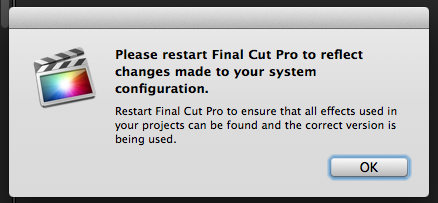
I'm getting this error message every time I start FCP X lately...
Please restart Final Cut Pro to reflect changes made to your system configuration.
Restart FCP to ensure that all effects used in your projects can be found and the correct version is being used.
Is this a glitch, or am I doing something wrong?
Please let me know what you think.
Thanks, Eddie
Please restart Final Cut Pro to reflect changes made to your system configuration.
Restart FCP to ensure that all effects used in your projects can be found and the correct version is being used.
Is this a glitch, or am I doing something wrong?
Please let me know what you think.
Thanks, Eddie
Please Log in to join the conversation.


01 Aug 2014 08:31 #50803
by plysat
It's a warning from FX Factory or RG Universe… something like that. Do you own either, and has anything changed recently
Can't sleep? Try this: fcpxpert.net ;-)
Replied by plysat on topic "Restart Final Cut Pro"
youngeddie wrote: I'm getting this error message every time I start FCP X lately...
Please restart Final Cut Pro to reflect changes made to your system configuration.
Restart FCP to ensure that all effects used in your projects can be found and the correct version is being used.
Is this a glitch, or am I doing something wrong?
Please let me know what you think.
Thanks, Eddie
It's a warning from FX Factory or RG Universe… something like that. Do you own either, and has anything changed recently
Can't sleep? Try this: fcpxpert.net ;-)
Please Log in to join the conversation.
- youngeddie
-
Topic Author
- Offline
- Premium Member
-
Less
More
- Posts: 136
- Thank you received: 0
01 Aug 2014 09:22 #50806
by youngeddie
Replied by youngeddie on topic "Restart Final Cut Pro"
Great! Yes, I did just install a Ripple Training plugin that required installing the FXFactory app.
So... should I do like it says and restart FCP X like it says? I guess so, right?
Thanks very much for your help with this!!
Eddie
So... should I do like it says and restart FCP X like it says? I guess so, right?
Thanks very much for your help with this!!
Eddie
Please Log in to join the conversation.
- ronny courtens
-

- Offline
- Moderator
-

Less
More
- Posts: 4455
- Thank you received: 962
01 Aug 2014 09:28 #50807
by ronny courtens
Replied by ronny courtens on topic "Restart Final Cut Pro"
Plysat is correct (as always). Every time you change your FXPlug configuration FCP X detects the changes at the next restart and it will ask you to launch it again so it can add the new plugins to your effects browser. So yes, go for it.
- Ronny
- Ronny
Please Log in to join the conversation.
01 Aug 2014 09:28 #50808
by plysat
Yeah, it's fine… though it should only do it once after you install something. You might want to open FX Factory and disable everything other than what you need/want. It installs a bunch of trial apps which is kind of annoying. You can see what's installed in the fx factory app, uncheck them all (except the ripple training thing) You may see that warning after doing this, just restart X and they *should* stop.
Can't sleep? Try this: fcpxpert.net ;-)
Replied by plysat on topic "Restart Final Cut Pro"
youngeddie wrote: Great! Yes, I did just install a Ripple Training plugin that required installing the FXFactory app.
So... should I do like it says and restart FCP X like it says? I guess so, right?
Thanks very much for your help with this!!
Eddie
Yeah, it's fine… though it should only do it once after you install something. You might want to open FX Factory and disable everything other than what you need/want. It installs a bunch of trial apps which is kind of annoying. You can see what's installed in the fx factory app, uncheck them all (except the ripple training thing) You may see that warning after doing this, just restart X and they *should* stop.
Can't sleep? Try this: fcpxpert.net ;-)
Please Log in to join the conversation.
- youngeddie
-
Topic Author
- Offline
- Premium Member
-
Less
More
- Posts: 136
- Thank you received: 0
01 Aug 2014 09:33 #50809
by youngeddie
Replied by youngeddie on topic "Restart Final Cut Pro"
Thanks guys for your help!
I wrote FXFactory last night to find out how to turn off all those trial apps, and that's when I learned that the app was on my computer. I checked, "disable all trial products" just to clean things up, and now I realize that that will make things run better.
Thanks again!!
Eddie
I wrote FXFactory last night to find out how to turn off all those trial apps, and that's when I learned that the app was on my computer. I checked, "disable all trial products" just to clean things up, and now I realize that that will make things run better.
Thanks again!!
Eddie
Please Log in to join the conversation.
