


- Posts: 31
- Thank you received: 0
3 Post Moderation Rule for New Boarders (25 Jan 2021)
New boarders will have their posts moderated - Don't worry if you cannot see your post immediately.
Can't properly paste titles over black to end of sequence with dissolve
- S.Clements
-
 Topic Author
- Offline
- Junior Member
-

Less
More
30 Jul 2014 13:04 #50694
by S.Clements
Hi,
This is driving me nuts. I have titles connected to black from one sequence that I want to copy and paste onto the end of another sequence. However, the other sequence has a dissolve at the end. When I paste the black onto the new sequence, it cuts into the dissolve and completely damages the end. I have to do all sorts of crazy fiddling to get things sort of the way they're supposed to be. What's going on? Why is it so difficult to paste something onto the end of a sequence that has a dissolve on it?
This is driving me nuts. I have titles connected to black from one sequence that I want to copy and paste onto the end of another sequence. However, the other sequence has a dissolve at the end. When I paste the black onto the new sequence, it cuts into the dissolve and completely damages the end. I have to do all sorts of crazy fiddling to get things sort of the way they're supposed to be. What's going on? Why is it so difficult to paste something onto the end of a sequence that has a dissolve on it?
Please Log in to join the conversation.
- S.Clements
-
Topic Author
- Offline
- Junior Member
-
Less
More
- Posts: 31
- Thank you received: 0
30 Jul 2014 13:35 #50696
by S.Clements
Replied by S.Clements on topic Can't properly paste titles over black to end of sequence with dissolve
Basically, if I have a sequence ending with a dissolve, I can't add filler to the end without destroying the positioning of the dissolve. If I have filler at the end, I can blade it and paste in whatever I want though. Is there not a way to add filler to the end of a sequence with a dissolve without damaging the dissolve?
Please Log in to join the conversation.

30 Jul 2014 13:37 #50697
by timfo
Replied by timfo on topic Can't properly paste titles over black to end of sequence with dissolve
I think I understand what you're asking: you have a clip that is now the end of a timeline, ending with a dissolve. You want to now add a title, making it the end of the timeline, correct?
The dissolve transition is just that, a transition. So when there is nothing else after a clip, yes that dissolve will go to black, but if there is anything else it will transition to that image/clip/title, etc.
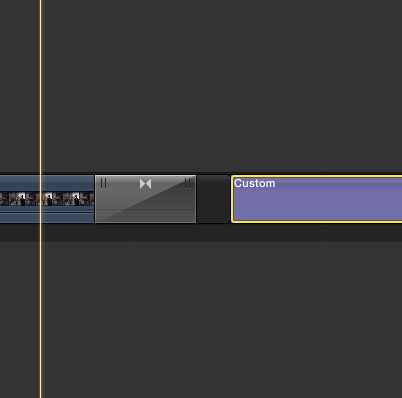
You may need to simply add a gap after the dissolve and before the title, by placing your playhead at the end of the dissolve and hitting Option + W. You can trim back the gap to make it shorter if necessary and then add your title. Should look like the pic attached.
The dissolve transition is just that, a transition. So when there is nothing else after a clip, yes that dissolve will go to black, but if there is anything else it will transition to that image/clip/title, etc.
You may need to simply add a gap after the dissolve and before the title, by placing your playhead at the end of the dissolve and hitting Option + W. You can trim back the gap to make it shorter if necessary and then add your title. Should look like the pic attached.
Please Log in to join the conversation.
- S.Clements
-
Topic Author
- Offline
- Junior Member
-
Less
More
- Posts: 31
- Thank you received: 0
30 Jul 2014 13:47 #50698
by S.Clements
Replied by S.Clements on topic Can't properly paste titles over black to end of sequence with dissolve
Thanks, Timfo. That all makes sense and is exactly what I want to do, but when I place the position marker after the dissolve and hit option + W to add some filler, the positioning of the dissolve gets all screwed up. It's not a simple case of just adding more filler, as you describe it.
Please Log in to join the conversation.
- Squamish ed
-
- Offline
- Elite Member
-

Less
More
- Posts: 238
- Thank you received: 20
30 Jul 2014 17:53 #50707
by Squamish ed
Ed
Replied by Squamish ed on topic Can't properly paste titles over black to end of sequence with dissolve
Have you tried fading out the last clip using the Video animation controls? Select the clip and use Control V. This will create a fade to black with the compositing controls. Then position your titles. That way there's no transition that will move because you're working on the characteristics of the selected clip.
Ed
Please Log in to join the conversation.
- haysoos123
-
- Offline
- Platinum Member
-

Less
More
- Posts: 402
- Thank you received: 72
30 Jul 2014 18:11 #50708
by haysoos123
Replied by haysoos123 on topic Can't properly paste titles over black to end of sequence with dissolve
The beginning and ends of my timelines will often be secondary storylines if there needs to be dissolves. You just have a little finer amount of control because the dissolve doesn't have to go into anything like it has to in the primary. A dissolve in the primary always has to be between two clips, or a clip and a gap clip. However, if you have a secondary floating above a gap clip, it can be a true end dissolve. The dissolve will look the same, but again, it's easier to control. Yes, another way to dissolve is to keyframe the opacity.
Please Log in to join the conversation.
- ronny courtens
-

- Offline
- Moderator
-

Less
More
- Posts: 4455
- Thank you received: 962
30 Jul 2014 18:45 #50713
by ronny courtens
Replied by ronny courtens on topic Can't properly paste titles over black to end of sequence with dissolve
There is a very easy solution for this: you only need to copy/paste the title.
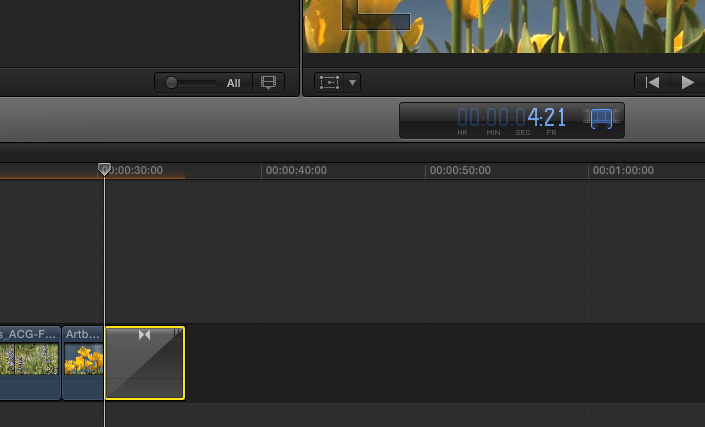
Here's the timeline with the dissolve. The dissolve is 4"21 frames long:
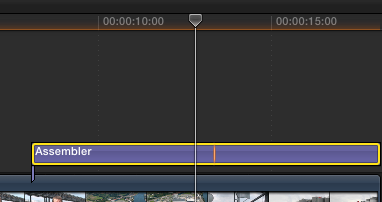
Here's the title on black in the other timeline. Select the title and press CMD+C:
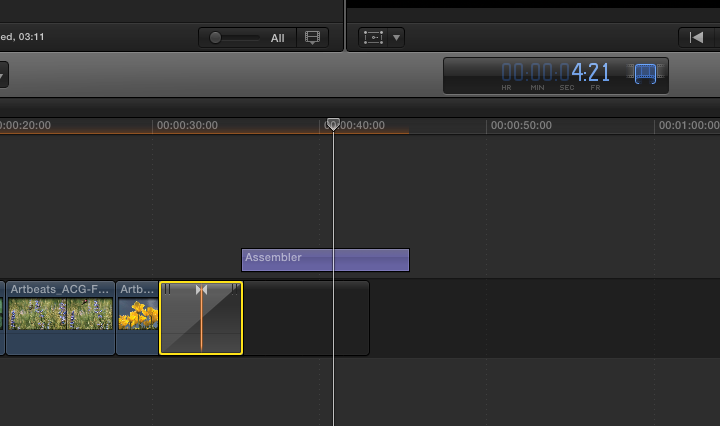
Go to the end of the dissolve in the dissolve timeline and press CMD+V. The title gets added, a gap clip is added right after the dissolve and the dissolve still is exactly 4"21 frames long and at the exact same place as it was before:
If the title or generator or whatever you wish to copy/paste is on the primary storyline instead of connected to it, all you have to do is copy it and press ALT+V (instead of CMD+V) to paste it as a connected clip after the dissolve.
- Ronny
Here's the timeline with the dissolve. The dissolve is 4"21 frames long:
Here's the title on black in the other timeline. Select the title and press CMD+C:
Go to the end of the dissolve in the dissolve timeline and press CMD+V. The title gets added, a gap clip is added right after the dissolve and the dissolve still is exactly 4"21 frames long and at the exact same place as it was before:
If the title or generator or whatever you wish to copy/paste is on the primary storyline instead of connected to it, all you have to do is copy it and press ALT+V (instead of CMD+V) to paste it as a connected clip after the dissolve.
- Ronny
Please Log in to join the conversation.
