


- Posts: 17
- Thank you received: 0
3 Post Moderation Rule for New Boarders (25 Jan 2021)
New boarders will have their posts moderated - Don't worry if you cannot see your post immediately.
Basic RAID questions
29 Jul 2014 14:41 #50654
by jbaugh
Basic RAID questions was created by jbaugh
From my post you will immediately recognize that I am a novice in terms of understanding basic concepts of optimizing for using FCPX and Compressor. Any help will be appreciated.
I want to optimize my current hardware to improve my work flow with FCPX and Compressor. I have an early 2009 Mac Pro with two 2.66GHz Quad Core processors and 32GB RAM. I boot from an OWC Mercury Accelsior PCIe 240GB card which, in addition to the OS contains my applications. I have all four internal drive bays filled with 2TB hard drives.
I use this set up primarily for video editing with Final Cut Pro X and encoding with Compressor. I have been doing this for a couple of years with no major problems but I feel I am not maximizing the potential of my equipment. From start to finish it takes me about 8 hours to take about 100 minutes of raw video footage, apply very basic editing, export from FCPX as a master file, and then encode with Compressor to two final formats ( .mv4 video @ 640x360 and .mp4 @ 640x360). The two bottlenecks to my work are the export from FCPX and the encoding with Compressor.
Currently I use only two of my internal hard drives in my work flow. My “FCPX” drive holds the FCP Libraries and is the destination for exports of master files from FCPX. My “Compressor Destination” drive is used for the destination of encoded files from Compressor.
I’m wondering if I can improve throughput speed if I create a SOFTWARE based RAID volume using two or more of my 4 internal hard drives? Basically I would like to know your suggestions for the best utilization of my computer resources for the above stated uses. If RAID can help me how would I best configure it? Or am I limited by the limitations of my CPUs such that increasing hard drive read and write speeds will not help substantially? I'm not concerned about data protection because I have an aggressive regimen of back up to external drives. Improving speed is my major interest.
Thanks.
John
I want to optimize my current hardware to improve my work flow with FCPX and Compressor. I have an early 2009 Mac Pro with two 2.66GHz Quad Core processors and 32GB RAM. I boot from an OWC Mercury Accelsior PCIe 240GB card which, in addition to the OS contains my applications. I have all four internal drive bays filled with 2TB hard drives.
I use this set up primarily for video editing with Final Cut Pro X and encoding with Compressor. I have been doing this for a couple of years with no major problems but I feel I am not maximizing the potential of my equipment. From start to finish it takes me about 8 hours to take about 100 minutes of raw video footage, apply very basic editing, export from FCPX as a master file, and then encode with Compressor to two final formats ( .mv4 video @ 640x360 and .mp4 @ 640x360). The two bottlenecks to my work are the export from FCPX and the encoding with Compressor.
Currently I use only two of my internal hard drives in my work flow. My “FCPX” drive holds the FCP Libraries and is the destination for exports of master files from FCPX. My “Compressor Destination” drive is used for the destination of encoded files from Compressor.
I’m wondering if I can improve throughput speed if I create a SOFTWARE based RAID volume using two or more of my 4 internal hard drives? Basically I would like to know your suggestions for the best utilization of my computer resources for the above stated uses. If RAID can help me how would I best configure it? Or am I limited by the limitations of my CPUs such that increasing hard drive read and write speeds will not help substantially? I'm not concerned about data protection because I have an aggressive regimen of back up to external drives. Improving speed is my major interest.
Thanks.
John
Please Log in to join the conversation.

30 Jul 2014 11:26 #50685
by VidGreg
Replied by VidGreg on topic Basic RAID questions
Hi John,
You are asking some really technical questions. Also it would be helpful to know some additional information. Are you using FCPX 10.1.2 on Mavericks? What Graphics card GPU do you have in your computer? What type of video and video format/codec do you shoot? Do you shoot multiple cameras? Do you transcode to ProRes? Do you use lots of effects? Do you use subtitles/lower thirds titles throughout you vids? Why does this matter?
Your computer originally came with either the Nvidia GT120 or the ATI 4870, both of these cards are very long in the tooth for FCPX10.1.2. If have not upgraded your GPU, then start there. FCP10.1.2 uses the GPU for rendering/effects/exporting so having a modern card like the 680/780 would speed your system up. Most likely even more than a RAID 0.
If you are only shooting and using a single cam and not shooting something like 4K, then you may not see any improvements using a RAID set-up. Even if you shoot in 4K but you transcode to optimized/proxy media you will not see speed improvements using RAID for single cam work.
The benefits to RAID is when a single drive cannot deliver data fast enough to the computer(ram) for processing in real time, therefore linking 2 or more hdds in RAID 0 will double the data delivered in a 2 drive RAID 0. Only if you are using video that requires lots of data in native formats will you exceed the capabilities of a single hdd i.e. 4K red files or multiple cam 1080 HD files. You can always transcode to optimized or proxy media to overcome this if needed. Your editing time will improve but export time would increase.
One way you might see a slight increase in throughput is to send final export files to a separate drive not involved in reading the files.
Sounds like you are exporting for the web??
Here we get into some weird technical issues with FCPX vs Compressor. FCPX will almost always leverage the graphics card (GPU) for effects and to transcode for export, not necessarily so for Compressor. Also Compressor for some codecs will not use multicores/threads for exporting/transcoding. Why, no idea other than Apple needs to update Compressor. It can "Group" computers and use multiple CPUs for transcoding but not always utilize all the resources on a single computer, go figure.
Modern GPUs can process graphics much faster than the CPU especially when the CPU is involved in other tasks.
So I would suggest that you try to use the built-in export in FCPX for YouTube/Vimeo if that is where you are going, otherwise create custom settings in Compressor and send the settings to FCPX. These custom settings will show up in FCPX so you don't have to send to Compressor. Time each workflow using just FCPX internal export (share) and then using Compressor for the same project and see which way is faster.
Hope this helps, Greg
You are asking some really technical questions. Also it would be helpful to know some additional information. Are you using FCPX 10.1.2 on Mavericks? What Graphics card GPU do you have in your computer? What type of video and video format/codec do you shoot? Do you shoot multiple cameras? Do you transcode to ProRes? Do you use lots of effects? Do you use subtitles/lower thirds titles throughout you vids? Why does this matter?
Your computer originally came with either the Nvidia GT120 or the ATI 4870, both of these cards are very long in the tooth for FCPX10.1.2. If have not upgraded your GPU, then start there. FCP10.1.2 uses the GPU for rendering/effects/exporting so having a modern card like the 680/780 would speed your system up. Most likely even more than a RAID 0.
If you are only shooting and using a single cam and not shooting something like 4K, then you may not see any improvements using a RAID set-up. Even if you shoot in 4K but you transcode to optimized/proxy media you will not see speed improvements using RAID for single cam work.
The benefits to RAID is when a single drive cannot deliver data fast enough to the computer(ram) for processing in real time, therefore linking 2 or more hdds in RAID 0 will double the data delivered in a 2 drive RAID 0. Only if you are using video that requires lots of data in native formats will you exceed the capabilities of a single hdd i.e. 4K red files or multiple cam 1080 HD files. You can always transcode to optimized or proxy media to overcome this if needed. Your editing time will improve but export time would increase.
One way you might see a slight increase in throughput is to send final export files to a separate drive not involved in reading the files.
Sounds like you are exporting for the web??
Here we get into some weird technical issues with FCPX vs Compressor. FCPX will almost always leverage the graphics card (GPU) for effects and to transcode for export, not necessarily so for Compressor. Also Compressor for some codecs will not use multicores/threads for exporting/transcoding. Why, no idea other than Apple needs to update Compressor. It can "Group" computers and use multiple CPUs for transcoding but not always utilize all the resources on a single computer, go figure.
Modern GPUs can process graphics much faster than the CPU especially when the CPU is involved in other tasks.
So I would suggest that you try to use the built-in export in FCPX for YouTube/Vimeo if that is where you are going, otherwise create custom settings in Compressor and send the settings to FCPX. These custom settings will show up in FCPX so you don't have to send to Compressor. Time each workflow using just FCPX internal export (share) and then using Compressor for the same project and see which way is faster.
Hope this helps, Greg
Please Log in to join the conversation.
30 Jul 2014 14:39 #50699
by jbaugh
Replied by jbaugh on topic Basic RAID questions
Greg,
Thank you very much for your detailed response to my questions. I really appreciate the time and effort you have taken to help me. Your response is exactly the kind of help I need. I will give you a better overview of my equipment and my typical use of FCPX and Compressor.
I am using FCPX 10.1.2 on Mavericks. I previously upgraded my original GPU card to an ATI Radeon HD 5770 1024 MB.
I capture video from a single Vixia HV 30 camcorder in AVCHD format at 1920x1080. I import it to FCPX and transcode it to ProRes 422. My only effects are a few fade transitions and a short introductory simple title. I "share" the final edit as a ProRes 422 master file which goes to a dedicated internal HD ("FCPX"). I have Compressor set up for the maximum "additional instances" which is 3. I have three custom Compressor settings– M4V for "Apple Devices", MP4 @ 640x360 and 59.94FPS, and MP3 audio output.
These are all sent to a dedicated internal HD ("Compressor Destination") so that I am reading and writing to separate drives.
During the Compressor encoding my CPU usage ranges from about 80- 92% with 4 "instances" showing in Activity Monitor. I am very pleased with the quality of my final encoded video. Both the MP4 and M4V files are about 1.2 GB in size for a 45- 50 minute video. Each week I process three of these videos for upload to my church's website. Incidentally, each of these videos are broadcast live and simultaneously recorded each week.
So, as I've said, I'm happy with my final output. But I've wondered if there was a way to get more speed from my set-up by utilizing the two extra internal HDs that are not participating in the whole process. From your comments and my own suppositions, it appears that there is not much to be gained by trying to set up software RAID to incorporate all 4 internal HDs into this process. I suspect that my CPUs may be the limiting factor in throughput and that speeding up disk access with RAID will not accomplish much. At least not with my work flow.
Is there any thing else you would suggest or other observations you would make now that you have more information about my set-up?
Once again, thank you for your willingness to share your knowledge with me.
John
Thank you very much for your detailed response to my questions. I really appreciate the time and effort you have taken to help me. Your response is exactly the kind of help I need. I will give you a better overview of my equipment and my typical use of FCPX and Compressor.
I am using FCPX 10.1.2 on Mavericks. I previously upgraded my original GPU card to an ATI Radeon HD 5770 1024 MB.
I capture video from a single Vixia HV 30 camcorder in AVCHD format at 1920x1080. I import it to FCPX and transcode it to ProRes 422. My only effects are a few fade transitions and a short introductory simple title. I "share" the final edit as a ProRes 422 master file which goes to a dedicated internal HD ("FCPX"). I have Compressor set up for the maximum "additional instances" which is 3. I have three custom Compressor settings– M4V for "Apple Devices", MP4 @ 640x360 and 59.94FPS, and MP3 audio output.
These are all sent to a dedicated internal HD ("Compressor Destination") so that I am reading and writing to separate drives.
During the Compressor encoding my CPU usage ranges from about 80- 92% with 4 "instances" showing in Activity Monitor. I am very pleased with the quality of my final encoded video. Both the MP4 and M4V files are about 1.2 GB in size for a 45- 50 minute video. Each week I process three of these videos for upload to my church's website. Incidentally, each of these videos are broadcast live and simultaneously recorded each week.
So, as I've said, I'm happy with my final output. But I've wondered if there was a way to get more speed from my set-up by utilizing the two extra internal HDs that are not participating in the whole process. From your comments and my own suppositions, it appears that there is not much to be gained by trying to set up software RAID to incorporate all 4 internal HDs into this process. I suspect that my CPUs may be the limiting factor in throughput and that speeding up disk access with RAID will not accomplish much. At least not with my work flow.
Is there any thing else you would suggest or other observations you would make now that you have more information about my set-up?
Once again, thank you for your willingness to share your knowledge with me.
John
Please Log in to join the conversation.
30 Jul 2014 15:21 #50702
by VidGreg
Replied by VidGreg on topic Basic RAID questions
Hi John,
Single cam files and single ProRes encodes will not be enhanced by RAID. A single hdd can send media data as fast as needed for those codecs.
According to your Activity Monitor readings, Compressor is only using one core for encoding and is encoding sequentially. Each core can have 100% so a 4 core theoretically can hit 400%. Again this is, I believe, a limitation of Compressor. You may/will get better speeds in FCPX as it will utilized more cores and the GPU. Since you are transcoding to 3 separate export settings, you might try to set all three up as group export in FCPX (custom destinations) and I think you will see faster final exports. You can send your settings from Compressor to FCP, but I think @least 2 are already preset in FCPX unless you have created something custom.
One click share export. Won't hurt to try.
Other than that, replacing your GPU will result in faster speeds. See this article on BareFeats about various cards using various tests. Your 5770 is about 40% slower than the 5870 shown in the article.
You can use any 680/780 straight out of box but you will not have the initial boot screen, first screen will be log-in screen unless you flash card. Even without flashing card your MP will utilize the card fully. Flashing entails installing Apple's boot EFI code onto the card.
Note that BareFeats used a pre-flashed GPU from MacVidCards.
Only you can decide if $$$ are worth it. The cost of a new card would be less than properly setting up a RAID solution + back up and as a RAID won't help…
Perhaps others have more suggestions.
Hope this helps, Greg
Single cam files and single ProRes encodes will not be enhanced by RAID. A single hdd can send media data as fast as needed for those codecs.
According to your Activity Monitor readings, Compressor is only using one core for encoding and is encoding sequentially. Each core can have 100% so a 4 core theoretically can hit 400%. Again this is, I believe, a limitation of Compressor. You may/will get better speeds in FCPX as it will utilized more cores and the GPU. Since you are transcoding to 3 separate export settings, you might try to set all three up as group export in FCPX (custom destinations) and I think you will see faster final exports. You can send your settings from Compressor to FCP, but I think @least 2 are already preset in FCPX unless you have created something custom.
One click share export. Won't hurt to try.
Other than that, replacing your GPU will result in faster speeds. See this article on BareFeats about various cards using various tests. Your 5770 is about 40% slower than the 5870 shown in the article.
You can use any 680/780 straight out of box but you will not have the initial boot screen, first screen will be log-in screen unless you flash card. Even without flashing card your MP will utilize the card fully. Flashing entails installing Apple's boot EFI code onto the card.
Note that BareFeats used a pre-flashed GPU from MacVidCards.
Only you can decide if $$$ are worth it. The cost of a new card would be less than properly setting up a RAID solution + back up and as a RAID won't help…
Perhaps others have more suggestions.
Hope this helps, Greg
Please Log in to join the conversation.
30 Jul 2014 18:45 #50714
by dkag7
Replied by dkag7 on topic Basic RAID questions
Raid will help for HDD speed and redundancy (Less chance of loosing stuff because a HDD dies).
This of course will help playback of unrendered media in FCP (especially multilayer timelines and/or where more than one media file is playing at once).
To speed up rendering and export (for web videos) I recommend getting x264 plugin for compressor (free)
www.macupdate.com/app/mac/24173/x264encoder
Some settings once it is set up..
realworldvideocompression.com/rwvc/2010/...n-in-compressor.html
Kurt
This of course will help playback of unrendered media in FCP (especially multilayer timelines and/or where more than one media file is playing at once).
To speed up rendering and export (for web videos) I recommend getting x264 plugin for compressor (free)
www.macupdate.com/app/mac/24173/x264encoder
Some settings once it is set up..
realworldvideocompression.com/rwvc/2010/...n-in-compressor.html
Kurt
Please Log in to join the conversation.
30 Jul 2014 23:13 #50739
by VidGreg
Replied by VidGreg on topic Basic RAID questions
John,
I may be inadvertently leading you down a wrong path. Or perhaps the Right Path Wrong Time.
You never say exactly when/what process you think is the slow down. Is it in importing/exporting that you think is too slow?
I can take days editing a 1 hour vid.
Having rethought your needs vs your current system, I think you may have a different issue, so before spending $$ I would make sure it isn't software/firmware not hardware.
How full are your drives? Do you have at least 15-20% free? Too full of drives makes a dramatic speed difference.
Is all your software up to date including any plug-ins?
Have you tried to run system housekeeping routines? I like to use Titanium Software Onyx (free) download and run the permissions repair and daily/weekly/monthly scripts.
Does your Excelsior have new firmware updates?
Have you tried to trash plist for FCPX and Compressor?
Have you tested your ram recently? Try MemTest to stress your ram for flakiness.
Have you cleaned inside your computer and gotten rid of all the dust bunnies? Hot not good!
Does Activity Monitor show lots of page swaps (pages in/out)?
Since you are mostly only processing 1-3 ProRes422 files at any one time, your current set-up shouldn't really be a big lump on the log. ProRes422 is about ~20MB/s (actually less) per incidence and you most likely are hitting around 3 during export. A standard 7200rpm hdd in your MP SATAII bus is capable of around ~100-140MB/s for sequential R/Ws so that is why I don't think a RAID will improve your throughput. Not using slow drives r u??
You can test using Black Magic Speed Test (free) to test transfer speeds.
Really your 5770 should be able to handle a single transcode file just fine.
I really wonder about the Excelsior being in some way the issue.
The drives are feeding your ram that feeds data to FCPX and Compressor for processing. Unless you have lots of pages swaps or Activity Monitor is showing all ram (wired memory) being used, I do not think this is the issue.
If you are concurrently running other big ram hog apps like any Adobe apps or MS Office then AM will show this and you could be bottlenecked. I always restart my computer when my wife uses Office as I have had it not release ram when it should.
Kurt-RAID 0 does not provide any redundancy, only transfer speed increase. Lose a drive in RAID0 all info lost/gone/adíos… RAID1 (mirror) is essentially the same speed as a single hdd. We're talking about a 2 drive set-up here. Again I do not think this will help.
John, I would start here and hopefully it corrects any issues.
Hope this helps, Greg
I may be inadvertently leading you down a wrong path. Or perhaps the Right Path Wrong Time.
You never say exactly when/what process you think is the slow down. Is it in importing/exporting that you think is too slow?
I can take days editing a 1 hour vid.
Having rethought your needs vs your current system, I think you may have a different issue, so before spending $$ I would make sure it isn't software/firmware not hardware.
How full are your drives? Do you have at least 15-20% free? Too full of drives makes a dramatic speed difference.
Is all your software up to date including any plug-ins?
Have you tried to run system housekeeping routines? I like to use Titanium Software Onyx (free) download and run the permissions repair and daily/weekly/monthly scripts.
Does your Excelsior have new firmware updates?
Have you tried to trash plist for FCPX and Compressor?
Have you tested your ram recently? Try MemTest to stress your ram for flakiness.
Have you cleaned inside your computer and gotten rid of all the dust bunnies? Hot not good!
Does Activity Monitor show lots of page swaps (pages in/out)?
Since you are mostly only processing 1-3 ProRes422 files at any one time, your current set-up shouldn't really be a big lump on the log. ProRes422 is about ~20MB/s (actually less) per incidence and you most likely are hitting around 3 during export. A standard 7200rpm hdd in your MP SATAII bus is capable of around ~100-140MB/s for sequential R/Ws so that is why I don't think a RAID will improve your throughput. Not using slow drives r u??
You can test using Black Magic Speed Test (free) to test transfer speeds.
Really your 5770 should be able to handle a single transcode file just fine.
I really wonder about the Excelsior being in some way the issue.
The drives are feeding your ram that feeds data to FCPX and Compressor for processing. Unless you have lots of pages swaps or Activity Monitor is showing all ram (wired memory) being used, I do not think this is the issue.
If you are concurrently running other big ram hog apps like any Adobe apps or MS Office then AM will show this and you could be bottlenecked. I always restart my computer when my wife uses Office as I have had it not release ram when it should.
Kurt-RAID 0 does not provide any redundancy, only transfer speed increase. Lose a drive in RAID0 all info lost/gone/adíos… RAID1 (mirror) is essentially the same speed as a single hdd. We're talking about a 2 drive set-up here. Again I do not think this will help.
John, I would start here and hopefully it corrects any issues.
Hope this helps, Greg
Please Log in to join the conversation.
30 Jul 2014 23:26 #50744
by dkag7
Replied by dkag7 on topic Basic RAID questions
Yes, correct. Sorry I didnt make that clear.
The RAID 0 is for speed, you will need to keep running backups for this type of RAID.
For redundancy (and some speed gains as well) maybe a 5 or 50 or 10 (there's more). (on my raid 50, 2 of the HDDs out of 8, are for redundancy).
If you havent tried x264, give it a try. you can make presets in compressor and use them in FCPX.
Much faster rendering speeds and the quality vs MB size is better than compressors h264.
This is just for rendering speeds out of FCPX to a web video.
thanks
Kurt
The RAID 0 is for speed, you will need to keep running backups for this type of RAID.
For redundancy (and some speed gains as well) maybe a 5 or 50 or 10 (there's more). (on my raid 50, 2 of the HDDs out of 8, are for redundancy).
If you havent tried x264, give it a try. you can make presets in compressor and use them in FCPX.
Much faster rendering speeds and the quality vs MB size is better than compressors h264.
This is just for rendering speeds out of FCPX to a web video.
thanks
Kurt
Please Log in to join the conversation.
30 Jul 2014 23:29 #50746
by dkag7
Replied by dkag7 on topic Basic RAID questions
I missed that.. Yest if we are talking about a 2 drive setup, you'd only get a mirror. No speed gains at all.
Please Log in to join the conversation.
30 Jul 2014 23:42 #50748
by VidGreg
Replied by VidGreg on topic Basic RAID questions
John
One last thing occurred to me.
What slot is your Excelsior in and how many PCIe lanes are assigned to it?
If only 1 lane that could be the issue.
About this Mac>More info>System Report>PCI cards.
Hope this helps, Greg
One last thing occurred to me.
What slot is your Excelsior in and how many PCIe lanes are assigned to it?
If only 1 lane that could be the issue.
About this Mac>More info>System Report>PCI cards.
Hope this helps, Greg
Please Log in to join the conversation.
31 Jul 2014 01:41 #50755
by jbaugh
Replied by jbaugh on topic Basic RAID questions
I'm not sure about your question. IHere is what is shown for PCI cards:
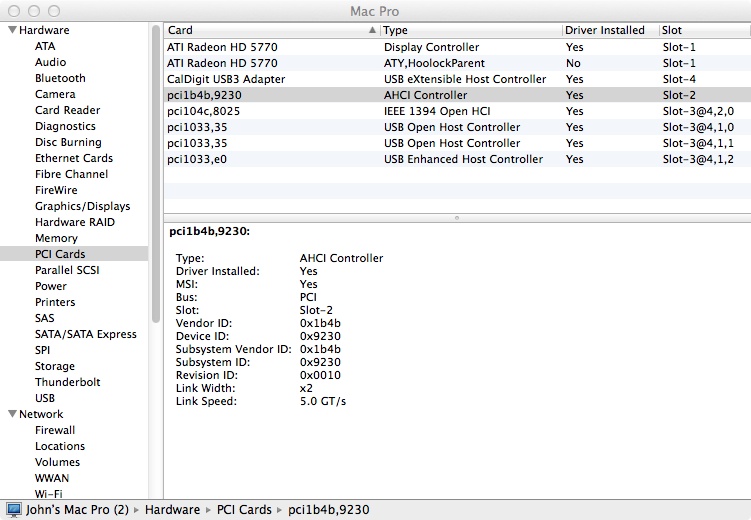
John
John
Please Log in to join the conversation.
31 Jul 2014 01:48 #50756
by jbaugh
Replied by jbaugh on topic Basic RAID questions
I previously installed x264 encoder. But I've never had any experience with it. When I set up my Compressor pre-sets I modified a copy of a defaultMPEG 4 setting. I can't find any way to select the x264 encoder. I guess I would have to start from scratch and see if I can do that.
Please Log in to join the conversation.
31 Jul 2014 02:09 #50757
by jbaugh
Replied by jbaugh on topic Basic RAID questions
The GTX 780 sounded very impressive and I was interested until I saw the cost for a flashed card. I'm not sure I want to spend $700+ for a GPU upgrade at this point.
I plan on exploring some of the suggestions made here on this topic. This has been an excellent education for me and I thank everyone who has contributed.
I plan on exploring some of the suggestions made here on this topic. This has been an excellent education for me and I thank everyone who has contributed.
Please Log in to join the conversation.
31 Jul 2014 02:19 #50758
by dkag7
Replied by dkag7 on topic Basic RAID questions
I dont have time now, a storms coming in, but if I remember right I can make a droplet for compressor.
If so, Ill look at it tomorrow and send you a couple. Basically its just a preset. So if x264 is installed, you can use the droplet to add into fcpx as a compressor x264 export. I use them all the time and also use them for preview videos for customers (with timecode burned in). depending on the video length, there small enough to email to them with decent quality. For final exports, I have some of those presets as well. I am on limited bandwidth for internet so this is why I started using x264.. much better quality for lower MB sizes. The speed exporting out of fcp as well..
Kurt
If so, Ill look at it tomorrow and send you a couple. Basically its just a preset. So if x264 is installed, you can use the droplet to add into fcpx as a compressor x264 export. I use them all the time and also use them for preview videos for customers (with timecode burned in). depending on the video length, there small enough to email to them with decent quality. For final exports, I have some of those presets as well. I am on limited bandwidth for internet so this is why I started using x264.. much better quality for lower MB sizes. The speed exporting out of fcp as well..
Kurt
Please Log in to join the conversation.
31 Jul 2014 02:40 #50759
by VidGreg
Replied by VidGreg on topic Basic RAID questions
Hi John
If that is the Excelsior card in slot 2 then it is using x16 lanes so no problem.
Here is what Apple says about your PCIe slots…
Mac Pro (Early 2009), Mac Pro (Mid 2010), and Mac Pro (Mid 2012)
The Mac Pro (Early 2009), Mac Pro (Mid 2010), and Mac Pro (Mid 2012) computers implement PCI Express revision 2.0 for all four slots. Slots 1 and 2 are x16 slots, and slots 3 and 4 are x4 slots. As with the Mac Pro (Early 2008), placing a revision 1 card in a revision 2.0 slot works and results in a revision 1 link.
The Expansion Slot Utility is not required for these configurations, since the number of lanes for each slot are permanently set.
So that wouldn't be the problem for transfer speeds. Just a thought.
Try the other suggestions and see if it helps.
Yeah, the 780 6Gb = $$$ ~$575.00 not flashed. Definitely a big dollar layout so last resort in my book. There are other cards if you want to go GPU upgrade.
Another thing I did not mention is that if all my other suggestions don't work, you can try re-installing FCPX, Compressor and even Mavericks. Has helped others, just extra work. Might be worth $700.00.
When do you experience the slowdowns?
Best, Greg
If that is the Excelsior card in slot 2 then it is using x16 lanes so no problem.
Here is what Apple says about your PCIe slots…
Mac Pro (Early 2009), Mac Pro (Mid 2010), and Mac Pro (Mid 2012)
The Mac Pro (Early 2009), Mac Pro (Mid 2010), and Mac Pro (Mid 2012) computers implement PCI Express revision 2.0 for all four slots. Slots 1 and 2 are x16 slots, and slots 3 and 4 are x4 slots. As with the Mac Pro (Early 2008), placing a revision 1 card in a revision 2.0 slot works and results in a revision 1 link.
The Expansion Slot Utility is not required for these configurations, since the number of lanes for each slot are permanently set.
So that wouldn't be the problem for transfer speeds. Just a thought.
Try the other suggestions and see if it helps.
Yeah, the 780 6Gb = $$$ ~$575.00 not flashed. Definitely a big dollar layout so last resort in my book. There are other cards if you want to go GPU upgrade.
Another thing I did not mention is that if all my other suggestions don't work, you can try re-installing FCPX, Compressor and even Mavericks. Has helped others, just extra work. Might be worth $700.00.
When do you experience the slowdowns?
Best, Greg
Please Log in to join the conversation.
- funwithstuff
-

- Offline
- Senior Member
-

Less
More
- Posts: 64
- Thank you received: 19
31 Jul 2014 12:14 - 31 Jul 2014 12:15 #50768
by funwithstuff
Replied by funwithstuff on topic Basic RAID questions
RAID 0 will help until your drives fill up — to a point — but at this point I can't recommend upgrading a Mac that's from 2009. The QuickSync technology in almost every current Mac (NOT the old or new Mac Pro) will chew through H.264 encoding at many times faster than real time. It won't work on your current Mac Pro, though.
If you have a laptop handy, in FCP X, choose the Faster Encoding options, and in Compressor, you'll need to make a single-pass preset. It might be faster to work on an external drive you can use on both systems, then quit FCP X on the Mac Pro, eject the drive, connect to the laptop, open the library in FCP X on the laptop, then export.
Here are a few speed tests for you to look at:
www.macprovideo.com/hub/final-cut/final-...o-x-performance-test
Basically, if you're happy with the quality of QuickSync (which is likely) then it's potentially twice as fast as the Mac Pro's dual GPUs working together. Scaling adds to the CPU workload, but encoding is no longer a factor.
If you have a laptop handy, in FCP X, choose the Faster Encoding options, and in Compressor, you'll need to make a single-pass preset. It might be faster to work on an external drive you can use on both systems, then quit FCP X on the Mac Pro, eject the drive, connect to the laptop, open the library in FCP X on the laptop, then export.
Here are a few speed tests for you to look at:
www.macprovideo.com/hub/final-cut/final-...o-x-performance-test
Basically, if you're happy with the quality of QuickSync (which is likely) then it's potentially twice as fast as the Mac Pro's dual GPUs working together. Scaling adds to the CPU workload, but encoding is no longer a factor.
Last edit: 31 Jul 2014 12:15 by funwithstuff.
Please Log in to join the conversation.
01 Aug 2014 06:32 #50801
by rhoydotp
Replied by rhoydotp on topic Basic RAID questions
RAID in general helps speed of IO but it depends on what you really want to achieve. Each harddrive is capabale of a finite amount of throughput than it can do physically, hence, SSD are great because it eliminates this limitation. There are many factors in determining how much of an improvement doing a RAID can give you such as bus speeds and topology/transport used. Software RAIDs of internal disks are most of the time meant for redundancy, not performance (i believe someone alluded to that earlier)
Btw, RAID0 is not mirroring at all. That would be either a R1 or a variant of R1 (R1+0, R0+1 are most common).
If you want more technical info, you can PM me. I manage enterprise storage devices for a living
Btw, RAID0 is not mirroring at all. That would be either a R1 or a variant of R1 (R1+0, R0+1 are most common).
If you want more technical info, you can PM me. I manage enterprise storage devices for a living
Please Log in to join the conversation.
01 Aug 2014 13:40 #50830
by jbaugh
My initial intention was to utilize the resources I already have to the maximum, which means I wanted to use software RAID on my internal disks. Since I have an aggressive back-up strategy I wasn't so interested in data redundancy. So it sounds like going to the trouble of configuring SoftRAID on my internal drives would result in little if any improvement in work flow speed. This is very useful information for me.
Thank you very much for your generous offer of private help. Personal assistance from someone with your background is more than I could have ever expected. But I don't think I will investigate RAID further at the present time. I'm frequently amazed at the extent to which other Mac users are willing to go to help each other out.
Replied by jbaugh on topic Basic RAID questions
rhoydotp wrote: Software RAIDs of internal disks are most of the time meant for redundancy, not performance (i believe someone alluded to that earlier)
Btw, RAID0 is not mirroring at all.
If you want more technical info, you can PM me. I manage enterprise storage devices for a living
My initial intention was to utilize the resources I already have to the maximum, which means I wanted to use software RAID on my internal disks. Since I have an aggressive back-up strategy I wasn't so interested in data redundancy. So it sounds like going to the trouble of configuring SoftRAID on my internal drives would result in little if any improvement in work flow speed. This is very useful information for me.
Thank you very much for your generous offer of private help. Personal assistance from someone with your background is more than I could have ever expected. But I don't think I will investigate RAID further at the present time. I'm frequently amazed at the extent to which other Mac users are willing to go to help each other out.
Please Log in to join the conversation.
01 Aug 2014 13:45 #50831
by VidGreg
Replied by VidGreg on topic Basic RAID questions
Hey Folks
John wants to know how to speed up his workflow. We should be focussed on what would help him. RAID is a fascinating and complex subject, but would it really help him within his current system, I think not.
We should start a topic on RAIDs What are they, when are they of benefit. Software vs hardware. Real performance.
John, I re-read your original couple of posts, may I ask a couple of clarification questions.
I asked when do you experience the slowdowns and I think I overlooked this…
"The two bottlenecks to my work are the export from FCPX and the encoding with Compressor."
Is this when you're are experiencing delays?
Provided you ran down all potential system issues, then an upgraded card would most likely help.
However, you also wrote a couple of things that seem contradictory. In original post you wrote… "My “FCPX” drive holds the FCP Libraries and is the destination for exports of master files from FCPX." Likewise for Compressor.
Then in response to me you wrote…"…I am reading and writing to separate drives." If by "FCP Libraries" you mean your media files as well (where do you store media vs Libraries) you may be in fact reading and writing to the same drive. Exporting transcoded/rendered Master Files and Compressor files are rather large file(s), unlike simple edited data files.
Another commenter can correct me if I'm wrong here.
If media is stored on separate drive from destination, then the entire file is always copied, if on same drive, no copying occurs(?). When going between FCPX and Compressor are entire files copied or only accessed?? If only accessed, then it might be faster to not use separate drives. Someone who knows (Ronny/Tom/???) might help me out here. I don't use Compressor often, preferring to export directly from FCP.
Still 8 hours seems like a long time, so suspect another issue.
Perhaps Kurt's offer of x264 plug-in will help, no experience with it, but would be interested in trying it out. Just be aware that all 3rd party plug-ins need to be regularly updated with app updates.
funwithstuff- the link you provide for the "comparison/test" is no comparison at all. That compares VW beetles to turbo Jetta's. GPUs, RAIDS vs single drives, 4 drive TB raids vs 2 drive raid with 5400rpm drives, what??? Also there is nothing wrong with the 2009 MP for the work John is doing and upgrading costs a fraction of $$ to a $10,000 nMP.
rhoydotp- IMHO software RAID 0 or 1 in a single user or even all Mac environment has no real downside and lots of benefits including RAID 0, if needed. Hardware RAIDS are great for multiple OSs, and where you need a RAID version that uses parity RAID 5/6 etc… CPU time for 0/1 is not an issue. Hardware RAIDS require maintaining and if the hardware chip/box goes down you need a spare box with the same firmware to use your disks. For Mac software RAID, you can pop the disk into lots of Macs and good to go. Again N/A here. Need to start a new Topic.
Well now that I'm guilty of inappropriate RAID talk,
Hope this helps, Greg
John wants to know how to speed up his workflow. We should be focussed on what would help him. RAID is a fascinating and complex subject, but would it really help him within his current system, I think not.
We should start a topic on RAIDs What are they, when are they of benefit. Software vs hardware. Real performance.
John, I re-read your original couple of posts, may I ask a couple of clarification questions.
I asked when do you experience the slowdowns and I think I overlooked this…
"The two bottlenecks to my work are the export from FCPX and the encoding with Compressor."
Is this when you're are experiencing delays?
Provided you ran down all potential system issues, then an upgraded card would most likely help.
However, you also wrote a couple of things that seem contradictory. In original post you wrote… "My “FCPX” drive holds the FCP Libraries and is the destination for exports of master files from FCPX." Likewise for Compressor.
Then in response to me you wrote…"…I am reading and writing to separate drives." If by "FCP Libraries" you mean your media files as well (where do you store media vs Libraries) you may be in fact reading and writing to the same drive. Exporting transcoded/rendered Master Files and Compressor files are rather large file(s), unlike simple edited data files.
Another commenter can correct me if I'm wrong here.
If media is stored on separate drive from destination, then the entire file is always copied, if on same drive, no copying occurs(?). When going between FCPX and Compressor are entire files copied or only accessed?? If only accessed, then it might be faster to not use separate drives. Someone who knows (Ronny/Tom/???) might help me out here. I don't use Compressor often, preferring to export directly from FCP.
Still 8 hours seems like a long time, so suspect another issue.
Perhaps Kurt's offer of x264 plug-in will help, no experience with it, but would be interested in trying it out. Just be aware that all 3rd party plug-ins need to be regularly updated with app updates.
funwithstuff- the link you provide for the "comparison/test" is no comparison at all. That compares VW beetles to turbo Jetta's. GPUs, RAIDS vs single drives, 4 drive TB raids vs 2 drive raid with 5400rpm drives, what??? Also there is nothing wrong with the 2009 MP for the work John is doing and upgrading costs a fraction of $$ to a $10,000 nMP.
rhoydotp- IMHO software RAID 0 or 1 in a single user or even all Mac environment has no real downside and lots of benefits including RAID 0, if needed. Hardware RAIDS are great for multiple OSs, and where you need a RAID version that uses parity RAID 5/6 etc… CPU time for 0/1 is not an issue. Hardware RAIDS require maintaining and if the hardware chip/box goes down you need a spare box with the same firmware to use your disks. For Mac software RAID, you can pop the disk into lots of Macs and good to go. Again N/A here. Need to start a new Topic.
Well now that I'm guilty of inappropriate RAID talk,
Hope this helps, Greg
Please Log in to join the conversation.
01 Aug 2014 14:14 #50834
by jbaugh
Replied by jbaugh on topic Basic RAID questions
Kurt,
I tried an experiment to compare an encoding session with x264 compared to my usual custom encoding with Apple's .264.
Perhaps I configured something wrong. But the difference in encoding time was dramatically in favor of the basic .264 over the x264.
First I encoded a 93GB video using an x264 profile that I tried to configure as closely as I could to the "720p for YouTube" example on the realworldcompression.com link you posted earlier. To my surprise and dismay Compressor only utilized one instance of the four instances that are available when I encode using my own custom .264 encode preset. It took 5 hours and 23 minutes to process the 93GB file. Only about 15% of my total CPU resources were used according to Activity Monitor. There was once instance of "compressord" that showed 160- 200% CPU use. The Network Encoding Monitor in Compressor showed one "busy" and three "idle" processes.
Then I encoded the same 93GB video using my custom preset. Total time of encoding was 1 hour and 17 minutes. Activity monitor showed 4 instances of "compressord" with each one showing approximately 450% CPU usage. Total CPU load was 85-90%. Under the Network Encoding Monitor of Compressor it showed three "busy" and one "idle" instances.
So here is the strange part– I decided to re-try this experiment to see if the results were reproducible. Encoding using the x264 set proceeded as before with one instance and about 15% CPU usage. BUT, when I re-encoded with my custom .264 preset this time only three of the four compressord instances were active. Using exactly the same set-up I got different results. I don't know how to explain this. On the second trial I did not allow the encoding to go to completion for the sake of time. But it was clear that for me and my encoding set-ups .264 was vastly superior in terms of time to encode. I will say that a close examination of the final video from .264 compared to x264 showed a very slight advantage of the x264 in terms of quality over the .264.
I tried an experiment to compare an encoding session with x264 compared to my usual custom encoding with Apple's .264.
Perhaps I configured something wrong. But the difference in encoding time was dramatically in favor of the basic .264 over the x264.
First I encoded a 93GB video using an x264 profile that I tried to configure as closely as I could to the "720p for YouTube" example on the realworldcompression.com link you posted earlier. To my surprise and dismay Compressor only utilized one instance of the four instances that are available when I encode using my own custom .264 encode preset. It took 5 hours and 23 minutes to process the 93GB file. Only about 15% of my total CPU resources were used according to Activity Monitor. There was once instance of "compressord" that showed 160- 200% CPU use. The Network Encoding Monitor in Compressor showed one "busy" and three "idle" processes.
Then I encoded the same 93GB video using my custom preset. Total time of encoding was 1 hour and 17 minutes. Activity monitor showed 4 instances of "compressord" with each one showing approximately 450% CPU usage. Total CPU load was 85-90%. Under the Network Encoding Monitor of Compressor it showed three "busy" and one "idle" instances.
So here is the strange part– I decided to re-try this experiment to see if the results were reproducible. Encoding using the x264 set proceeded as before with one instance and about 15% CPU usage. BUT, when I re-encoded with my custom .264 preset this time only three of the four compressord instances were active. Using exactly the same set-up I got different results. I don't know how to explain this. On the second trial I did not allow the encoding to go to completion for the sake of time. But it was clear that for me and my encoding set-ups .264 was vastly superior in terms of time to encode. I will say that a close examination of the final video from .264 compared to x264 showed a very slight advantage of the x264 in terms of quality over the .264.
Please Log in to join the conversation.
- funwithstuff
-
- Offline
- Senior Member
-
Less
More
- Posts: 64
- Thank you received: 19
01 Aug 2014 14:27 #50835
by funwithstuff
Replied by funwithstuff on topic Basic RAID questions
Absolutely the benchmarks were from a wide variety of different machines — but they were supposed to be a "real world" test. There was a 2008 Mac Pro using an internal drive in the test, as well as a variety of newer machines, two tested with a USB3 RAID 0 set and two with a 4-bay Thunderbolt. Despite all the differences, the most interesting part is that the built-in hardware encoding in new consumer Macs (QuickSync) makes a bigger difference than anything else when it comes to H.264 encoding.
To be clear, the new Mac Pro, with the fastest drive on test, came second last, in front of the old Mac Pro. No matter what GPU you throw in the old Mac Pro, it's not going to do better than the dual GPUs in the new one, and all the consumer Macs went faster than it did.
macprovid.vo.llnwd.net/o43/hub/media/100...xporting-to-h264.png
If encoding is really your bottleneck, nothing will speed the process up like a new Mac and using Faster/Single-Pass encoding, to activate QuickSync.
To be clear, the new Mac Pro, with the fastest drive on test, came second last, in front of the old Mac Pro. No matter what GPU you throw in the old Mac Pro, it's not going to do better than the dual GPUs in the new one, and all the consumer Macs went faster than it did.
macprovid.vo.llnwd.net/o43/hub/media/100...xporting-to-h264.png
If encoding is really your bottleneck, nothing will speed the process up like a new Mac and using Faster/Single-Pass encoding, to activate QuickSync.
Please Log in to join the conversation.
