


- Posts: 377
- Thank you received: 9
3 Post Moderation Rule for New Boarders (25 Jan 2021)
New boarders will have their posts moderated - Don't worry if you cannot see your post immediately.
long delays switching between titles, transitions, generators, etc..
27 Jul 2014 15:02 #50553
by dkag7
I seen on another thread that the FCP audio files folder can be moved/changed.
Is it possible to do this as well with the transition or effects folder/s?
I have FCPX installed on a 2TB raid spanning 4 disks. read and rite speeds are in the 500 range, very fast.
But switching between the icons / folders in the effects browser takes forever, like 15 seconds or so.
I do have alot of plugins, but still seems way too long.
Any Ideas whats going on?
Wondering if changing or making more folders, like the thread I mention above, will do anything or not to help speed things up.
thanks
Kurt
Is it possible to do this as well with the transition or effects folder/s?
I have FCPX installed on a 2TB raid spanning 4 disks. read and rite speeds are in the 500 range, very fast.
But switching between the icons / folders in the effects browser takes forever, like 15 seconds or so.
I do have alot of plugins, but still seems way too long.
Any Ideas whats going on?
Wondering if changing or making more folders, like the thread I mention above, will do anything or not to help speed things up.
thanks
Kurt
Please Log in to join the conversation.
- ronny courtens
-

- Offline
- Moderator
-

Less
More
- Posts: 4455
- Thank you received: 962
28 Jul 2014 06:57 - 28 Jul 2014 06:58 #50569
by ronny courtens
Replied by ronny courtens on topic long delays switching between titles, transitions, generators, etc..
Hi Kurt,
Yes, it is possible to move the Motion Templates folder to an external location. It takes a simple Terminal command to do this, as is explained in this video:
This method is commonly used in SAN workflows as it allows multiple workstations to access and share custom templates from a central location. We have been doing this successfully for some time now, and I know some other people working on SAN or NAS systems that do the same.
But for single user systems this method offers no advantages at all, so I don't think this will solve your specific problem.
When you experience delays when switching between effects, titles etc. the first thing you need to do is to clean up your templates. You absolutely need to make sure that every single template has been updated to its latest version. If you have any templates (especially free ones) that you have downloaded before 10.1 and that haven't been updated since, these will be the first suspects for slowing down your browser.
You can temporarily move any custom and third party templates out of your Motion Templates folder into a "Hidden Templates" folder, then launch FCP X and see if everything works as excepted. If everything works with the default effects you can start adding templates back until you see the UI slowing down again. Those templates need to be updated, or removed from your system.
- Ronny
Yes, it is possible to move the Motion Templates folder to an external location. It takes a simple Terminal command to do this, as is explained in this video:
This method is commonly used in SAN workflows as it allows multiple workstations to access and share custom templates from a central location. We have been doing this successfully for some time now, and I know some other people working on SAN or NAS systems that do the same.
But for single user systems this method offers no advantages at all, so I don't think this will solve your specific problem.
When you experience delays when switching between effects, titles etc. the first thing you need to do is to clean up your templates. You absolutely need to make sure that every single template has been updated to its latest version. If you have any templates (especially free ones) that you have downloaded before 10.1 and that haven't been updated since, these will be the first suspects for slowing down your browser.
You can temporarily move any custom and third party templates out of your Motion Templates folder into a "Hidden Templates" folder, then launch FCP X and see if everything works as excepted. If everything works with the default effects you can start adding templates back until you see the UI slowing down again. Those templates need to be updated, or removed from your system.
- Ronny
Last edit: 28 Jul 2014 06:58 by ronny courtens.
Please Log in to join the conversation.


28 Jul 2014 19:42 #50597
by ulisses
Replied by ulisses on topic long delays switching between titles, transitions, generators, etc..
Try to delete FCPX preferences...
Please Log in to join the conversation.
28 Jul 2014 19:49 #50599
by dkag7
Replied by dkag7 on topic long delays switching between titles, transitions, generators, etc..
Thanks,
I already tried trashing preferences, no luck.
Ill take a look at cleaning out some unused effects etc.. that I made (or attempted to make-- trial and error stuff) in motion
thanks
Kurt
I already tried trashing preferences, no luck.
Ill take a look at cleaning out some unused effects etc.. that I made (or attempted to make-- trial and error stuff) in motion
thanks
Kurt
Please Log in to join the conversation.
28 Jul 2014 19:59 #50602
by ulisses
Replied by ulisses on topic long delays switching between titles, transitions, generators, etc..
Please Log in to join the conversation.
28 Jul 2014 20:13 #50603
by dkag7
Replied by dkag7 on topic long delays switching between titles, transitions, generators, etc..
Yes, thats what I used.
This is something that is not new (on my system anyway).
Previous versions did the same thing.
I have always noticed the slowness clicking between trans/filters/titles/etc...
especially if the last area (or folder) you looked at was set to ALL (for doing searches)
Honestly, overall I dont see any real performance boost between this version and the last.
Another slowdown I notice is trimming. Many times it takes the mouse curser X amount of time to update after a trim on the timeline.
Overall 'sticky' and sluggish.
I keep only current working libraries open and optimize all media, but as projects begin to build in complexity (titles, trans, filters, etc...) it becomes frustrating. Restarting FCPX helps for a little while..
Processor 3.33 GHz 6-Core Intel Xeon
Memory 24 GB 1333 MHz DDR3 ECC
Graphics NVIDIA GeForce GTX 680 2048 MB
My dogs are getting use to me swearing at the computer monitor
thanks
Kurt
This is something that is not new (on my system anyway).
Previous versions did the same thing.
I have always noticed the slowness clicking between trans/filters/titles/etc...
especially if the last area (or folder) you looked at was set to ALL (for doing searches)
Honestly, overall I dont see any real performance boost between this version and the last.
Another slowdown I notice is trimming. Many times it takes the mouse curser X amount of time to update after a trim on the timeline.
Overall 'sticky' and sluggish.
I keep only current working libraries open and optimize all media, but as projects begin to build in complexity (titles, trans, filters, etc...) it becomes frustrating. Restarting FCPX helps for a little while..
Processor 3.33 GHz 6-Core Intel Xeon
Memory 24 GB 1333 MHz DDR3 ECC
Graphics NVIDIA GeForce GTX 680 2048 MB
My dogs are getting use to me swearing at the computer monitor
thanks
Kurt
Please Log in to join the conversation.
28 Jul 2014 20:26 #50605
by ulisses
Replied by ulisses on topic long delays switching between titles, transitions, generators, etc..
If you select a folder instead of ALL, it goes faster? How faster?
"ALL" probably loads all plugins every time, that should be optimized by Apple, as other areas like trimming... in this aspect I missed FCP7 a lot.
Ulisses
"ALL" probably loads all plugins every time, that should be optimized by Apple, as other areas like trimming... in this aspect I missed FCP7 a lot.
Ulisses
Please Log in to join the conversation.
28 Jul 2014 20:35 #50606
by dkag7
Replied by dkag7 on topic long delays switching between titles, transitions, generators, etc..
much faster, it varies, but I'd say 50 to 75% faster.
So if it was set on ALL (in filters and transitions for example), and I switched between them, the lag is around 10 - 15 seconds.
If it was set to some sub folder instead of ALL, probably 3-5 seconds lag time.
FCPX doesn't seem to 'remember' that I just clicked on the transitions folder (for example). It seems like there is no cache here. So it seems like it is doing a complete search and update every time you switch between the main folders (trans/filters/titles...)
So if it was set on ALL (in filters and transitions for example), and I switched between them, the lag is around 10 - 15 seconds.
If it was set to some sub folder instead of ALL, probably 3-5 seconds lag time.
FCPX doesn't seem to 'remember' that I just clicked on the transitions folder (for example). It seems like there is no cache here. So it seems like it is doing a complete search and update every time you switch between the main folders (trans/filters/titles...)
Please Log in to join the conversation.
28 Jul 2014 20:44 #50607
by dkag7
Replied by dkag7 on topic long delays switching between titles, transitions, generators, etc..
now that I think about it, it probably is doing a complete search everytime you click on the main folders because when you make a filter in motion and publish it to fcpx, it will auto load. So fcp knows something was added and refreshes the folder/s. If there was some sort of cache here, you'd probably need to change folders and back again before the new effect was seen in fcp..
Please Log in to join the conversation.
- ronny courtens
-
- Offline
- Moderator
-
Less
More
- Posts: 4455
- Thank you received: 962
28 Jul 2014 21:02 #50608
by ronny courtens
Replied by ronny courtens on topic long delays switching between titles, transitions, generators, etc..
There is something wrong with your setup. I have installed about any plugin you can imagine on a small Mac Mini i5 with 8 GB RAM for testing purposes and I don't have any lags at all, even when running FCP X with a huge Library that is stored on the connected Promise RAID. I can even make you a video capture so you can see how fast FCP X runs on this minimum specced system. So this has nothing to do with FCP X whatsoever.
That's why I suspect you either have some corrupt or conflicting plugins, which you can check. You do have FCP X installed on your system drive and not on an external drive, correct?
- Ronny
That's why I suspect you either have some corrupt or conflicting plugins, which you can check. You do have FCP X installed on your system drive and not on an external drive, correct?
- Ronny
Please Log in to join the conversation.
28 Jul 2014 21:14 #50609
by dkag7
Replied by dkag7 on topic long delays switching between titles, transitions, generators, etc..
I havent had a chance yet to go through the plugins yet but I plan on it later today or tomorrow.
Yes, its installed on the main OS (4TB stripe raid, 4 hdds)
Been thinking about setting up another partition to install FCPX on (partition the internal raid again)
On this partition have only the essentials, FCPX (no plugins) Email and web
No Premiere, AE, and other editing stuff.
Just to see the difference.
But like I mentioned earlier, this is nothing new. I've seen this lag on previous versions and different OS' as well.
Yes, its installed on the main OS (4TB stripe raid, 4 hdds)
Been thinking about setting up another partition to install FCPX on (partition the internal raid again)
On this partition have only the essentials, FCPX (no plugins) Email and web
No Premiere, AE, and other editing stuff.
Just to see the difference.
But like I mentioned earlier, this is nothing new. I've seen this lag on previous versions and different OS' as well.
Please Log in to join the conversation.
- ronny courtens
-
- Offline
- Moderator
-
Less
More
- Posts: 4455
- Thank you received: 962
28 Jul 2014 21:50 #50612
by ronny courtens
Replied by ronny courtens on topic ID
If you have always had this problem then it's definitely your setup.
For starters I would never install OSX or any apps on a RAID. You use a RAID for continuous throughput of large media files and you use a single drive with fast accessibility for the OS and the apps. This way your system won't bog down because of all the simultaneous read/write operations it has to perform while handling the OS, the open apps and your media streams on the same drive. That's a number one rule for video editing.
Partitioning the RAID won't help. A partition is just a part of the same drive, so the problem stays the same. Unless you are only dealing with small projects that you constantly remove from the drive when they are finished, you really need a dedicated system drive that is separated from your media drives.
- Ronny
For starters I would never install OSX or any apps on a RAID. You use a RAID for continuous throughput of large media files and you use a single drive with fast accessibility for the OS and the apps. This way your system won't bog down because of all the simultaneous read/write operations it has to perform while handling the OS, the open apps and your media streams on the same drive. That's a number one rule for video editing.
Partitioning the RAID won't help. A partition is just a part of the same drive, so the problem stays the same. Unless you are only dealing with small projects that you constantly remove from the drive when they are finished, you really need a dedicated system drive that is separated from your media drives.
- Ronny
Please Log in to join the conversation.
28 Jul 2014 22:01 #50614
by dkag7
read write on the raid is in the 500 range.
without it on a single drive it is around 100 or so sata speeds.
This is faster, not slower.
Much Much faster. I have done various installs and tests on this system.
There is no comparison in the speeds achieved.
media is not on the internal raid, media is on an external raid 50 (including optimized)
The internal raid holds the OS and apps.
Partitioning the raid is for a new OS with a new fcpx for testing.
Partitioning a raid will result in the same speed as the other partitions on the raid, 500 read write range.
Kurt
without it on a single drive it is around 100 or so sata speeds.
This is faster, not slower.
Much Much faster. I have done various installs and tests on this system.
There is no comparison in the speeds achieved.
media is not on the internal raid, media is on an external raid 50 (including optimized)
The internal raid holds the OS and apps.
Partitioning the raid is for a new OS with a new fcpx for testing.
Partitioning a raid will result in the same speed as the other partitions on the raid, 500 read write range.
Kurt
Please Log in to join the conversation.
- ronny courtens
-
- Offline
- Moderator
-
Less
More
- Posts: 4455
- Thank you received: 962
28 Jul 2014 22:23 #50616
by ronny courtens
Replied by ronny courtens on topic ID
Kurt,
This is the little Mini I'm at right now:
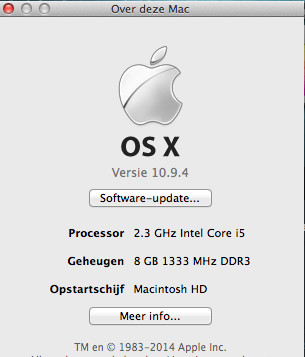
I have a Library open with over 3000 1080p clips and some 60 Projects ranging from 3 minutes to 90 minutes:
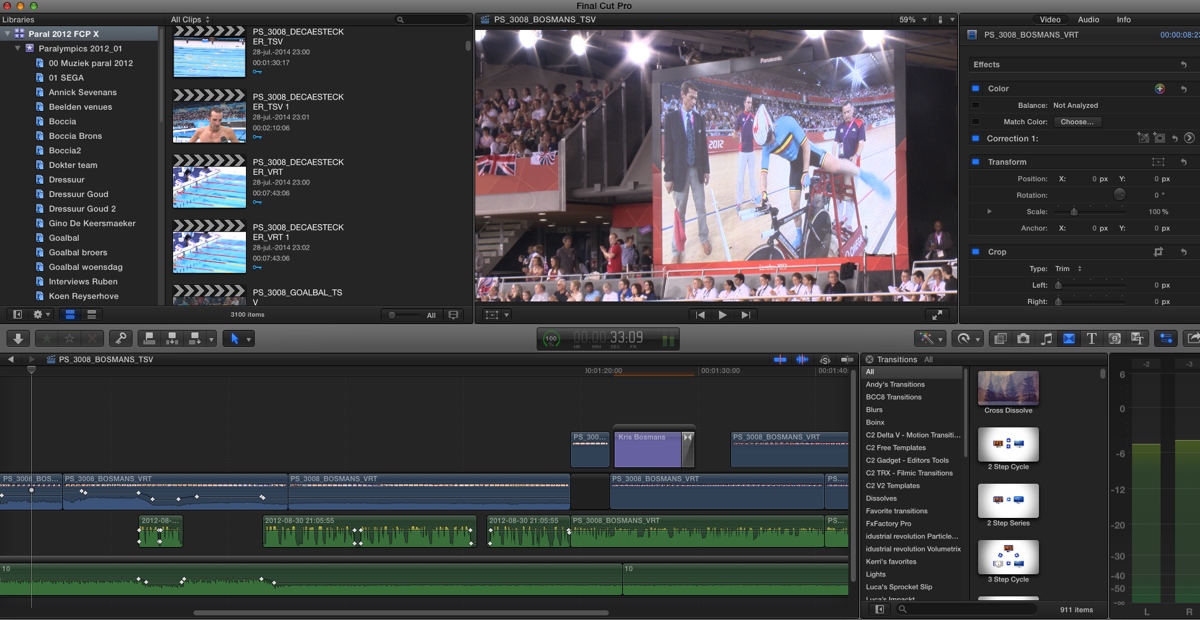
Its internal HDD has something like 54 MBPS read/write speed and I have some 300 plugins installed on it. I have no lags whatsoever when editing nor when clicking the effects, titles... browser icons with All selected for each. I can do a search All in less than 1 second.
Just to say: there definitely must be something wrong with your setup.
- Ronny
This is the little Mini I'm at right now:
I have a Library open with over 3000 1080p clips and some 60 Projects ranging from 3 minutes to 90 minutes:
Its internal HDD has something like 54 MBPS read/write speed and I have some 300 plugins installed on it. I have no lags whatsoever when editing nor when clicking the effects, titles... browser icons with All selected for each. I can do a search All in less than 1 second.
Just to say: there definitely must be something wrong with your setup.
- Ronny
Please Log in to join the conversation.
28 Jul 2014 22:45 #50618
by dkag7
Im not sure where the problem is as far as clicking through the effects folders, but putting FCP on a slower drive will not fix the problem. My first guess is what you mentioned earlier about some corrupt plugins, that will be my first attack on this. One thing I should add, is when I mentioned the overall sticky-ness of the app during editing, is that I use many of these plugins in projects, there not just sitting in the folders, there on the timeline. So if any of these are corrupt in some way it would compound the problem.
Also I am currently on 10.9.2.. not sure how much this matters... havent had time to update yet.
Ill take it one step at a time and see if I can get better performance out of FCP, but nothing on earth would make me go back to running an OS at regular sata speeds after using a raid setup at 5X or better speeds.
I have Premiere and did some beta work on lightworks, both these apps run smooth (though not a good comparison to FCP engine architecture, the point I am trying to make is no other apps have any problems with sluggishness.)
Kurt
Also I am currently on 10.9.2.. not sure how much this matters... havent had time to update yet.
Ill take it one step at a time and see if I can get better performance out of FCP, but nothing on earth would make me go back to running an OS at regular sata speeds after using a raid setup at 5X or better speeds.
I have Premiere and did some beta work on lightworks, both these apps run smooth (though not a good comparison to FCP engine architecture, the point I am trying to make is no other apps have any problems with sluggishness.)
Kurt
Please Log in to join the conversation.
29 Jul 2014 19:56 #50663
by dkag7
I got it sped up about 50 to 75% faster switching between the folders when set to 'all'.
A while back, maybe a year or so, I made some titles in motion that had video in them.
Its a great shortcut to editing, but these videos built within the titles is what was slowing things down.
How this effects actual editing (trimming etc..) sluggishness is yet to be seen...
Im sure it would help if one of those titles was in the timeline, but just sitting in the title folder, not too sure yet..
So dont do stupid things like put videos in your titles that you make in motion
thanks
Kurt
A while back, maybe a year or so, I made some titles in motion that had video in them.
Its a great shortcut to editing, but these videos built within the titles is what was slowing things down.
How this effects actual editing (trimming etc..) sluggishness is yet to be seen...
Im sure it would help if one of those titles was in the timeline, but just sitting in the title folder, not too sure yet..
So dont do stupid things like put videos in your titles that you make in motion
thanks
Kurt
Please Log in to join the conversation.
