


3 Post Moderation Rule for New Boarders (25 Jan 2021)
New boarders will have their posts moderated - Don't worry if you cannot see your post immediately.
Is there a way to have “final cut pro sound effects folder” in another location?
- javiquil
-
 Topic Author
- Offline
- New Member
-

- ¿Dónde estas tú? Yo estoy en el bando de los que siguen soñando con un mundo sin fronteras, sin países, sin banderas, sin valientes ni tiranos, sin creyentes, sin esclavos, los que siempre preguntamos... ¿dónde está tu voz? ?? uff, un s
Less
More
25 Jul 2014 09:33 #50463
by javiquil
Is there a way to have “final cut pro sound effects folder” in another location? was created by javiquil
It's very handy to have all the sound effects visible and searchable from the FCPX interface but... as we are increasing our libraries the main HD doesn't hold them...
so that's my question: Is there a way to have “final cut pro sound effects folder” in another location and visible from #fcpx ?
Would an alias work?
Thanks!
so that's my question: Is there a way to have “final cut pro sound effects folder” in another location and visible from #fcpx ?
Would an alias work?
Thanks!
Please Log in to join the conversation.
- ronny courtens
-

- Offline
- Moderator
-

Less
More
- Posts: 4455
- Thank you received: 962
25 Jul 2014 10:14 - 25 Jul 2014 10:15 #50465
by ronny courtens
Replied by ronny courtens on topic Is there a way to have “final cut pro sound effects folder” in another location?
Drag the FCP Sound Effects folder from your Mac's Library to an external drive:

When the folder is copied over to the external drive, delete the original folder:

Launch FCP X. When you go to the Music and Sound browser your FCP Sound Effects will be gone:
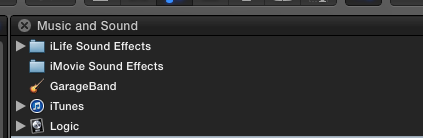
From the Finder, drag the FCP Sound effects folder from its new location onto the FCP X Music and Sound browser. This will create a new folder (called "Folders") inside the browser. Click "Folders" to open it and inside it you will instantly see your Final Cut Pro Sound Effects folder:

- Ronny
When the folder is copied over to the external drive, delete the original folder:
Launch FCP X. When you go to the Music and Sound browser your FCP Sound Effects will be gone:
From the Finder, drag the FCP Sound effects folder from its new location onto the FCP X Music and Sound browser. This will create a new folder (called "Folders") inside the browser. Click "Folders" to open it and inside it you will instantly see your Final Cut Pro Sound Effects folder:
- Ronny
Last edit: 25 Jul 2014 10:15 by ronny courtens.
Please Log in to join the conversation.
25 Jul 2014 10:16 #50466
by javiquil
Replied by javiquil on topic Is there a way to have “final cut pro sound effects folder” in another location?
Wow ronny That was such an answer!!
I'm really impressed and thankful. I'm gonna try right now.
Thanks!!
I'm really impressed and thankful. I'm gonna try right now.
Thanks!!
Please Log in to join the conversation.
25 Jul 2014 10:19 #50467
by javiquil
Replied by javiquil on topic Is there a way to have “final cut pro sound effects folder” in another location?
Just a question... If I keep adding files to that new location... will they appear on fcpx automatically?
Please Log in to join the conversation.
- ronny courtens
-
- Offline
- Moderator
-
Less
More
- Posts: 4455
- Thank you received: 962
25 Jul 2014 10:25 #50468
by ronny courtens
Replied by ronny courtens on topic Is there a way to have “final cut pro sound effects folder” in another location?
Yes, they will 
- Ronny
- Ronny
Please Log in to join the conversation.

25 Jul 2014 11:55 - 25 Jul 2014 11:57 #50470
by BenB
Replied by BenB on topic Is there a way to have “final cut pro sound effects folder” in another location?
Be aware that if a future FCPX update comes along, as did recently, that updates existing media (4K) and adds new media (as just happened), FCPX will create a new folder in the original location, it won't add it to an external location you moved it to. At least according to our tests.
For this reason, I teach my students in class (as I did just yesterday) to store stock media from third parties in a folder somewhere, organize that folder, and drop the top level folder (i.e. "Stock Media"), into the FCPX audio browser. Leave the FCPX audio folder alone. Plus, it's just easier and more logical to keep third party stuff in its own folder for organizational purposes.
For this reason, I teach my students in class (as I did just yesterday) to store stock media from third parties in a folder somewhere, organize that folder, and drop the top level folder (i.e. "Stock Media"), into the FCPX audio browser. Leave the FCPX audio folder alone. Plus, it's just easier and more logical to keep third party stuff in its own folder for organizational purposes.
Last edit: 25 Jul 2014 11:57 by BenB.
Please Log in to join the conversation.

26 Jul 2014 17:22 #50515
by Soran
Replied by Soran on topic Is there a way to have “final cut pro sound effects folder” in another location?
Hi Ben,
Thanks for this great tip.. Silly question but how do you link stock media folder located external drive to FCPX audio browser? Just drag and drop?
Also, can you do the same for images/layered graphics rather than iPhoto?
Your help much appreciated.
-Soran
Thanks for this great tip.. Silly question but how do you link stock media folder located external drive to FCPX audio browser? Just drag and drop?
Also, can you do the same for images/layered graphics rather than iPhoto?
Your help much appreciated.
-Soran
Please Log in to join the conversation.
26 Jul 2014 19:52 - 26 Jul 2014 19:53 #50518
by BenB
Replied by BenB on topic Is there a way to have “final cut pro sound effects folder” in another location?
Yes, you can drag-and-drop from any drive.
I've never tested it in the Photo Browser.
I've never tested it in the Photo Browser.
Last edit: 26 Jul 2014 19:53 by BenB.
Please Log in to join the conversation.
