


- Posts: 16
- Thank you received: 0
3 Post Moderation Rule for New Boarders (25 Jan 2021)
New boarders will have their posts moderated - Don't worry if you cannot see your post immediately.
Title issue
23 Jul 2014 04:15 #50344
by hunnylees
Title issue was created by hunnylees
How to make titles like this (animated and kind of the floating feel)
@0:05
@0:05
Please Log in to join the conversation.
- ronny courtens
-

- Offline
- Moderator
-

Less
More
- Posts: 4455
- Thank you received: 962
23 Jul 2014 05:31 #50347
by ronny courtens
Replied by ronny courtens on topic Title issue
Very easy to do in Motion 5 using the included tracker, or in FCP X if you have Track X/Mocha.
Type you title, set the track point to follow the movement of the boat and link the x and y position of the title to the tracker.
- Ronny
Type you title, set the track point to follow the movement of the boat and link the x and y position of the title to the tracker.
- Ronny
Please Log in to join the conversation.
23 Jul 2014 08:04 #50352
by hunnylees
Replied by hunnylees on topic Title issue
is this on motion 5 or fcpx?
Please Log in to join the conversation.
- ronny courtens
-
- Offline
- Moderator
-
Less
More
- Posts: 4455
- Thank you received: 962
23 Jul 2014 08:08 #50353
by ronny courtens
Replied by ronny courtens on topic Title issue
In Motion 5. You cannot track inside FCP X unless you use a specialized plugin such as Slice/Track X with Mocha. There are other plugins that include a tracking system, but Slice/Track X seems to be the most popular and user-friendly one.
- Ronny
- Ronny
Please Log in to join the conversation.
23 Jul 2014 08:36 #50354
by hunnylees
Replied by hunnylees on topic Title issue
okay, thanks, so do i have to drag the specific cilp for the title, export it and then back to FCPX? (if I'm using motion 5)
Please Log in to join the conversation.
- ronny courtens
-
- Offline
- Moderator
-
Less
More
- Posts: 4455
- Thank you received: 962
23 Jul 2014 08:49 #50355
by ronny courtens
Replied by ronny courtens on topic Title issue
Yes, that's correct. Import the clip in Motion 5, add the title to the clip, track the clip and add the tracker information to the title, check if everything works as expected and export. Then you import the title clip in FCP X.
- Ronny
- Ronny
Please Log in to join the conversation.
- ronny courtens
-
- Offline
- Moderator
-
Less
More
- Posts: 4455
- Thank you received: 962
23 Jul 2014 09:17 #50356
by ronny courtens
Replied by ronny courtens on topic Title issue
If you haven't done this before and you are having trouble with it, post back and I will make a quick tutorial. The whole process only takes a few minutes.
- Ronny
- Ronny
Please Log in to join the conversation.
- Karsten Schlüter
-

- Offline
- Moderator
-
Less
More
- Posts: 3790
- Thank you received: 718
23 Jul 2014 11:28 #50360
by Karsten Schlüter
Replied by Karsten Schlüter on topic Title issue
In Motion it's really drop-dead-simple:
you add to your ttile a MatchMove behaviour (from the Lib of behaviours) and assign some pixels the Tracker should track (=there's a red circle, you move with the mouse) - find some contrasty area, here in my example. my finger-tip before the yellow wall.
Plus, you can 'off-set' the MatchMove, so the title/group hasn't to be attached at exact THAT point.
btw: super-cute!! a ticklish seal!! :lol: I once had the oppurtunity to play with a manatee ... weird feeling to 'play' with an animal in the wild...
just for seal-fans, another story:
news.nationalgeographic.com/news/2014/03...-photographer-viral/
you add to your ttile a MatchMove behaviour (from the Lib of behaviours) and assign some pixels the Tracker should track (=there's a red circle, you move with the mouse) - find some contrasty area, here in my example. my finger-tip before the yellow wall.
Plus, you can 'off-set' the MatchMove, so the title/group hasn't to be attached at exact THAT point.
btw: super-cute!! a ticklish seal!! :lol: I once had the oppurtunity to play with a manatee ... weird feeling to 'play' with an animal in the wild...
just for seal-fans, another story:
news.nationalgeographic.com/news/2014/03...-photographer-viral/
Please Log in to join the conversation.
23 Jul 2014 12:45 #50362
by adriatomy
Replied by adriatomy on topic Title issue
can we do this in any software? or which software i have to install before ?
Please Log in to join the conversation.
23 Jul 2014 13:07 #50365
by PaulW
Replied by PaulW on topic Title issue
Motion 5 - in the App Store
Please Log in to join the conversation.
- Karsten Schlüter
-
- Offline
- Moderator
-
Less
More
- Posts: 3790
- Thank you received: 718
23 Jul 2014 13:54 #50369
by Karsten Schlüter
Word can not do that, Excel neither. Tetris best to my knowledge lacks tracking either, same with CoD, B4 or Fifa14. Pixelmator has no tracking, Keynote too, iBooks, Outlook, OpenOffice = no tracking ........... SCNR!!!
.. guess, ANY reply i this thread mentions Motion5. That is a NAME OF A SOFTWARE, no feature of FCPX, nor a company's name. ..........
<sorry for getting sarcastic> ..........
Replied by Karsten Schlüter on topic Title issue
adriatomy wrote: can we do this in any software? or which software i have to install before ?
Word can not do that, Excel neither. Tetris best to my knowledge lacks tracking either, same with CoD, B4 or Fifa14. Pixelmator has no tracking, Keynote too, iBooks, Outlook, OpenOffice = no tracking ........... SCNR!!!
.. guess, ANY reply i this thread mentions Motion5. That is a NAME OF A SOFTWARE, no feature of FCPX, nor a company's name. ..........
<sorry for getting sarcastic> ..........
Please Log in to join the conversation.
24 Jul 2014 04:27 #50399
by hunnylees
Replied by hunnylees on topic Title issue
Kar, Im having trouble, i did get to the matchmove/ the clip im using is me riding a bycicle and its a still shot where I pass by, I want to add a title match moving to my feet (pedaling)
I make my title, go to library then to match maker,
I click apply
I go to inspector and move the red dot to my shoes
and then whats next? do i click analyze? i tried to but the motion becomes weird and it doesn't smoothly follow like your clip.
I make my title, go to library then to match maker,
I click apply
I go to inspector and move the red dot to my shoes
and then whats next? do i click analyze? i tried to but the motion becomes weird and it doesn't smoothly follow like your clip.
Please Log in to join the conversation.
24 Jul 2014 04:30 #50400
by hunnylees
Replied by hunnylees on topic Title issue
Yes ron, i might need real specifics cus not much experiecne with motion.
do i have to use the match move from the behaivour file?
and the x and y thing you mentioned up top, i'm not sure how to use the tracker to begin with and how to get to the point ! and how to position the x and y!
do i have to use the match move from the behaivour file?
and the x and y thing you mentioned up top, i'm not sure how to use the tracker to begin with and how to get to the point ! and how to position the x and y!
Please Log in to join the conversation.
- Karsten Schlüter
-
- Offline
- Moderator
-
Less
More
- Posts: 3790
- Thank you received: 718
24 Jul 2014 05:09 #50401
by Karsten Schlüter
hunny, a board doesn't replace e.g a Manual:
help.apple.com/motion/mac/5.0/en/motion/...apter=22%26section=3

Replied by Karsten Schlüter on topic Title issue
hunnylees wrote: .. and then whats next? ..
hunny, a board doesn't replace e.g a Manual:
help.apple.com/motion/mac/5.0/en/motion/...apter=22%26section=3
Please Log in to join the conversation.
24 Jul 2014 05:28 #50403
by hunnylees
Replied by hunnylees on topic Title issue
The reason why i'm trying to ask here is because of people who actually has experience and can help me 
cus im weak with reading and following manuals,
I appreciate the link and i have looked through but it really doesn't tell me HOW TO. its more about WHAT is match motion and such!
so im just really lost with motion
cus im weak with reading and following manuals,
I appreciate the link and i have looked through but it really doesn't tell me HOW TO. its more about WHAT is match motion and such!
so im just really lost with motion
Please Log in to join the conversation.
- ronny courtens
-
- Offline
- Moderator
-
Less
More
- Posts: 4455
- Thank you received: 962
24 Jul 2014 10:12 #50419
by ronny courtens
Replied by ronny courtens on topic Title issue
As Karsten says: this is very simple to do. But if you have no experience with Motion at all I understand it can be overwhelming at first. So here's a step-by-step in which I have used the go pro video you had posted:
vimeo.com/101602462
The Behavior you need is called the Match Move behavior. Once you have created your title: select it, click the Behaviors button and choose Motion Tracking > Match Move. The Match Move behavior will be added to your title layer.
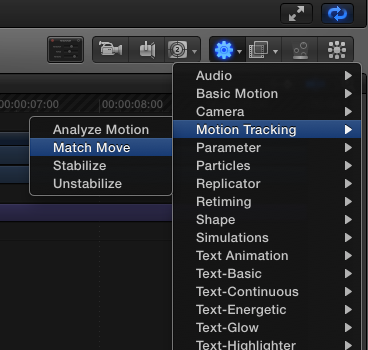
For this example it works very straightforward. But if you want to track a bike that moves anywhere around the frame you might need to add trackers and change the tracker parameters. Impossible to say when we don't see what exactly you want to track.
- Ronny
vimeo.com/101602462
The Behavior you need is called the Match Move behavior. Once you have created your title: select it, click the Behaviors button and choose Motion Tracking > Match Move. The Match Move behavior will be added to your title layer.
For this example it works very straightforward. But if you want to track a bike that moves anywhere around the frame you might need to add trackers and change the tracker parameters. Impossible to say when we don't see what exactly you want to track.
- Ronny
Please Log in to join the conversation.
- Karsten Schlüter
-
- Offline
- Moderator
-
Less
More
- Posts: 3790
- Thank you received: 718
24 Jul 2014 11:24 - 24 Jul 2014 11:27 #50424
by Karsten Schlüter
It describes IN DETAIL the workflow, IF you would read beyond the one page I linked to and read-on on the following pages.. :
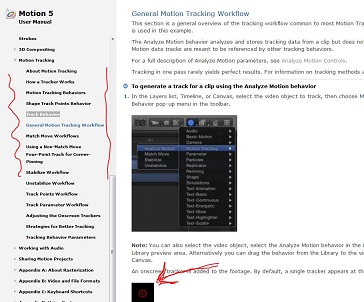
you're not familiar reading Manuals, aren't you? :silly:
... the technique behind it is not trivial. But the usage in M5 is drop-dead-simple - Ronny posted a link to some tutorial, if 'movin' pictures' is more your type of learning than raeding...
But you need some background knowledge/there's no one-click-solution; esp. your task, to attach some title to your pedals... I dare to foresee some 'issues' due to lack of contrats of your target-zone. So, most probably, the tracker will lose it - you then HAVE to understand, how to fix that. (you can fix that, easiely).
If you prefer a even-simpler-solution in FCPX, consider purchase of TrackX
www.coremelt.com/products/trackx-powered-by-mocha.html
.. it has a manual too , but coremelt offers excellent video-tutorials too ...
Replied by Karsten Schlüter on topic Title issue
hunnylees wrote: ... but it really doesn't tell me HOW TO. its more about WHAT is match motion and such!...
It describes IN DETAIL the workflow, IF you would read beyond the one page I linked to and read-on on the following pages.. :
you're not familiar reading Manuals, aren't you? :silly:
... the technique behind it is not trivial. But the usage in M5 is drop-dead-simple - Ronny posted a link to some tutorial, if 'movin' pictures' is more your type of learning than raeding...
But you need some background knowledge/there's no one-click-solution; esp. your task, to attach some title to your pedals... I dare to foresee some 'issues' due to lack of contrats of your target-zone. So, most probably, the tracker will lose it - you then HAVE to understand, how to fix that. (you can fix that, easiely).
If you prefer a even-simpler-solution in FCPX, consider purchase of TrackX
www.coremelt.com/products/trackx-powered-by-mocha.html
.. it has a manual too
, but coremelt offers excellent video-tutorials too ...
Last edit: 24 Jul 2014 11:27 by Karsten Schlüter.
Please Log in to join the conversation.
25 Jul 2014 05:32 #50454
by hunnylees
Replied by hunnylees on topic Title issue
Thanks kar
Btw, with the sample video you posted up there. How did you make the line? Is that a template or something for titles?
-hun
Btw, with the sample video you posted up there. How did you make the line? Is that a template or something for titles?
-hun
Please Log in to join the conversation.
- Karsten Schlüter
-
- Offline
- Moderator
-
Less
More
- Posts: 3790
- Thank you received: 718
25 Jul 2014 06:30 #50456
by Karsten Schlüter
Everything in Motion is inside a 'group'.
So, draw a line with the draw-tools M5 offers in the same group, and apply the MatchMove behavior not just to the title but to the group... That simple.
I'm no pro, just a hobbyist - my main recommendation: DO! Just try it ... trial'n error. I learned most by following step-by-step the tutorials offered by Macbreak Studio/rippletraining offered for free (!) at youtube. Mark&Steve offer superb advice (always the latest here at fcp.co)! And keep in mind: English is not my native tongue, ... and I do get.
Again: A forum, a board is not the place to learn the basics of a complex tool as M5 - rippletraining offers ~200 video tutorials, you'll find several dozens more at larryjordan.biz, izzyvideo and even at the 'dark side', creativecow .....
dig that thru, start with the basics (no, tracking isn't basic) - 3-6 months later, a sticking-title is as easy as snap.- :woohoo:
Replied by Karsten Schlüter on topic Title issue
hunnylees wrote: .. How did you make the line? Is that a template or something for titles?
-hun
Everything in Motion is inside a 'group'.
So, draw a line with the draw-tools M5 offers in the same group, and apply the MatchMove behavior not just to the title but to the group... That simple.
I'm no pro, just a hobbyist - my main recommendation: DO! Just try it ... trial'n error. I learned most by following step-by-step the tutorials offered by Macbreak Studio/rippletraining offered for free (!) at youtube. Mark&Steve offer superb advice (always the latest here at fcp.co)! And keep in mind: English is not my native tongue, ... and I do get.
Again: A forum, a board is not the place to learn the basics of a complex tool as M5 - rippletraining offers ~200 video tutorials, you'll find several dozens more at larryjordan.biz, izzyvideo and even at the 'dark side', creativecow .....
dig that thru, start with the basics (no, tracking isn't basic) - 3-6 months later, a sticking-title is as easy as snap.- :woohoo:
Please Log in to join the conversation.

25 Jul 2014 12:06 #50472
by BenB
Replied by BenB on topic Title issue
Here's one on making a line's end points anchor and track.
www.macprovideo.com/hub/motion/creating-...ck-objects-in-motion
www.macprovideo.com/hub/motion/creating-...ck-objects-in-motion
Please Log in to join the conversation.
