


- Posts: 16
- Thank you received: 0
3 Post Moderation Rule for New Boarders (25 Jan 2021)
New boarders will have their posts moderated - Don't worry if you cannot see your post immediately.
How to make title like this
23 Jul 2014 04:10 #50342
by hunnylees
How to make title like this was created by hunnylees
Hey
how do i make this kind of title shown at 0:05
how do i make this kind of title shown at 0:05
Please Log in to join the conversation.
- ronny courtens
-

- Offline
- Moderator
-

Less
More
- Posts: 4455
- Thank you received: 962
23 Jul 2014 06:22 #50350
by ronny courtens
Replied by ronny courtens on topic How to make title like this
You mean the foot hiding the title? That's a simple animated matte. For very short and easy effects like the one in the video you can use the bezier mask tool with manual keyframing in Motion 5, or you can use the third-party Slice X/Mocha plugin in FCP X.
Here's how to in Motion:
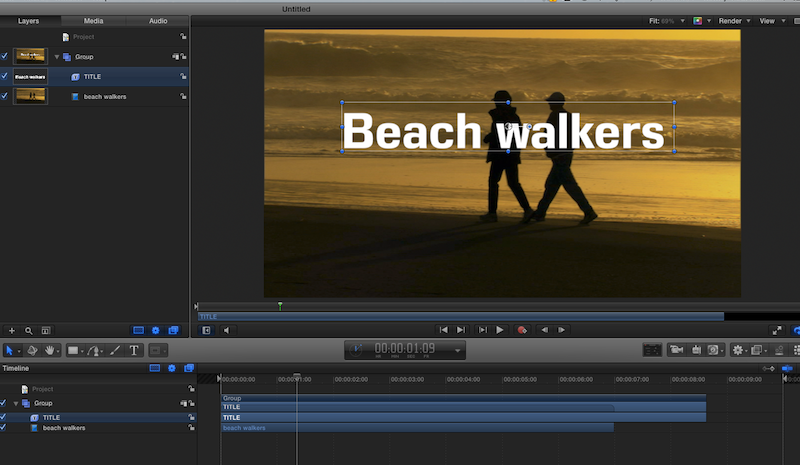
Add the title on top of your clip
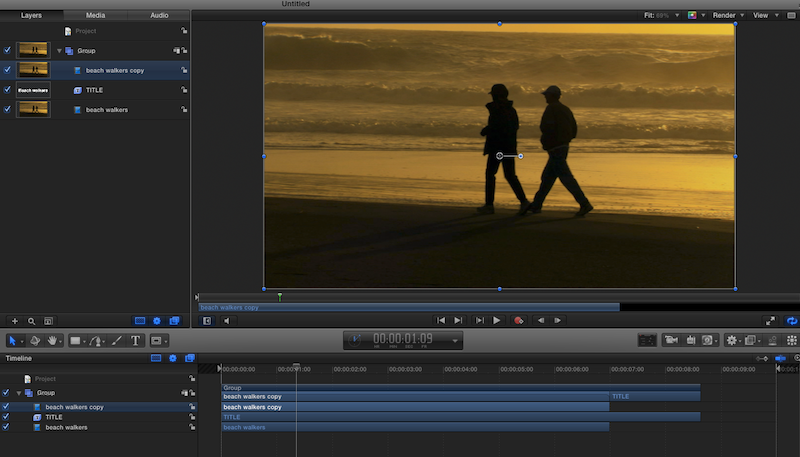
Duplicate the clip and put the duplicate on top of your title
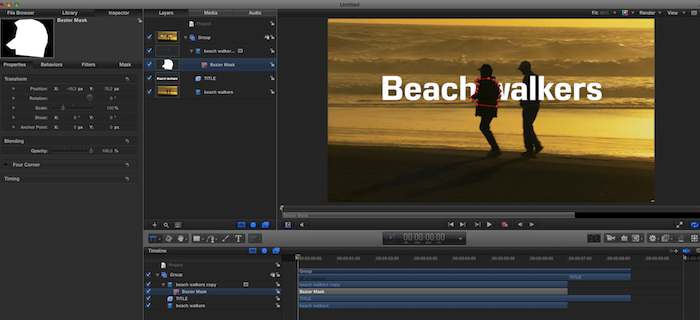
Use the bezier mask tool on the duplicate clip to mask out the element(s) you want to see in front of the title
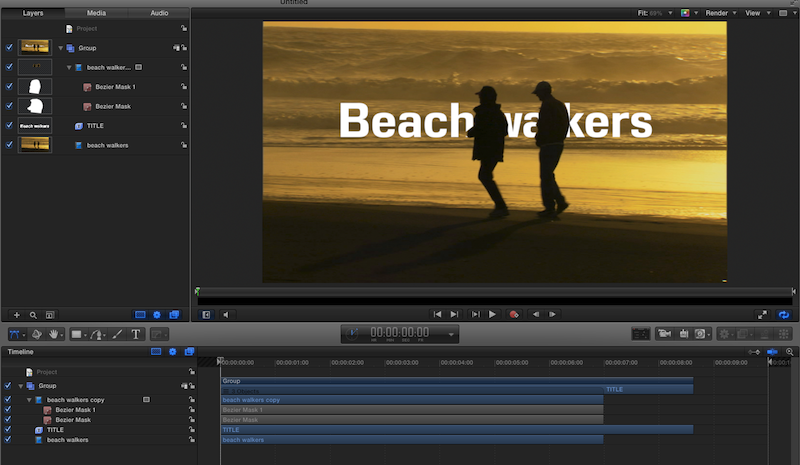
Animate the matte with manual keyframing or with the tracking system in Motion
- Ronny
Here's how to in Motion:
Add the title on top of your clip
Duplicate the clip and put the duplicate on top of your title
Use the bezier mask tool on the duplicate clip to mask out the element(s) you want to see in front of the title
Animate the matte with manual keyframing or with the tracking system in Motion
- Ronny
Please Log in to join the conversation.
23 Jul 2014 08:03 #50351
by hunnylees
Replied by hunnylees on topic How to make title like this
Ah! sweet ronny!
I'll try it out. I just started editing and getting used to FCPX
I'll try it out. I just started editing and getting used to FCPX
Please Log in to join the conversation.
24 Jul 2014 04:14 - 24 Jul 2014 04:18 #50398
by hunnylees
Replied by hunnylees on topic How to make title like this
Ron, i seem to have trouble. i might need exact help..I'm using this clip here: the biker passes the camera
I tried to make this title (which i could make in FCPX because of the angle mask thing:
this is the mask i was talking about which i could easily manouver to angle with the road, but i couldnt' do it in Motion which i want to do.
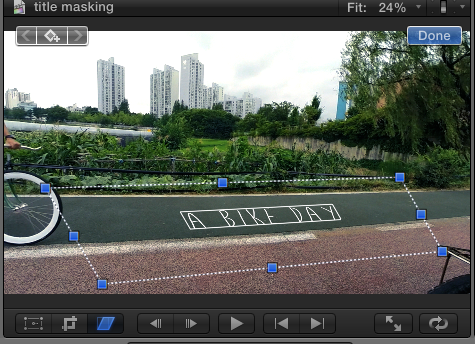
my vision for this clip is that the bike will ride OVER the title: like the foot in the youtube video i posted in the beginning, I know i'm gunna have to frame by frame mask but I just odn't know where to start and i'm confused with motion 5.. barely any experience at all!
I tried to make this title (which i could make in FCPX because of the angle mask thing:
this is the mask i was talking about which i could easily manouver to angle with the road, but i couldnt' do it in Motion which i want to do.
my vision for this clip is that the bike will ride OVER the title: like the foot in the youtube video i posted in the beginning, I know i'm gunna have to frame by frame mask but I just odn't know where to start and i'm confused with motion 5.. barely any experience at all!
Last edit: 24 Jul 2014 04:18 by hunnylees.
Please Log in to join the conversation.
24 Jul 2014 05:17 #50402
by hunnylees
Replied by hunnylees on topic How to make title like this
I'm basically trying to achieve the this effect!
@0:06 where the title is behind all the objects that can be moving or still!
@0:06 where the title is behind all the objects that can be moving or still!
Please Log in to join the conversation.
- ronny courtens
-
- Offline
- Moderator
-
Less
More
- Posts: 4455
- Thank you received: 962
24 Jul 2014 07:11 #50405
by ronny courtens
Replied by ronny courtens on topic How to make title like this
Ah, I see. The title looks very nice and you have a good sense for perspective.
But what you want to do with the bike is not obvious at all. A leg or a foot or even a complete person is quite easy to mask out because they are solid objects. A bike has many transparent and curved moving elements like the inside of the wheels, so it is much more difficult to mask. This will be very hard to do in FCP X, even with Slice X+Mocha. But maybe there is an easier solution...
Here's a suggestion: can you send me the original clip via We Transfer or Airbridge? Then I can have a closer look at it to see if there are other and easier ways to extract the bike. I really need to see the moving clip in full quality for this. Then I can guide you through the process step by step, or I can just do it for you.
- Ronny
But what you want to do with the bike is not obvious at all. A leg or a foot or even a complete person is quite easy to mask out because they are solid objects. A bike has many transparent and curved moving elements like the inside of the wheels, so it is much more difficult to mask. This will be very hard to do in FCP X, even with Slice X+Mocha. But maybe there is an easier solution...
Here's a suggestion: can you send me the original clip via We Transfer or Airbridge? Then I can have a closer look at it to see if there are other and easier ways to extract the bike. I really need to see the moving clip in full quality for this. Then I can guide you through the process step by step, or I can just do it for you.
- Ronny
Please Log in to join the conversation.
25 Jul 2014 04:06 #50451
by hunnylees
Replied by hunnylees on topic How to make title like this
Thanks Ron,
but yeah, i figured it'd be very tedious, assuming i'd have to mask it frame by frame.
it doesn't have to be the wheels then, lets say the body of the biker will mask out a title which is in the mid screen instead of the perspective title on the road. i just want to learn how to be able to mask,even if its just like the gopro video above!
i'll send you via airbridge. whats your email?
thanks that you're up to jsut doign it for me but i'd love to learn how to so that I can also teach someone in the future like ya are!
but yeah, i figured it'd be very tedious, assuming i'd have to mask it frame by frame.
it doesn't have to be the wheels then, lets say the body of the biker will mask out a title which is in the mid screen instead of the perspective title on the road. i just want to learn how to be able to mask,even if its just like the gopro video above!
i'll send you via airbridge. whats your email?
thanks that you're up to jsut doign it for me but i'd love to learn how to so that I can also teach someone in the future like ya are!
Please Log in to join the conversation.
- ronny courtens
-
- Offline
- Moderator
-
Less
More
- Posts: 4455
- Thank you received: 962
25 Jul 2014 06:14 #50455
by ronny courtens
Replied by ronny courtens on topic How to make title like this
Okay, then I will make a step-by-step video tutorial so you can learn how to do this yourself.
You can send the file to ronnycourtens(at)mac(dot)com
- Ronny
You can send the file to ronnycourtens(at)mac(dot)com
- Ronny
Please Log in to join the conversation.
25 Jul 2014 07:57 #50458
by hunnylees
Replied by hunnylees on topic How to make title like this
thanks ron, its being sent right now
Please Log in to join the conversation.
25 Jul 2014 08:01 #50460
by hunnylees
Replied by hunnylees on topic How to make title like this
first time using airbridge but heres the link the gave me. I also sent it to ur email
mab.to/LclBUcTxE
mab.to/LclBUcTxE
Please Log in to join the conversation.
- ronny courtens
-
- Offline
- Moderator
-
Less
More
- Posts: 4455
- Thank you received: 962
25 Jul 2014 08:03 #50461
by ronny courtens
Replied by ronny courtens on topic How to make title like this
Than you. I have downloaded the clip and will be looking at it later today.
- Ronny
- Ronny
Please Log in to join the conversation.
25 Jul 2014 13:58 #50473
by tpayton
Replied by tpayton on topic How to make title like this
I believe you could try a luma key instead, check out the technique here:
Please Log in to join the conversation.
25 Jul 2014 14:49 - 25 Jul 2014 14:49 #50474
by tpayton
Replied by tpayton on topic How to make title like this
I couldn't see all your images in this post for some reason, but I was able to download the clip (Thanks for posting) and make a quick version of the effect with the build in keyed.
Here is a video walking you through the process with your clip (it might still be processing, give it a few minutes if it doesn't play)
You would need to tweak the key a bit, and perhaps even add multiple layers to ensure you get all the spokes, but no need to do any frame by frame work.
Here is a video walking you through the process with your clip (it might still be processing, give it a few minutes if it doesn't play)
You would need to tweak the key a bit, and perhaps even add multiple layers to ensure you get all the spokes, but no need to do any frame by frame work.
Last edit: 25 Jul 2014 14:49 by tpayton.
Please Log in to join the conversation.
- ronny courtens
-
- Offline
- Moderator
-
Less
More
- Posts: 4455
- Thank you received: 962
25 Jul 2014 15:17 #50477
by ronny courtens
Replied by ronny courtens on topic How to make title like this
Tim beat me to this 
But I'm glad we had the same idea, which means it works. Here's a similar tutorial on how to use the standard keyer inside FCP X to achieve what you want (no Motion 5 nor keyframe animation involved):
vimeo.com/101719583
And if you want to do something much faster and simpler, albeit a different effect, you can use a simple wipe:
vimeo.com/101706521
- Ronny
But I'm glad we had the same idea, which means it works. Here's a similar tutorial on how to use the standard keyer inside FCP X to achieve what you want (no Motion 5 nor keyframe animation involved):
vimeo.com/101719583
And if you want to do something much faster and simpler, albeit a different effect, you can use a simple wipe:
vimeo.com/101706521
- Ronny
Please Log in to join the conversation.
- Andreas Kiel
-

- Offline
- Platinum Member
-

Less
More
- Posts: 1077
- Thank you received: 189
26 Jul 2014 12:06 #50512
by Andreas Kiel
Replied by Andreas Kiel on topic How to make title like this
These tutorials from Tim and Ronny are both excellent.
I may add a note as an old man who was used to work with paper, pencils, pins and all this stuff people don't know the names today.
There is a little old fashion thing you can do for the title itself. FCP X doesn't support any real perspective without plugins.
But you can somehow mimic it.
Find a picture where some "plain horizontal to endless" lines can be detected. Copy this image.
For the below I used Adobe Illustrator, cause I own it and familiar with it. You also can use Preview and draw strokes following these lines, but it will cost more time.
In case of the published example the perspective focus will look like below.
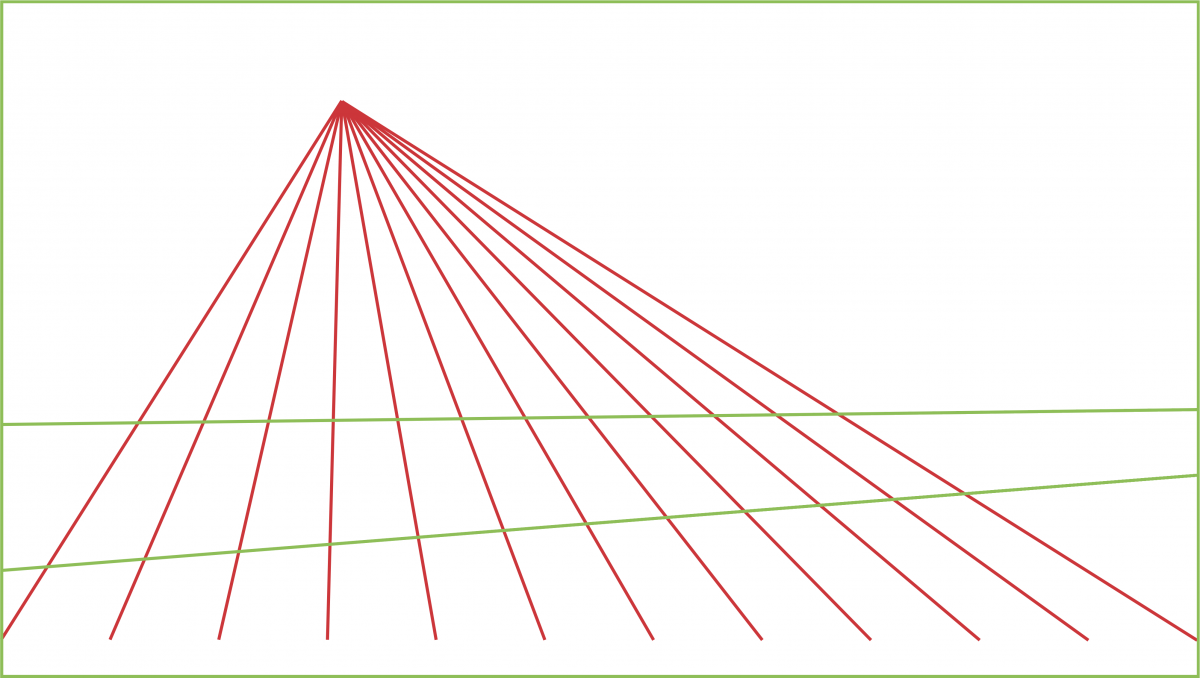
Now copy the resulting image into you timeline. Use "Overlay" as composite mode
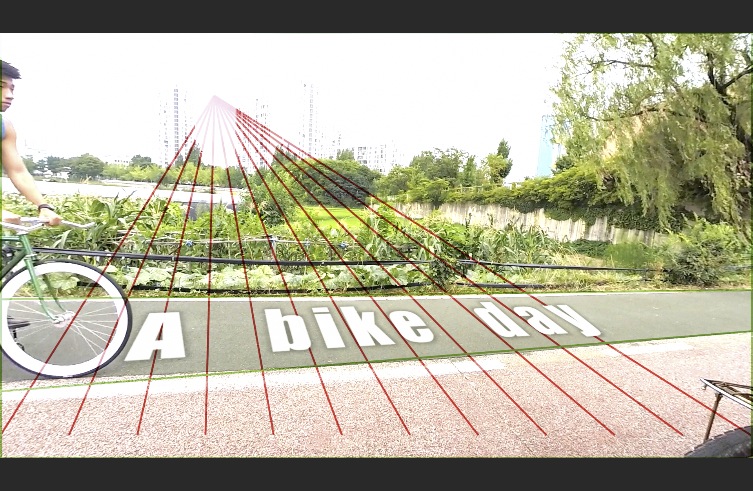
Now you can adjust the distortion matching the simple grid.
Then follow those instructions Ronny and Tim gave.
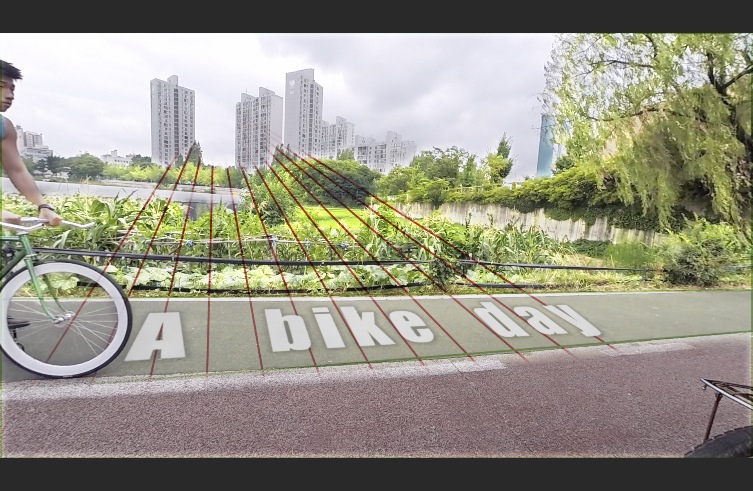
Switch of the "perspective clip" and render.
- Andreas
I may add a note as an old man who was used to work with paper, pencils, pins and all this stuff people don't know the names today.
There is a little old fashion thing you can do for the title itself. FCP X doesn't support any real perspective without plugins.
But you can somehow mimic it.
Find a picture where some "plain horizontal to endless" lines can be detected. Copy this image.
For the below I used Adobe Illustrator, cause I own it and familiar with it. You also can use Preview and draw strokes following these lines, but it will cost more time.
In case of the published example the perspective focus will look like below.
Now copy the resulting image into you timeline. Use "Overlay" as composite mode
Now you can adjust the distortion matching the simple grid.
Then follow those instructions Ronny and Tim gave.
Switch of the "perspective clip" and render.
- Andreas
Please Log in to join the conversation.

13 Sep 2014 01:22 #52653
by Endoh935
tpayton, i tried it & did it..mate it's a brilliant alternative to motion tacking.
Replied by Endoh935 on topic How to make title like this
tpayton wrote: I believe you could try a luma key instead, check out the technique here:
tpayton, i tried it & did it..mate it's a brilliant alternative to motion tacking.
Please Log in to join the conversation.

13 Sep 2014 03:31 #52654
by BenB
Replied by BenB on topic How to make title like this
Or use Motion, make a line a replicator, set the actor point, spread them out. Wonder if that could be made into a Perspective Guide generator template in Motion? Seems I just got my weekend project to do...
Please Log in to join the conversation.
13 Sep 2014 11:41 #52664
by BenB
Replied by BenB on topic How to make title like this
I slapped this together as an graphics tool. A generator template that gives you a fanned out perspective grid, adjustable, to help line up simple, single vanishing points. Installation and usage instructions in the READ ME file.
Click here to download.
Click here to download.
Please Log in to join the conversation.
