


- Posts: 11
- Thank you received: 0
3 Post Moderation Rule for New Boarders (25 Jan 2021)
New boarders will have their posts moderated - Don't worry if you cannot see your post immediately.
4th go at fcpx by an offroad editor.10.1. Gd things but some limitations. pro software? Full report
22 Jul 2014 06:36 #50287
by nicohk92
4th go at fcpx by an offroad editor.10.1. Gd things but some limitations. pro software? Full report was created by nicohk92
I was recommended posting here after adressing the finacutpro editor Facebook page. Indeed my hope with that report is to get feedback from more seasoned editors who have fully dived into FCPx and could address some of the points I mention with perhaps solutions.
I am a director/producer with extensive background in Editing, going back over 10 years and starting from Avid to quickly switch to final cut on which I’ve cut lots of different formats over the years, often on the go and often from a macbook pro. So I am somewhat an advanced editor but not the professional who clocks in to a complex post house setting, rather the off-road one who’s been relying on editing as the spine of a broader activity (so actually the profile FCPx seems to be addressing from what I read).
I gave fcpx a few tries before. It actually performed quite well for me in a heavy multi cam viral gig a few years back but I was, just as many, annoyed by this new way of doing things and stuck to fcp7 for most jobs until recently.
Last month I found myself at a crossroad when I bought a brand new pimped out MBP. Since I had to face that fcp7 was no longer being catered to, I would need to either go with Premiere, or swallow my defiance and head for fcpx and embrace it totally.
I chose the latter. Therefore I do want fcpx to full fill its promisses and become the new standard in a few years. I’m going into it in good faith as my livelihood is at stake and I want this new workflow to succeed.
Nevertheless, after cutting a complex project which mixes full cg clips with graphics, I enjoyed some great improvements, but stumbled upon some head scratching limitations which, I am sad to say, makes me agree with the critics who suspect FCPX didn’t get proper test runs and wasn’t inspired by true field insights.
I just delivered the film and can now report on my experience using FCP10.1 and Apple Motion exclusively.
Please note that I’ve overcome the nostalgia of fcpx haters, meaning that I don’t mind learning alternate ways. I don’t care anymore that things are different, and I’m willing to take new habits, as long as everything I need can be done one way or another.
To keep things balanced and show my impartiality, here’s what I enjoyed in this new way of editing.
- Keywording and smart searches are promissing and should be helpful when I have heavy derushing and get into it more..
- Colors is pretty cool in some ways (except for a biggy i’ll develop later). It’s fast and adding color corrections with masks and pickers is convenient. I’ve never used match colors cause it’s never perfect.
- Noise reduction is amazing, period.
- I like the skimmer in general, and the ability to “mute” clips (pressing v)
- The ability to create generators, effects etc… and publish any parameter from motion to fcp is a great idea and saved me a lot of time (but still not perfect, I’ll explain).
Now to the bad points, which are really worrisome, absurd and perplexing limitations and which unfortunately keep me from calling fcpx a pro software yet in my humble opinion. I made the decision to support FCPx so I really hope these will get fixed or that I missed something:
- The mask effect doesn’t have precision adjustment. No numeral value to change. I downloaded the free plug-in for eight point garbage mask thankfully. But the included four point mask only has nodes to manipulate which is very impractical. Problem solved anyway, thanks to Alex4d
- No keyframing for colours. This is a huge problem. How can they make a nice and elaborate color correction feature and forget to include key-framing abilities? Superimposing a duplicated clip and using fades is a really lame and time wasting work around so this is a real issue.
- No interpolation capabilities. Perhaps the most baffling limitation in fcpx which by itself is a big obstacle to achieving desired results and constitutes a good reason to stay away from Final cut. We need to be able to set each and every keyframe to bezier or linear, whatever the parameter. It was as such in fcp7 and there is no reason this shouldn't be in fcpx. I was so disappointed when finding out this and truly hope it gets fixed or I will have to switch to another soft. (Yes some interpolation change is possible on the transform tool but position is far from the only parameter which requires interpolation control on a regular basis)
- No shortcut to turn off guide overlays. This limitation cries out: “We never actually tested fcpx in situation”. I do not want to skim over my timeline and be shown overlays for drop shadows or what have you. There is no way to hide generally guides and overlays and it’s now a case by case headache to have any idea what the picture looks like without lines and nodes. The "Command+/“ was one of the most used shortcut in version 7 for a very good reason. I’m can’t explain why they didn’t think of including it here.
- No way to copy and paste text settings. You all understand how it would be a good idea to have this feature. We can already past other attributes, so it ‘d make sense. I haven’t found the “remove attribute” function by the way, which would be a very welcomed addition as well.
- Creating a keyframe on the transform position tool makes the playhead jumps one frame back in the timeline. It may be a bug or there may be some very good explanation I am eager to know.But right now it’s truly annoying.
- Although the template publishing from Motion is a great idea, it’s not always perfect as some rig sliders would sometime perform weird jumps in value when only moving in small increments near zero. Overall not very stable and again, no complete control over interpolation. So this feature can be as much a life saver as a time waster depending on the situation.
- Compound clips are unreliable. If you offer this feature, get ready for us to use it. And right now, compound clips are risky business as they don’t operate as they’re told and would forget effects, keyframes and such. There’s nothing more frustrating than to export a sequence and find out that settings were not respected within compound clips.
- No round tripping with Motion. I see enough complaining about that around to feel the need to develop.
- No way to select all clips after a given point in the timeline. Again, if an experienced fcp7 editor was consulted for the new version, he would have recommended keeping the “t t t” shortcut which is so useful, even with the magnetic timeline.
That’s all I can think of for now. These are notes I’ve taken as I was editing and running into obstacles. I googled the hell out of these issues and found out there were just no solutions and we had to accept bad design. This is sad and will keep people from using fcpx seriously. There is nothing sadder than key framing a movement approximately to compensate for the lack of linear interpolation for example. I understand that fcpx was design for beginners also. But eventually these beginners will become proficient and run into the same problems so there are no reason to make a limited software when imovie does just fine in that domain.
I would be very happy to be mistaken, seriously. So this report is really for other editors who can show me how wrong I am and offer ways to overcome the above limitations. I am really ok with learning new ways to work but I am not talking frustrating workarounds, but real ways that can show me outsmarted but excited in grasping them.
Right now, there are standard things I simply cannot do easily with Fcpx. So it's like a beautiful sounding saxophone which has a note missing. No matter how beautiful the sound, I cannot play my song on this instrument and may have to switch to another one.
I would submit this report to apple if I was able to sign into the support page, as, like many other people, I am kept out because of some persistent log in bug.
Thanks and I hope to get feedback which will improve my skills and get me hopeful again with fcpx because I am starting to consider moving to Premiere instead.
I am a director/producer with extensive background in Editing, going back over 10 years and starting from Avid to quickly switch to final cut on which I’ve cut lots of different formats over the years, often on the go and often from a macbook pro. So I am somewhat an advanced editor but not the professional who clocks in to a complex post house setting, rather the off-road one who’s been relying on editing as the spine of a broader activity (so actually the profile FCPx seems to be addressing from what I read).
I gave fcpx a few tries before. It actually performed quite well for me in a heavy multi cam viral gig a few years back but I was, just as many, annoyed by this new way of doing things and stuck to fcp7 for most jobs until recently.
Last month I found myself at a crossroad when I bought a brand new pimped out MBP. Since I had to face that fcp7 was no longer being catered to, I would need to either go with Premiere, or swallow my defiance and head for fcpx and embrace it totally.
I chose the latter. Therefore I do want fcpx to full fill its promisses and become the new standard in a few years. I’m going into it in good faith as my livelihood is at stake and I want this new workflow to succeed.
Nevertheless, after cutting a complex project which mixes full cg clips with graphics, I enjoyed some great improvements, but stumbled upon some head scratching limitations which, I am sad to say, makes me agree with the critics who suspect FCPX didn’t get proper test runs and wasn’t inspired by true field insights.
I just delivered the film and can now report on my experience using FCP10.1 and Apple Motion exclusively.
Please note that I’ve overcome the nostalgia of fcpx haters, meaning that I don’t mind learning alternate ways. I don’t care anymore that things are different, and I’m willing to take new habits, as long as everything I need can be done one way or another.
To keep things balanced and show my impartiality, here’s what I enjoyed in this new way of editing.
- Keywording and smart searches are promissing and should be helpful when I have heavy derushing and get into it more..
- Colors is pretty cool in some ways (except for a biggy i’ll develop later). It’s fast and adding color corrections with masks and pickers is convenient. I’ve never used match colors cause it’s never perfect.
- Noise reduction is amazing, period.
- I like the skimmer in general, and the ability to “mute” clips (pressing v)
- The ability to create generators, effects etc… and publish any parameter from motion to fcp is a great idea and saved me a lot of time (but still not perfect, I’ll explain).
Now to the bad points, which are really worrisome, absurd and perplexing limitations and which unfortunately keep me from calling fcpx a pro software yet in my humble opinion. I made the decision to support FCPx so I really hope these will get fixed or that I missed something:
- The mask effect doesn’t have precision adjustment. No numeral value to change. I downloaded the free plug-in for eight point garbage mask thankfully. But the included four point mask only has nodes to manipulate which is very impractical. Problem solved anyway, thanks to Alex4d
- No keyframing for colours. This is a huge problem. How can they make a nice and elaborate color correction feature and forget to include key-framing abilities? Superimposing a duplicated clip and using fades is a really lame and time wasting work around so this is a real issue.
- No interpolation capabilities. Perhaps the most baffling limitation in fcpx which by itself is a big obstacle to achieving desired results and constitutes a good reason to stay away from Final cut. We need to be able to set each and every keyframe to bezier or linear, whatever the parameter. It was as such in fcp7 and there is no reason this shouldn't be in fcpx. I was so disappointed when finding out this and truly hope it gets fixed or I will have to switch to another soft. (Yes some interpolation change is possible on the transform tool but position is far from the only parameter which requires interpolation control on a regular basis)
- No shortcut to turn off guide overlays. This limitation cries out: “We never actually tested fcpx in situation”. I do not want to skim over my timeline and be shown overlays for drop shadows or what have you. There is no way to hide generally guides and overlays and it’s now a case by case headache to have any idea what the picture looks like without lines and nodes. The "Command+/“ was one of the most used shortcut in version 7 for a very good reason. I’m can’t explain why they didn’t think of including it here.
- No way to copy and paste text settings. You all understand how it would be a good idea to have this feature. We can already past other attributes, so it ‘d make sense. I haven’t found the “remove attribute” function by the way, which would be a very welcomed addition as well.
- Creating a keyframe on the transform position tool makes the playhead jumps one frame back in the timeline. It may be a bug or there may be some very good explanation I am eager to know.But right now it’s truly annoying.
- Although the template publishing from Motion is a great idea, it’s not always perfect as some rig sliders would sometime perform weird jumps in value when only moving in small increments near zero. Overall not very stable and again, no complete control over interpolation. So this feature can be as much a life saver as a time waster depending on the situation.
- Compound clips are unreliable. If you offer this feature, get ready for us to use it. And right now, compound clips are risky business as they don’t operate as they’re told and would forget effects, keyframes and such. There’s nothing more frustrating than to export a sequence and find out that settings were not respected within compound clips.
- No round tripping with Motion. I see enough complaining about that around to feel the need to develop.
- No way to select all clips after a given point in the timeline. Again, if an experienced fcp7 editor was consulted for the new version, he would have recommended keeping the “t t t” shortcut which is so useful, even with the magnetic timeline.
That’s all I can think of for now. These are notes I’ve taken as I was editing and running into obstacles. I googled the hell out of these issues and found out there were just no solutions and we had to accept bad design. This is sad and will keep people from using fcpx seriously. There is nothing sadder than key framing a movement approximately to compensate for the lack of linear interpolation for example. I understand that fcpx was design for beginners also. But eventually these beginners will become proficient and run into the same problems so there are no reason to make a limited software when imovie does just fine in that domain.
I would be very happy to be mistaken, seriously. So this report is really for other editors who can show me how wrong I am and offer ways to overcome the above limitations. I am really ok with learning new ways to work but I am not talking frustrating workarounds, but real ways that can show me outsmarted but excited in grasping them.
Right now, there are standard things I simply cannot do easily with Fcpx. So it's like a beautiful sounding saxophone which has a note missing. No matter how beautiful the sound, I cannot play my song on this instrument and may have to switch to another one.
I would submit this report to apple if I was able to sign into the support page, as, like many other people, I am kept out because of some persistent log in bug.
Thanks and I hope to get feedback which will improve my skills and get me hopeful again with fcpx because I am starting to consider moving to Premiere instead.
Please Log in to join the conversation.
- ronny courtens
-

- Offline
- Moderator
-

Less
More
- Posts: 4455
- Thank you received: 962
22 Jul 2014 11:12 - 22 Jul 2014 11:31 #50291
by ronny courtens
Replied by ronny courtens on topic 4th go at fcpx by an offroad editor.10.1. Gd things but some limitations. pro software? Full report
Hi Nico, and welcome to the forum.
Before we talk in detail about some points you have made please allow me to comment on a few general statements you are making. My reaction may sound a little un-friendly at first, but this is absolutely not intended to you as a person because I think you are genuinely interested in making the software work for you.
I just want to deal with some old misconceptions that have been annoying me and many others for a long time now and which, unfortunately, I also find back in your otherwise friendly post:
Now to the bad points, which are really worrisome, absurd and perplexing limitations and which unfortunately keep me from calling fcpx a pro software yet in my humble opinion.
Some of the points you mention are not correct at all or have been addressed since 10.1.2 (see below). It's good to point out things that can be improved in FCP X, we all do this regularly for any software we use. But please do it without falling into the old and tiresome "fcp x is not pro" absurdness. Many of the members here are using FCP X professionally, some of us (and more than you think) in high-end enterprise environments. So saying FCP X is not "pro" (whatever that means) is not only offending towards the many professionals who happily use it on a daily basis in film, broadcast, corporate or any other productions; it also is laughable.
... but stumbled upon some head scratching limitations which, I am sad to say, makes me agree with the critics who suspect FCPX didn’t get proper test runs and wasn’t inspired by true field insights.
This limitation cries out: “We never actually tested fcpx in situation”.
These kind of unfounded remarks simply make me furious. Every update of every NLE software I know (and I think I know most of them fairly well) gets tested in the field by real world editors before it gets released. If there are bugs they get reported. Sometimes the bugs are easily fixed, or they get fixed in a later update. Sometimes it takes a long time to get things straight because coding is much more difficult than we think. And yes, sometimes this makes us angry. This applies to any software you can think of:
forums.adobe.com/thread/1241741?start=40&tstart=0
Quote: I don't understand how any pro editor who regularly edits with client in the suite, can use Premiere CC. It's simply unacceptable to hit play on a sequence and not be able to have audio play consistently.
community.avid.com/forums/p/112969/686782.aspx
Quote: I'm really getting sick and tired of Avids excuses. If other editing software can do it, then there is absolutely no reason why Avid can't, especially when in previous versions it worked just fine. I'm now starting to understand peoples complaints with Media Composer. For a program that is known for 'stability', I've experienced everything but that.
As someone who has used FCP with much love over many years I will be so polite not to link to any recent legacy FCP rants, but believe me there are plenty
Does this imply that none of these softwares have been tested in the real world? Short answer: every software gets field-tested, period. This does not mean that the software is perfect. If a software manufacturer should wait to release his software until it has all the features anyone in the world could ever want and until all these features were completely bug-free, no software would ever be released at all. So saying a software has not been field-tested because it is missing features or it has bugs is simply incorrect.
So now to your specific points:
The mask effect doesn’t have precision adjustment.
Many standard filters in any NLE are just included as basic effects that most people can use. If you want to have more performant filters with more customizable parameters there is a plethora of third-party developers where you can get them. The beauty of FCP X is, as you rightfully mention, that standard filters can easily be customized and enhanced (or entirely new filters can be created from scratch) in Motion 5 and instantly made available in FCP X. Many great people like Alex have created specialized filters and made them available for free. As you are new to this forum, here's a link to the ever-growing fcp.co Free Plugins and templates section: www.fcp.co/forum/9-free-fcpx-plugins-and-templates
No keyframing for colours. This is a huge problem.
Yes, and this was (is) a huge problem in FCP as well. While Exposure and Saturation are easy to keyframe because they are linear values, Color is much more difficult because it adds or subtracts specific color information in steps. That's why keyframing color information is rarely smooth. Here's a link to one of the many posts complaining about this: forums.creativecow.net/thread/8/1099270
When we still worked with FCP we used the dissolve workaround as well to get around this stepping-stone color keyframing. I think that's why Apple hasn't added this feature back yet, I hope they just wait until they can come up with a better solution.
No interpolation capabilities.
Most of this has been addressed in the latest update. As your report comes from using 10.1 I can understand why you rightfully mention this. But before posting you really should check if the issues you report are still valid.
No shortcut to turn off guide overlays.
The overlays help you when you are working on a clip. As soon as you play the clip the guidelines go away. Or just click anywhere in the Inspector and the guidelines will go away without playing the clip. I agree a keyboard shortcut could also be handy for this, you always can post a feature request.
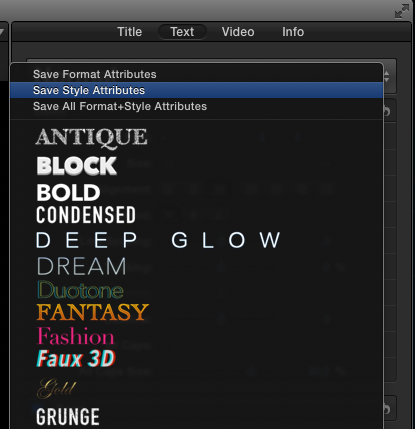
No way to copy and paste text settings.
Save your custom text settings and you can apply them to any new title whenever you wish:
Creating a keyframe on the transform position tool makes the playhead jumps one frame back in the timeline.
This is a bug indeed. It only occurs when you set the keyframe in the Inspector. But you can use the Transform tool for keyframing until this bug gets fixed. This is not a workaround, it's an an existing tool that works.
Although the template publishing from Motion is a great idea, it’s not always perfect as some rig sliders would sometime perform weird jumps in value when only moving in small increments near zero.
Just like I mentioned in the color keyframing question: some parameters are linear, some behave completely differently. Knowing how specific parameters change over time is a learning curve with any Motion graphics application.
Compound clips are unreliable...
I have not had any effects on CCs not exporting correctly, nor do I seem to recall any posts mentioning this. So I cannot confirm if this is an issue or not.
No round tripping with Motion.
Welcome to the club Although, as I mentioned before, if they ever bring this back it will have to be much more reliable than it was with FCP. That was terrible.
No way to select all clips after a given point in the timeline.
Park your playhead before the clips you want to select. In the timeline index press "shift/alt/down" to select all clips to the right, or "shift+alt+down" to select all clips to the left. I agree "ttt" was somewhat easier, but do not say "no way" if there is one.
I hope this little list has addressed some of the points you have made. FCP X is evolving very fast and indeed, it still misses some features us "good-old" FCP users found very handy. Some may come back, some may never come back. OTOH FCP X has a lot of features that work much better than in FCP, or in any other NLE for that matter. Feel free to suggest any features using the Feedback page. I don't know why you say you "cannot log in", I submit reports on a regular basis and it aways seems to work for me. Apple carefully reads the feedback and they contact you whenever they need more information.
But if you really think FCP X misses too many features from FCP you need right now and you say you would like to try Premiere CC instead, I think you will be happy to contribute to this great list :
:
theeditdoctor.tumblr.com/post/6681593879...g-caps-but-im-saying
- Ronny
Before we talk in detail about some points you have made please allow me to comment on a few general statements you are making. My reaction may sound a little un-friendly at first, but this is absolutely not intended to you as a person because I think you are genuinely interested in making the software work for you.
I just want to deal with some old misconceptions that have been annoying me and many others for a long time now and which, unfortunately, I also find back in your otherwise friendly post:
Now to the bad points, which are really worrisome, absurd and perplexing limitations and which unfortunately keep me from calling fcpx a pro software yet in my humble opinion.
Some of the points you mention are not correct at all or have been addressed since 10.1.2 (see below). It's good to point out things that can be improved in FCP X, we all do this regularly for any software we use. But please do it without falling into the old and tiresome "fcp x is not pro" absurdness. Many of the members here are using FCP X professionally, some of us (and more than you think) in high-end enterprise environments. So saying FCP X is not "pro" (whatever that means) is not only offending towards the many professionals who happily use it on a daily basis in film, broadcast, corporate or any other productions; it also is laughable.
... but stumbled upon some head scratching limitations which, I am sad to say, makes me agree with the critics who suspect FCPX didn’t get proper test runs and wasn’t inspired by true field insights.
This limitation cries out: “We never actually tested fcpx in situation”.
These kind of unfounded remarks simply make me furious. Every update of every NLE software I know (and I think I know most of them fairly well) gets tested in the field by real world editors before it gets released. If there are bugs they get reported. Sometimes the bugs are easily fixed, or they get fixed in a later update. Sometimes it takes a long time to get things straight because coding is much more difficult than we think. And yes, sometimes this makes us angry. This applies to any software you can think of:
forums.adobe.com/thread/1241741?start=40&tstart=0
Quote: I don't understand how any pro editor who regularly edits with client in the suite, can use Premiere CC. It's simply unacceptable to hit play on a sequence and not be able to have audio play consistently.
community.avid.com/forums/p/112969/686782.aspx
Quote: I'm really getting sick and tired of Avids excuses. If other editing software can do it, then there is absolutely no reason why Avid can't, especially when in previous versions it worked just fine. I'm now starting to understand peoples complaints with Media Composer. For a program that is known for 'stability', I've experienced everything but that.
As someone who has used FCP with much love over many years I will be so polite not to link to any recent legacy FCP rants, but believe me there are plenty
Does this imply that none of these softwares have been tested in the real world? Short answer: every software gets field-tested, period. This does not mean that the software is perfect. If a software manufacturer should wait to release his software until it has all the features anyone in the world could ever want and until all these features were completely bug-free, no software would ever be released at all. So saying a software has not been field-tested because it is missing features or it has bugs is simply incorrect.
So now to your specific points:
The mask effect doesn’t have precision adjustment.
Many standard filters in any NLE are just included as basic effects that most people can use. If you want to have more performant filters with more customizable parameters there is a plethora of third-party developers where you can get them. The beauty of FCP X is, as you rightfully mention, that standard filters can easily be customized and enhanced (or entirely new filters can be created from scratch) in Motion 5 and instantly made available in FCP X. Many great people like Alex have created specialized filters and made them available for free. As you are new to this forum, here's a link to the ever-growing fcp.co Free Plugins and templates section: www.fcp.co/forum/9-free-fcpx-plugins-and-templates
No keyframing for colours. This is a huge problem.
Yes, and this was (is) a huge problem in FCP as well. While Exposure and Saturation are easy to keyframe because they are linear values, Color is much more difficult because it adds or subtracts specific color information in steps. That's why keyframing color information is rarely smooth. Here's a link to one of the many posts complaining about this: forums.creativecow.net/thread/8/1099270
When we still worked with FCP we used the dissolve workaround as well to get around this stepping-stone color keyframing. I think that's why Apple hasn't added this feature back yet, I hope they just wait until they can come up with a better solution.
No interpolation capabilities.
Most of this has been addressed in the latest update. As your report comes from using 10.1 I can understand why you rightfully mention this. But before posting you really should check if the issues you report are still valid.
No shortcut to turn off guide overlays.
The overlays help you when you are working on a clip. As soon as you play the clip the guidelines go away. Or just click anywhere in the Inspector and the guidelines will go away without playing the clip. I agree a keyboard shortcut could also be handy for this, you always can post a feature request.
No way to copy and paste text settings.
Save your custom text settings and you can apply them to any new title whenever you wish:
Creating a keyframe on the transform position tool makes the playhead jumps one frame back in the timeline.
This is a bug indeed. It only occurs when you set the keyframe in the Inspector. But you can use the Transform tool for keyframing until this bug gets fixed. This is not a workaround, it's an an existing tool that works.
Although the template publishing from Motion is a great idea, it’s not always perfect as some rig sliders would sometime perform weird jumps in value when only moving in small increments near zero.
Just like I mentioned in the color keyframing question: some parameters are linear, some behave completely differently. Knowing how specific parameters change over time is a learning curve with any Motion graphics application.
Compound clips are unreliable...
I have not had any effects on CCs not exporting correctly, nor do I seem to recall any posts mentioning this. So I cannot confirm if this is an issue or not.
No round tripping with Motion.
Welcome to the club
Although, as I mentioned before, if they ever bring this back it will have to be much more reliable than it was with FCP. That was terrible.No way to select all clips after a given point in the timeline.
Park your playhead before the clips you want to select. In the timeline index press "shift/alt/down" to select all clips to the right, or "shift+alt+down" to select all clips to the left. I agree "ttt" was somewhat easier, but do not say "no way" if there is one.
I hope this little list has addressed some of the points you have made. FCP X is evolving very fast and indeed, it still misses some features us "good-old" FCP users found very handy. Some may come back, some may never come back. OTOH FCP X has a lot of features that work much better than in FCP, or in any other NLE for that matter. Feel free to suggest any features using the Feedback page. I don't know why you say you "cannot log in", I submit reports on a regular basis and it aways seems to work for me. Apple carefully reads the feedback and they contact you whenever they need more information.
But if you really think FCP X misses too many features from FCP you need right now and you say you would like to try Premiere CC instead, I think you will be happy to contribute to this great list
:theeditdoctor.tumblr.com/post/6681593879...g-caps-but-im-saying
- Ronny
Last edit: 22 Jul 2014 11:31 by ronny courtens.
Please Log in to join the conversation.

22 Jul 2014 11:35 #50292
by BenB
Replied by BenB on topic 4th go at fcpx by an offroad editor.10.1. Gd things but some limitations. pro software? Full report
Submit your bugs and ideas to Apple via the FCPX feedback page, no logging in required.
www.apple.com/feedback/finalcutpro.html
- You can switch between Linear and Smooth keyframes, right-click them in the Viewer.
- For high precision masks and mattes, you really need to invest in SliceX and possibly TrackX.
- No clue what you're talking about with Compound Clips. Can you be specific?
- Guide overlays comes up when you have a specific effect, title, or generator selected (highlighted) in the Inspector. Deselect it when you're done with it, its overlays won't show up. No, there is no universal overlay.
- You can save text settings as pre-sets very easily. Either the basic settings, the more complex settings, or both.
- Motion templates, well, you need to understand the limitations of each control in Motion to avoid what you're referring to. But I find that issue very rare.
I can go to any other NLE, even MC and PPro and find an equal number of missing, malfunctioning features. So FCPX is on par with other in the "what's missing" and "what's broken" department.
To say it is not tested or Apple doesn't consult with professionals, nothing is farther from the truth. They consult with a lot of industry professionals. But industry professionals are not the whole market. There are semi-pros, prosumers, and consumers who all are part of the NLE market. If you focus only on broadcast and/or film professionals, you only focus on 1% of the video production market. And there is no longer any need to do that. The same tools a pro uses, consumer users now have access to, and are using.
Then again, what is pro and what isn't? iPhone video has been used in feature films. Amateur software has been used in professional productions. What qualifies a tool as pro or not? The answer is nothing. There are two realities we all must face now: 1- There is no such thing as industry standards. 2- There is only a very blurred hair line between professional and consumer. Those are the realities today.
There is a to-do list the developers have that is several hundred features long. You can't do them all at once, programming doesn't work that way. But to get what we're getting, as fast as we're getting it, and for free, is simply amazing. So much so, that Adobe copied the model (and ruined it with a subscription). Only so much code can be written so fast. FCPX is only 3 years old. Compare a brand new, 3 year old product to MC or PPro, and you really should wonder not why FCPX isn't further along, but why MC and PPro are not further along than THEY are after so many years of developing the exact same code.
Finally, Apple never promised FCPX would be an industry standard, they never said it would be anything but the next generation of NLE, using modern technology to work with a pure digital media workflow, breaking free from the analog media paradigms that NLEs have been sticking with for over a decade. That is the only "promise" Apple ever made.
Keyframing color grading, etc, yes, those are needed, there are reasonable workarounds, and it is all coming. User feedback via the feedback page, plus the consulting (I know first hand for a fact, they do with professionals) both determine the priorities set on the extensive to-do list Apple has in front of them. Not to mention the features that have come which no one asked for, but we are super glad we have them.
It is the fastest, most fun way to work currently, and will get better. BUT it is not for everyone. No single NLE is. I know and communicate regularly with a great number of professional editors who love MC and hate PPro and FCPX, or hate MC and FCPX, or use FCPX and (in their words) refuse to go backwards in time to use outdated tool sets. So, who of all these pros are right, and who are wrong?
Glad to see you're giving FCPX a fair shake. Be sure you have the latest version, also. That addresses a few things.
www.apple.com/feedback/finalcutpro.html
- You can switch between Linear and Smooth keyframes, right-click them in the Viewer.
- For high precision masks and mattes, you really need to invest in SliceX and possibly TrackX.
- No clue what you're talking about with Compound Clips. Can you be specific?
- Guide overlays comes up when you have a specific effect, title, or generator selected (highlighted) in the Inspector. Deselect it when you're done with it, its overlays won't show up. No, there is no universal overlay.
- You can save text settings as pre-sets very easily. Either the basic settings, the more complex settings, or both.
- Motion templates, well, you need to understand the limitations of each control in Motion to avoid what you're referring to. But I find that issue very rare.
I can go to any other NLE, even MC and PPro and find an equal number of missing, malfunctioning features. So FCPX is on par with other in the "what's missing" and "what's broken" department.
To say it is not tested or Apple doesn't consult with professionals, nothing is farther from the truth. They consult with a lot of industry professionals. But industry professionals are not the whole market. There are semi-pros, prosumers, and consumers who all are part of the NLE market. If you focus only on broadcast and/or film professionals, you only focus on 1% of the video production market. And there is no longer any need to do that. The same tools a pro uses, consumer users now have access to, and are using.
Then again, what is pro and what isn't? iPhone video has been used in feature films. Amateur software has been used in professional productions. What qualifies a tool as pro or not? The answer is nothing. There are two realities we all must face now: 1- There is no such thing as industry standards. 2- There is only a very blurred hair line between professional and consumer. Those are the realities today.
There is a to-do list the developers have that is several hundred features long. You can't do them all at once, programming doesn't work that way. But to get what we're getting, as fast as we're getting it, and for free, is simply amazing. So much so, that Adobe copied the model (and ruined it with a subscription). Only so much code can be written so fast. FCPX is only 3 years old. Compare a brand new, 3 year old product to MC or PPro, and you really should wonder not why FCPX isn't further along, but why MC and PPro are not further along than THEY are after so many years of developing the exact same code.
Finally, Apple never promised FCPX would be an industry standard, they never said it would be anything but the next generation of NLE, using modern technology to work with a pure digital media workflow, breaking free from the analog media paradigms that NLEs have been sticking with for over a decade. That is the only "promise" Apple ever made.
Keyframing color grading, etc, yes, those are needed, there are reasonable workarounds, and it is all coming. User feedback via the feedback page, plus the consulting (I know first hand for a fact, they do with professionals) both determine the priorities set on the extensive to-do list Apple has in front of them. Not to mention the features that have come which no one asked for, but we are super glad we have them.
It is the fastest, most fun way to work currently, and will get better. BUT it is not for everyone. No single NLE is. I know and communicate regularly with a great number of professional editors who love MC and hate PPro and FCPX, or hate MC and FCPX, or use FCPX and (in their words) refuse to go backwards in time to use outdated tool sets. So, who of all these pros are right, and who are wrong?
Glad to see you're giving FCPX a fair shake. Be sure you have the latest version, also. That addresses a few things.
Please Log in to join the conversation.
22 Jul 2014 12:59 #50309
by nicohk92
Replied by nicohk92 on topic 4th go at fcpx by an offroad editor.10.1. Gd things but some limitations. pro software? Full report
Hello Ronny and Ben and thank you very much for taking the time to address my post in depth.
Let me start right off the bat by apologizing for my poor choice of words and for letting my frustration transpire in a negative fashion at parts. I hope you can understand how we can all get when things don't work the way we want (man vs machine...). From my assumptions on the program's development to my throwing out blindly the "pro" concept was careless of me and I'm sorry for the annoyance It must have caused.
I am glad to have posted in this forum because it produced exactly what I hoped for: Solutions I was unaware of.
It is true that now we can make our own effects and I'm just coming to this happy realization which foresees many possibilities I have yet to explore. As stated, Mask is no longer an issue to me and yes I've heard great things about SliceX.
About keyframes for colors. I understand Ronny's point. But here was the concrete situation which led me to this remark. I had used color mask on a clip to limit my grading to a small part of an element. That area was supposed to get bigger overtime and at the very least I had hoped for the color masks to offer keyframing. There are work arounds for now, perhaps a real option in the future.
About CC, I was on a deadline and didn't spend too much time troubleshooting the issue but it happened twice. Both time, while I had a CC within a CC within a CC. At one time The deepest cc had a series of clips, dissolving into each other. It played ok in the program but the export showed that some cross dissolves had vanished. The other instance happened at the deepest level as well and if I remember correctly I had desaturated and brightened a an element on an Alpha channel clip. Now that I think of it, I may have used the Hue/saturation effect instead of color, one of the two, I'll need to check but in any case, upon export, my color correction did not take effect. I quickly chose to break apart the deepest CC, worked around each desired effect and quickly moved on so sorry If I don't have any more details.
I still think a shortcut to hide overlays would be a blessing. I can of course manage to see unobstructed frames but at the cost of clicks every time. Concrete examples are color correction masks (where we really need to see what's under the nodes back and forth). Also the fact that the moment you set drop shadow on a clip, you're going to see these handle lines all the time from then on even tho you no longer need to adjust for the rest of your edit. I haven't found a way to skim through the timeline without seeing these drop shadow handles (it'd be so much nicer to skim through a clean viewer.) And everytime I start working on a clip, I have to click somewhere in the inspector to take them out of view. It just makes the experience less enjoyable in an otherwise very pleasing ergonomic. I may be doing something wrong and so that's why I asked for advice. (By the way, I never meant to imply that I knew for a fact that there were no solutions to my remarks or that I had been around the whole soft, I did spend the time to research the manual and web and here I am asking for your insights)
The ability to save text setting is another instance of you guys brightening up my day. I must have missed that somehow and it does look easy and convenient. So thanks for the tip.
About interpolation, I am on 10.1.2 and I noticed only two interpolation controls, the transform tool on the viewer, and I believe the ability to set interpolation of rig sliders from Motion if I'm not mistaken. I ran into a few instances where I could have used more control on other tools. I remember fcp7 constantly offering this whenever possible and with a curve editor which is no longer available. I can imagine that programming a nle soft must be quite complex but these would have been very thoughtful features in my mind. I hope we'll start to see more flexibility in that area soon.
At last I must emphasize that I am pleased with the many powerful features I got to use for the first time (which got me spoiled right away perhaps). I am still working on making the magnetic timeline second nature but that's just me adapting and i'll get there eventually. On a previous job with multicam interviews and short deadline, the editing speed was baffling and I happily admit that I could never have delivered my daily segments in time had I stayed on FCP7. And more recently, I derushed and preped a music video with about 6 different set ups in a couple hours when it would have taken me the whole day before.
So I can only agree when Ben talks of a shift in paradigm toward better, faster ways to get things done.
I had really hoped for the kind of responses you gave me since I could never seriously switch to Premiere and its subscription system knowing that the future was being shaped elsewhere and that the coming generation will eventually learn straight from fcpx and fundamentally surpass whatever advantage my little experience still holds. Back in my camera operating days I remember how bitter my Beta holding colleagues sounded when seeing that 20 year old kid stealing the show with a dvx100. I can definitely see an analogy here and so must stay up to date in that situation to not be left out by pride and rigidity.
Thanks to you I am reassured in my support for Apple's vision (it took some time) and hope that FCPx will keep improving with the most demanding users in mind. In the meantime, I will continue to face my editor friend's sarcasms with a smile. We know who'll get the last laugh :evil:
Thanks again to both of you for your support
Let me start right off the bat by apologizing for my poor choice of words and for letting my frustration transpire in a negative fashion at parts. I hope you can understand how we can all get when things don't work the way we want (man vs machine...). From my assumptions on the program's development to my throwing out blindly the "pro" concept was careless of me and I'm sorry for the annoyance It must have caused.
I am glad to have posted in this forum because it produced exactly what I hoped for: Solutions I was unaware of.
It is true that now we can make our own effects and I'm just coming to this happy realization which foresees many possibilities I have yet to explore. As stated, Mask is no longer an issue to me and yes I've heard great things about SliceX.
About keyframes for colors. I understand Ronny's point. But here was the concrete situation which led me to this remark. I had used color mask on a clip to limit my grading to a small part of an element. That area was supposed to get bigger overtime and at the very least I had hoped for the color masks to offer keyframing. There are work arounds for now, perhaps a real option in the future.
About CC, I was on a deadline and didn't spend too much time troubleshooting the issue but it happened twice. Both time, while I had a CC within a CC within a CC. At one time The deepest cc had a series of clips, dissolving into each other. It played ok in the program but the export showed that some cross dissolves had vanished. The other instance happened at the deepest level as well and if I remember correctly I had desaturated and brightened a an element on an Alpha channel clip. Now that I think of it, I may have used the Hue/saturation effect instead of color, one of the two, I'll need to check but in any case, upon export, my color correction did not take effect. I quickly chose to break apart the deepest CC, worked around each desired effect and quickly moved on so sorry If I don't have any more details.
I still think a shortcut to hide overlays would be a blessing. I can of course manage to see unobstructed frames but at the cost of clicks every time. Concrete examples are color correction masks (where we really need to see what's under the nodes back and forth). Also the fact that the moment you set drop shadow on a clip, you're going to see these handle lines all the time from then on even tho you no longer need to adjust for the rest of your edit. I haven't found a way to skim through the timeline without seeing these drop shadow handles (it'd be so much nicer to skim through a clean viewer.) And everytime I start working on a clip, I have to click somewhere in the inspector to take them out of view. It just makes the experience less enjoyable in an otherwise very pleasing ergonomic. I may be doing something wrong and so that's why I asked for advice. (By the way, I never meant to imply that I knew for a fact that there were no solutions to my remarks or that I had been around the whole soft, I did spend the time to research the manual and web and here I am asking for your insights)
The ability to save text setting is another instance of you guys brightening up my day. I must have missed that somehow and it does look easy and convenient. So thanks for the tip.
About interpolation, I am on 10.1.2 and I noticed only two interpolation controls, the transform tool on the viewer, and I believe the ability to set interpolation of rig sliders from Motion if I'm not mistaken. I ran into a few instances where I could have used more control on other tools. I remember fcp7 constantly offering this whenever possible and with a curve editor which is no longer available. I can imagine that programming a nle soft must be quite complex but these would have been very thoughtful features in my mind. I hope we'll start to see more flexibility in that area soon.
At last I must emphasize that I am pleased with the many powerful features I got to use for the first time (which got me spoiled right away perhaps). I am still working on making the magnetic timeline second nature but that's just me adapting and i'll get there eventually. On a previous job with multicam interviews and short deadline, the editing speed was baffling and I happily admit that I could never have delivered my daily segments in time had I stayed on FCP7. And more recently, I derushed and preped a music video with about 6 different set ups in a couple hours when it would have taken me the whole day before.
So I can only agree when Ben talks of a shift in paradigm toward better, faster ways to get things done.
I had really hoped for the kind of responses you gave me since I could never seriously switch to Premiere and its subscription system knowing that the future was being shaped elsewhere and that the coming generation will eventually learn straight from fcpx and fundamentally surpass whatever advantage my little experience still holds. Back in my camera operating days I remember how bitter my Beta holding colleagues sounded when seeing that 20 year old kid stealing the show with a dvx100. I can definitely see an analogy here and so must stay up to date in that situation to not be left out by pride and rigidity.
Thanks to you I am reassured in my support for Apple's vision (it took some time) and hope that FCPx will keep improving with the most demanding users in mind. In the meantime, I will continue to face my editor friend's sarcasms with a smile. We know who'll get the last laugh :evil:
Thanks again to both of you for your support
Please Log in to join the conversation.
22 Jul 2014 14:04 #50313
by nicohk92
Replied by nicohk92 on topic 4th go at fcpx by an offroad editor.10.1. Gd things but some limitations. pro software? Full report
Forget about my remark on the drop shadow overlay. I just need to close the tab, click in empty space and the overlay is gone for clear skimming. How silly of me...
Please Log in to join the conversation.
- Tom Wolsky
-

- Offline
- Moderator
-
22 Jul 2014 14:12 #50314
by Tom Wolsky
Replied by Tom Wolsky on topic 4th go at fcpx by an offroad editor.10.1. Gd things but some limitations. pro software? Full report
Shape masks in color correction are keyframable.
Please Log in to join the conversation.
22 Jul 2014 14:25 #50316
by nicohk92
Replied by nicohk92 on topic 4th go at fcpx by an offroad editor.10.1. Gd things but some limitations. pro software? Full report
True. It must have been something else. I remember needing keyframing several times on that one. Sorry but my brain's all foggy today, I need rest.
By the way, another great thing I just recall cause i'm using it at the moment: Being able to have different settings within the same text portion. I remember having to go through some convoluted plug-in back then (was it Borisfx?) and here it couldn't be easier.
By the way, another great thing I just recall cause i'm using it at the moment: Being able to have different settings within the same text portion. I remember having to go through some convoluted plug-in back then (was it Borisfx?) and here it couldn't be easier.
Please Log in to join the conversation.

22 Jul 2014 20:56 #50332
by tpayton
Replied by tpayton on topic 4th go at fcpx by an offroad editor.10.1. Gd things but some limitations. pro software? Full report
Quick note about keyframing color changes:
Something simple like a color to black and white, and even colorization can be keyframes with the Hue/Saturation Effect. You can also keyframe if you use a third party color corrector like the excellent HyColour Pro.
And regarding Keyframing in general. Our shop does alot of compositing in FCPX, much more than we did in FCP7, but we actually find ourselves using keyframes very infrequently. We found that we would much rather rely on an effect that handles the animation, or transition, and it becomes much easier to make revisions. I don't know how you are using keyframes in your project, but many times after we examine an issue we find that an effect, custom effect or transition will better suit our needs than keyframing.
Something simple like a color to black and white, and even colorization can be keyframes with the Hue/Saturation Effect. You can also keyframe if you use a third party color corrector like the excellent HyColour Pro.
And regarding Keyframing in general. Our shop does alot of compositing in FCPX, much more than we did in FCP7, but we actually find ourselves using keyframes very infrequently. We found that we would much rather rely on an effect that handles the animation, or transition, and it becomes much easier to make revisions. I don't know how you are using keyframes in your project, but many times after we examine an issue we find that an effect, custom effect or transition will better suit our needs than keyframing.
Please Log in to join the conversation.

23 Jul 2014 03:04 #50341
by ddixon
Replied by ddixon on topic 4th go at fcpx by an offroad editor.10.1. Gd things but some limitations. pro software? Full report
+1 on using and liking HyColour Pro. It's a great program (and site advertiser) that I use on every project.
Please Log in to join the conversation.
