


- Posts: 18
- Thank you received: 0
3 Post Moderation Rule for New Boarders (25 Jan 2021)
New boarders will have their posts moderated - Don't worry if you cannot see your post immediately.
Cross fading audio in multicam tracks
- chrisgilesphoto
-
 Topic Author
- Offline
- New Member
-

Less
More
16 Jul 2014 18:40 #50095
by chrisgilesphoto
Cross fading audio in multicam tracks was created by chrisgilesphoto
I'll try to explain this as simply as I can but bear with me if it is confusing.
I have a multicam of a roundtable discussion. There were about 60 people sitting around a room at conference tables placed around the perimeter of the room. There were two cameras and three "microphones" placed around the room. The three microphones consisted of the PA audio which was connected to microphones at the head table and then two Zooms that were placed in the opposite corners of the roundtable.
I am switching my camera and audio angles in the multicam as a project using angle displays and that is pretty straightforward. My question comes to working with the multiple audio sources around the room to capture audio from different people around the room conversing with each other.
When I change the audio angles for the audio for different speakers, I have two very different sounding audio from the microphones. The PA is quite crisp and clear as the people were talking into the microphones where as the audio from the Zooms is much more ambient and airy because it wasn't located directly in front of the any particular person when they were speaking.
How can I cross fade the audio between switches in the multicam so there are not abrupt changes in audio quality and it blends together better?
Thanks
Chris
I have a multicam of a roundtable discussion. There were about 60 people sitting around a room at conference tables placed around the perimeter of the room. There were two cameras and three "microphones" placed around the room. The three microphones consisted of the PA audio which was connected to microphones at the head table and then two Zooms that were placed in the opposite corners of the roundtable.
I am switching my camera and audio angles in the multicam as a project using angle displays and that is pretty straightforward. My question comes to working with the multiple audio sources around the room to capture audio from different people around the room conversing with each other.
When I change the audio angles for the audio for different speakers, I have two very different sounding audio from the microphones. The PA is quite crisp and clear as the people were talking into the microphones where as the audio from the Zooms is much more ambient and airy because it wasn't located directly in front of the any particular person when they were speaking.
How can I cross fade the audio between switches in the multicam so there are not abrupt changes in audio quality and it blends together better?
Thanks
Chris
Please Log in to join the conversation.
- Tom Wolsky
-

- Offline
- Moderator
-

16 Jul 2014 18:44 #50096
by Tom Wolsky
Replied by Tom Wolsky on topic Cross fading audio in multicam tracks
Use Clip>Expand Audio Components. Use keyframes to fade channels in and out as needed. Cut the picture only.
Please Log in to join the conversation.
- chrisgilesphoto
-
Topic Author
- Offline
- New Member
-
Less
More
- Posts: 18
- Thank you received: 0
16 Jul 2014 19:03 #50099
by chrisgilesphoto
Replied by chrisgilesphoto on topic Cross fading audio in multicam tracks
Thanks Tom
How can I use keyframes to go beyond the audio switches so there is a fade vs a dip in the audio?
Is this being done in my project or in the multicam via Angle Editor?
How can I use keyframes to go beyond the audio switches so there is a fade vs a dip in the audio?
Is this being done in my project or in the multicam via Angle Editor?
Please Log in to join the conversation.
- Tom Wolsky
-
- Offline
- Moderator
-
16 Jul 2014 20:43 #50107
by Tom Wolsky
Replied by Tom Wolsky on topic Cross fading audio in multicam tracks
Unfortunately because of the way FCP actually cuts the audio, it's a little tricky. I do this:
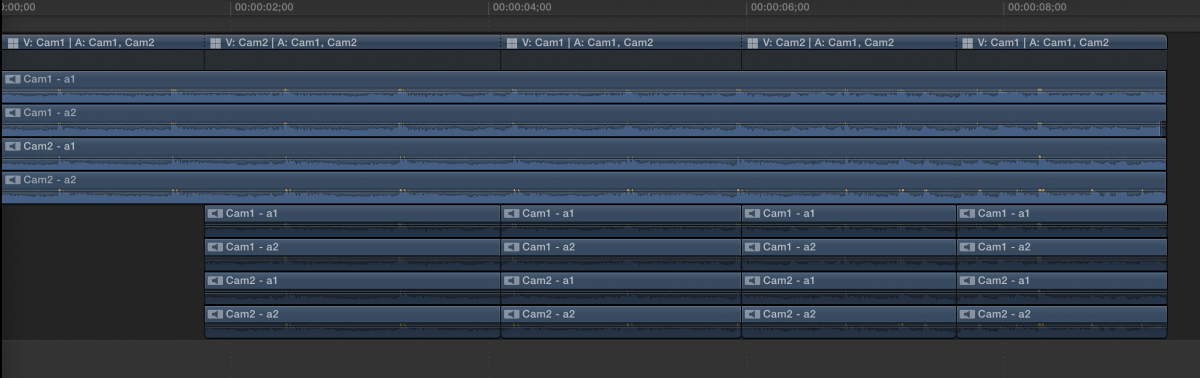
I make long split edits that extend the audio tracks so they don't cut.
The tracks duplicate underneath and they continue to be cut, but I disable them. It's really a workaround and the best solution would be for the application to actually not cut the audio.
I make long split edits that extend the audio tracks so they don't cut.
The tracks duplicate underneath and they continue to be cut, but I disable them. It's really a workaround and the best solution would be for the application to actually not cut the audio.
Please Log in to join the conversation.
