


- Posts: 3
- Thank you received: 0
3 Post Moderation Rule for New Boarders (25 Jan 2021)
New boarders will have their posts moderated - Don't worry if you cannot see your post immediately.
10.1.2 bug: Color correction in multicam clips not being shared
- smunk_denmark
-
 Topic Author
- Offline
- New Member
-

Less
More
16 Jul 2014 11:47 #50059
by smunk_denmark
I have color corrected the individual clips inside a multicam clip (in the angle editor). Inside FCP everything looks as it should, both in the angle editor and in the project timeline.
BUT when sharing (e.g. Master File or Youtube), the output doesn't have color correction.
The project is ProRes 422, and the footage is optimized.
As far as I remember this worked in earlier versions.
Does anybody else have this problem?
BUT when sharing (e.g. Master File or Youtube), the output doesn't have color correction.
The project is ProRes 422, and the footage is optimized.
As far as I remember this worked in earlier versions.
Does anybody else have this problem?
Please Log in to join the conversation.
- Tom Wolsky
-

- Offline
- Moderator
-

16 Jul 2014 11:57 #50062
by Tom Wolsky
Replied by Tom Wolsky on topic 10.1.2 bug: Color correction in multicam clips not being shared
Did you use paste attributes? Select all the clips in timeline. In the video inspector switch off the color correction and then switch it back on. See if it exports.
Please Log in to join the conversation.
- ronny courtens
-

- Offline
- Moderator
-
Less
More
- Posts: 4455
- Thank you received: 962
16 Jul 2014 12:23 #50063
by ronny courtens
Replied by ronny courtens on topic 10.1.2 bug: Color correction in multicam clips not being shared
Please don't call something a bug until the issue gets confirmed by others 
I just did a test to verify this.
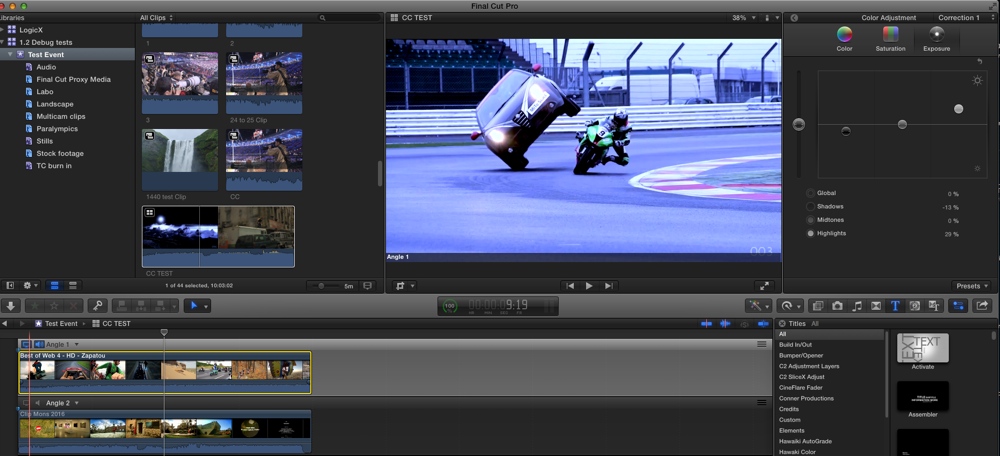
Here's a color correction made on one angle (exaggerated for the test):
Here's the result in the multicam:
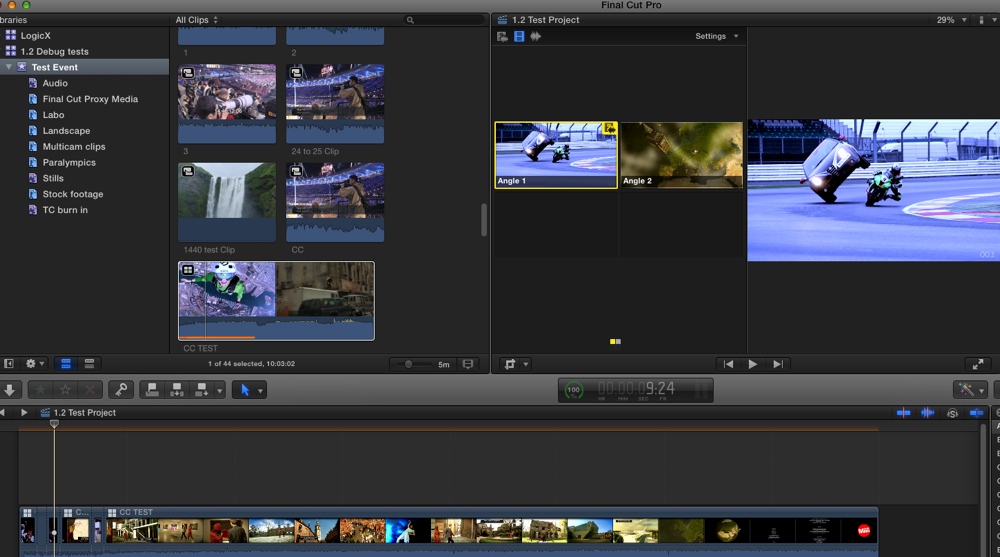
And here's the result on the exported file:
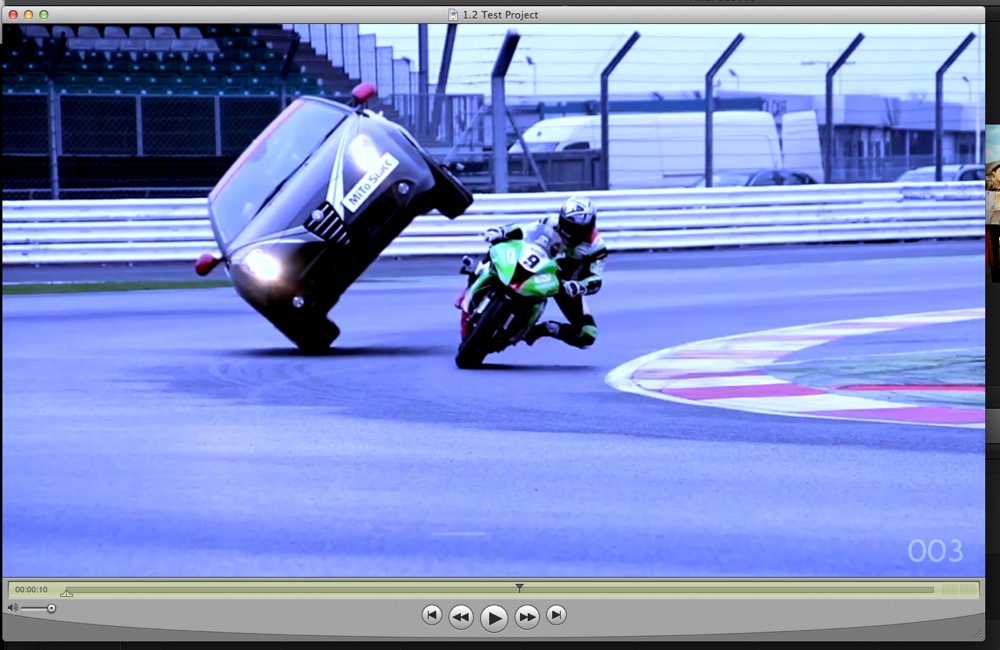
So it seems to be an issue with your workflow or your system and not with 10.1.2.
Follow Tom's advice and if the problem persists post back so we can further assist you.
- Ronny
I just did a test to verify this.
Here's a color correction made on one angle (exaggerated for the test):
Here's the result in the multicam:
And here's the result on the exported file:
So it seems to be an issue with your workflow or your system and not with 10.1.2.
Follow Tom's advice and if the problem persists post back so we can further assist you.
- Ronny
Please Log in to join the conversation.
- smunk_denmark
-
Topic Author
- Offline
- New Member
-
Less
More
- Posts: 3
- Thank you received: 0
16 Jul 2014 12:38 #50064
by smunk_denmark
Replied by smunk_denmark on topic 10.1.2 bug: Color correction in multicam clips not being shared
Tom and Ronny...Thanks to both of you. I'll be more careful with my wording in the future
Tom's advice solved the problem. I went to the angle editor, selected all clips, and turned "color" off and then on in the inspector. After that the export was fine.
Still, it's hardly a feature when the export is different from what you see inside Fcp. I'll try to replicate asap - it probably has to do with "paste attributes".
Tom's advice solved the problem. I went to the angle editor, selected all clips, and turned "color" off and then on in the inspector. After that the export was fine.
Still, it's hardly a feature when the export is different from what you see inside Fcp. I'll try to replicate asap - it probably has to do with "paste attributes".
Please Log in to join the conversation.

18 Jul 2014 20:08 #50199
by dkag7
Replied by dkag7 on topic 10.1.2 bug: Color correction in multicam clips not being shared
I am seeing this as well, but the clips are not multicam.
In the timeline they are rendered with the color correction applied OK, export and about 50% or so of the clips have no color correction applied (exported as h264).
clips are 422, some on main track some on upper track/s.
haven't had time yet to see if I can find where the problem is..
Kurt
In the timeline they are rendered with the color correction applied OK, export and about 50% or so of the clips have no color correction applied (exported as h264).
clips are 422, some on main track some on upper track/s.
haven't had time yet to see if I can find where the problem is..
Kurt
Please Log in to join the conversation.
- rodrigoafonseca
-
- Offline
- New Member
-
Less
More
- Posts: 1
- Thank you received: 0
22 Jul 2014 11:48 - 22 Jul 2014 11:50 #50295
by rodrigoafonseca
Replied by rodrigoafonseca on topic 10.1.2 bug: Color correction in multicam clips not being shared
I'm having the same issue with copy/paste color attributes on clips in the timeline. In FCPX monitor seams to be color corrected, but when exported it fails in some clips. I've tried to set color correction manually, and it worked. But I'd love to be able to copy and paste it on several, since I work on 30min length projects with hundreds of cuts.
I do not use multi cam clips.
I do not use multi cam clips.
Last edit: 22 Jul 2014 11:50 by rodrigoafonseca. Reason: Adding important info about the subject.
Please Log in to join the conversation.
- ronny courtens
-
- Offline
- Moderator
-
Less
More
- Posts: 4455
- Thank you received: 962
22 Jul 2014 12:09 #50302
by ronny courtens
Replied by ronny courtens on topic 10.1.2 bug: Color correction in multicam clips not being shared
I am not seeing this problem, but as more people are reporting this now I think it would be wise to use the Feedback page and accurately describe the issue you are experiencing. The more people report this to Apple the faster they are going to have a look at it.
- Ronny
- Ronny
Please Log in to join the conversation.
- Tom Wolsky
-
- Offline
- Moderator
-
22 Jul 2014 12:16 #50305
by Tom Wolsky
Replied by Tom Wolsky on topic 10.1.2 bug: Color correction in multicam clips not being shared
Did you use this solution mentioned above:
"Select all the clips in timeline. In the video inspector switch off the color correction and then switch it back on. See if it exports."
This effectively switches off the correction and reapplies it not using the paste attributes mechanism. It has nothing to do with multicam editing. It applies to other paste attribute functions like crop settings.
"Select all the clips in timeline. In the video inspector switch off the color correction and then switch it back on. See if it exports."
This effectively switches off the correction and reapplies it not using the paste attributes mechanism. It has nothing to do with multicam editing. It applies to other paste attribute functions like crop settings.
Please Log in to join the conversation.
- NinjaMonkey
-
- Offline
- New Member
-
Less
More
- Posts: 9
- Thank you received: 1
22 Jul 2014 12:27 #50307
by NinjaMonkey
Replied by NinjaMonkey on topic 10.1.2 bug: Color correction in multicam clips not being shared
This is definitely a bug as it has affected me and our other edit suites, it does seem to be a copy/paste attributes bug and I have submitted a bug report to apple last week, this is highly annoying and causing me no end of grief and lost time.
Please Log in to join the conversation.
- ronny courtens
-
- Offline
- Moderator
-
Less
More
- Posts: 4455
- Thank you received: 962
22 Jul 2014 12:45 - 22 Jul 2014 12:47 #50308
by ronny courtens
Replied by ronny courtens on topic 10.1.2 bug: Color correction in multicam clips not being shared
I have finally been able to recreate the issue.
I created a timeline with clips in various formats, including some stills. Applied a distinct color correction to the first clip, then use Paste Attributes to paste the correction onto the other clips. Everything looked OK in the timeline. But after exporting the correction was missing on some clips. All .mov clips had the correction in the exported video, the stills and three native XDCAM clips did not have it. Maybe that's why I did not notice this in earlier tests.
Then I tried Tom's suggestion (CMD+A, deselect and reselect Color Correction) and exported again: all perfect now.
I think we can safely confirm this as a bug and I invite everyone to personally report this to Apple so they get it fixed. In the meantime Tom's workaround is fast and it works flawlessly, so use it.
- Ronny
I created a timeline with clips in various formats, including some stills. Applied a distinct color correction to the first clip, then use Paste Attributes to paste the correction onto the other clips. Everything looked OK in the timeline. But after exporting the correction was missing on some clips. All .mov clips had the correction in the exported video, the stills and three native XDCAM clips did not have it. Maybe that's why I did not notice this in earlier tests.
Then I tried Tom's suggestion (CMD+A, deselect and reselect Color Correction) and exported again: all perfect now.
I think we can safely confirm this as a bug and I invite everyone to personally report this to Apple so they get it fixed. In the meantime Tom's workaround is fast and it works flawlessly, so use it.
- Ronny
Last edit: 22 Jul 2014 12:47 by ronny courtens.
Please Log in to join the conversation.
- Kody Gibson
-
- Offline
- New Member
-
Less
More
- Posts: 1
- Thank you received: 0
22 Jul 2014 23:52 - 23 Jul 2014 00:00 #50339
by Kody Gibson
Replied by Kody Gibson on topic 10.1.2 bug: Color correction in multicam clips not being shared
I'm having this same problem. Deactivating and activating Color is not working for me. I have also tried deleting render files without success.
Edit: Ok, so you have to select all clips in the Angle Editor, switch color off and on. Not in the Project timeline. I must have missed that detail. Got it. Fixed. Thanks.
Edit: Ok, so you have to select all clips in the Angle Editor, switch color off and on. Not in the Project timeline. I must have missed that detail. Got it. Fixed. Thanks.
Last edit: 23 Jul 2014 00:00 by Kody Gibson.
Please Log in to join the conversation.
23 Jul 2014 01:34 #50340
by dkag7
Replied by dkag7 on topic 10.1.2 bug: Color correction in multicam clips not being shared
Turning on and off the color did not work for me either.
After trying that what I did was delete all render files, then change one of the color sliders (i think i moved one of the exposure settings a bit), then export was OK.
I exported in 422, x264 and h264. All were OK.
This was on a timeline without multicam
kurt
After trying that what I did was delete all render files, then change one of the color sliders (i think i moved one of the exposure settings a bit), then export was OK.
I exported in 422, x264 and h264. All were OK.
This was on a timeline without multicam
kurt
Please Log in to join the conversation.

23 Jul 2014 11:11 #50359
by Simmie
Replied by Simmie on topic 10.1.2 bug: Color correction in multicam clips not being shared
We have also seen the bug here, toggling the correction on then off hasn't worked for us - but we can get colour-corrected exports by sending via compressor.
Please Log in to join the conversation.
- fb_1084894937
-
- Offline
- New Member
-
Less
More
- Posts: 1
- Thank you received: 0
07 Aug 2014 23:02 #51083
by fb_1084894937
Replied by fb_1084894937 on topic 10.1.2 bug: Color correction in multicam clips not being shared
Same problem in my project. Switching on/off helped.
Please Log in to join the conversation.
- Daniel Rutledge
-
- Offline
- Premium Member
-

- Those that know don't tell, and those that tell don't know.
08 Aug 2014 14:41 #51101
by Daniel Rutledge
Replied by Daniel Rutledge on topic 10.1.2 bug: Color correction in multicam clips not being shared
I've had the same problem several times. It always occurs in multi-cam clips for me (but that constitutes a majority of my work). Most of the time switching on and off has fixed it but on two occasions it did not. In that case I made a small adjustment to all color corrections, and that solved it.
I reported the problem to Apple immediately, of course.
But I am chiming in to confirm that switching CC off and on does not always remedy the problem, so beware and check your re-export carefully after using that as a first fix.
I reported the problem to Apple immediately, of course.
But I am chiming in to confirm that switching CC off and on does not always remedy the problem, so beware and check your re-export carefully after using that as a first fix.
Please Log in to join the conversation.
