


- Posts: 46
- Thank you received: 0
3 Post Moderation Rule for New Boarders (25 Jan 2021)
New boarders will have their posts moderated - Don't worry if you cannot see your post immediately.
Lack of choices for settings in share menu
16 Jul 2014 06:41 #50045
by Doug108
Lack of choices for settings in share menu was created by Doug108
Hi
I have a video I did in Premier Pro a while ago, I had to make a change to it recently. I am confused in relation to output file size.
The original cut was 25 minutes rendered at 1920x180 29.97fps Format 1080p Audio 48Khz with H264 codec, giving me a file size of 773 Mbs
After adding a 3 second lower third title I went to share and the choices were slim to say the least.
I have tried setting up for the following ways
YouTube HD720p (1280x720) gives me a file size of 1.93Gb
if I change to HD1080p (1920x1080) I get 1.88Gb
Master File Format Computer H264 1280 x 720 gives me 2.33Gb
Master file web hosting gives me 2.88Gb
Master File Video and Audio H264 1920 x 1080 gives me 4.23Gb
If PP was able to render this file at less than 1Gb why can't FCPX match that, and also the limits of choice in the settigns seems incredibly restrictive compared to PP.
I would apreciate any advice as to get decent sizes with good quality for eventual uploading to You Tube. I can't upload directly as they need to be viewed and approved by a thrid party before publishing, so I have to save to computer then sync the file to their computer and then do an upload once approved.
Thanks for any advice
I have a video I did in Premier Pro a while ago, I had to make a change to it recently. I am confused in relation to output file size.
The original cut was 25 minutes rendered at 1920x180 29.97fps Format 1080p Audio 48Khz with H264 codec, giving me a file size of 773 Mbs
After adding a 3 second lower third title I went to share and the choices were slim to say the least.
I have tried setting up for the following ways
YouTube HD720p (1280x720) gives me a file size of 1.93Gb
if I change to HD1080p (1920x1080) I get 1.88Gb
Master File Format Computer H264 1280 x 720 gives me 2.33Gb
Master file web hosting gives me 2.88Gb
Master File Video and Audio H264 1920 x 1080 gives me 4.23Gb
If PP was able to render this file at less than 1Gb why can't FCPX match that, and also the limits of choice in the settigns seems incredibly restrictive compared to PP.
I would apreciate any advice as to get decent sizes with good quality for eventual uploading to You Tube. I can't upload directly as they need to be viewed and approved by a thrid party before publishing, so I have to save to computer then sync the file to their computer and then do an upload once approved.
Thanks for any advice
Please Log in to join the conversation.
- ronny courtens
-

- Offline
- Moderator
-

Less
More
- Posts: 4455
- Thank you received: 962
16 Jul 2014 06:59 #50047
by ronny courtens
Replied by ronny courtens on topic Lack of choices for settings in share menu
Hey Doug,
The FCP X Share menu offers a number of standard export settings that will suit most regular users. If you have Compressor installed you can create custom settings to compress your video at lower bit rates, resulting in smaller file sizes. These settings can be added as custom Destinations to the FCP X Share menu if you want to re-use them in the future.
- Ronny
The FCP X Share menu offers a number of standard export settings that will suit most regular users. If you have Compressor installed you can create custom settings to compress your video at lower bit rates, resulting in smaller file sizes. These settings can be added as custom Destinations to the FCP X Share menu if you want to re-use them in the future.
- Ronny
Please Log in to join the conversation.
16 Jul 2014 07:11 #50048
by Doug108
Replied by Doug108 on topic Lack of choices for settings in share menu
Thanks Ronny, I do have compressor, just haven't looked at it yet. I seem to remember dropping the bit rate in PP, so maybe thats the issue. Pity that FCPX doesn't give you those adjustment options within the program itself, rather than having to use a second program.
OK thanks for the quick reply.
OK thanks for the quick reply.
Please Log in to join the conversation.

16 Jul 2014 09:23 #50052
by cgbier
Replied by cgbier on topic Lack of choices for settings in share menu
They still need an argument to sell Compressor.
I export my YouTube stuff via MPEG Streamclip or sometimes even Handbrake. They won't give me all the Compressor features, but I, at least, can set a target size for the files.
I export my YouTube stuff via MPEG Streamclip or sometimes even Handbrake. They won't give me all the Compressor features, but I, at least, can set a target size for the files.
Please Log in to join the conversation.
16 Jul 2014 12:45 #50065
by Doug108
Replied by Doug108 on topic Lack of choices for settings in share menu
Hi again Ronny
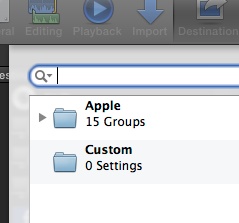
I created a custom h264 setting in compressor, but it won't show in FCPX. I can see the 10 apple settings, but the custom folder shows 0. I have trolled many threads elsewhere but short of uninstalling both programs and then reinstalling them after doing a clean app on the computer I can't see an answer.
I have checked the Library>Application Support>Compressor>settings folder and the new custom preset is there.
Can I copy that to the correct plist that fcpx uses? I have never worked with plists before so not sure what to do, if its possible.
Thanks
I created a custom h264 setting in compressor, but it won't show in FCPX. I can see the 10 apple settings, but the custom folder shows 0. I have trolled many threads elsewhere but short of uninstalling both programs and then reinstalling them after doing a clean app on the computer I can't see an answer.
I have checked the Library>Application Support>Compressor>settings folder and the new custom preset is there.
Can I copy that to the correct plist that fcpx uses? I have never worked with plists before so not sure what to do, if its possible.
Thanks
Please Log in to join the conversation.
16 Jul 2014 12:47 #50066
by Doug108
Replied by Doug108 on topic Lack of choices for settings in share menu
Thanks CGBier,
Its that sort of mindset that made me ditch windows and move to Linux where I have been very happy to live for the last 7 years. If only cinellera was as advanced as fcpx I would have stayed, but at this stage it is laggin a little. I hate big corporations dictating to their customer base.
Its that sort of mindset that made me ditch windows and move to Linux where I have been very happy to live for the last 7 years. If only cinellera was as advanced as fcpx I would have stayed, but at this stage it is laggin a little. I hate big corporations dictating to their customer base.
Please Log in to join the conversation.
- ronny courtens
-
- Offline
- Moderator
-
Less
More
- Posts: 4455
- Thank you received: 962
16 Jul 2014 12:52 #50067
by ronny courtens
Replied by ronny courtens on topic Lack of choices for settings in share menu
In FCP X press the Share button, then in the Share Project window press the Add Destination button:
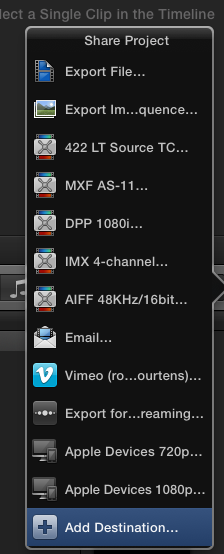
This will open the Destinations window. In the Destinations window double-click the Compressor Settings icon, which will show all your Compressor presets. Scroll down to the Custom folder, select your custom H.264 setting and press OK:
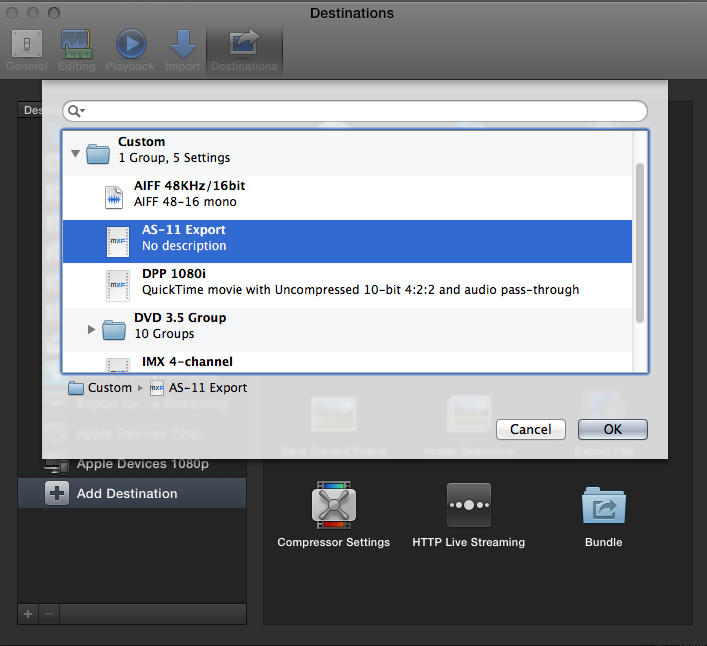
This will add your custom H.264 preset to the Destinations list.
- Ronny
This will open the Destinations window. In the Destinations window double-click the Compressor Settings icon, which will show all your Compressor presets. Scroll down to the Custom folder, select your custom H.264 setting and press OK:
This will add your custom H.264 preset to the Destinations list.
- Ronny
Please Log in to join the conversation.
16 Jul 2014 12:56 #50068
by Doug108
Replied by Doug108 on topic Lack of choices for settings in share menu
Sorry maybe I didn't make myself clear. The new custom setting is not showing up in the custom folder. Your screen shot shows AS-11 Export, in your custom folder. My custom folder shows '0' despite their being a new custom preset that has been correctly created inside compressor. It doesn't show in FCPX?
Please Log in to join the conversation.
- ronny courtens
-
- Offline
- Moderator
-
Less
More
- Posts: 4455
- Thank you received: 962
16 Jul 2014 13:01 #50069
by ronny courtens
Replied by ronny courtens on topic Lack of choices for settings in share menu
When you open Compressor, don't you see any presets when you disclose the Custom settings triangle?
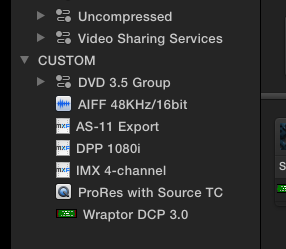
- Ronny
- Ronny
Please Log in to join the conversation.
16 Jul 2014 13:06 #50071
by Doug108
Replied by Doug108 on topic Lack of choices for settings in share menu
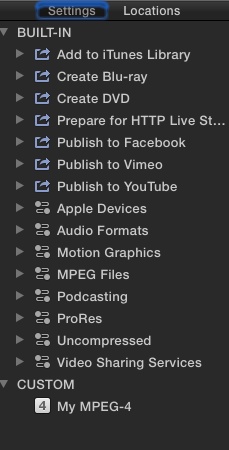
Your still not seeing it. The first image is my compressor settings. You can see the new custom preset called My mpeg 4 The second image is FCPX share add destination drop down, you can see the 15 Apple Groups, and Custom 0. It should show Custom 1
Please Log in to join the conversation.
- ronny courtens
-
- Offline
- Moderator
-
Less
More
- Posts: 4455
- Thank you received: 962
16 Jul 2014 13:10 #50072
by ronny courtens
Replied by ronny courtens on topic Lack of choices for settings in share menu
Close FCP X, then re-launch it and try again.
- Ronny
- Ronny
Please Log in to join the conversation.
16 Jul 2014 13:12 #50073
by Doug108
Replied by Doug108 on topic Lack of choices for settings in share menu
Done about 4 times already. also rebooted. Just the same. I saw when I googled this issue that it is not a new one. But I don't want to have to uniinstall. clean and then reinstall both programs, thats a farce.
Any other ideas?
Any other ideas?
Please Log in to join the conversation.

16 Jul 2014 13:16 #50074
by ddixon
Replied by ddixon on topic Lack of choices for settings in share menu
Do you have older versions of the Apple Pro Apps installed? I had this exact same problem for months and finally solved it by deleting the old software. Sorry, I can't remember now if it was FCP7, Motion 4, or an old version of Compressor. But, just deleting that old software fixed everything.
Somehow FCPX was looking to the wrong (older) folder for those Custom presets, despite every effort to point it elsewhere.
If you don't have those still installed, maybe this is at least a clue - it's looking somehow to the wrong location. Hope this helps...
Somehow FCPX was looking to the wrong (older) folder for those Custom presets, despite every effort to point it elsewhere.
If you don't have those still installed, maybe this is at least a clue - it's looking somehow to the wrong location. Hope this helps...
Please Log in to join the conversation.
16 Jul 2014 13:18 - 16 Jul 2014 13:27 #50075
by Doug108
Replied by Doug108 on topic Lack of choices for settings in share menu
Nope no older programs, in fact this whole OS installation is less than two months old. I figured that it is looking in the wrong place for the settings, as I found somewhere a thread saying that FCPX has a particualr plist where it stores the share settings, but I dont know how to edit the plist or add my preset into it.
EDIT: - that idea just went out the window, I found the plist, but the entries are just gobbledgook to me, so no way to manualy add in my preset there.
EDIT: - that idea just went out the window, I found the plist, but the entries are just gobbledgook to me, so no way to manualy add in my preset there.
Last edit: 16 Jul 2014 13:27 by Doug108. Reason: more info
Please Log in to join the conversation.
16 Jul 2014 13:26 #50076
by ddixon
Replied by ddixon on topic Lack of choices for settings in share menu
Sorry that didn't help. I guess at this point I would trash and reinstall FCPX. It's actually not a big thing to do - just drag the app to the trash, delete prefs with one of the utilities, re-install from the App Store. Only takes a few minutes - can't hurt.
One other thought, have you tried this with a fresh, new user account?
One other thought, have you tried this with a fresh, new user account?
Please Log in to join the conversation.
- ronny courtens
-
- Offline
- Moderator
-
Less
More
- Posts: 4455
- Thank you received: 962
16 Jul 2014 13:29 #50077
by ronny courtens
Replied by ronny courtens on topic Lack of choices for settings in share menu
Editing the plist is useless because next time you create a custom setting in Compressor you will have the same problem.
I agree uninstalling and reinstalling only takes a few minutes. You can use FCS Remover (free) to completely uninstall FCP X and/or Compressor and all the associated files: www.digitalrebellion.com/fcsremover/
- Ronny
I agree uninstalling and reinstalling only takes a few minutes. You can use FCS Remover (free) to completely uninstall FCP X and/or Compressor and all the associated files: www.digitalrebellion.com/fcsremover/
- Ronny
Please Log in to join the conversation.
16 Jul 2014 13:30 #50078
by Doug108
Replied by Doug108 on topic Lack of choices for settings in share menu
Haven't tried with a new user account, I will do that tomorrow and see what happens. Other than that I might have to trash and reinstall. One thing I loved about Linux is using th terminal and a text editor you could do anything and with care make the syetm be the way you wanted it. not the way someone else wanted it. Oh well can't keep looking back I guess. Onward and upward
Thanks for the help I will post results tomorrow.
Thanks for the help I will post results tomorrow.
Please Log in to join the conversation.
17 Jul 2014 09:01 #50130
by Doug108
Replied by Doug108 on topic Lack of choices for settings in share menu
Ok guys, looks like thats the trip I will have to take. One question though, will I lose all my fxfactory plugins and have to download them all again? or do they automatically populate the new installation?
Still not overly familair with Apples install/uninstall methods.
Still not overly familair with Apples install/uninstall methods.
Please Log in to join the conversation.
- ronny courtens
-
- Offline
- Moderator
-
Less
More
- Posts: 4455
- Thank you received: 962
17 Jul 2014 09:16 #50132
by ronny courtens
Replied by ronny courtens on topic Lack of choices for settings in share menu
I would remove and re-install Compressor first. If that doesn't solve the issue then yes, do it for both apps. The FX Factory plugin manager will still be on your system. Open it to reinstall the plugins in FCP X from there if needed.
- Ronny
- Ronny
Please Log in to join the conversation.
