


- Posts: 19
- Thank you received: 1
3 Post Moderation Rule for New Boarders (25 Jan 2021)
New boarders will have their posts moderated - Don't worry if you cannot see your post immediately.
How to control Fade in and Fade out of a Title
15 Jul 2014 12:43 #49984
by Ralph
How to control Fade in and Fade out of a Title was created by Ralph
I'm trying to create a Title that fades in and out with FCP-X version 0.9. I select a title type from titles. Place that over my video. Open up video animation editor and click on Composting Opacity. Go to inspector window and open FACE window. Set the opacity to zero and click on add key frame. Move to where I want the title to be at 100% opacity and add another key frame moving the slider to 100%. Move to where I want the title to start to fade and add another key frame then another key frame where I want the title at zero opacity again and add a final key frame. When I play back the title sequence I can see the slider moving from zero to 100% and back at the key frame points but the actual title remains at zero throughout the viewing. Also there is no physical key frame diamonds anywhere on the time line even thought they seem to be set in the inspector. Any ideas about what I should do to create fade in and face out points on my titles would be greatly appreciated.
Please Log in to join the conversation.
- Tom Wolsky
-

- Offline
- Moderator
-

15 Jul 2014 13:30 #49991
by Tom Wolsky
Replied by Tom Wolsky on topic How to control Fade in and Fade out of a Title
Way too many steps in the wrong place. You could just add cross dissolves at the beginning and end of the title. You don't need video animation editor. If you really want to do it with keyframes use the video inspector. At the bottom click a keyframe for opacity. Set the level to zero. Move forward change the value to 100. The keyframe is added for you. Go forward, add another keyframe to hold it. Go forward and change the value to 0. The last keyframe will be added for you.
Please Log in to join the conversation.
15 Jul 2014 13:50 #49994
by Ralph
Replied by Ralph on topic How to control Fade in and Fade out of a Title
Thanks, Tom. My problem was I was setting key frames using the Text tab in the inspector. As you pointed out I should have been using the Video tab to set key frames. I can now see the key frame diamonds in the compositing opacity bar in video animation and slide the diamonds around to set the timing. Mystery solved. thanks again.
Please Log in to join the conversation.

16 Jul 2014 17:50 #50092
by rhoydotp
Replied by rhoydotp on topic How to control Fade in and Fade out of a Title
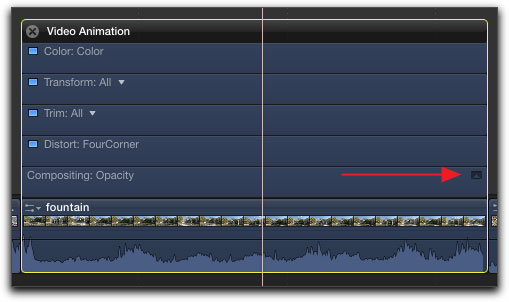
I find it easier to control the fades using the "Show Animation" -> "Compositing: Opacity" than using keyframes for titles.
*not my screenshot
*not my screenshot
Please Log in to join the conversation.
- Tom Wolsky
-
- Offline
- Moderator
-
16 Jul 2014 17:53 #50093
by Tom Wolsky
Replied by Tom Wolsky on topic How to control Fade in and Fade out of a Title
I find it easiest to select the title and press Cmd-T.
Please Log in to join the conversation.
16 Jul 2014 18:18 #50094
by rhoydotp
Replied by rhoydotp on topic How to control Fade in and Fade out of a Title
So the options, in order of degree of difficulty! 
1. Keyframes
2. Compositing: Opacity
3. Cmd-T (only works if default transition is cross-dissolve)
Lots of ways to skin the cat, some would say
1. Keyframes
2. Compositing: Opacity
3. Cmd-T (only works if default transition is cross-dissolve)
Lots of ways to skin the cat, some would say
Please Log in to join the conversation.
- Jonathan Levin
-

- Offline
- Platinum Member
-

Less
More
- Posts: 786
- Thank you received: 21
16 Jul 2014 21:48 #50108
by Jonathan Levin
Replied by Jonathan Levin on topic How to control Fade in and Fade out of a Title
I've never liked the results fading with the Compositing slider and keyframes works. The speed of the fade never quite worked for me.
I use a Fade to Color transition (in the Transitions>Disolves) and then I adjust the Midpoint and Hold sliders. Give it a try.
Jonathan
I use a Fade to Color transition (in the Transitions>Disolves) and then I adjust the Midpoint and Hold sliders. Give it a try.
Jonathan
Please Log in to join the conversation.
