


- Posts: 6
- Thank you received: 0
3 Post Moderation Rule for New Boarders (25 Jan 2021)
New boarders will have their posts moderated - Don't worry if you cannot see your post immediately.
Plugin issue in FCPX 10.1.2
14 Jul 2014 15:29 #49889
by Captvid
Plugin issue in FCPX 10.1.2 was created by Captvid
Hello, first time writing to the forum, long time user of FCP.
I noticed since I loaded FCPX 10.1.2 certain plugins don't seem to do anything. Right now I when I load in grid tools like Andy's Safe Guides, the lines don't show up and it dims the image. My Volumetrix plugins make the image disappear. Could this be my video card? I'm using a AMD 6870 modified for mac. Other than certain plugins not working, everything else seems fine. Anyone have any thoughts?
I noticed since I loaded FCPX 10.1.2 certain plugins don't seem to do anything. Right now I when I load in grid tools like Andy's Safe Guides, the lines don't show up and it dims the image. My Volumetrix plugins make the image disappear. Could this be my video card? I'm using a AMD 6870 modified for mac. Other than certain plugins not working, everything else seems fine. Anyone have any thoughts?
Please Log in to join the conversation.
- ronny courtens
-

- Offline
- Moderator
-

Less
More
- Posts: 4455
- Thank you received: 962
14 Jul 2014 16:58 - 14 Jul 2014 17:02 #49891
by ronny courtens
Replied by ronny courtens on topic Plugin issue in FCPX 10.1.2
Post deleted (pics not showing), see next post.
- Ronny
- Ronny
Last edit: 14 Jul 2014 17:02 by ronny courtens.
Please Log in to join the conversation.
- ronny courtens
-
- Offline
- Moderator
-
Less
More
- Posts: 4455
- Thank you received: 962
14 Jul 2014 16:59 - 14 Jul 2014 17:00 #49892
by ronny courtens
Replied by ronny courtens on topic Plugin issue in FCPX 10.1.2
Whenever you update FCP X or the OS it is a good idea to go to the website of the plugin developer to see if they have updated their plugins as well. You always should work with the latest version on any plugins.
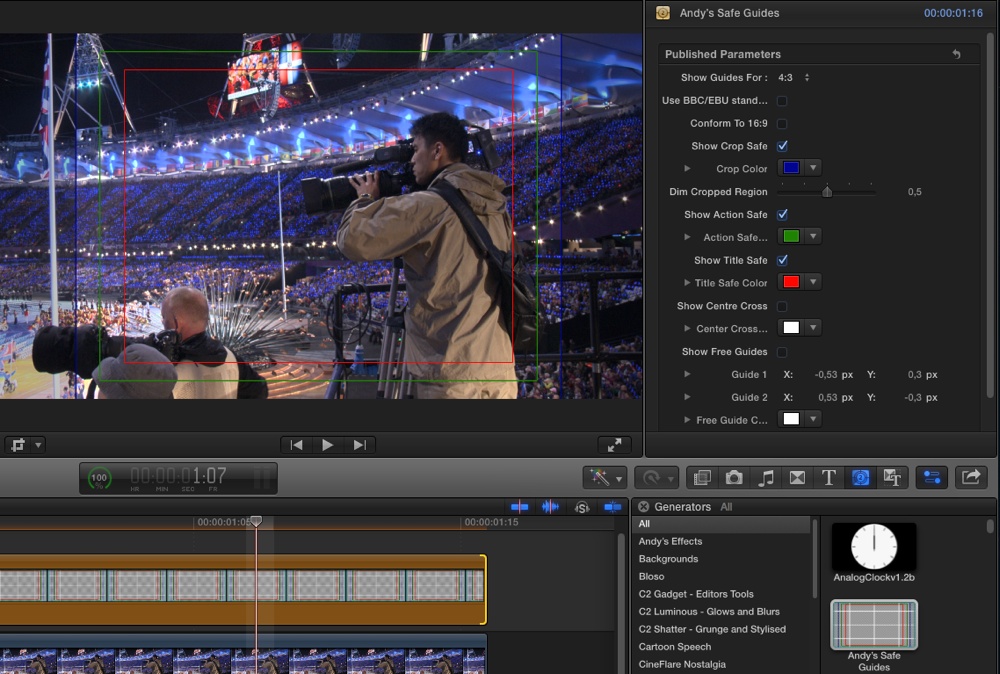
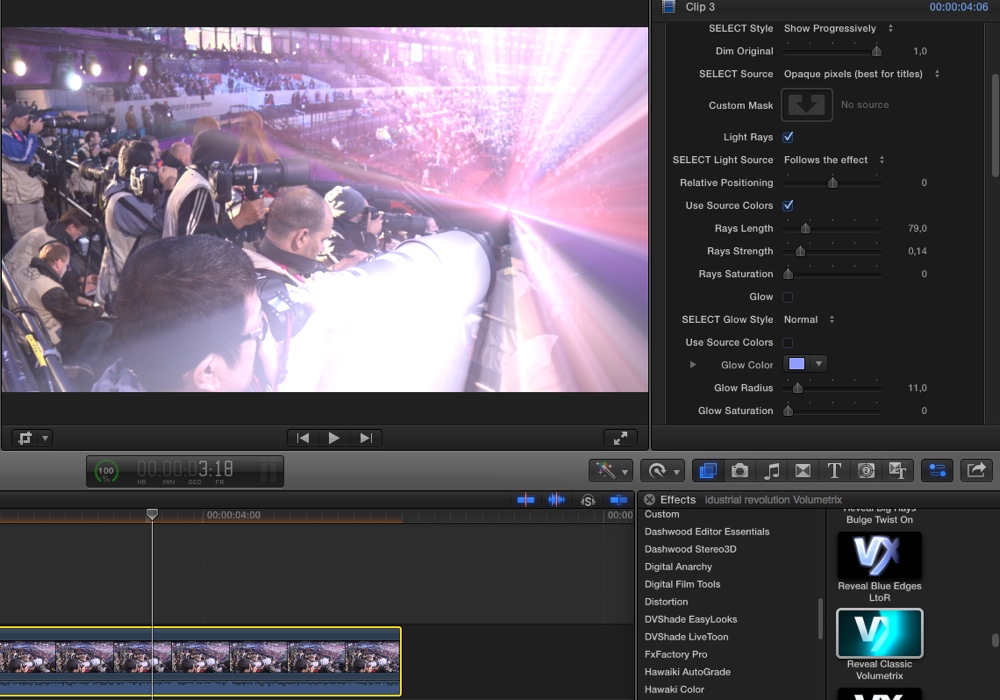
This said I just tested both Andy's Safe Guides and one of the excellent Volumetrix plugins and everything seems to work fine. So there might indeed be an issue with your graphics card. Do you have the possibility to check the same plugins with 10.1.2 on a different system?
Andy's Safe Guides:
Volumetrix Classic Reveal:
- Ronny
This said I just tested both Andy's Safe Guides and one of the excellent Volumetrix plugins and everything seems to work fine. So there might indeed be an issue with your graphics card. Do you have the possibility to check the same plugins with 10.1.2 on a different system?
Andy's Safe Guides:
Volumetrix Classic Reveal:
- Ronny
Last edit: 14 Jul 2014 17:00 by ronny courtens.
Please Log in to join the conversation.
14 Jul 2014 17:11 #49894
by Captvid
Replied by Captvid on topic Plugin issue in FCPX 10.1.2
Thanks for the reply Ronnie, Unfortunately I don't have another system that I can test it. I confirmed that it has something to do with the upgrade because I reloaded 10.1 .1 and it seems fine. Plus I haven't read of anyone else having the same issues. So I'm trying to eliminate the possible causes. Maybe it will be corrected when I load OS 10.9.4.
Please Log in to join the conversation.
- ronny courtens
-
- Offline
- Moderator
-
Less
More
- Posts: 4455
- Thank you received: 962
14 Jul 2014 17:16 #49895
by ronny courtens
Replied by ronny courtens on topic Plugin issue in FCPX 10.1.2
That's certainly a good idea.
If this does not help: refresh your FCP X preferences. Best method for doing this now is to quit FCP X and re-launch it while pressing and holding the OPTION (ALT) + the CMD keys. Good-old Preference Manager seems to fail refreshing the prefs sometimes since the latest updates.
Also do a Repair Permissions on your system drive.
If all this does not bring the plugins back in good working order you can try to re-install them and see if this helps.
- Ronny
If this does not help: refresh your FCP X preferences. Best method for doing this now is to quit FCP X and re-launch it while pressing and holding the OPTION (ALT) + the CMD keys. Good-old Preference Manager seems to fail refreshing the prefs sometimes since the latest updates.
Also do a Repair Permissions on your system drive.
If all this does not bring the plugins back in good working order you can try to re-install them and see if this helps.
- Ronny
Please Log in to join the conversation.
14 Jul 2014 17:19 #49896
by Captvid
Replied by Captvid on topic Plugin issue in FCPX 10.1.2
I'll give them as shot, sorry I got your name wrong.
Thanks
Thanks
Please Log in to join the conversation.
- ronny courtens
-
- Offline
- Moderator
-
Less
More
- Posts: 4455
- Thank you received: 962
14 Jul 2014 17:23 #49898
by ronny courtens
Replied by ronny courtens on topic Plugin issue in FCPX 10.1.2
No sweat, it's just a name 
I hope you will be able to solve this without having to worry about the hardware.
- Ronny
I hope you will be able to solve this without having to worry about the hardware.
- Ronny
Please Log in to join the conversation.
14 Jul 2014 17:53 #49903
by Captvid
Replied by Captvid on topic Plugin issue in FCPX 10.1.2
Good news! I think the preferences worked, I see both plugins working! Thanks for your help. I'm not ready to make any dramatic changes right now so It's nice to know I can still work with what I have and not miss all the new stuff.
Please Log in to join the conversation.
- ronny courtens
-
- Offline
- Moderator
-
Less
More
- Posts: 4455
- Thank you received: 962
14 Jul 2014 17:59 #49905
by ronny courtens
Replied by ronny courtens on topic Plugin issue in FCPX 10.1.2
As my good friend Ken Stone always says: Good news, I love good news!
Glad you got the plugins working again. Never change a good-working system unless you really need to
- Ronny
Glad you got the plugins working again. Never change a good-working system unless you really need to
- Ronny
Please Log in to join the conversation.
