


- Posts: 31
- Thank you received: 0
3 Post Moderation Rule for New Boarders (25 Jan 2021)
New boarders will have their posts moderated - Don't worry if you cannot see your post immediately.
Problem with Transitions Across Compound Clips
- S.Clements
-
 Topic Author
- Offline
- Junior Member
-

Less
More
13 Jul 2014 23:39 #49826
by S.Clements
Problem with Transitions Across Compound Clips was created by S.Clements
I am having great problems creating transitions across compound clips. For example, I want to have a bloom transition that traditions from one scene consisting of one video clip to another scene that has one videoclip, a connected clip solid colour layer with reduced opacity and above it a graphics layer, and above that a text layer. With the bloom effect, you can't just put it on every layer, because it gives strange artefacts during the transition. However, when I try to cut everything up into compound clips, it won't give me any handles to make the transition. If I go in and try to give myself handles, it throws my whole project out of sync. How do you deal with this sort of thing?
Please Log in to join the conversation.

14 Jul 2014 03:30 #49834
by tpayton
Replied by tpayton on topic Problem with Transitions Across Compound Clips
It looks like you are new to fcp.co, so welcome.
I believe what you are describing is not having enough content in your compound clips to apply a transition between them. If that is the case you need to either add more content inside the compound clips or alter the transition position so it uses more of the existing compound clips. In practical terms, shorten the tail your outgoing clip by the duration of the transition (eg 1 second). Do the same with the top of your incoming clip.
Does this make sense?
I believe what you are describing is not having enough content in your compound clips to apply a transition between them. If that is the case you need to either add more content inside the compound clips or alter the transition position so it uses more of the existing compound clips. In practical terms, shorten the tail your outgoing clip by the duration of the transition (eg 1 second). Do the same with the top of your incoming clip.
Does this make sense?
Please Log in to join the conversation.
- S.Clements
-
Topic Author
- Offline
- Junior Member
-
Less
More
- Posts: 31
- Thank you received: 0
14 Jul 2014 03:44 #49835
by S.Clements
Replied by S.Clements on topic Problem with Transitions Across Compound Clips
Thanks, tpayton. Unfortunately this is a real slowdown in FCP X's workflow. FCP X really should remember all the media it has to work with at the point the compound clip is made and allow you to extend beyond whenever you wish to. Now, a lot of time will be spent adding handles, making clips, trimming handles, etc, just to make a transition between shots with more than one layer. Some on the net have even referred to this as a "bug". I think it's a major oversight.
Please Log in to join the conversation.

14 Jul 2014 03:54 #49837
by Redifer
Replied by Redifer on topic Problem with Transitions Across Compound Clips
Agreed, manually adding handles inside compound clips is a pain and really slows the workflow. If you add handles to the beginning it slips everything out of sync on the timeline and then you have to shorten it by the amount you added to get it back in where it was. It doesn't care if you lengthen the tail.
Please Log in to join the conversation.

14 Jul 2014 14:45 #49887
by alex4D
Replied by alex4D on topic Problem with Transitions Across Compound Clips
A workaround is to use an animated bloom effect applied to an adjustment layer applied between the clips.
@Alex4D
@Alex4D
Please Log in to join the conversation.
- S.Clements
-
Topic Author
- Offline
- Junior Member
-
Less
More
- Posts: 31
- Thank you received: 0
14 Jul 2014 22:32 #49939
by S.Clements
Replied by S.Clements on topic Problem with Transitions Across Compound Clips
That's interesting, Alex. I haven't looked at animating a bloom. I'll try it. Still a slowdown though. I wonder if Apple is aware of this.
Please Log in to join the conversation.
14 Jul 2014 22:58 #49941
by tpayton
Replied by tpayton on topic Problem with Transitions Across Compound Clips
It appears to me like the transition behavior is the same for compound clips as it is of regular clips. How would you propose this be different than it currently is?
Please Log in to join the conversation.
14 Jul 2014 23:28 - 14 Jul 2014 23:29 #49942
by plysat
Can't sleep? Try this: fcpxpert.net ;-)
Replied by plysat on topic Problem with Transitions Across Compound Clips
Just add handles to the clips before you compound them, (may have to pop out of the primary to do so) then trim it to fit the space you had before. Easy and takes no time at all. As tpayton says, it's the same for any clip, (and any nested clip in any NLE). If there's no head or tail for a transition it ain't gonna work.
Can't sleep? Try this: fcpxpert.net ;-)
Last edit: 14 Jul 2014 23:29 by plysat.
Please Log in to join the conversation.
- S.Clements
-
Topic Author
- Offline
- Junior Member
-
Less
More
- Posts: 31
- Thank you received: 0
15 Jul 2014 03:28 #49957
by S.Clements
Replied by S.Clements on topic Problem with Transitions Across Compound Clips
Hi, Tpayton.
To answer your question:
"It appears to me like the transition behavior is the same for compound clips as it is of regular clips. How would you propose this be different than it currently is?"
These clips are of course not physical. The media exists beyond the bounds of the compound clips you make. Why not have FCP X let us extend the media that's really there?
Let's say you make a sequence where you have a bunch of graphics sequences laid out one after another. Originally you weren't planning on transitioning between them. You have a video layer, with a semi transparent solid connected to that, with a graphic connected as well, as well as a title or two. After you've edited your piece to music, you think it would be a good idea to transition between all your sequences. The only way to do this is to go to each and every single layer and drag them all out before making your compound clip for each one (meanwhile throwing your whole edit out of sync). Then, you have to manually trim all those compound clips back to be the right length. If you're not careful and forget your trimming mathematics, your whole sequence will be out of sync. Then, you can add a transition.
Why does FCP X make us go through all these gymnastics, when the media is there in the computer? At least with a track-based NLE (with no magnetic timeline), it's easier to perform such preps for nested clips. You just move things up to higher tracks and do your surgery, without everything going out of sync. It's very awkward in the trackless environment.
To answer your question:
"It appears to me like the transition behavior is the same for compound clips as it is of regular clips. How would you propose this be different than it currently is?"
These clips are of course not physical. The media exists beyond the bounds of the compound clips you make. Why not have FCP X let us extend the media that's really there?
Let's say you make a sequence where you have a bunch of graphics sequences laid out one after another. Originally you weren't planning on transitioning between them. You have a video layer, with a semi transparent solid connected to that, with a graphic connected as well, as well as a title or two. After you've edited your piece to music, you think it would be a good idea to transition between all your sequences. The only way to do this is to go to each and every single layer and drag them all out before making your compound clip for each one (meanwhile throwing your whole edit out of sync). Then, you have to manually trim all those compound clips back to be the right length. If you're not careful and forget your trimming mathematics, your whole sequence will be out of sync. Then, you can add a transition.
Why does FCP X make us go through all these gymnastics, when the media is there in the computer? At least with a track-based NLE (with no magnetic timeline), it's easier to perform such preps for nested clips. You just move things up to higher tracks and do your surgery, without everything going out of sync. It's very awkward in the trackless environment.
Please Log in to join the conversation.
15 Jul 2014 03:44 #49960
by plysat
Can't sleep? Try this: fcpxpert.net ;-)
Replied by plysat on topic Problem with Transitions Across Compound Clips
"You just move things up to higher tracks and do your surgery, without everything going out of sync. It's very awkward in the trackless environment."
Actually, it's the same. Pop out of the primary, make adjustments, comp, pop back in. What's different?
Actually, it's the same. Pop out of the primary, make adjustments, comp, pop back in. What's different?
Can't sleep? Try this: fcpxpert.net ;-)
Please Log in to join the conversation.
15 Jul 2014 03:47 #49961
by tpayton
Replied by tpayton on topic Problem with Transitions Across Compound Clips
(BTW. I get what you are saying. I'm just trying to see if there are other ways to accomplish what you are trying to do.)
So I can understand how this would work with a still graphic since there is really no "time" for the clip, you could easily extend the start time negatively as much as you wanted, but how would this work for non-still graphic clips that you can't extend the start time negatively?
Is there some other NLE that behaves this way?
How would a track-based environment help you?
You've brought up an interesting discussion, perhaps you can make a screencast showing your workflow since I have never experienced this need.
S.Clements wrote: These clips are of course not physical. The media exists beyond the bounds of the compound clips you make. Why not have FCP X let us extend the media that's really there?
So I can understand how this would work with a still graphic since there is really no "time" for the clip, you could easily extend the start time negatively as much as you wanted, but how would this work for non-still graphic clips that you can't extend the start time negatively?
Is there some other NLE that behaves this way?
S.Clements wrote: Why does FCP X make us go through all these gymnastics, when the media is there in the computer? At least with a track-based NLE (with no magnetic timeline), it's easier to perform such preps for nested clips. You just move things up to higher tracks and do your surgery, without everything going out of sync. It's very awkward in the trackless environment.
How would a track-based environment help you?
You've brought up an interesting discussion, perhaps you can make a screencast showing your workflow since I have never experienced this need.
Please Log in to join the conversation.
15 Jul 2014 04:03 #49963
by tpayton
Replied by tpayton on topic Problem with Transitions Across Compound Clips
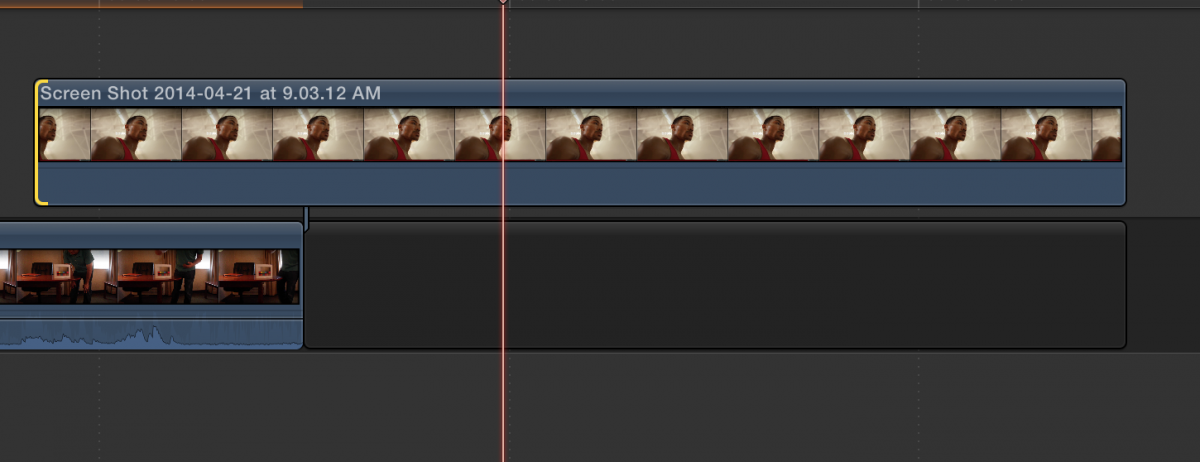
I just did a quick test and graphic files do work this way, ie. you can extend a graphic left as much as you want (just not compound clips).
Here is a sample still graphic as a connected clip (for clarity)
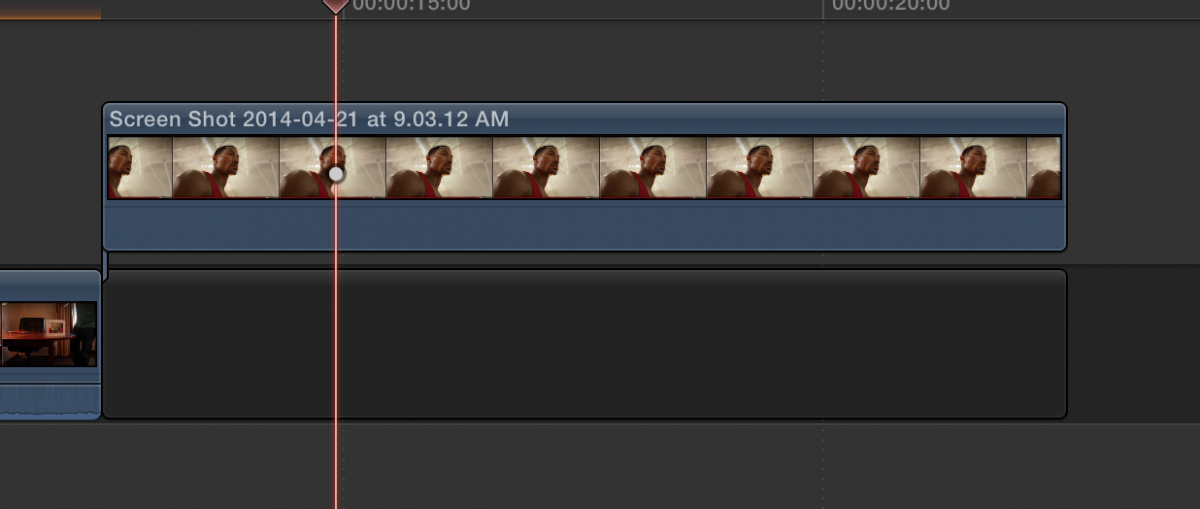
And I extend it well before the starting point:
Here is a sample still graphic as a connected clip (for clarity)
And I extend it well before the starting point:
Please Log in to join the conversation.
15 Jul 2014 04:17 - 15 Jul 2014 04:21 #49964
by tpayton
Replied by tpayton on topic Problem with Transitions Across Compound Clips
Quick question to the other fcp.co members monitoring this post. Prior to 10.1, when you opened a compound clip and extended the left edit point of the first clip, do you remember if you edit moved in the "dark area" outside of the in and out points used for that particular compound clip, or did it change the in and out points to reflect the new start point of the compound clip?
I.e. see current behavior here:
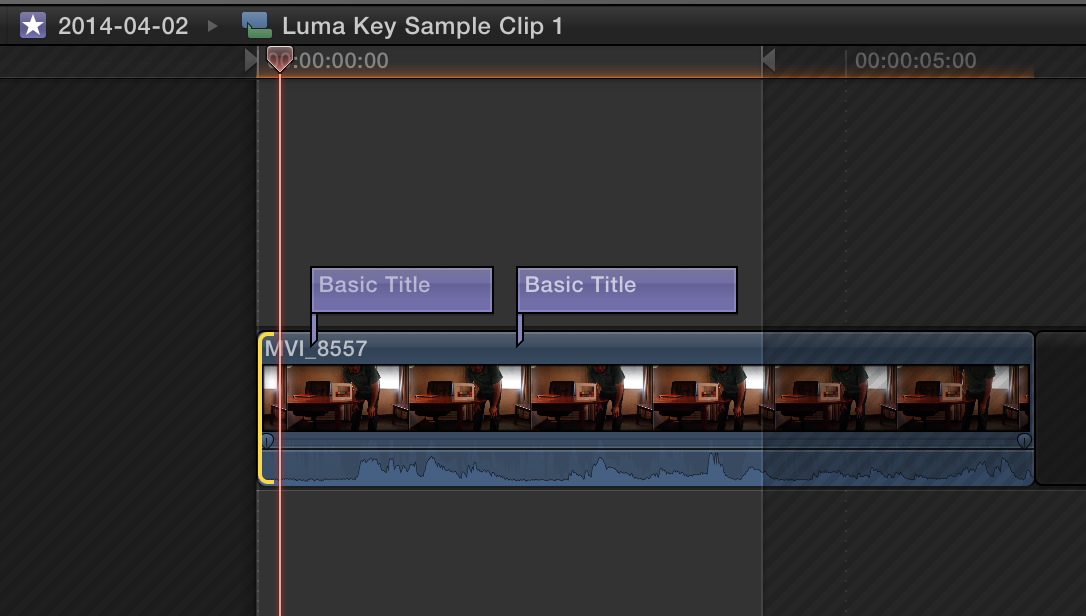
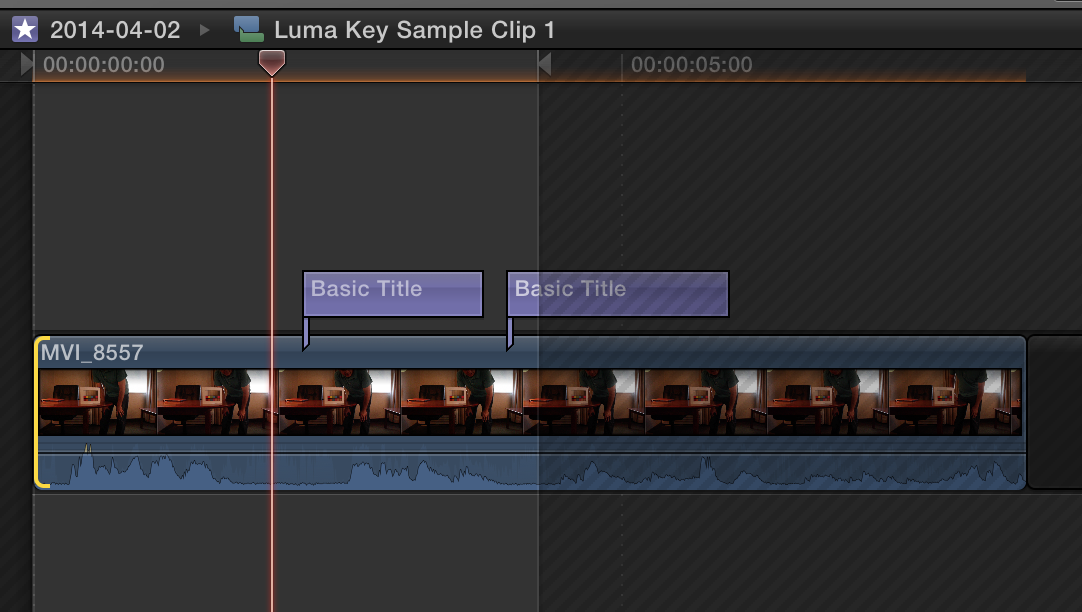
I for some reason recall that it behaved differently prior to 10.1. Granted that would be crazy because then it would have to update all instances uses of that compound clip and it would no longer reflect the proper timecode of the in and out. That is unless it allowed for a negative timecode entry.
I.e. see current behavior here:
I for some reason recall that it behaved differently prior to 10.1. Granted that would be crazy because then it would have to update all instances uses of that compound clip and it would no longer reflect the proper timecode of the in and out. That is unless it allowed for a negative timecode entry.
Last edit: 15 Jul 2014 04:21 by tpayton.
Please Log in to join the conversation.
15 Jul 2014 04:34 #49965
by plysat
Can't sleep? Try this: fcpxpert.net ;-)
Replied by plysat on topic Problem with Transitions Across Compound Clips
Hey tpayton. Not sure if it behaved this way earlier, but it sure does now. Please send feedback to Apple about this, as it seems to be a bug. You should be able to (must be able to) add handles on both sides of a CC. If it was working then the OP wouldn't have an issue as you could just open the CC, add handles, and the add your transitions. Since the media on the left/head *can't* be extended without screwing up the CC sync, it's a problem... 
Can't sleep? Try this: fcpxpert.net ;-)
Please Log in to join the conversation.
- ronny courtens
-

- Offline
- Moderator
-

Less
More
- Posts: 4455
- Thank you received: 962
15 Jul 2014 08:30 - 15 Jul 2014 14:17 #49969
by ronny courtens
Replied by ronny courtens on topic Problem with Transitions Across Compound Clips
Nice catch, T.
I just tested this in 10.0.9 and 10.1.0 and I see the same behavior. Apparently not many people ever need to do this or we would have heard about it long ago
Back to the OP.
This has nothing to do with track-based or non track-based editing. FCP7 is a track-based NLE and it doesn't include media handles in nested clips either. Avid seems to be the only NLE that does this, but then again Avid has loads of other problems with nested clips. Anyway...
If you have a bunch of stacked clips on your timeline and you wish to turn them into a CC while including some handles for transitions:
1. If one of the clips in your stack is in the Primary Storyline, lift it out of it (ALT+CMD+ARROW UP)
2. Extend the length of the clips. NOTHING will get out of synch.
3. Press ALT+G to create the CC
4. Trim the CC and drop it into the Primary Storyline (ALT+CMD+ARROW DOWN)
Tips:
- to quickly add end handles to multiple clips at the same time just select the clips, press CTRL+D and enter the number of frames or seconds you want to add to the end of all clips. Type + and the duration.
- to quickly trim the CC use the Trim Start and Trim End shortcuts (CTRL+brackets)
Use the feedback form to submit a feature request for creating CCs with handles. I'm not sure it will be high on the priority list as only few people seem to need this, but one can always try
- Ronny
I just tested this in 10.0.9 and 10.1.0 and I see the same behavior. Apparently not many people ever need to do this or we would have heard about it long ago
Back to the OP.
This has nothing to do with track-based or non track-based editing. FCP7 is a track-based NLE and it doesn't include media handles in nested clips either. Avid seems to be the only NLE that does this, but then again Avid has loads of other problems with nested clips. Anyway...
If you have a bunch of stacked clips on your timeline and you wish to turn them into a CC while including some handles for transitions:
1. If one of the clips in your stack is in the Primary Storyline, lift it out of it (ALT+CMD+ARROW UP)
2. Extend the length of the clips. NOTHING will get out of synch.
3. Press ALT+G to create the CC
4. Trim the CC and drop it into the Primary Storyline (ALT+CMD+ARROW DOWN)
Tips:
- to quickly add end handles to multiple clips at the same time just select the clips, press CTRL+D and enter the number of frames or seconds you want to add to the end of all clips. Type + and the duration.
- to quickly trim the CC use the Trim Start and Trim End shortcuts (CTRL+brackets)
Use the feedback form to submit a feature request for creating CCs with handles. I'm not sure it will be high on the priority list as only few people seem to need this, but one can always try
- Ronny
Last edit: 15 Jul 2014 14:17 by ronny courtens.
Please Log in to join the conversation.
- S.Clements
-
Topic Author
- Offline
- Junior Member
-
Less
More
- Posts: 31
- Thank you received: 0
15 Jul 2014 14:07 #49996
by S.Clements
Replied by S.Clements on topic Problem with Transitions Across Compound Clips
Wow! Thanks, Ronny. Those are all great suggestions for speeding this up.
Please Log in to join the conversation.
- ronny courtens
-
- Offline
- Moderator
-
Less
More
- Posts: 4455
- Thank you received: 962
15 Jul 2014 14:14 #49997
by ronny courtens
Replied by ronny courtens on topic Problem with Transitions Across Compound Clips
No problem. As a matter of fact I just submitted a detailed feature request to have compound clips retain start and end handles for the media inside them. I agree this would be useful. However I have suggested to limit the handles to a specific maximum duration (e.g. 5 seconds). If the clips on your timeline have been taken from long master clips in your Browser you don't want to include 1 hour handles inside the CCs
- Ronny
- Ronny
Please Log in to join the conversation.
