


- Posts: 7
- Thank you received: 0
3 Post Moderation Rule for New Boarders (25 Jan 2021)
New boarders will have their posts moderated - Don't worry if you cannot see your post immediately.
Help!!! Can't upload from Final Cut Pro X to anything!!!!
- maxxyboy12
-
 Topic Author
- Offline
- New Member
-

Less
More
12 Jul 2014 19:41 #49748
by maxxyboy12
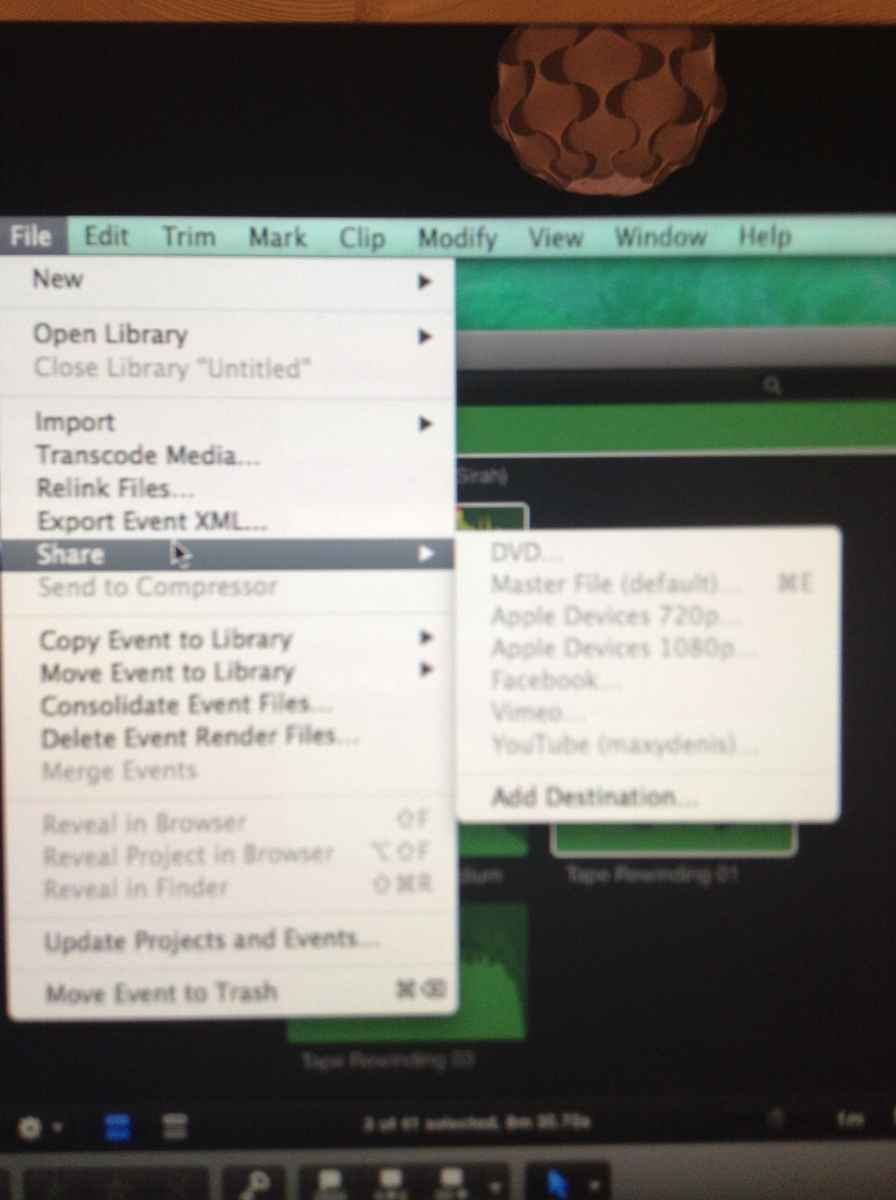
Please Help!!!! When I go on File>Share it all comes up in grey except "add destination" I've done this for youtube and it says my username and all, but it STILL comes up in grey! If you know how to help I'd really appreciate it!! 

Please Log in to join the conversation.

12 Jul 2014 19:56 #49749
by BenB
Replied by BenB on topic Help!!! Can't upload from Final Cut Pro X to anything!!!!
I'll start with the obvious. Are you sure either the Timeline is the active pane, or that the Browser is active with a Project selected & active? Not to be starting off with stupid questions, but I see this mistake with students in my classes all the time.
May want to try deleting your preferences, too.
May want to try deleting your preferences, too.
Please Log in to join the conversation.
- maxxyboy12
-
Topic Author
- Offline
- New Member
-
Less
More
- Posts: 7
- Thank you received: 0
12 Jul 2014 20:22 #49751
by maxxyboy12
Replied by maxxyboy12 on topic Help!!! Can't upload from Final Cut Pro X to anything!!!!
Hi, thanks so much for replying. It's gonna sound stupid but how would i delete the preferences, and by active pane do you mean that the project isa selected, cos it is.
Please Log in to join the conversation.
- ronny courtens
-

- Offline
- Moderator
-

Less
More
- Posts: 4455
- Thank you received: 962
12 Jul 2014 20:42 #49752
by ronny courtens
Replied by ronny courtens on topic Help!!! Can't upload from Final Cut Pro X to anything!!!!
What version of FCP X are you using?
- Ronny
- Ronny
Please Log in to join the conversation.
- maxxyboy12
-
Topic Author
- Offline
- New Member
-
Less
More
- Posts: 7
- Thank you received: 0
12 Jul 2014 21:20 #49753
by maxxyboy12
Replied by maxxyboy12 on topic Help!!! Can't upload from Final Cut Pro X to anything!!!!
Umm, its the newest one 10.1.2
Please Log in to join the conversation.
- ronny courtens
-
- Offline
- Moderator
-
Less
More
- Posts: 4455
- Thank you received: 962
12 Jul 2014 21:27 #49754
by ronny courtens
Replied by ronny courtens on topic Help!!! Can't upload from Final Cut Pro X to anything!!!!
Shut down FCP X, then re-launch it while you press and hold OPTION key and the CMD key. This will launch FCP X with refreshed preferences. This procedure does not work with earlier versions of the software.
- Ronny
- Ronny
Please Log in to join the conversation.
- ronny courtens
-
- Offline
- Moderator
-
Less
More
- Posts: 4455
- Thank you received: 962
12 Jul 2014 21:35 #49755
by ronny courtens
Replied by ronny courtens on topic Help!!! Can't upload from Final Cut Pro X to anything!!!!
Okay, taking a better look at your screenshot I can see that your Project is NOT selected. The File menu in your screenshot shows the commands for an Event, not for a Project. That's why the Share menu is disabled.
Select the Project icon in your Browser, when it is selected there will be a yellow line around the Project icon. Then try sharing again.
- Ronny
Select the Project icon in your Browser, when it is selected there will be a yellow line around the Project icon. Then try sharing again.
- Ronny
Please Log in to join the conversation.
12 Jul 2014 23:03 #49757
by BenB
Replied by BenB on topic Help!!! Can't upload from Final Cut Pro X to anything!!!!
Also, you can verify the Timeline pane is active, if it is open there, with Command-2.
Please Log in to join the conversation.
- maxxyboy12
-
Topic Author
- Offline
- New Member
-
Less
More
- Posts: 7
- Thank you received: 0
13 Jul 2014 10:47 #49773
by maxxyboy12
Replied by maxxyboy12 on topic Help!!! Can't upload from Final Cut Pro X to anything!!!!
Hi again, how would i shut down final cut pro do you mean just to click the red X?
Please Log in to join the conversation.
- maxxyboy12
-
Topic Author
- Offline
- New Member
-
Less
More
- Posts: 7
- Thank you received: 0
13 Jul 2014 10:49 - 13 Jul 2014 10:50 #49774
by maxxyboy12
Replied by maxxyboy12 on topic Help!!! Can't upload from Final Cut Pro X to anything!!!!
I think I've selected it now but it still doesn't work?????? :oops: It's shows in another screen shot  Also if i was to relaunch it where is the OPTION key??? :blush:
Also if i was to relaunch it where is the OPTION key??? :blush: 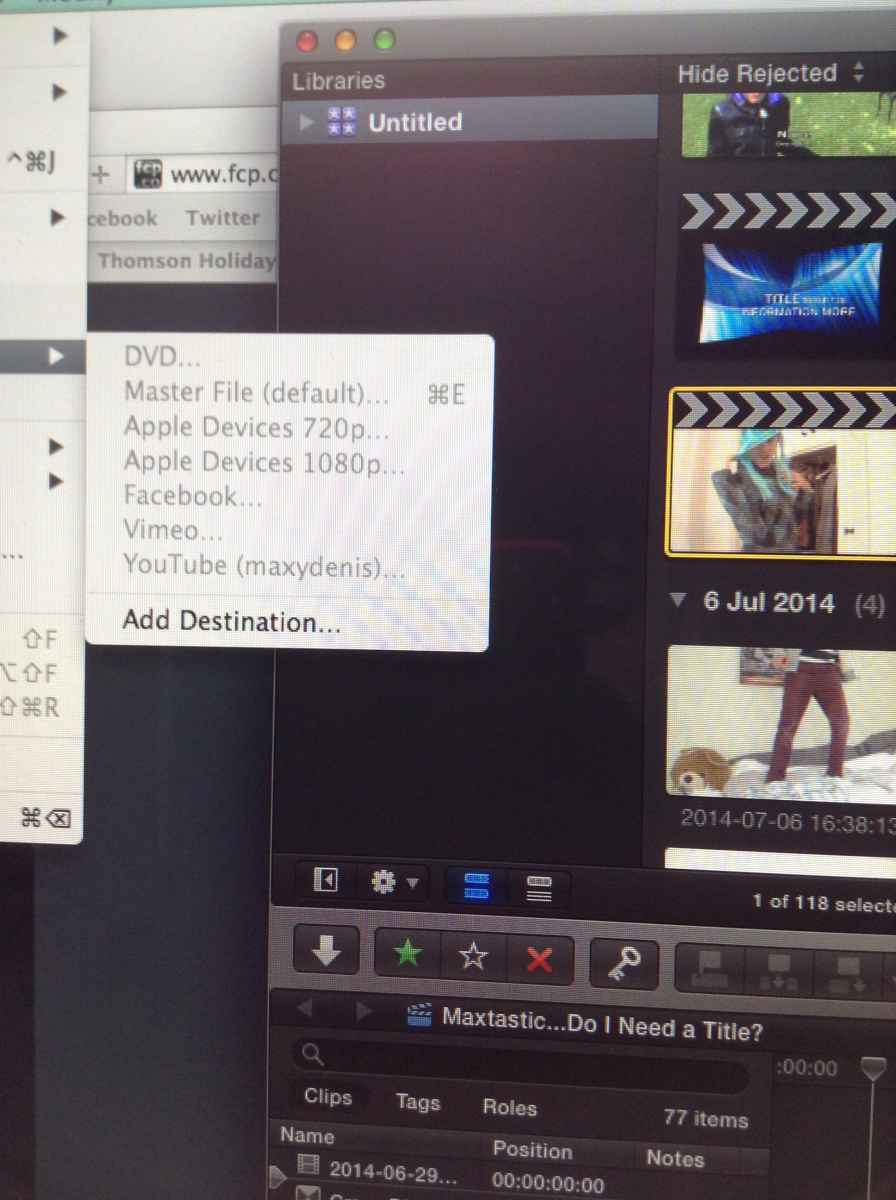
Last edit: 13 Jul 2014 10:50 by maxxyboy12.
Please Log in to join the conversation.
- ronny courtens
-
- Offline
- Moderator
-
Less
More
- Posts: 4455
- Thank you received: 962
13 Jul 2014 10:58 - 13 Jul 2014 11:03 #49775
by ronny courtens
Replied by ronny courtens on topic Help!!! Can't upload from Final Cut Pro X to anything!!!!
I'm assuming this is the first time you are using FCP X? No sweat, we will do it step by step.
Double-click the Project icon to load the Project in the Timeline. Then press the Share button (the curved arrow at the bottom right of your Viewer). You will see different export destinations in the Sharing window (the destinations in my screenshot will differ from yours). Select the export format you wish.
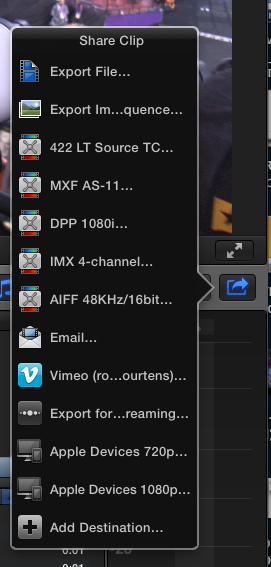
If sharing does not work: shut down FCP X (Final Cut Pro > Quit Final Cut Pro). Then re-open FCP X (like you always do) while pressing and holding the OPTON (= ALT) + the CMD keys. This will refresh your FCP X preferences.
If this still does not work after having refreshed your preferences you will have to completely remove and re-install FCP X. Post back for further advice on how to do this.
- Ronny
Double-click the Project icon to load the Project in the Timeline. Then press the Share button (the curved arrow at the bottom right of your Viewer). You will see different export destinations in the Sharing window (the destinations in my screenshot will differ from yours). Select the export format you wish.
If sharing does not work: shut down FCP X (Final Cut Pro > Quit Final Cut Pro). Then re-open FCP X (like you always do) while pressing and holding the OPTON (= ALT) + the CMD keys. This will refresh your FCP X preferences.
If this still does not work after having refreshed your preferences you will have to completely remove and re-install FCP X. Post back for further advice on how to do this.
- Ronny
Last edit: 13 Jul 2014 11:03 by ronny courtens.
Please Log in to join the conversation.
- maxxyboy12
-
Topic Author
- Offline
- New Member
-
Less
More
- Posts: 7
- Thank you received: 0
13 Jul 2014 11:04 #49776
by maxxyboy12
Replied by maxxyboy12 on topic Help!!! Can't upload from Final Cut Pro X to anything!!!!
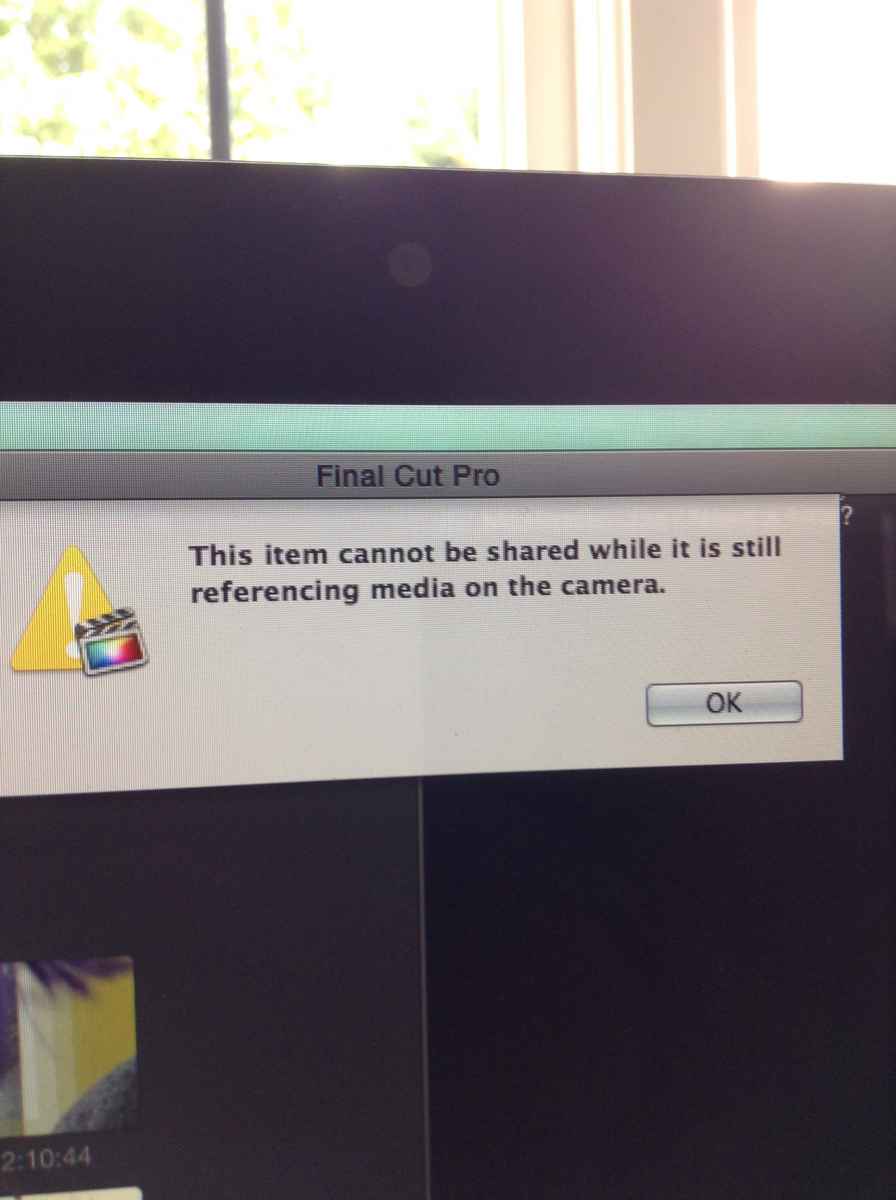
I, thanks so much, i Can't believe I never saw that!! But its come up with a weird message? There is also a little symbol next to my title as shown in the second screen shot, any idea if that could be effecting it????
Please Log in to join the conversation.
- ronny courtens
-
- Offline
- Moderator
-
Less
More
- Posts: 4455
- Thank you received: 962
13 Jul 2014 11:14 #49778
by ronny courtens
Replied by ronny courtens on topic Help!!! Can't upload from Final Cut Pro X to anything!!!!
Ah, now we get to the real cause of the problem.
You have imported from a camera card or a camera archive and you haven't waited until all the media was properly imported. That's why some clips in your Project are still referencing the camera card or archive. You cannot share a Project with media that is still referencing a camera card, so you will have to re-import the clips:
1. Make sure the card from which you have imported your media is connected to you system. If you have imported from a folder that was copied from a camera card, or from an camera archive, make sure the drive that holds the folder or the archive is connected to your system.
2. Select all your clips in your event browser
3. Go to File --> Import --> Reimport from Camera/Archive --> Continue
4. Wait until the import is 100% completed and then all share items will become available again
- Ronny
You have imported from a camera card or a camera archive and you haven't waited until all the media was properly imported. That's why some clips in your Project are still referencing the camera card or archive. You cannot share a Project with media that is still referencing a camera card, so you will have to re-import the clips:
1. Make sure the card from which you have imported your media is connected to you system. If you have imported from a folder that was copied from a camera card, or from an camera archive, make sure the drive that holds the folder or the archive is connected to your system.
2. Select all your clips in your event browser
3. Go to File --> Import --> Reimport from Camera/Archive --> Continue
4. Wait until the import is 100% completed and then all share items will become available again
- Ronny
Please Log in to join the conversation.
- maxxyboy12
-
Topic Author
- Offline
- New Member
-
Less
More
- Posts: 7
- Thank you received: 0
13 Jul 2014 13:54 #49787
by maxxyboy12
Replied by maxxyboy12 on topic Help!!! Can't upload from Final Cut Pro X to anything!!!!
Thank you so much Ronny!!! You've saved the day! 
Please Log in to join the conversation.
- ronny courtens
-
- Offline
- Moderator
-
Less
More
- Posts: 4455
- Thank you received: 962
13 Jul 2014 13:55 #49788
by ronny courtens
Replied by ronny courtens on topic Help!!! Can't upload from Final Cut Pro X to anything!!!!
Glad you got it fixed!
- Ronny
- Ronny
Please Log in to join the conversation.
