


- Posts: 730
- Thank you received: 26
3 Post Moderation Rule for New Boarders (25 Jan 2021)
New boarders will have their posts moderated - Don't worry if you cannot see your post immediately.
Export to ProRes?
- DmitriZigany
-
 Topic Author
- Offline
- Platinum Member
-

Less
More
12 Jul 2014 15:43 #49737
by DmitriZigany
Export to ProRes? was created by DmitriZigany
I'm shooting on monday and the client wants the footage as ProRes HQ. What would the best way to export footage from FCPX be?
Some clips might not need trimming while some might not.
Get each clip into the timeline then export as master file as ProRes HQ? And repeat for each clip?
Files start their life as AVCHD from a FS700.
thanks
Some clips might not need trimming while some might not.
Get each clip into the timeline then export as master file as ProRes HQ? And repeat for each clip?
Files start their life as AVCHD from a FS700.
thanks
Please Log in to join the conversation.

12 Jul 2014 16:25 #49741
by BenB
Replied by BenB on topic Export to ProRes?
Batch them in Compressor.
Please Log in to join the conversation.
12 Jul 2014 18:27 #49745
by tpayton
Replied by tpayton on topic Export to ProRes?
You might want to talk with your client about the fact that AVCHD to ProRes 422, or ProRes HQ will be exactly the same quality since it is dependent on the source. If that is the case you can transcode to optimized all the clips in FCPX and then give those optimized files in the library (or outside) to your client.
Please Log in to join the conversation.
- DmitriZigany
-
Topic Author
- Offline
- Platinum Member
-
Less
More
- Posts: 730
- Thank you received: 26
13 Jul 2014 21:50 #49822
by DmitriZigany
Replied by DmitriZigany on topic Export to ProRes?
Well, seems they have no real clue what they are doing to be honest. The want files in ProRes HQ.
They also want "broadcast quality" but have said that qualifying cameras are 5D, 7D and 1D. None of which record more than 8 bit 420 as far as I know.
Last response I got was that they "like the jpg file format"
They also want "broadcast quality" but have said that qualifying cameras are 5D, 7D and 1D. None of which record more than 8 bit 420 as far as I know.
Last response I got was that they "like the jpg file format"
Please Log in to join the conversation.

14 Jul 2014 02:41 - 14 Jul 2014 02:41 #49833
by Deano
Replied by Deano on topic Export to ProRes?
Whilst what has been said before is fundamentally correct - transcoding from AVCHD will offer some slight improvement in POST for grading and correction - as long as the vision is correct exposure to begin with.
I said slight...lol.
The real solution is get an Odyssey 7q and record 10bit ProRes straight out.
I said slight...lol.
The real solution is get an Odyssey 7q and record 10bit ProRes straight out.
Last edit: 14 Jul 2014 02:41 by Deano.
Please Log in to join the conversation.
14 Jul 2014 04:56 #49840
by BenB
The 7D (one we use occasionally), 1D, and 5D are actually, technically, beyond "broadcast quality" in any manner you wish to express "HD broadcast quality". The JPEG file format? Wow, there's a dinosaur for you...
Where does the "420" number come from?
Replied by BenB on topic Export to ProRes?
DmitriZigany wrote: Well, seems they have no real clue what they are doing to be honest. The want files in ProRes HQ.
They also want "broadcast quality" but have said that qualifying cameras are 5D, 7D and 1D. None of which record more than 8 bit 420 as far as I know.
Last response I got was that they "like the jpg file format"
The 7D (one we use occasionally), 1D, and 5D are actually, technically, beyond "broadcast quality" in any manner you wish to express "HD broadcast quality". The JPEG file format? Wow, there's a dinosaur for you...
Where does the "420" number come from?
Please Log in to join the conversation.
- DmitriZigany
-
Topic Author
- Offline
- Platinum Member
-
Less
More
- Posts: 730
- Thank you received: 26
14 Jul 2014 05:57 #49844
by DmitriZigany
I do want the 7Q though... It's just beyond my means.
Replied by DmitriZigany on topic Export to ProRes?
Unfortunately, I can't buy a €4000 recorder to do a €200 jobDeano wrote: The real solution is get an Odyssey 7q and record 10bit ProRes straight out.
I do want the 7Q though... It's just beyond my means.
Please Log in to join the conversation.
- ronny courtens
-

- Offline
- Moderator
-

Less
More
- Posts: 4455
- Thank you received: 962
14 Jul 2014 10:21 #49863
by ronny courtens
Replied by ronny courtens on topic Export to ProRes?
Hey Dmitri,
As Ben says: batch converting the FS700 clips to ProRes HQ in Compressor is pretty straightforward.
Copy the card to your computer and open the Private folder. You will see this:
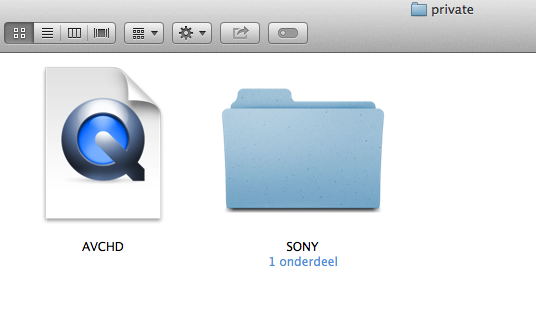
R-click the AVCHD container and choose "Show Package Contents", which will give you this:
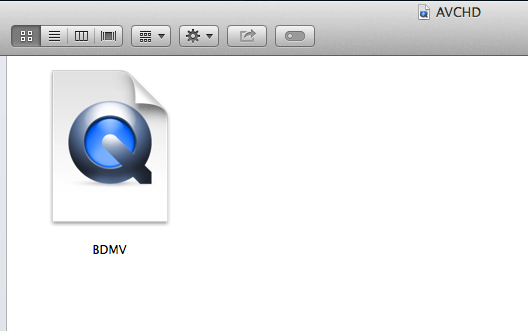
R-click the BDMV container and choose "Show Package Contents" to get into the actual folders:
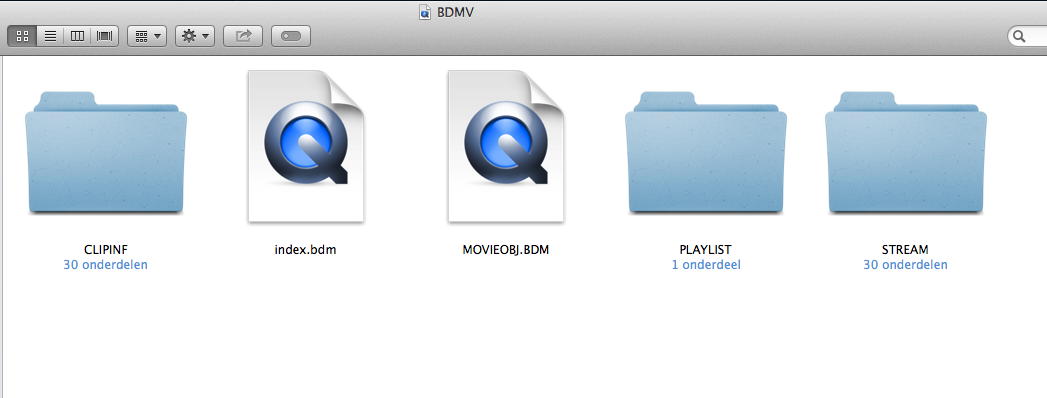
Open the Stream folder to see all your clips:
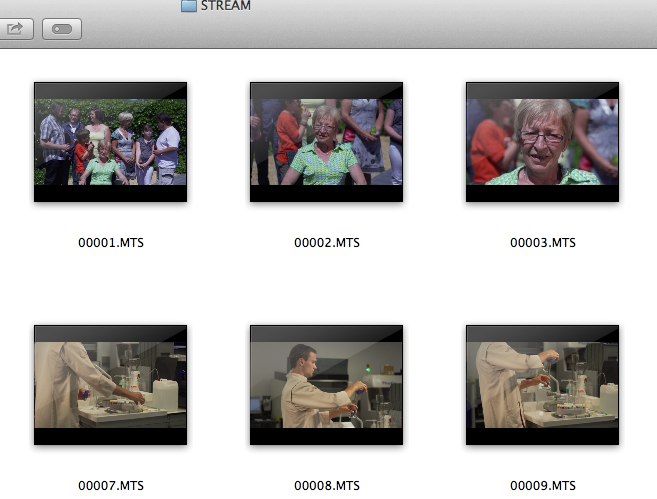
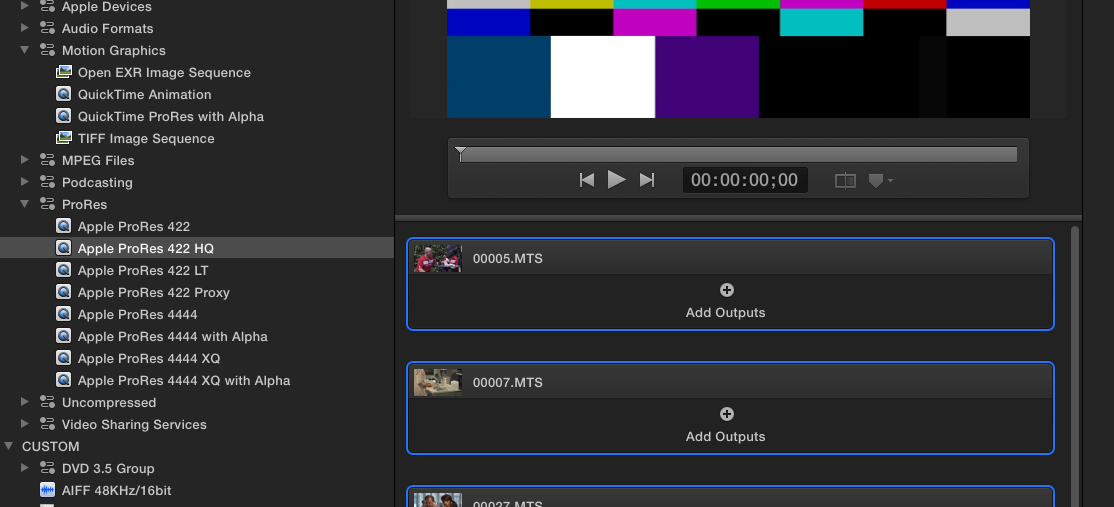
Drag the clips you wish to convert onto your Compressor batch window, group-select the imported clips and drop the ProRes HQ preset onto the batch, set an output location and press Start Batch:
If your client is so fund of image sequences you can even export your clips as TIFF image sequences, Compressor has a preset for this. But JPEG, really? That's back to the Dark Ages :S
- Ronny
As Ben says: batch converting the FS700 clips to ProRes HQ in Compressor is pretty straightforward.
Copy the card to your computer and open the Private folder. You will see this:
R-click the AVCHD container and choose "Show Package Contents", which will give you this:
R-click the BDMV container and choose "Show Package Contents" to get into the actual folders:
Open the Stream folder to see all your clips:
Drag the clips you wish to convert onto your Compressor batch window, group-select the imported clips and drop the ProRes HQ preset onto the batch, set an output location and press Start Batch:
If your client is so fund of image sequences you can even export your clips as TIFF image sequences, Compressor has a preset for this. But JPEG, really? That's back to the Dark Ages :S
- Ronny
Please Log in to join the conversation.
14 Jul 2014 11:09 #49866
by Seanus
Sean Lander - Editing since 1982 - AVID 1991 - FCP 1999 - FCPX 2011
Replied by Seanus on topic Export to ProRes?
I use Compressor droplets to do this kind of stuff. I have a whole suite of them for all kinds of needs. But if you need to trim the clips then Ronny's method is on the money. (As per usual) 
Sean Lander - Editing since 1982 - AVID 1991 - FCP 1999 - FCPX 2011
Please Log in to join the conversation.
- ronny courtens
-
- Offline
- Moderator
-
Less
More
- Posts: 4455
- Thank you received: 962
14 Jul 2014 11:21 #49868
by ronny courtens
Replied by ronny courtens on topic Export to ProRes?
Now why didn't I think of that!
Seanus is correct: if you don't need to trim any media the easiest way for doing this is to create a droplet in Compressor and just drop the clips from the STREAM folder onto it anytime you need to do such a conversion.
- Ronny
Seanus is correct: if you don't need to trim any media the easiest way for doing this is to create a droplet in Compressor and just drop the clips from the STREAM folder onto it anytime you need to do such a conversion.
- Ronny
Please Log in to join the conversation.
