


- Posts: 377
- Thank you received: 9
3 Post Moderation Rule for New Boarders (25 Jan 2021)
New boarders will have their posts moderated - Don't worry if you cannot see your post immediately.
correct way to delete stabilization files (10.1.2)
11 Jul 2014 16:05 #49697
by dkag7
correct way to delete stabilization files (10.1.2) was created by dkag7
Hi,
What is the correct way to delete un needed stabilization data?
I'd imagine it is not doing it via finder... but not sure..
thanks
Kurt
What is the correct way to delete un needed stabilization data?
I'd imagine it is not doing it via finder... but not sure..
thanks
Kurt
Please Log in to join the conversation.
- ronny courtens
-

- Offline
- Moderator
-

Less
More
- Posts: 4455
- Thank you received: 962
11 Jul 2014 18:59 - 11 Jul 2014 19:04 #49703
by ronny courtens
Replied by ronny courtens on topic correct way to delete stabilization files (10.1.2)
Hi Kurt,
I suppose you are working with 10.1.2
If you have set your Library Properties to store the Cache Files inside the Library:
- R-click the Library container and choose "Show Package Contents".
- Open the event folder and go to the Analysis Files > Stabilization folder to delete the stabilization analysis file(s).
If you have set your Library Properties to store the Cache files outside of the Library:
- Go to the folder you have created to store your Cache files.
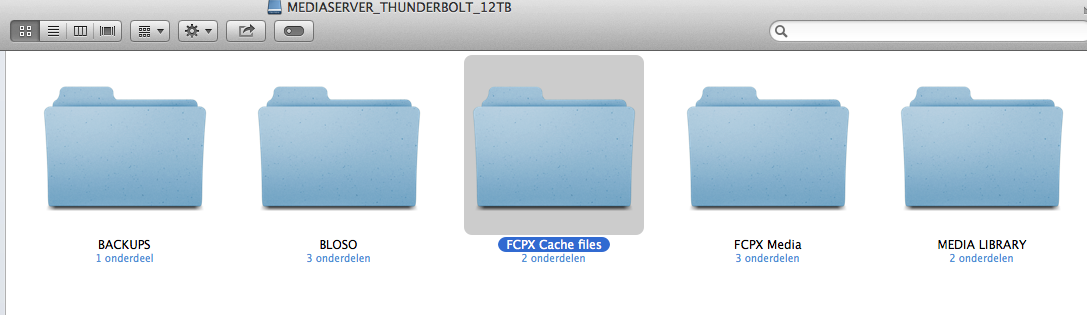
- Inside that folder you will see the cache container (.fcpcache extension) for your Library
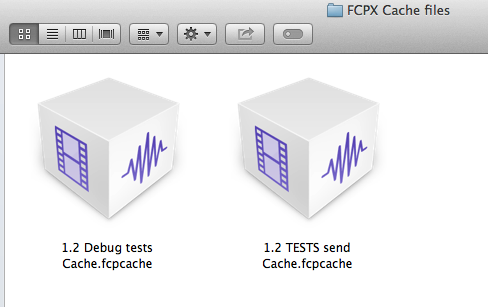
- R-click the Cache container and choose "Show Package Contents".
- Open the event folder and go to the Analysis Files > Stabilization folder to delete the stabilization analysis file(s).
EDIT: Just remember that if you delete the analysis files while the effect is still applied to the clip on the Project timeline FCP X will re-analyse the clip and recreate the analysis file the moment you launch the app again.
- Ronny
I suppose you are working with 10.1.2
If you have set your Library Properties to store the Cache Files inside the Library:
- R-click the Library container and choose "Show Package Contents".
- Open the event folder and go to the Analysis Files > Stabilization folder to delete the stabilization analysis file(s).
If you have set your Library Properties to store the Cache files outside of the Library:
- Go to the folder you have created to store your Cache files.
- Inside that folder you will see the cache container (.fcpcache extension) for your Library
- R-click the Cache container and choose "Show Package Contents".
- Open the event folder and go to the Analysis Files > Stabilization folder to delete the stabilization analysis file(s).
EDIT: Just remember that if you delete the analysis files while the effect is still applied to the clip on the Project timeline FCP X will re-analyse the clip and recreate the analysis file the moment you launch the app again.
- Ronny
Last edit: 11 Jul 2014 19:04 by ronny courtens.
Please Log in to join the conversation.
11 Jul 2014 19:04 #49704
by dkag7
Replied by dkag7 on topic correct way to delete stabilization files (10.1.2)
Thanks Ronny,
I wasn't sure if there was another way besides doing it in finder.
I just found that library manager also has this, but you need to show it first (flow and shared are not on by default)
thanks
Kurt
I wasn't sure if there was another way besides doing it in finder.
I just found that library manager also has this, but you need to show it first (flow and shared are not on by default)
thanks
Kurt
Please Log in to join the conversation.
- ronny courtens
-
- Offline
- Moderator
-
Less
More
- Posts: 4455
- Thank you received: 962
11 Jul 2014 19:10 - 11 Jul 2014 19:11 #49705
by ronny courtens
Replied by ronny courtens on topic correct way to delete stabilization files (10.1.2)
Yes Final Cut Library Manager can handle this, but ONLY if you have stored your Cache files inside the Library.
If you have stored your Cache files and/or your Optimized/Proxy files outside of the Library FC Library Manager will not find them.
They are working on an update to make Library Manager work with better the new media management structure in 10.1.2.:
We’ve just released a minor update to Final Cut Library Manager (version 2.05) which will allow it to work if you have Final Cut Pro 10.1.2 installed. Note however that this version does not yet take into account externally located generated and cached files. Only internal files, plus internal and external originals are handled, as was previously the case.
- Ronny
If you have stored your Cache files and/or your Optimized/Proxy files outside of the Library FC Library Manager will not find them.
They are working on an update to make Library Manager work with better the new media management structure in 10.1.2.:
We’ve just released a minor update to Final Cut Library Manager (version 2.05) which will allow it to work if you have Final Cut Pro 10.1.2 installed. Note however that this version does not yet take into account externally located generated and cached files. Only internal files, plus internal and external originals are handled, as was previously the case.
- Ronny
Last edit: 11 Jul 2014 19:11 by ronny courtens.
Please Log in to join the conversation.
