


3 Post Moderation Rule for New Boarders (25 Jan 2021)
New boarders will have their posts moderated - Don't worry if you cannot see your post immediately.
Would appreciate help with Color grading, RGB Parade question.


11 Jul 2014 05:24 #49653
by Bobbyco
I've attached a screen grab to illustrate something I don't understand about the RGB Parade graph.
What does it really mean for the excessive white within each color band? I'm not clear that it is indicative of a problem or simply representing density of each color present. But if the latter, I'd just expect the RGorB color-not white. I've always got Luma in the 0-100 range, Color board adjustments affect the RGB in ways that don't alter this white out fill. So, well that's my question. Thanks.
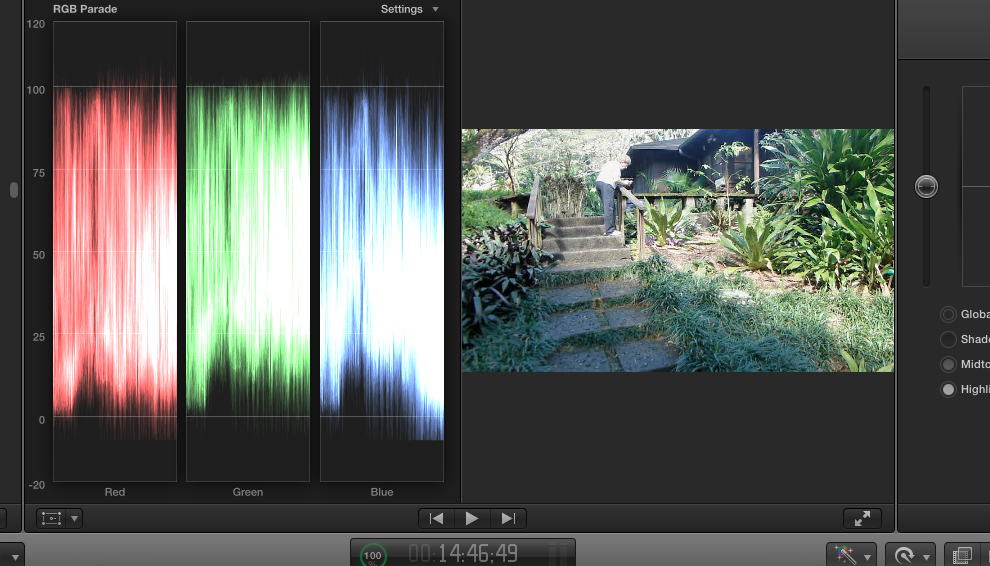
What does it really mean for the excessive white within each color band? I'm not clear that it is indicative of a problem or simply representing density of each color present. But if the latter, I'd just expect the RGorB color-not white. I've always got Luma in the 0-100 range, Color board adjustments affect the RGB in ways that don't alter this white out fill. So, well that's my question. Thanks.
Please Log in to join the conversation.

11 Jul 2014 10:16 #49660
by BenB
Replied by BenB on topic Would appreciate help with Color grading, RGB Parade question.
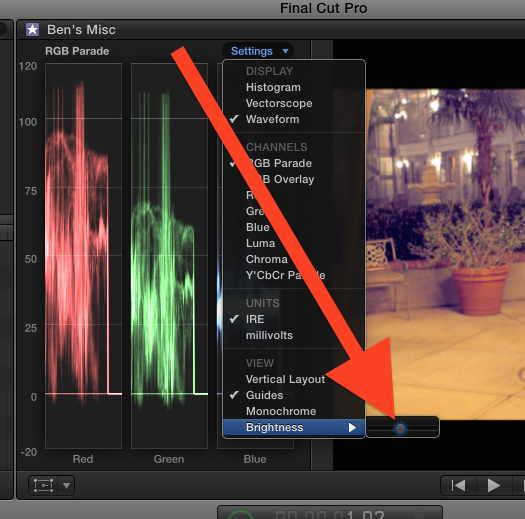
Turn down the brightness of your scopes. That's how intensity/density of data is shown. Getting more of a color won't really show the intensity/density of data as well, as there's too much of a limit to how much red can be shown clearly.
Think of it this way:
Using the Waveform - Luma scope, you're adjusting the amour of luminance, or brightness (never use the word "brightness" with a professional colorist, btw). This is done in the Exposure pane.
Using the Waveform - RGB Parade, you're going to adjust the amount of saturation of each color, or chrominance values. This is done in the Saturation and/or Color panes.
Yes, they can effect each other, and as is the nature of color grading, you'll be going back and forth to find a balance. But to answer your question, no, the white you see is only data intensity/density, and can be toned down with the "Brightness" control for the scopes.
Think of it this way:
Using the Waveform - Luma scope, you're adjusting the amour of luminance, or brightness (never use the word "brightness" with a professional colorist, btw). This is done in the Exposure pane.
Using the Waveform - RGB Parade, you're going to adjust the amount of saturation of each color, or chrominance values. This is done in the Saturation and/or Color panes.
Yes, they can effect each other, and as is the nature of color grading, you'll be going back and forth to find a balance. But to answer your question, no, the white you see is only data intensity/density, and can be toned down with the "Brightness" control for the scopes.
Please Log in to join the conversation.
