


- Posts: 38
- Thank you received: 0
3 Post Moderation Rule for New Boarders (25 Jan 2021)
New boarders will have their posts moderated - Don't worry if you cannot see your post immediately.
Highliting Section of a Still Image (screen grab)?
10 Jul 2014 22:08 - 10 Jul 2014 22:10 #49627
by riversurf
Highliting Section of a Still Image (screen grab)? was created by riversurf
Been trying like crazy to figure out what I thought would be a simple effect:
I have a screen grab of a webpage positioned above the main timeline. It has a bit of text, there
is a voice over reading some of the the text.
I want to quickly highlight a particular word here and there to match the voice over. So, for instance,
The VO says "First there is GREEN..." (and I want to have a flash of green come up to highlight just the word
"green" in the text. Then the VO says "Next there is RED" and I want a quick flash of red to flare up over
the word "red" on the screenshot... etc.
I've tried shape masking with keyframes every which way I can think of while changing the color control, but I can't get the effect. The color flash just comes on and doesn't change.
Any suggestions would be greatly appreciated.
Thank you!
Steve
I have a screen grab of a webpage positioned above the main timeline. It has a bit of text, there
is a voice over reading some of the the text.
I want to quickly highlight a particular word here and there to match the voice over. So, for instance,
The VO says "First there is GREEN..." (and I want to have a flash of green come up to highlight just the word
"green" in the text. Then the VO says "Next there is RED" and I want a quick flash of red to flare up over
the word "red" on the screenshot... etc.
I've tried shape masking with keyframes every which way I can think of while changing the color control, but I can't get the effect. The color flash just comes on and doesn't change.
Any suggestions would be greatly appreciated.
Thank you!
Steve
Last edit: 10 Jul 2014 22:10 by riversurf.
Please Log in to join the conversation.

11 Jul 2014 01:29 #49637
by BenB
Replied by BenB on topic Highliting Section of a Still Image (screen grab)?
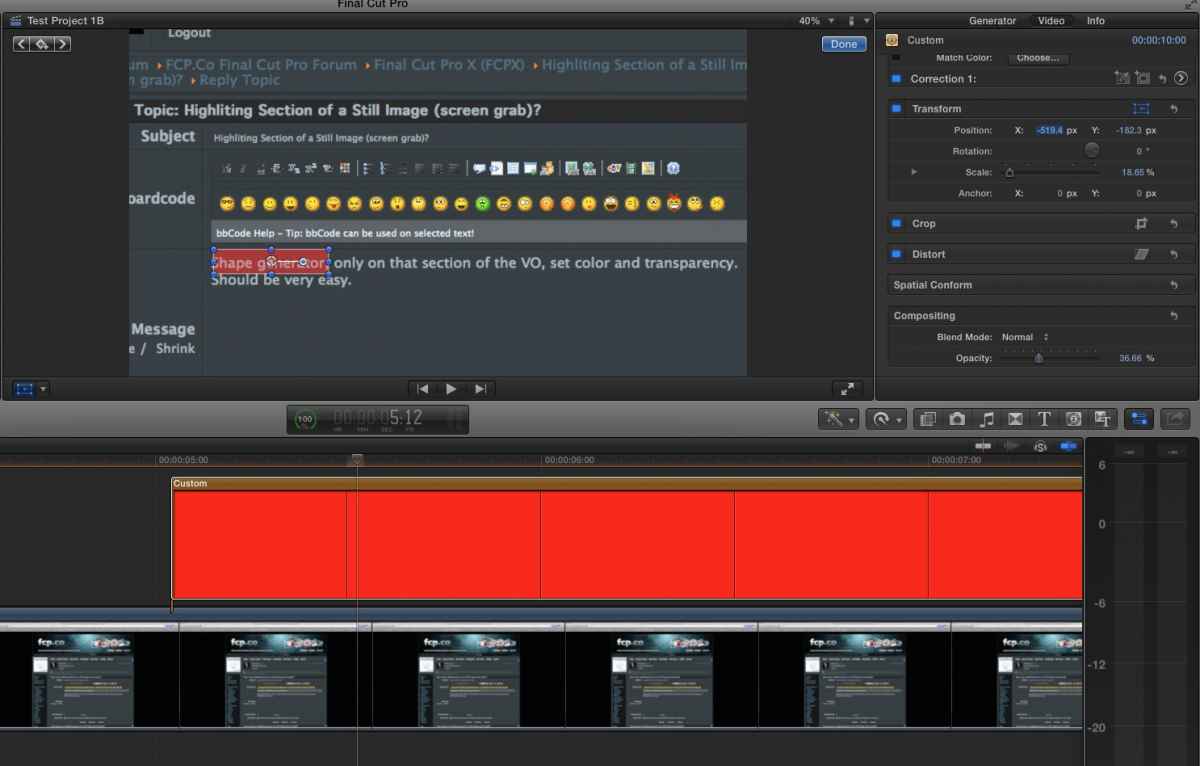
Shape generator, only on that section of the VO, set color and transparency. Should be very easy.
Please Log in to join the conversation.
11 Jul 2014 02:30 - 11 Jul 2014 02:31 #49642
by riversurf
Replied by riversurf on topic Highliting Section of a Still Image (screen grab)?
Thank you! I eventually found a more involved solution, but this gives me another option and more flexibility.
Last edit: 11 Jul 2014 02:31 by riversurf.
Please Log in to join the conversation.

11 Jul 2014 03:02 #49645
by ddixon
Replied by ddixon on topic Highliting Section of a Still Image (screen grab)?
Not *exactly* the same thing, but I also like Simon Ubsdell's TKY Marker Pen - a free Title that provides animated markers that could be made to work as highlighter effects:
www.fcp.co/forum/text-titles/15591-free-...ffect-tky-marker-pen
www.fcp.co/forum/text-titles/15591-free-...ffect-tky-marker-pen
Please Log in to join the conversation.
