


- Posts: 377
- Thank you received: 32
3 Post Moderation Rule for New Boarders (25 Jan 2021)
New boarders will have their posts moderated - Don't worry if you cannot see your post immediately.
If This Then That for FCPX?
10 Jul 2014 04:13 #49573
by Julian
If This Then That for FCPX? was created by Julian
I'm organizing media right now and can't help but notice how many things FCPX could do for me automatically when I complete a repetitive task.
Right now I'm syncing multi cam clips, after I sync the clips I will enter "SYNCED" in the notes column for those clips. I haven't quite figured out how to use Automator yet, but I wonder if something like that could be setup to work with FCPX.
Do any of you know anything about this type automation? Are there already ways of automating tasks like this?
Right now I'm syncing multi cam clips, after I sync the clips I will enter "SYNCED" in the notes column for those clips. I haven't quite figured out how to use Automator yet, but I wonder if something like that could be setup to work with FCPX.
Do any of you know anything about this type automation? Are there already ways of automating tasks like this?
Please Log in to join the conversation.
10 Jul 2014 06:05 #49575
by tpayton
Replied by tpayton on topic If This Then That for FCPX?
While there is not an automatic way of doing this. You should be able to pull off most all of this. Try filtering clips by certain criteria in the browser and then selecting the found clips and change all notes (in your example) to "synced" or whatever you like.
Does this make sense?
Does this make sense?
Please Log in to join the conversation.

10 Jul 2014 12:13 - 10 Jul 2014 12:15 #49593
by BenB
Replied by BenB on topic If This Then That for FCPX?
I assume you're putting the word "SYNCED" into the notes field so you can group and find them easily. I'd not bother with that unnecessary step. I'd create a Smart Collection of them. Save yourself a ton of time.
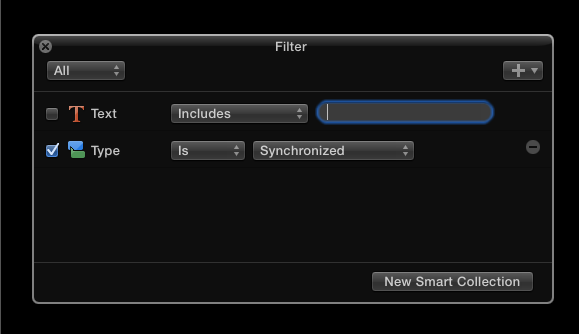
I've also been encouraging my peers and students to fill in the feedback form asking for this "Type" metadata field to be added as an option to the Browser headings.
I've also been encouraging my peers and students to fill in the feedback form asking for this "Type" metadata field to be added as an option to the Browser headings.
Last edit: 10 Jul 2014 12:15 by BenB.
Please Log in to join the conversation.
10 Jul 2014 18:35 #49616
by Julian
Replied by Julian on topic If This Then That for FCPX?
I use smart collections for the clips that have been created, but what I'm trying to do is automatically label the original clips so I know which have already been turned into multi cam or synchronized.
Please Log in to join the conversation.
11 Jul 2014 01:32 #49639
by BenB
Replied by BenB on topic If This Then That for FCPX?
Keyword it, way faster. Cmd-K.
Please Log in to join the conversation.
11 Jul 2014 05:13 #49651
by Julian
Replied by Julian on topic If This Then That for FCPX?
I guess I could do that, or just reject the clip. Mainly, I just want to see FCPX add some cool automation features like this, or transcription. It's the NLE of the future and I want to see some cool things that have never been used in any other NLE. The Magnetic timeline is awesome and since FCPX is built as a database, I feel like there is so much room for organizing media with automation.
Please Log in to join the conversation.
11 Jul 2014 10:17 #49661
by BenB
Replied by BenB on topic If This Then That for FCPX?
Fill out the feedback form.
Please Log in to join the conversation.
11 Jul 2014 14:35 #49687
by tpayton
Replied by tpayton on topic If This Then That for FCPX?
I don't know if this will help you in your particular situation, but I was working with some students on workflows for a feature length film, and had a discussion with fellow fcp.co user (Marcus at Disproportionate Pictures) about how to better handle syncing, and large amounts of footage.
Hope this helps.
Hope this helps.
Please Log in to join the conversation.
- DSvoboda356
-

- Offline
- Premium Member
-

Less
More
- Posts: 109
- Thank you received: 5
11 Jul 2014 15:23 #49691
by DSvoboda356
Replied by DSvoboda356 on topic If This Then That for FCPX?
I have used a super similar process to the one that TPayton illustrated. I find that using the metadata given to you is a great way to organize large sums of clips. One that that I think could solve your problem is this. Try making a smart collection for all clips that are Synchronized Clips. Then you can build a batch renaming convention in the inspector and apply a _Synced to the end of the file name. Select all the clips available in the Smart Collection and run that process.
Please Log in to join the conversation.
11 Jul 2014 15:32 #49694
by tpayton
Replied by tpayton on topic If This Then That for FCPX?
One of the things I didn't go into detail in that video is how you can use smart collection based on roles to find what you have synced. I started talking about it and then got distracted.
For example:
1. Assign original video with audio role of: Camera Audio
2. Assign Second Source Audio with role of: DSS
3. Then after you sync, then create a smart collection finding all clips that contain the roles of Camera Audio and DSS.
Then if you wanted to add notes to all those found clips is a simple process (but probably unnecessary.)
I think every FCPX editor should have to figure out how to deal with syncing 1400 shots with 2 audio recorders and prepping those for an editor. You'll then be in awe of the organization capabilities of FCPX.
BTW. If you are interested in doing sophisticated things with certain metadata you might what to check out Shot Notes X. It lets you do all sorts of things like automatically pull video clip metadata and put it in a synchronized clip and brings your event into a spreadsheet for manipulation. www.koptostudios.com/shot-notes-x/
For example:
1. Assign original video with audio role of: Camera Audio
2. Assign Second Source Audio with role of: DSS
3. Then after you sync, then create a smart collection finding all clips that contain the roles of Camera Audio and DSS.
Then if you wanted to add notes to all those found clips is a simple process (but probably unnecessary.)
I think every FCPX editor should have to figure out how to deal with syncing 1400 shots with 2 audio recorders and prepping those for an editor. You'll then be in awe of the organization capabilities of FCPX.
BTW. If you are interested in doing sophisticated things with certain metadata you might what to check out Shot Notes X. It lets you do all sorts of things like automatically pull video clip metadata and put it in a synchronized clip and brings your event into a spreadsheet for manipulation. www.koptostudios.com/shot-notes-x/
Please Log in to join the conversation.
- DSvoboda356
-
- Offline
- Premium Member
-
Less
More
- Posts: 109
- Thank you received: 5
11 Jul 2014 15:38 #49696
by DSvoboda356
Replied by DSvoboda356 on topic If This Then That for FCPX?
TPayton I completely agree. I am an editor / assistant / media manager at a 10 seat facility. FCPX has saved literally days and days of time. The organization and media management of the app is what sets in a class of its own in my opinion.
Please Log in to join the conversation.
