


- Posts: 1433
- Thank you received: 64
3 Post Moderation Rule for New Boarders (25 Jan 2021)
New boarders will have their posts moderated - Don't worry if you cannot see your post immediately.
Timecode Readers- any plugins or working free generators out there?
- Disproportionate Pictures
-
 Topic Author
- Offline
- Platinum Member
-

Less
More
09 Jul 2014 18:44 #49543
by Disproportionate Pictures
Timecode Readers- any plugins or working free generators out there? was created by Disproportionate Pictures
I've been asked to provide clip TC burn on online reference files- is there an easy way to do this these days? Leo Hans had a generator a while ago but it apparently stopped working with 10.0.4.
Free generator? Plugin?
Free generator? Plugin?
Please Log in to join the conversation.

09 Jul 2014 18:55 #49544
by anickt
Replied by anickt on topic Timecode Readers- any plugins or working free generators out there?
Check Fox Mahoney on youtube. He has a video and link to download. Apparently he got it to work properly somehow but I haven't followed up on it to see how it does.
Please Log in to join the conversation.
- willypimentel
-

- Offline
- Senior Member
-

Less
More
- Posts: 68
- Thank you received: 3
09 Jul 2014 20:07 #49547
by willypimentel
Replied by willypimentel on topic Timecode Readers- any plugins or working free generators out there?
Compressor can burn in timecode easily on exports.
Please Log in to join the conversation.
- ronny courtens
-

- Offline
- Moderator
-

Less
More
- Posts: 4455
- Thank you received: 962
09 Jul 2014 20:44 - 09 Jul 2014 20:47 #49548
by ronny courtens
Replied by ronny courtens on topic Timecode Readers- any plugins or working free generators out there?
I'm afraid that Fox Mahoney generator still doesn't work yet.
I really, really, really wish there were a generator or filter that you could just drop onto a bunch of clips in the Timeline and that would burn-in the SOURCE TC of every individual clip, allowing you to export a whole bunch of original clips with burnt-in TC in one simple action. There used to be such a generator in 2011, but something was changed in a following update and since then no-one seems to have been able to fix this.
There are a few workarounds:
- Open each clip in its timeline and drop the Time Code generator onto the clip. Then export each clip as a single file with burnt-in source TC. A very labour-intensive task if you have loads of clips to export.
- Make a compound clip for each clip you wish to export, open the compound clip and drop the TC generator on it. Do this for every clip, then drop all the compound clips onto a Project timeline and export the Project. This is a little less intensive as it allows you to export all your clips as one file, but you lose the clip name information.
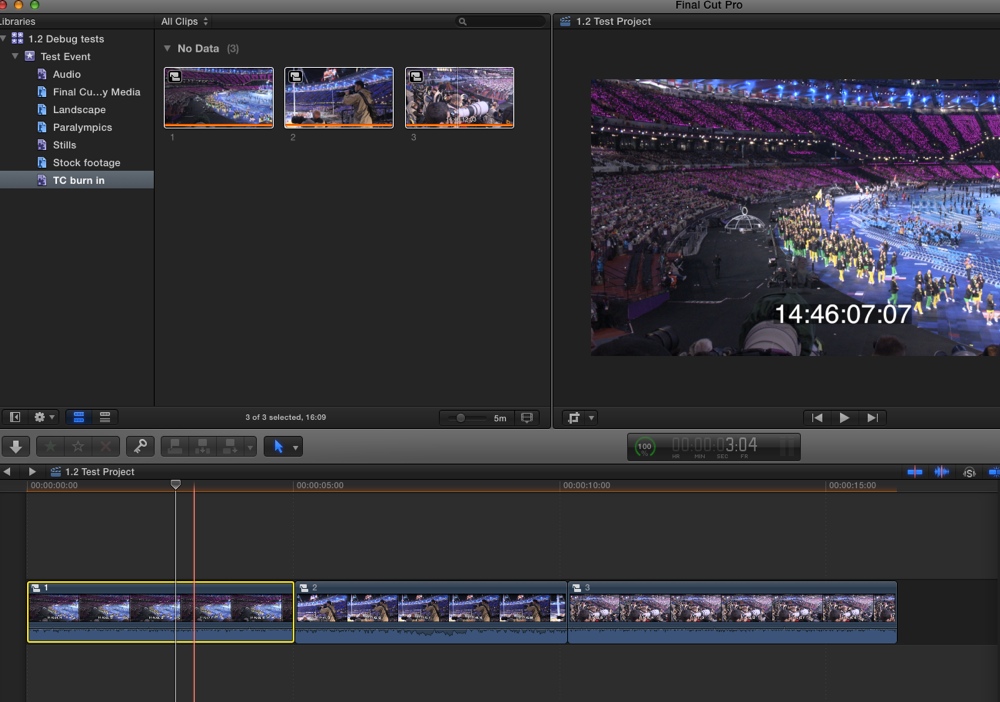
None of these workarounds are ideal. So IMO the fastest solution is using Compressor because, as Willy says, Compressor has an option to burn source TC in a clip and you can batch-encode all your clips.
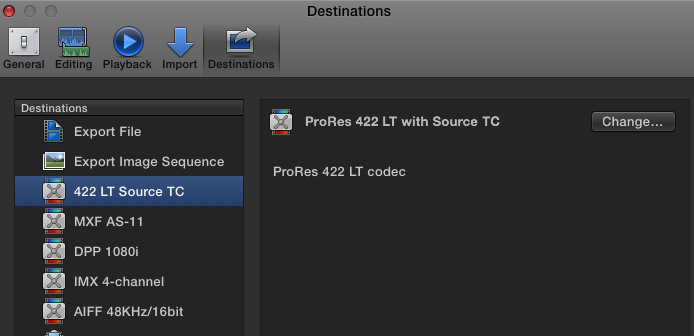
- For exporting only a few clips I have created a custom Compressor preset which I have added to my FCP X Destinations. I select the clip and I Share it using the custom Destination. As you know you can Share multiple clips one after the other and FCP X will do the exporting in the Background, which is pretty fast and it allows you to continue editing while the exporting is going on.
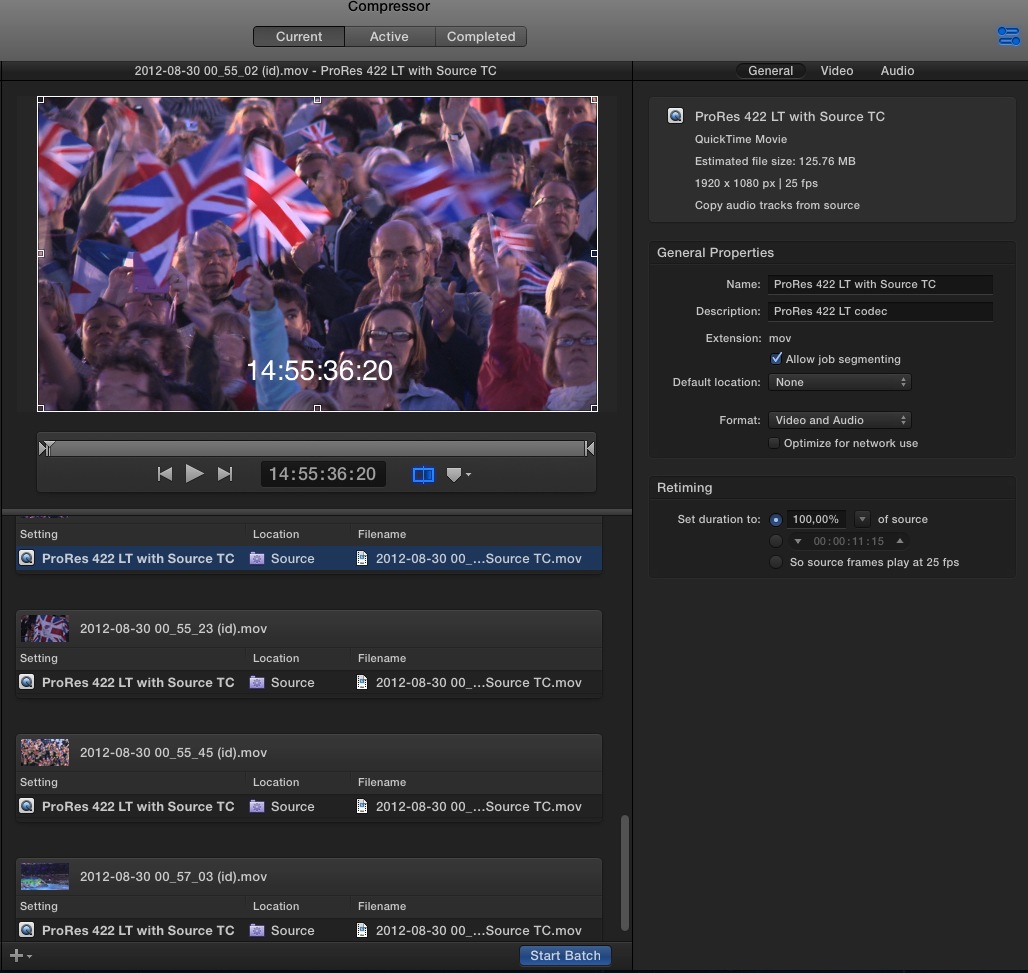
- For large amounts of clips I just delve into the Original Media folder (which is always external in our setups), drag the clips onto the Compressor window and I batch-process the clips using my custom TC burn-in preset. The only drawback to using Compressor is that the burnt-in TC does not have a black box around it, making it difficult to see on bright images. So you have to make the TC quite big.
- Ronny
I really, really, really wish there were a generator or filter that you could just drop onto a bunch of clips in the Timeline and that would burn-in the SOURCE TC of every individual clip, allowing you to export a whole bunch of original clips with burnt-in TC in one simple action. There used to be such a generator in 2011, but something was changed in a following update and since then no-one seems to have been able to fix this.
There are a few workarounds:
- Open each clip in its timeline and drop the Time Code generator onto the clip. Then export each clip as a single file with burnt-in source TC. A very labour-intensive task if you have loads of clips to export.
- Make a compound clip for each clip you wish to export, open the compound clip and drop the TC generator on it. Do this for every clip, then drop all the compound clips onto a Project timeline and export the Project. This is a little less intensive as it allows you to export all your clips as one file, but you lose the clip name information.
None of these workarounds are ideal. So IMO the fastest solution is using Compressor because, as Willy says, Compressor has an option to burn source TC in a clip and you can batch-encode all your clips.
- For exporting only a few clips I have created a custom Compressor preset which I have added to my FCP X Destinations. I select the clip and I Share it using the custom Destination. As you know you can Share multiple clips one after the other and FCP X will do the exporting in the Background, which is pretty fast and it allows you to continue editing while the exporting is going on.
- For large amounts of clips I just delve into the Original Media folder (which is always external in our setups), drag the clips onto the Compressor window and I batch-process the clips using my custom TC burn-in preset. The only drawback to using Compressor is that the burnt-in TC does not have a black box around it, making it difficult to see on bright images. So you have to make the TC quite big.
- Ronny
Last edit: 09 Jul 2014 20:47 by ronny courtens.
Please Log in to join the conversation.
- Disproportionate Pictures
-
Topic Author
- Offline
- Platinum Member
-
Less
More
- Posts: 1433
- Thank you received: 64
09 Jul 2014 20:51 #49549
by Disproportionate Pictures
Replied by Disproportionate Pictures on topic Timecode Readers- any plugins or working free generators out there?
Unfortunately this is a finished cut with lots of edits- the Online guys would like source TC burn on the reference file in case any clips don't relink in Resolve.
Please Log in to join the conversation.
- haysoos123
-
- Offline
- Platinum Member
-
Less
More
- Posts: 402
- Thank you received: 72
09 Jul 2014 23:25 #49559
by haysoos123
Replied by haysoos123 on topic Timecode Readers- any plugins or working free generators out there?
If you don't have an AE to do it for you, then it's a real pain of course. Also, I would question whether your online guys really need it. I'm pretty sure every session I've ever done with a color house has never asked for this. They will usually just call you if there's a problem, and if they have to, they will match by eye if it's just a few clips.
If you absolutely need to do it, you can go Xto7, then put the TC reader effect on all your clips to read source TC, then render it out.
Another way is to actually use Resolve! Import your XML into Resolve, and then have it render clips out with handles. Then, you can run a batch through Compressor to add TC burn, and then relink to those clips when you round trip back into FCPX.
Why don't you say as a compromise, you can just give source TC burn on any clips that don't link?
If you absolutely need to do it, you can go Xto7, then put the TC reader effect on all your clips to read source TC, then render it out.
Another way is to actually use Resolve! Import your XML into Resolve, and then have it render clips out with handles. Then, you can run a batch through Compressor to add TC burn, and then relink to those clips when you round trip back into FCPX.
Why don't you say as a compromise, you can just give source TC burn on any clips that don't link?
Please Log in to join the conversation.
- ronny courtens
-
- Offline
- Moderator
-
Less
More
- Posts: 4455
- Thank you received: 962
09 Jul 2014 23:42 #49560
by ronny courtens
Replied by ronny courtens on topic Timecode Readers- any plugins or working free generators out there?
Source TC burn-in is a fundamental feature for any collaborative workflow.
XML > Xto7 > FCP7 will work if you still have these, then drop the FCP Time Code Reader onto the clips and export. I know, it's a drag
- Ronny
XML > Xto7 > FCP7 will work if you still have these, then drop the FCP Time Code Reader onto the clips and export. I know, it's a drag
- Ronny
Please Log in to join the conversation.

10 Jul 2014 08:46 #49584
by alex4D
Replied by alex4D on topic Timecode Readers- any plugins or working free generators out there?
While investigating this a while ago I used the Compressor trick:
1. I went inside the library (Show package contents), drag copied the optimised media out of the event to make a copy
2. Used Compressor to do burned in timecode on the copies of optimised media - using a preset that didn't rename the files
3. Dragged the burnt-in TC versions into the Proxy media folder in the event - replacing any that were there
4. On opening the project in the library, I could then set the viewer to show proxy media. Final Cut doesn't check file sizes or creation dates when it comes to proxy media. Even though it hadn't created these burnt in TC versions of the media it happily displayed them - thinking they were proxy files.
5. Exported a timeline while displaying 'proxies' then switched off proxies for final export.
One day I'll see if I can find the preset within Final Cut that does the proxies - I might be able to replace it with one of my own choice that adds TC and perhaps doesn't compress the footage quite so much.
@Alex4D
PS: Timecode readers in Final Cut don't work properly because of a bug in frame maths in Motion that hasn't been fixed yet.
1. I went inside the library (Show package contents), drag copied the optimised media out of the event to make a copy
2. Used Compressor to do burned in timecode on the copies of optimised media - using a preset that didn't rename the files
3. Dragged the burnt-in TC versions into the Proxy media folder in the event - replacing any that were there
4. On opening the project in the library, I could then set the viewer to show proxy media. Final Cut doesn't check file sizes or creation dates when it comes to proxy media. Even though it hadn't created these burnt in TC versions of the media it happily displayed them - thinking they were proxy files.
5. Exported a timeline while displaying 'proxies' then switched off proxies for final export.
One day I'll see if I can find the preset within Final Cut that does the proxies - I might be able to replace it with one of my own choice that adds TC and perhaps doesn't compress the footage quite so much.
@Alex4D
PS: Timecode readers in Final Cut don't work properly because of a bug in frame maths in Motion that hasn't been fixed yet.
Please Log in to join the conversation.

10 Jul 2014 12:07 #49591
by BenB
Replied by BenB on topic Timecode Readers- any plugins or working free generators out there?
Not a clip by clip trick, but TC in Compressor article macProVideo's HUB section published with me, anyway. Just FYI.
www.macprovideo.com/hub/final-cut/compre...ecode-burn-in-preset
www.macprovideo.com/hub/final-cut/compre...ecode-burn-in-preset
Please Log in to join the conversation.
- Disproportionate Pictures
-
Topic Author
- Offline
- Platinum Member
-
Less
More
- Posts: 1433
- Thank you received: 64
10 Jul 2014 13:48 - 10 Jul 2014 13:49 #49595
by Disproportionate Pictures
Replied by Disproportionate Pictures on topic Timecode Readers- any plugins or working free generators out there?
After I get this week's episodes out the door, I'm going to try an experiment that's a bit of a hack but may be the quickest solution
Fortunately/Unfortunately half my timeline is RED files, so they may not move over in a Xto7 conversion.
My hope is that they show up as missing media, but with TC intact.
Then I just drop the TC reader plug-in on all the clips in the timeline. I'll choose the black box for my TC overlay.
Then I just export the sequence (with TC over missing media), and import that video file back into FCP X and put it overtop my whole project and crop everything but the TC window.
We'll see how it works.
Fortunately/Unfortunately half my timeline is RED files, so they may not move over in a Xto7 conversion.
My hope is that they show up as missing media, but with TC intact.
Then I just drop the TC reader plug-in on all the clips in the timeline. I'll choose the black box for my TC overlay.
Then I just export the sequence (with TC over missing media), and import that video file back into FCP X and put it overtop my whole project and crop everything but the TC window.
We'll see how it works.
Last edit: 10 Jul 2014 13:49 by Disproportionate Pictures.
Please Log in to join the conversation.

10 Jul 2014 16:10 #49603
by sidderke
Replied by sidderke on topic Timecode Readers- any plugins or working free generators out there?
I've been asking Apple for a source TG generator/reader since 10.0.0.
Can't believe it's still not there.
It should be like the LUTs you can toggle on and off in the inspector.
Can't believe it's still not there.
It should be like the LUTs you can toggle on and off in the inspector.
Please Log in to join the conversation.
- Disproportionate Pictures
-
Topic Author
- Offline
- Platinum Member
-
Less
More
- Posts: 1433
- Thank you received: 64
10 Jul 2014 16:26 #49604
by Disproportionate Pictures
Replied by Disproportionate Pictures on topic Timecode Readers- any plugins or working free generators out there?
My solution seems to work.
1. Export FCPXML
2. Xto7
3. Import XML into FCP7
4. Put TC reader onto clip and copy/paste attributes to all other clips
5. Export QT movie of TC Burn
6. Import movie into FCP X and crop TC window to black box overlay.
Totally a hack, but easy to do and I'll only need to do it once for each episode.
1. Export FCPXML
2. Xto7
3. Import XML into FCP7
4. Put TC reader onto clip and copy/paste attributes to all other clips
5. Export QT movie of TC Burn
6. Import movie into FCP X and crop TC window to black box overlay.
Totally a hack, but easy to do and I'll only need to do it once for each episode.
Please Log in to join the conversation.
- ronny courtens
-
- Offline
- Moderator
-
Less
More
- Posts: 4455
- Thank you received: 962
10 Jul 2014 16:32 #49605
by ronny courtens
Replied by ronny courtens on topic Timecode Readers- any plugins or working free generators out there?
That has always worked. But you need Xto7 and FCP7 to do this, so it's not a good workaround for most people. Source TC burn-in is a basic feature that any NLE should have. Keep bugging Apple about this!
- Ronny
- Ronny
Please Log in to join the conversation.
- Andreas Kiel
-
- Offline
- Platinum Member
-
Less
More
- Posts: 1077
- Thank you received: 189
10 Jul 2014 17:22 - 10 Jul 2014 17:23 #49607
by Andreas Kiel
I totally agree.
But keep in mind the TCR is a Motion FX – therefore keep bugging the Motion team as well.
- Andreas
Replied by Andreas Kiel on topic Timecode Readers- any plugins or working free generators out there?
ronny courtens wrote: That has always worked. But you need Xto7 and FCP7 to do this, so it's not a good workaround for most people. Source TC burn-in is a basic feature that any NLE should have. Keep bugging Apple about this!
- Ronny
I totally agree.
But keep in mind the TCR is a Motion FX – therefore keep bugging the Motion team as well.
- Andreas
Last edit: 10 Jul 2014 17:23 by Andreas Kiel.
Please Log in to join the conversation.
- ronny courtens
-
- Offline
- Moderator
-
Less
More
- Posts: 4455
- Thank you received: 962
10 Jul 2014 17:26 #49608
by ronny courtens
Replied by ronny courtens on topic Timecode Readers- any plugins or working free generators out there?
Hi Andreas,
You are totally correct! It's also the Motion guys I should be after. Okay, loading my guns
- Ronny
You are totally correct! It's also the Motion guys I should be after. Okay, loading my guns
- Ronny
Please Log in to join the conversation.
- Andreas Kiel
-
- Offline
- Platinum Member
-
Less
More
- Posts: 1077
- Thank you received: 189
10 Jul 2014 17:41 #49610
by Andreas Kiel
Replied by Andreas Kiel on topic Timecode Readers- any plugins or working free generators out there?
I tried (for personal use) to create a TCR based on XML input.
The problem is that the TC offset don't allow negative offsets. So any primary storyline/project needs to start at 0 - which is also is not a big help.
- Andreas
The problem is that the TC offset don't allow negative offsets. So any primary storyline/project needs to start at 0 - which is also is not a big help.
- Andreas
Please Log in to join the conversation.
- Disproportionate Pictures
-
Topic Author
- Offline
- Platinum Member
-
Less
More
- Posts: 1433
- Thank you received: 64
10 Jul 2014 18:34 #49615
by Disproportionate Pictures
Replied by Disproportionate Pictures on topic Timecode Readers- any plugins or working free generators out there?
In my feature request to Apple, while I said that an adjustment to have the TC Generator simply read the TC of the topmost clip would be acceptable... my preferred implementation would be to have it be a Viewer option, with no plug-in or generator necessary.
You can have it display single or multiple time codes (like Legacy), and then you can choose to burn single, multiple, or sequence timecode on export.
You can have it display single or multiple time codes (like Legacy), and then you can choose to burn single, multiple, or sequence timecode on export.
Please Log in to join the conversation.

10 Jul 2014 21:21 #49624
by smg669
Replied by smg669 on topic Timecode Readers- any plugins or working free generators out there?
I think Ronny's/Alex's solution of creating a TC burn version the entire set of media and using them as proxy files is less hassle. Sure, it's a long render... but the Xto7/7toX method you laid out is inflexible if you need to make changes after you've rendered the sequence out of FCP7. But what do you have that fast MacPro and RAID for anyhow? By creating TC burned proxies at the outset, you'll have the option of spitting out source-TC burned cuts at any time during the edit process. And even easier now in 10.1.2 since the proxies/optimized can be stored outside of the Library bundle. That is if you're lucky enough to be able to use 10.1.2.
However, a better solution than Ben's red text (which won't do you any good if the subject of a shot happens to be wearing a red sweater) is to add a semitransparent black box under the (white) TC burn using the "Watermark" Video Effect in Compressor. This can be a bit finicky if you switch around input and output pixel sizes, but once you get the PNG and settings down for a set workflow, it works.
If you have Sorenson Squeeze, the latest version has a Source TC burn with built-in semitransparent background built-in - saving you some steps and hassle. You could make your proxy set with this as well.
However, a better solution than Ben's red text (which won't do you any good if the subject of a shot happens to be wearing a red sweater) is to add a semitransparent black box under the (white) TC burn using the "Watermark" Video Effect in Compressor. This can be a bit finicky if you switch around input and output pixel sizes, but once you get the PNG and settings down for a set workflow, it works.
If you have Sorenson Squeeze, the latest version has a Source TC burn with built-in semitransparent background built-in - saving you some steps and hassle. You could make your proxy set with this as well.
Please Log in to join the conversation.
- Andreas Kiel
-
- Offline
- Platinum Member
-
Less
More
- Posts: 1077
- Thank you received: 189
11 Jul 2014 06:03 #49654
by Andreas Kiel
Replied by Andreas Kiel on topic Timecode Readers- any plugins or working free generators out there?
Currently not a machine with Compressor installed – so it's just a guess.
In theory you could put a watermark file which fits the tc display and the TCR on the out file.
- Andreas
In theory you could put a watermark file which fits the tc display and the TCR on the out file.
- Andreas
Please Log in to join the conversation.
