


- Posts: 730
- Thank you received: 26
3 Post Moderation Rule for New Boarders (25 Jan 2021)
New boarders will have their posts moderated - Don't worry if you cannot see your post immediately.
FCPX 10.1.2 crashed and now Project file is missing!!!
- DmitriZigany
-
 Topic Author
- Offline
- Platinum Member
-

Less
More
09 Jul 2014 14:25 #49513
by DmitriZigany
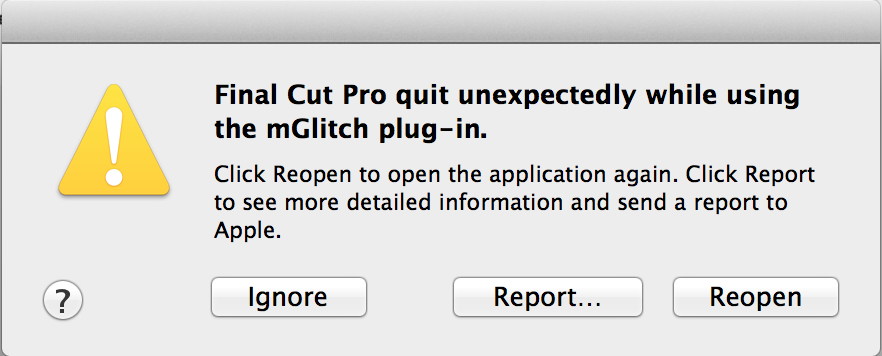
I was exporting my project (Master File) and then the App crashed, and I got a message saying "FCPX crashed using the mGlitch plug-in" and when I opened FCPX again, there was a yellow warning signal on the Event that I had been using and in it the project is now missing! HELP!!!!! WTF!?!?!?!? Hours and hours of work...
Please Log in to join the conversation.
- Tom Wolsky
-

- Offline
- Moderator
-

09 Jul 2014 14:29 #49515
by Tom Wolsky
Replied by Tom Wolsky on topic FCPX 10.1.2 crashed and now Project file is missing!!!
Report it and try opening a backup.
Uninstall the plugin and contact the manufacturer to confirm it is compatible with 10.1.2. When a new version comes out you should always assume all plugins are broken until confirmed otherwise by the manufacturer.
Uninstall the plugin and contact the manufacturer to confirm it is compatible with 10.1.2. When a new version comes out you should always assume all plugins are broken until confirmed otherwise by the manufacturer.
Please Log in to join the conversation.
- DmitriZigany
-
Topic Author
- Offline
- Platinum Member
-
Less
More
- Posts: 730
- Thank you received: 26
09 Jul 2014 14:38 #49518
by DmitriZigany
Replied by DmitriZigany on topic FCPX 10.1.2 crashed and now Project file is missing!!!
There is no back-ups to open 
There was issues with mGlitch (quite fitting haha) but then they updated the plug-in and all seemed fine. But that was mostly in 10.1.1. However, I never imagined that an entire project file would just disappear
I have written motionVFX support...
There was issues with mGlitch (quite fitting haha) but then they updated the plug-in and all seemed fine. But that was mostly in 10.1.1. However, I never imagined that an entire project file would just disappear
I have written motionVFX support...
Please Log in to join the conversation.
- DmitriZigany
-
Topic Author
- Offline
- Platinum Member
-
Less
More
- Posts: 730
- Thank you received: 26
09 Jul 2014 14:45 #49520
by DmitriZigany
Replied by DmitriZigany on topic FCPX 10.1.2 crashed and now Project file is missing!!!
Ok, so, going into the library and the event in the Finder, the Project's folder and the "CurrentVersion.fcpevent" file is still there, but for some reason FCPX won't see/open it... Any suggestions?
Please Log in to join the conversation.
- DmitriZigany
-
Topic Author
- Offline
- Platinum Member
-
Less
More
- Posts: 730
- Thank you received: 26
09 Jul 2014 15:02 #49522
by DmitriZigany
Replied by DmitriZigany on topic FCPX 10.1.2 crashed and now Project file is missing!!!
Ok, so there was also a "CurrentVersion.fcpevent-journal" file in the folder, if I removed that and restarted FCPX reads the project... But then immediately crashes "due to mGlitch". So it seems that mGlitch is rather very glitchy! 
At least now I know I won't have to do everything from scratch, but could just remove mGlitch and it should be fine...
Very scary this!
It's too bad. I love the motionVFX plug-ins. But they are the only ones that give me issues. And even when they are not crashing FCPX they are such power hogs and take forever to render and export so I usually end up never using them. But needed them for this project. mGlitch was a rather integral part of the edit for this project so I guess I have to wait for motionVFX to fix the problem before I can finish it...
At least now I know I won't have to do everything from scratch, but could just remove mGlitch and it should be fine...
Very scary this!
It's too bad. I love the motionVFX plug-ins. But they are the only ones that give me issues. And even when they are not crashing FCPX they are such power hogs and take forever to render and export so I usually end up never using them. But needed them for this project. mGlitch was a rather integral part of the edit for this project so I guess I have to wait for motionVFX to fix the problem before I can finish it...
Please Log in to join the conversation.
- DmitriZigany
-
Topic Author
- Offline
- Platinum Member
-
Less
More
- Posts: 730
- Thank you received: 26
09 Jul 2014 21:20 #49550
by DmitriZigany
Replied by DmitriZigany on topic FCPX 10.1.2 crashed and now Project file is missing!!!
So, last update on this.
About the 7th time I tried opening FCPX it didn't crash and I was able to render all and then export it.
In earlier versions (of both mGlitch and FCPX) I sometimes had to render before exporting, exporting directly before rendering would crash FCPX. So that old trick worked again.
Sorry for the drama. But having the actual project file disappear was a bit of a scare!
About the 7th time I tried opening FCPX it didn't crash and I was able to render all and then export it.
In earlier versions (of both mGlitch and FCPX) I sometimes had to render before exporting, exporting directly before rendering would crash FCPX. So that old trick worked again.
Sorry for the drama. But having the actual project file disappear was a bit of a scare!
Please Log in to join the conversation.
- ronny courtens
-

- Offline
- Moderator
-
Less
More
- Posts: 4455
- Thank you received: 962
09 Jul 2014 22:07 #49553
by ronny courtens
Replied by ronny courtens on topic FCPX 10.1.2 crashed and now Project file is missing!!!
Yes I can understand it's quite scary to suddenly see all your precious work vaporized :ohmy:
Glad you got it solved!
- Ronny
Glad you got it solved!
- Ronny
Please Log in to join the conversation.
