


- Posts: 88
- Thank you received: 7
3 Post Moderation Rule for New Boarders (25 Jan 2021)
New boarders will have their posts moderated - Don't worry if you cannot see your post immediately.
Synchronized Clip is wrong resolution
09 Jul 2014 13:41 #49508
by thefcpguy
Synchronized Clip is wrong resolution was created by thefcpguy
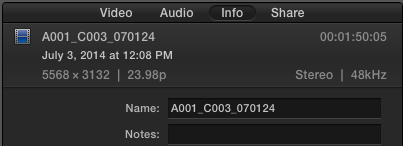
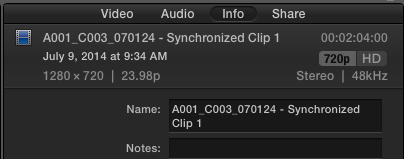
I just noticed that the RED 6K footage I synchronized with clean audio is downscaled to 720p. What the heck?
Please Log in to join the conversation.
- ronny courtens
-

- Offline
- Moderator
-

Less
More
- Posts: 4455
- Thank you received: 962
09 Jul 2014 15:54 #49525
by ronny courtens
Replied by ronny courtens on topic Synchronized Clip is wrong resolution
Hey Bill,
When you create a Synchronized clip a window pops up where you can set the resolution of the Synchronized clip. If the default setting is not correct you can set the resolution yourself by checking the Custom button. There is no 6K Custom preset, so you have to enter the resolution manually.
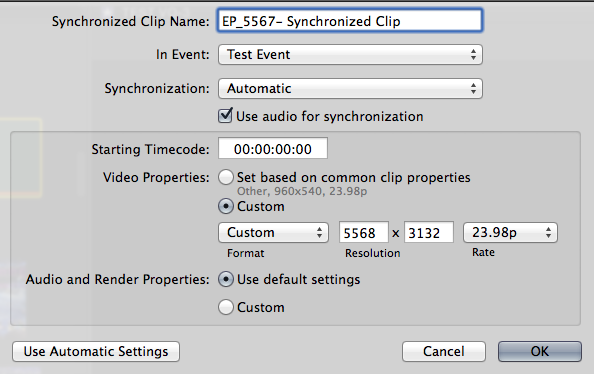
You cannot change the resolution of a Synchronized clip, so if you have created a Synchronized clip with the wrong resolution you will have to resynchronize the clips using the correct resolution setting.
- Ronny
When you create a Synchronized clip a window pops up where you can set the resolution of the Synchronized clip. If the default setting is not correct you can set the resolution yourself by checking the Custom button. There is no 6K Custom preset, so you have to enter the resolution manually.
You cannot change the resolution of a Synchronized clip, so if you have created a Synchronized clip with the wrong resolution you will have to resynchronize the clips using the correct resolution setting.
- Ronny
Please Log in to join the conversation.
- Disproportionate Pictures
-

- Offline
- Platinum Member
-

Less
More
- Posts: 1433
- Thank you received: 64
09 Jul 2014 16:07 - 09 Jul 2014 16:08 #49526
by Disproportionate Pictures
Replied by Disproportionate Pictures on topic Synchronized Clip is wrong resolution
Now if only they gave you the option to take on the metadata of the source video clip in that interface.... 
Last edit: 09 Jul 2014 16:08 by Disproportionate Pictures.
Please Log in to join the conversation.
- ronny courtens
-
- Offline
- Moderator
-
Less
More
- Posts: 4455
- Thank you received: 962
09 Jul 2014 16:37 #49531
by ronny courtens
Replied by ronny courtens on topic Synchronized Clip is wrong resolution
Hi Marcus,
When you synchronize clips and you select "Video Properties: Set based on common clip properties" the Synchronized clip will take the Format, Resolution, Frame Rate and Camera Name metadata of the source video clip. Notes, Scene, Reel and Take are currently not transferred over to the Synchronized clip. I agree this would be handy.
- Ronny
When you synchronize clips and you select "Video Properties: Set based on common clip properties" the Synchronized clip will take the Format, Resolution, Frame Rate and Camera Name metadata of the source video clip. Notes, Scene, Reel and Take are currently not transferred over to the Synchronized clip. I agree this would be handy.
- Ronny
Please Log in to join the conversation.
09 Jul 2014 16:40 #49532
by thefcpguy
Replied by thefcpguy on topic Synchronized Clip is wrong resolution
Thanks, Ronny. That's helpful information, but OMG what a FAIL in software design...
1) Why wouldn't Automatic Settings use common clip properties?
2) When I click custom, I see that it thinks that the common clip properties are 1280x720. Why?
3) When I customize the properties to the RED spec (5568x3132, 23.98fps) and synchronize the clip with the clean audio, it FORGETS THOSE SETTINGS when I go to the next clip and I have to type them all over again.
I'm assuming that this has occurred because my clips are a non-standard size, but when I've gone through (one by one) and synchronized 50-60 clips already and started cutting selects in the timeline this is a huge pain and waste of my time. Sorry, I had to vent a bit. I do appreciate the help!
And yes, I'll be reporting this one to Apple.
Bill
1) Why wouldn't Automatic Settings use common clip properties?
2) When I click custom, I see that it thinks that the common clip properties are 1280x720. Why?
3) When I customize the properties to the RED spec (5568x3132, 23.98fps) and synchronize the clip with the clean audio, it FORGETS THOSE SETTINGS when I go to the next clip and I have to type them all over again.
I'm assuming that this has occurred because my clips are a non-standard size, but when I've gone through (one by one) and synchronized 50-60 clips already and started cutting selects in the timeline this is a huge pain and waste of my time. Sorry, I had to vent a bit. I do appreciate the help!
And yes, I'll be reporting this one to Apple.
Bill
Please Log in to join the conversation.
- Disproportionate Pictures
-
- Offline
- Platinum Member
-
Less
More
- Posts: 1433
- Thank you received: 64
09 Jul 2014 16:44 #49533
by Disproportionate Pictures
Replied by Disproportionate Pictures on topic Synchronized Clip is wrong resolution
Yup. Those are the one's I'm referring to. Source Video TC as well.
I don't have TC lock from set on this series, so I've been using MovieSlate and ShotNotes, which thankfully recognizes and applies the metadata to both original video and any sync clips with those clip within.
But if you've logged material before syncing, then that info should definitely carry over.
I don't have TC lock from set on this series, so I've been using MovieSlate and ShotNotes, which thankfully recognizes and applies the metadata to both original video and any sync clips with those clip within.
But if you've logged material before syncing, then that info should definitely carry over.
Please Log in to join the conversation.

09 Jul 2014 16:48 #49535
by BenB
Replied by BenB on topic Synchronized Clip is wrong resolution
I'd love to be able to set up a customized format, and save it as a user preset.
Please Log in to join the conversation.
09 Jul 2014 16:49 #49536
by thefcpguy
Replied by thefcpguy on topic Synchronized Clip is wrong resolution
Me too. I'd also like it to use the actual frame size as the common clip property when creating synchronized clips. Feature request time!
Please Log in to join the conversation.
- Disproportionate Pictures
-
- Offline
- Platinum Member
-
Less
More
- Posts: 1433
- Thank you received: 64
09 Jul 2014 16:50 #49537
by Disproportionate Pictures
Replied by Disproportionate Pictures on topic Synchronized Clip is wrong resolution
Isn't is better to keep sync clips at the native resolution and make any scale adjustments at the Project level?
Please Log in to join the conversation.
09 Jul 2014 16:52 #49538
by thefcpguy
Replied by thefcpguy on topic Synchronized Clip is wrong resolution
Indeed, and that's what I thought I was doing until I noticed in the Inspector that it had turned my RED 6K clips into 720p. I now have to manually go back through each clip and customize the settings so they are synched with clean audio in the correct resolution. Grr.
Please Log in to join the conversation.
- Disproportionate Pictures
-
- Offline
- Platinum Member
-
Less
More
- Posts: 1433
- Thank you received: 64
09 Jul 2014 16:54 #49539
by Disproportionate Pictures
Replied by Disproportionate Pictures on topic Synchronized Clip is wrong resolution
You're right, of course. Get that in to Apple and I'm sure you'll see 6K elements supported in the next update.
Please Log in to join the conversation.
- ronny courtens
-
- Offline
- Moderator
-
Less
More
- Posts: 4455
- Thank you received: 962
09 Jul 2014 17:23 #49541
by ronny courtens
Replied by ronny courtens on topic Synchronized Clip is wrong resolution
Bill,
If you have to re-do 50-60 clips because of this then you have every right to vent
1. "Automatic Settings" does recognize common clip properties correctly, but it only recognizes video formats up to 5K. That's why if you have any doubts it is always best to press the Use Custom Settings button to double-check if the clip properties are indeed set correctly.
2. Your common clip properties were set to 1280x720 (this could also be a different size) because 6k is simply not recognized yet. Feedback time.
3. Yes you have to manually enter custom properties for each new clip. This is a drag. Ben's suggestion to be able to set and save custom sizes that FCP X will remember for every clip is an excellent one. Feedback time once again
- Ronny
If you have to re-do 50-60 clips because of this then you have every right to vent
1. "Automatic Settings" does recognize common clip properties correctly, but it only recognizes video formats up to 5K. That's why if you have any doubts it is always best to press the Use Custom Settings button to double-check if the clip properties are indeed set correctly.
2. Your common clip properties were set to 1280x720 (this could also be a different size) because 6k is simply not recognized yet. Feedback time.
3. Yes you have to manually enter custom properties for each new clip. This is a drag. Ben's suggestion to be able to set and save custom sizes that FCP X will remember for every clip is an excellent one. Feedback time once again
- Ronny
Please Log in to join the conversation.

09 Jul 2014 19:15 #49545
by fcpguru
Replied by fcpguru on topic Synchronized Clip is wrong resolution
This has happened to me several times with 1080p media too. I think it has something to do with the fact that I selected the audio file first and it defaulted to 720p for some reason. I've just gotten used to double checking any sync clip setting before clicking ok. Feedback time!
Please Log in to join the conversation.


25 Apr 2021 17:36 #114138
by simpassi
Replied by simpassi on topic Synchronized Clip is wrong resolution
Seven years later, this still is happening. So if you did end up here by googling the problem, I made a little tool that might help.
Use at your own risk:
github.com/simpassi/misclip
Use at your own risk:
github.com/simpassi/misclip
Please Log in to join the conversation.
