


- Posts: 87
- Thank you received: 3
3 Post Moderation Rule for New Boarders (25 Jan 2021)
New boarders will have their posts moderated - Don't worry if you cannot see your post immediately.
Moving only updated Projects between dupe Libraries on different drives
09 Jul 2014 10:53 #49495
by BobKrist
When I make a new library and project, I try to put it on three different drives. But when I work for a while on the project, I'd like to update the other two Libraries on the other drives, and thus far, the only way I've been able to do that reliably is to update the entire library and that takes time.
Is there any way to go into the Package Contents of the Library and just replace the updated project file? I've tried it, but it doesn't seem to work.
Thanks in advance!
Is there any way to go into the Package Contents of the Library and just replace the updated project file? I've tried it, but it doesn't seem to work.
Thanks in advance!
Please Log in to join the conversation.
- Tom Wolsky
-

- Offline
- Moderator
-

09 Jul 2014 12:36 #49499
by Tom Wolsky
Replied by Tom Wolsky on topic Moving only updated Projects between dupe Libraries on different drives
Can't you just drag the project from one library to the other in FCP.
Please Log in to join the conversation.
09 Jul 2014 12:42 #49500
by BobKrist
Replied by BobKrist on topic Moving only updated Projects between dupe Libraries on different drives
Tom: I have not been successful in doing that…when I simply drag the newer project file only to the new drive, the project doesn't seem to want to update.
Please Log in to join the conversation.


09 Jul 2014 13:30 - 09 Jul 2014 13:31 #49504
by Dave_EP
Replied by Dave_EP on topic Moving only updated Projects between dupe Libraries on different drives
It's quite simple. I use a generic file sync program called GoodSync.
Point the source (left side) to the one you're working on and the target (right side) to the duplicate on the other drive. When you're ready tell it to sync and voila - your copy Library / event / project is updated.
If you want to do it to two different places simply duplicate the job and point the second one at the other location.
This only updates the files that have changed and is perfect for updating backups of FCPX Libraries/Events/Projects across drives.
In fact, it's easier to use this to create the duplicates in the first place so that the files on the duplicate drives are perfectly in sync from the start, rather than having later time stamps.
Point the source (left side) to the one you're working on and the target (right side) to the duplicate on the other drive. When you're ready tell it to sync and voila - your copy Library / event / project is updated.
If you want to do it to two different places simply duplicate the job and point the second one at the other location.
This only updates the files that have changed and is perfect for updating backups of FCPX Libraries/Events/Projects across drives.
In fact, it's easier to use this to create the duplicates in the first place so that the files on the duplicate drives are perfectly in sync from the start, rather than having later time stamps.
Last edit: 09 Jul 2014 13:31 by Dave_EP.
Please Log in to join the conversation.
09 Jul 2014 13:35 #49505
by BobKrist
Replied by BobKrist on topic Moving only updated Projects between dupe Libraries on different drives
Thanks Dave, I will definitely check GoodSync out…but the question remains, in the Library package, what files exactly do you have to sync to move the updated project because, I don't know if it's a bug or a glitch, but when I simply drag over the project file, it doesn't update when I open it on the new drive.
So my question is not so much "how to" sync projects between drives, it's more of "what files" do you need to sync to simply update the project.
So my question is not so much "how to" sync projects between drives, it's more of "what files" do you need to sync to simply update the project.
Please Log in to join the conversation.
09 Jul 2014 13:37 #49506
by Dave_EP
Replied by Dave_EP on topic Moving only updated Projects between dupe Libraries on different drives
Typically it would be the database file as long as the media in the events etc haven't changed.
If there is new media then clearly you need to sync much more than just the database file - hence I always do a full sync.
If there is new media then clearly you need to sync much more than just the database file - hence I always do a full sync.
Please Log in to join the conversation.
09 Jul 2014 13:39 #49507
by BobKrist
Replied by BobKrist on topic Moving only updated Projects between dupe Libraries on different drives
So that means you are copying over the whole Library, events and all? That's what I've been doing and that works, but simply dragging the project file over doesn't work. I guess I'll stick to what I've been doing, but it seems like you should be able to just drag over the project file, which is tiny and would copy fast.
Please Log in to join the conversation.
09 Jul 2014 13:42 - 09 Jul 2014 13:45 #49509
by Dave_EP
Replied by Dave_EP on topic Moving only updated Projects between dupe Libraries on different drives
Bob, it's goes like this:
1) Create your initial Library / Event / Project (LEP)
2) Create a Sync job (in GoodSync) and have it sync that LEP to another drive so you have a full copy of the initial version
3) Make changes as required on your primary copy
4) Sync the library - this figures out what changed (if anything) and ONLY copies the files that have changed.
This means that if all you did was make a tweak to an edit, only the database file (which is tiny) is copied over, not the entire library again. If you happen to have added more media, that would automatically be synced to the second copy as well.
As an example, the initial sync could take 30 mins if there is lots of media, but subsequent syncs could take as little as a few seconds.
You can easily tell GoodSync to ignore render files etc, so if anything like that changes or is regenerated GoodSync will ignore them.
1) Create your initial Library / Event / Project (LEP)
2) Create a Sync job (in GoodSync) and have it sync that LEP to another drive so you have a full copy of the initial version
3) Make changes as required on your primary copy
4) Sync the library - this figures out what changed (if anything) and ONLY copies the files that have changed.
This means that if all you did was make a tweak to an edit, only the database file (which is tiny) is copied over, not the entire library again. If you happen to have added more media, that would automatically be synced to the second copy as well.
As an example, the initial sync could take 30 mins if there is lots of media, but subsequent syncs could take as little as a few seconds.
You can easily tell GoodSync to ignore render files etc, so if anything like that changes or is regenerated GoodSync will ignore them.
Last edit: 09 Jul 2014 13:45 by Dave_EP.
Please Log in to join the conversation.
09 Jul 2014 14:05 #49511
by BobKrist
Replied by BobKrist on topic Moving only updated Projects between dupe Libraries on different drives
Thanks Dave, I'm downloading GoodSync as we speak! Thanks again.
Please Log in to join the conversation.
- Tom Wolsky
-
- Offline
- Moderator
-
09 Jul 2014 14:25 #49512
by Tom Wolsky
Replied by Tom Wolsky on topic Moving only updated Projects between dupe Libraries on different drives
You do this inside FCP. You should not need to do anything to libraries at the Finder level. I assume you're using the current version.
Please Log in to join the conversation.
09 Jul 2014 14:27 #49514
by BobKrist
Replied by BobKrist on topic Moving only updated Projects between dupe Libraries on different drives
Yes, the latest version, and when I hit "Duplicate Project" it dupes it on the same drive...I may be missing something but I don't see an option as to where I can duplicate the project. That's why I think I'm missing something very obvious...which is not unusual for me:-)
Please Log in to join the conversation.
- Tom Wolsky
-
- Offline
- Moderator
-
09 Jul 2014 14:31 #49516
by Tom Wolsky
Replied by Tom Wolsky on topic Moving only updated Projects between dupe Libraries on different drives
I did not say duplicate. I said drag the current project from one library to the other. Do this inside FCP. Because it's a different library the project will be duplicated.
Please Log in to join the conversation.
09 Jul 2014 14:39 #49519
by BobKrist
Replied by BobKrist on topic Moving only updated Projects between dupe Libraries on different drives
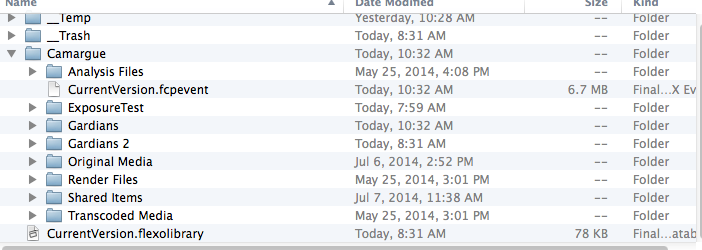
Okay, that's what I've been doing without success. In the attached screen shot, I've been dragging the current version.fcpevent, I see no other files in any other folder that say "project". Can you tell me what file to drag over?
Please Log in to join the conversation.
09 Jul 2014 15:01 #49521
by BobKrist
Replied by BobKrist on topic Moving only updated Projects between dupe Libraries on different drives
Tom: I think I've figured out what you mean. My problem was that none of my libraries on the other drives were showing up within the program. When I searched and added them, I see that I can drag the project into the new library, and I'm assuming that's what you meant. Sorry to be so thick. I forgot that you have to tell FCPX what Libraries to include when it opens.
Please Log in to join the conversation.
