




- Posts: 26
- Thank you received: 1
3 Post Moderation Rule for New Boarders (25 Jan 2021)
New boarders will have their posts moderated - Don't worry if you cannot see your post immediately.
FCP 10 created archive does not show video files
06 Jul 2014 18:45 #49283
by Shorty01
FCP 10 created archive does not show video files was created by Shorty01
I used FCP 10 to make an archive of an AVCHD camera SD card.
It generated it just fine with every file contained in the package, but when I try to open it, it only shows some
jpegs and an mp4 which are also on the card (and made by the same Panasonic HDC-SD200 camera)
I have no problems with the archives that I made of my GoPro cards.
Anybody have a clue?
It generated it just fine with every file contained in the package, but when I try to open it, it only shows some
jpegs and an mp4 which are also on the card (and made by the same Panasonic HDC-SD200 camera)
I have no problems with the archives that I made of my GoPro cards.
Anybody have a clue?
Please Log in to join the conversation.
- Tom Wolsky
-

- Offline
- Moderator
-

06 Jul 2014 18:53 #49284
by Tom Wolsky
Replied by Tom Wolsky on topic FCP 10 created archive does not show video files
Are you opening the archive bundle? Can you post screen shits of what you're seeing inside? You don't have a bundle called AVCHD?
Please Log in to join the conversation.
06 Jul 2014 18:55 #49285
by Shorty01
Replied by Shorty01 on topic FCP 10 created archive does not show video files
I just found out, that the same thing happens with an exact copy of the card.
When I have the SD card in my computer however, FCP "media import" does see the mts clips!
So ... the card itself is recognised just fine, but any copy or archive is not.
I did an import from the original card, but then a few clips did not import right and kept referencing the camera!?!
When I have the SD card in my computer however, FCP "media import" does see the mts clips!
So ... the card itself is recognised just fine, but any copy or archive is not.
I did an import from the original card, but then a few clips did not import right and kept referencing the camera!?!
Please Log in to join the conversation.
06 Jul 2014 19:00 #49287
by Shorty01
Replied by Shorty01 on topic FCP 10 created archive does not show video files
Hi Tom,
Wow ... that was quick! I didn't see your reply before I posted my second remark/question.
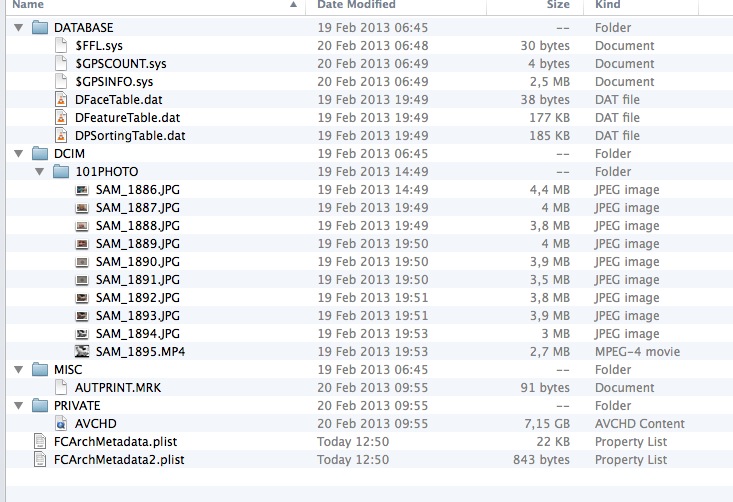
I do open an FCP archive bundle and as you can see, there is and AVCHD bundle inside
Wow ... that was quick! I didn't see your reply before I posted my second remark/question.
I do open an FCP archive bundle and as you can see, there is and AVCHD bundle inside
Please Log in to join the conversation.
- Tom Wolsky
-
- Offline
- Moderator
-
06 Jul 2014 19:07 #49288
by Tom Wolsky
Replied by Tom Wolsky on topic FCP 10 created archive does not show video files
Like QuickTime FCP will open the bundle to access the AVCHD media.
Please Log in to join the conversation.
06 Jul 2014 19:11 #49289
by Shorty01
Replied by Shorty01 on topic FCP 10 created archive does not show video files
I am sorry, but I am missing your point Tom.
As said before FCP generated a perfectly fine archive, but just like the exact copy of the card structure, the video clips are not recognized. That is when I try to import files out of them via the FCP media import.
As said before FCP generated a perfectly fine archive, but just like the exact copy of the card structure, the video clips are not recognized. That is when I try to import files out of them via the FCP media import.
Please Log in to join the conversation.
- Tom Wolsky
-
- Offline
- Moderator
-
06 Jul 2014 19:33 #49290
by Tom Wolsky
Replied by Tom Wolsky on topic FCP 10 created archive does not show video files
That can happen of you mix media formats on the same card. Every manufacturer recommends against that. You will have to crack the bundle and import the mts files and optimize them if FCP doesn't read the AVCHD clips.
Please Log in to join the conversation.
06 Jul 2014 19:48 #49291
by Shorty01
Replied by Shorty01 on topic FCP 10 created archive does not show video files
I think I figured it out ...
My Panasonic video camera has the possibility to make photos as well and as such places a DCIM folder in its structure.
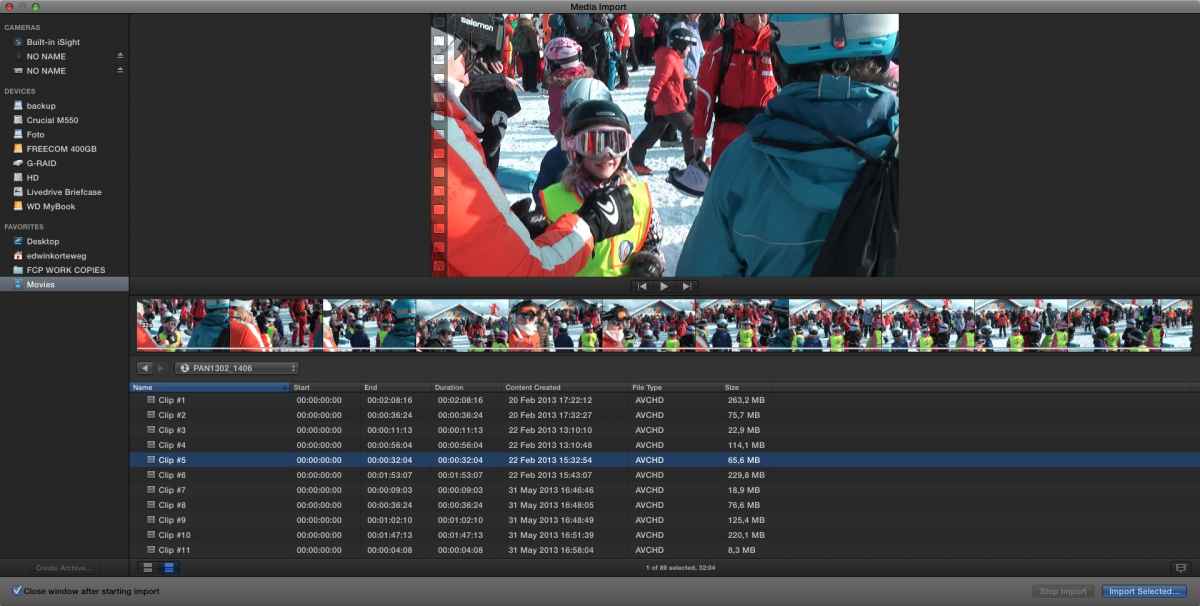
When I open "FCP media import" I see two devices, a photo camera and a video camera (called NO NAME).
For some reason this DCIM folder blocks any archive or card copy from showing its files from the video camera folder (PRIVATE/AVCHD).
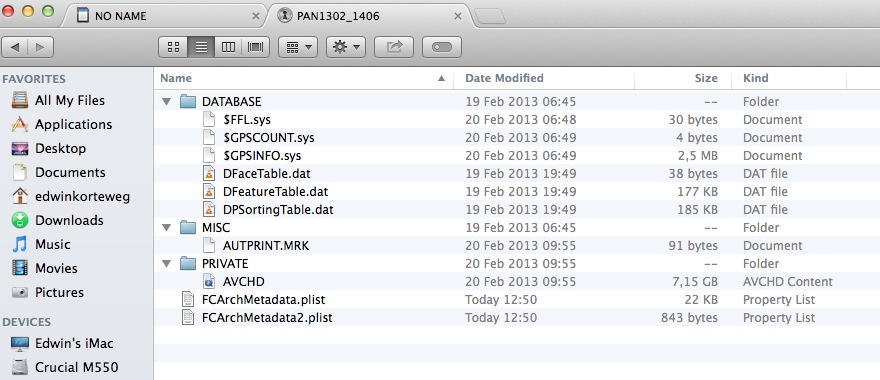
When I deleted the DCIM folder from the card copy folder structure and thereafter accessed this card copy within "FCP media import", the video files DID show up!
So, I deleted the same DCIM folder from the FCP generated archive file ... AND VOILA!
It is a bit strange and uncomfortable though as everybody keeps telling me NOT to touch the folder structure.
Greetings,
Edwin.
My Panasonic video camera has the possibility to make photos as well and as such places a DCIM folder in its structure.
When I open "FCP media import" I see two devices, a photo camera and a video camera (called NO NAME).
For some reason this DCIM folder blocks any archive or card copy from showing its files from the video camera folder (PRIVATE/AVCHD).
When I deleted the DCIM folder from the card copy folder structure and thereafter accessed this card copy within "FCP media import", the video files DID show up!
So, I deleted the same DCIM folder from the FCP generated archive file ... AND VOILA!
It is a bit strange and uncomfortable though as everybody keeps telling me NOT to touch the folder structure.
Greetings,
Edwin.
Please Log in to join the conversation.
06 Jul 2014 19:56 #49292
by Shorty01
Replied by Shorty01 on topic FCP 10 created archive does not show video files
Aha! I didn't know that. In this case Panasonic is the one forcing it on me however, but hey, the camera is from the pre-smart-whateverdevice era. They probably thought they were pretty smart putting this photo option into the camera.  Who blames them?
Anyway ... apparently, just deleting the DCIM folder from the archive does the trick!
Thanks very much for the QUICK help Tom!
Best regards,
Edwin
Who blames them?Anyway ... apparently, just deleting the DCIM folder from the archive does the trick!
Thanks very much for the QUICK help Tom!
Best regards,
Edwin
Please Log in to join the conversation.
