


3 Post Moderation Rule for New Boarders (25 Jan 2021)
New boarders will have their posts moderated - Don't worry if you cannot see your post immediately.
FCP x 10.1.2 and Da Vinci Roundtrip Challenge
- Deano
-
 Topic Author
- Offline
- Senior Member
-

- To the Virgins, to Make Much of Time Gather ye rosebuds while ye may, Old Time is still a-flying: And this same flower that smiles to-day To-morrow will be dying. The glorious lamp of heaven, the sun, The higher he's a-getting, The sooner will hi
As a now solid user of FCP X for a variety of Television Broadcast work now... I am generally happy with the ongoing development of the software and the way it deals with media management.
HOWEVER...
I now use DaVinci Resolve frequently as the finishing off content to deliver and I am now encountering this issue.
I use a variety of Cameras, including AVCHD material as delivered by the Sony FS700.
Prior to this version, any clips imported were renamed at the file level with Time/Date stamps.
With the latest update, it now uses the camera specific file names (Clip #1, Clip #2 etc.)... whilst I don't personally have any problem with that (Keywords are the core in terms of managing my media anyway for editing) - the problem is that AVCHD camera media is imported with hashtags embedded:
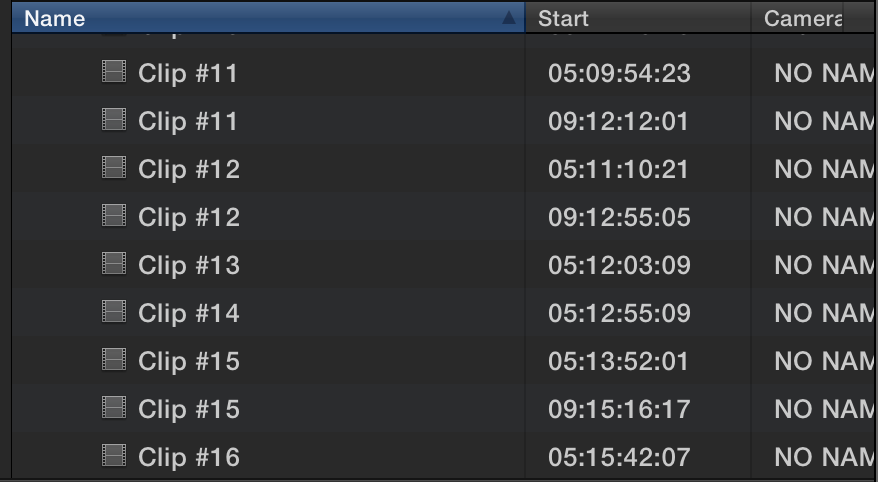
That's all fine and dandy within FCP X. However, Resolve 11 does not play happily with these files:
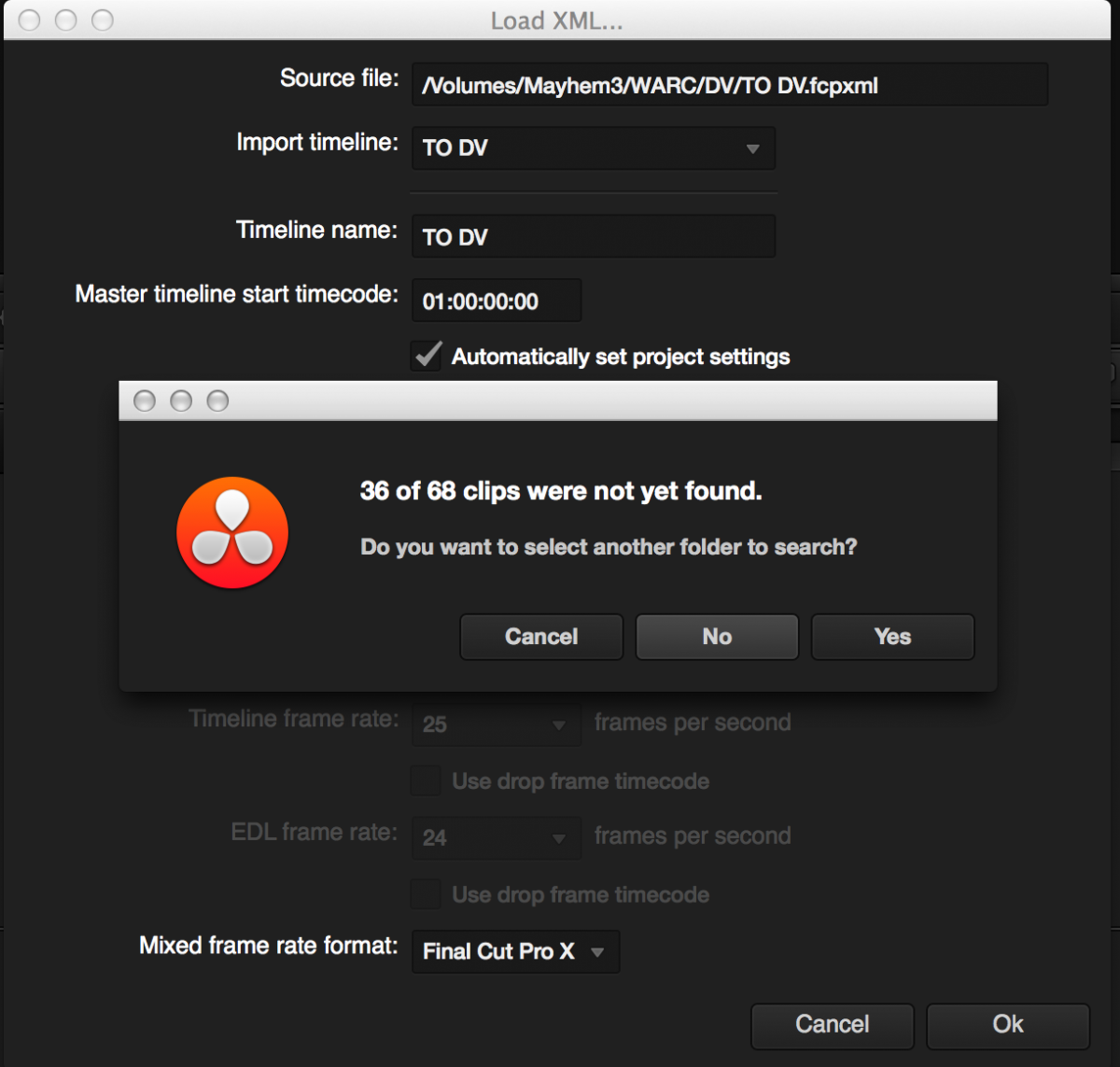
So... having to import media, then go to the finder to manually rename these files is just a clumsy, slow way of dealing with this.
I ended up grading my last project using Magic Bullet Looks to get it out on time.
I do have an Odyssey 7q for high end broadcast work, which in part solves this...but for web based and medium level work where AVCHD material is good enough and where turnarounds are tight... this is just a hassle.
Thoughts? Suggestions?
Dean....
Please Log in to join the conversation.
- Disproportionate Pictures
-

- Offline
- Platinum Member
-

- Posts: 1433
- Thank you received: 64
There are loads of easy finder-level name-changers, such as the one I use- called appropriately "NameChanger". I use this to rename the combined Zoom files that WaveAgent exports- very fast and easy.
Please Log in to join the conversation.
- Darren Roark
-
- Offline
- Platinum Member
-
Sony caused me to facepalm.
Please Log in to join the conversation.
- Tom Wolsky
-

- Offline
- Moderator
-

Please Log in to join the conversation.
Please Log in to join the conversation.
- Tom Wolsky
-
- Offline
- Moderator
-
Please Log in to join the conversation.
Time and Date stamp for these clips at least would be a far nicer solution for sure...
I have also checked out Sony NX5 files... and the same issue appears.
In addition... just ingested a clip from a FS700 recording back in Dec 2012 from a stored AVCHD file - Same issue.
Maybe there's a way to change how the files are generated within the camera? I wish...
Dean...
Please Log in to join the conversation.


Therefor I can say that in both an exact copy of the SD card and the archive file from FCP the AVCHD file contains .mts files that are preceded by a 5 digit number before the period. (00000.mts, 00001.mts etc.), but when I open one of these files in FCP media import, they are displayed with a hash tag!
So, seems to me, it has nothing to do with the archive itself?!
I opened both the card copy and FCP archive in Clip Wrap as well, to see what would happen and it shows the files with the 5 digit number without the hash tag.
So is FCP the bad guy and is Da Vinci the victim?
Please Log in to join the conversation.
Shorty01 wrote: So is FCP the bad guy and is Da Vinci the victim?
Actually I don't care which it is, I want it to go back to how it was! Arrgghh!
Please Log in to join the conversation.
- Darren Roark
-
- Offline
- Platinum Member
-
Please Log in to join the conversation.
Darren Roark wrote: Submit bug reports! This must be from the update of FCP X, (wiping egg from face) this is pretty strange.
Submitted. Please, everyone else do the same!
If anyone has a consistent workflow for AVCHD that doesn't have this problem please let us know!
Please Log in to join the conversation.
What really is the Sony clip filename though? There's certainly no hash symbol in THAT. That's what they should pull the new filename from, not the metadata field.
Please Log in to join the conversation.
