


- Posts: 33
- Thank you received: 2
3 Post Moderation Rule for New Boarders (25 Jan 2021)
New boarders will have their posts moderated - Don't worry if you cannot see your post immediately.
10.1.3 Request fot Project tags: How does everyone else manage these
01 Jul 2014 12:15 - 01 Jul 2014 12:18 #48990
by truestory
Hi all, great to see FCPX getting some major updates, however there is one annoying thing that catches me out quite frequently and hope Apple will add a simple fix..
Whenever we have a large number of projects for various edit stages it becomes very difficult to find the exact project you need... I have been caught out many times by clicking the wrong project or have started editing on the wrong timeline because there is no colour labelling feature, or if there is I haven;t found it...
This feature was great in FCP7 as you could assign colours to sequences (projects) and the tab in the timeline would also highlight making it easy to group different edits..
Also is there a way to have folders in the browser with different projects in each..
I love FCPX and hope something like this is in a future update..
What method do other FCPX users do when you have a large qty of projects to facilitate easier management.
I added some quick colour tabs to the project clappers and immediately you can see where you are.
Many thanks
Todd
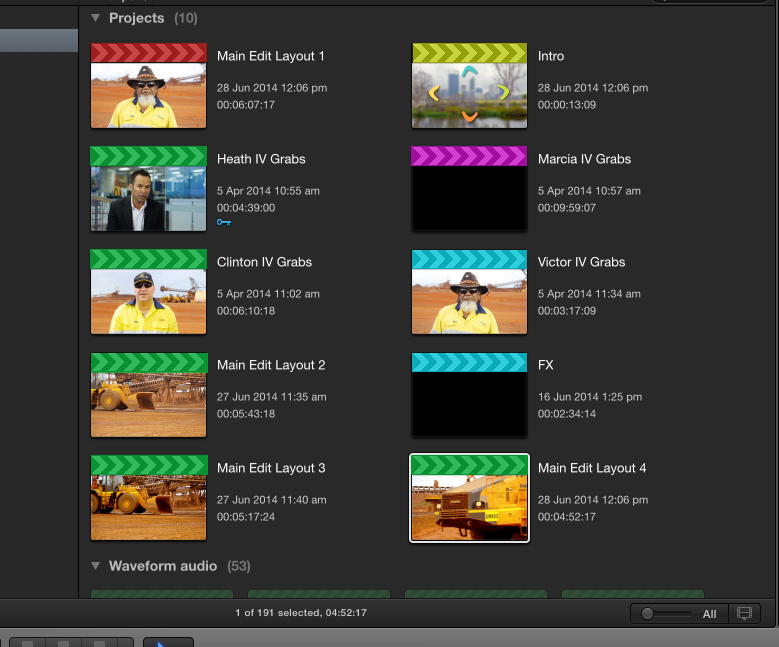
Whenever we have a large number of projects for various edit stages it becomes very difficult to find the exact project you need... I have been caught out many times by clicking the wrong project or have started editing on the wrong timeline because there is no colour labelling feature, or if there is I haven;t found it...
This feature was great in FCP7 as you could assign colours to sequences (projects) and the tab in the timeline would also highlight making it easy to group different edits..
Also is there a way to have folders in the browser with different projects in each..
I love FCPX and hope something like this is in a future update..
What method do other FCPX users do when you have a large qty of projects to facilitate easier management.
I added some quick colour tabs to the project clappers and immediately you can see where you are.
Many thanks
Todd
Last edit: 01 Jul 2014 12:18 by truestory. Reason: additional text
Please Log in to join the conversation.

01 Jul 2014 13:56 #48997
by Dawar
Replied by Dawar on topic 10.1.3 Request fot Project tags: How does everyone else manage these
No color labels, but you can keyword your projects, and put those keywords in folders in your event library.

Please Log in to join the conversation.
- Disproportionate Pictures
-

- Offline
- Platinum Member
-

Less
More
- Posts: 1433
- Thank you received: 64
01 Jul 2014 14:04 #48998
by Disproportionate Pictures
Replied by Disproportionate Pictures on topic 10.1.3 Request fot Project tags: How does everyone else manage these
Keywords will work. Otherwise set up smart collections with text field searches that get you the result you want. If you have a lot of videos on the go, set up a smart collection for Current Versions, and just include a text string like "CV" into the name of your working edit.
Loads of options to keep organized.
Loads of options to keep organized.
Please Log in to join the conversation.

Less
More
- Posts: 971
- Thank you received: 46
01 Jul 2014 15:54 #49004
by MsJustine
Replied by MsJustine on topic 10.1.3 Request fot Project tags: How does everyone else manage these
Is this color of clapper boards new in 10.1.2, it looks totally awesome sauce, how are clapper boards colored? I could not find a "color clapper-board" in the menu!!
Please Log in to join the conversation.


01 Jul 2014 17:31 #49005
by grailz
Replied by grailz on topic 10.1.3 Request fot Project tags: How does everyone else manage these
MsJustine,
I think the image above is a mock-up created by true story for illustrative purposes. They do not currently exist within Final Cut Pro.
I think the image above is a mock-up created by true story for illustrative purposes. They do not currently exist within Final Cut Pro.
Please Log in to join the conversation.
01 Jul 2014 23:52 #49014
by truestory
Replied by truestory on topic 10.1.3 Request fot Project tags: How does everyone else manage these
Thanks guys, I understand how keywords can work.. I see now that putting all projects in a separate event makes sense, but I still feel having the option of coloured Clapper tabs can only compliment this greatly and also makes for an instant visual reference.
Cheers
Cheers
Please Log in to join the conversation.
02 Jul 2014 03:00 #49018
by BenB
Replied by BenB on topic 10.1.3 Request fot Project tags: How does everyone else manage these
Not just a separate Event, but in a Smart Collection. Or in Keyword Collections, and build on that with Smart Collections in addition, and put all of those in one folder. The possibilities are numerous...
Please Log in to join the conversation.
- Disproportionate Pictures
-
- Offline
- Platinum Member
-
Less
More
- Posts: 1433
- Thank you received: 64
02 Jul 2014 03:02 #49019
by Disproportionate Pictures
Replied by Disproportionate Pictures on topic 10.1.3 Request fot Project tags: How does everyone else manage these
Exactly. Figure out how it works best for you. Lots of ways to skin this cat.
Please Log in to join the conversation.
02 Jul 2014 03:07 #49020
by truestory
Replied by truestory on topic 10.1.3 Request fot Project tags: How does everyone else manage these
Cheers for that, just as a matter of interest though are you guys all saying that having the option to colour code your project clappers is of no benefit to you?
Please Log in to join the conversation.
- Disproportionate Pictures
-
- Offline
- Platinum Member
-
Less
More
- Posts: 1433
- Thank you received: 64
02 Jul 2014 03:21 #49021
by Disproportionate Pictures
Replied by Disproportionate Pictures on topic 10.1.3 Request fot Project tags: How does everyone else manage these
Probably not. Again, if you have a lot of Projects, and different versions of projects, then I would sort them down using a smart collection. Even with Colour codes you're still looking at lots of different colours for what you want- could be more visually messy than just filtering via a preset search.
I'm working on 40 Episode TV series, so I've got loads of Projects- different versions. In the Notes field for the Project, I'll put "CVer", something that would be pretty impossible to show up in a text search otherwise, so I have a simple Smart Collection that sorts the current versions of all the episodes.
In the same notes field I also put the episode number as EP01, EP02 etc.... This sorts the cuts into Smart Collections I have for every episode, both the Raw Footage, Graphics, Audio, and Projects.
There are so many fluid ways to filter your data to make getting to what you want very fast and simple.
I'm working on 40 Episode TV series, so I've got loads of Projects- different versions. In the Notes field for the Project, I'll put "CVer", something that would be pretty impossible to show up in a text search otherwise, so I have a simple Smart Collection that sorts the current versions of all the episodes.
In the same notes field I also put the episode number as EP01, EP02 etc.... This sorts the cuts into Smart Collections I have for every episode, both the Raw Footage, Graphics, Audio, and Projects.
There are so many fluid ways to filter your data to make getting to what you want very fast and simple.
Please Log in to join the conversation.
02 Jul 2014 03:32 - 02 Jul 2014 05:07 #49022
by truestory
Replied by truestory on topic 10.1.3 Request fot Project tags: How does everyone else manage these
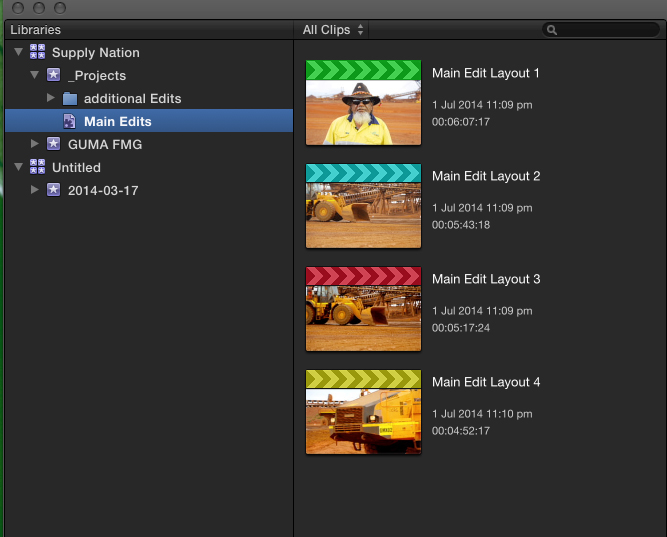
Cool, Ok I just made a smart collection and used the word "Main" and bingo my 4 Main edit projects as shown in my screen grab from first post appeared in that smart collection.
I guess it's about honing in on the database ability of FCPX and getting you young dogs to keep us old boys in the loop..LOL..
Still would like some colours though... just saying.....
Smart collections and colours.. Yes? No?....
.
I guess it's about honing in on the database ability of FCPX and getting you young dogs to keep us old boys in the loop..LOL..
Still would like some colours though... just saying.....
Smart collections and colours.. Yes? No?....
.
Last edit: 02 Jul 2014 05:07 by truestory.
Please Log in to join the conversation.
Less
More
- Posts: 971
- Thank you received: 46
02 Jul 2014 05:37 #49024
by MsJustine
Replied by MsJustine on topic 10.1.3 Request fot Project tags: How does everyone else manage these
I think the color system could work in limited cases, Green for Current project, Red for project with errors, Blue for ready for export, Yellow-exported projects. Purple for pay-day!!![Client paid!!]
Please Log in to join the conversation.
02 Jul 2014 05:43 #49025
by truestory
Replied by truestory on topic 10.1.3 Request fot Project tags: How does everyone else manage these
'Pay-Day'... I thought we all worked in this industry for Love...LOL
Please Log in to join the conversation.
