


- Posts: 5
- Thank you received: 0
3 Post Moderation Rule for New Boarders (25 Jan 2021)
New boarders will have their posts moderated - Don't worry if you cannot see your post immediately.
Swapping out an imported reference movie with a self-contained mov
30 Jun 2014 16:49 #48913
by victrolux
I have a project with an imported movie which is a REFERENCE MOVIE. When I imported it into FCPX I selected "copy original media to library". Since it was a reference movie, it only copied the reference movie... not the resources which the ref mov uses. So, as a result I need to have the hard drive where those resources are located mounted for movie to appear in the project timeline.
To fix this, my plan is to create a non-reference (self-contained) movie, import it into the library (copying original media to library) and wave a magic wand and have FCPX relink to the new self contained mov. I am wondering... if the self contained movie is exactly the same as the original reference movie, can FCPX simply, magically use the new self-contained movie in all the cuts I've already made in my timeline (cuts which had previously pointed to the reference movie)? Or will I need to recut everything using the new self-contained mov as the source for clips in the timeline?
Sufficiently unclear?
Thanks,
Victor
To fix this, my plan is to create a non-reference (self-contained) movie, import it into the library (copying original media to library) and wave a magic wand and have FCPX relink to the new self contained mov. I am wondering... if the self contained movie is exactly the same as the original reference movie, can FCPX simply, magically use the new self-contained movie in all the cuts I've already made in my timeline (cuts which had previously pointed to the reference movie)? Or will I need to recut everything using the new self-contained mov as the source for clips in the timeline?
Sufficiently unclear?
Thanks,
Victor
Please Log in to join the conversation.
- ronny courtens
-

- Offline
- Moderator
-

Less
More
- Posts: 4455
- Thank you received: 962
30 Jun 2014 20:37 - 30 Jun 2014 20:38 #48942
by ronny courtens
Replied by ronny courtens on topic Swapping out an imported reference movie with a self-contained mov
Yes relinking the reference file to a self-contained file will work and you won't have to re-edit anything. But you don't import the self-contained file into the Library. You relink first and then you let the relink feature import the file into the Library. Much easier and no magic involved 
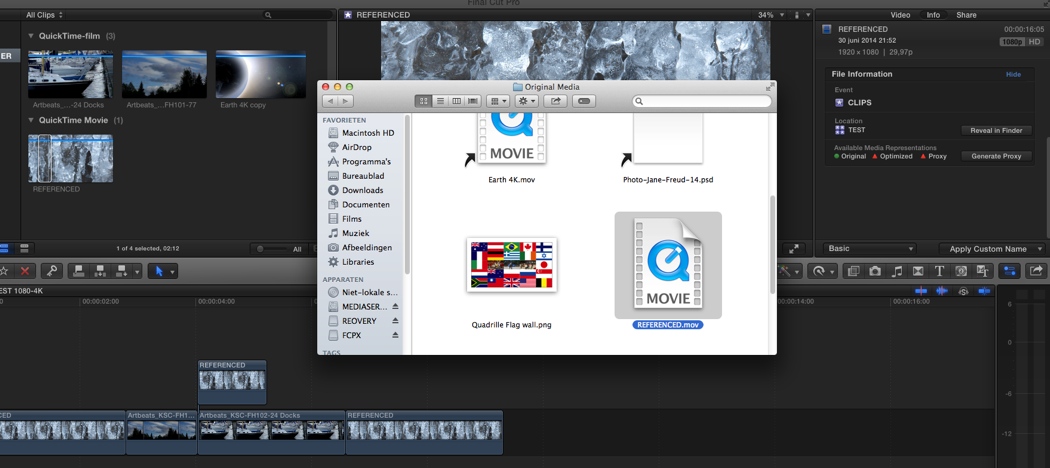
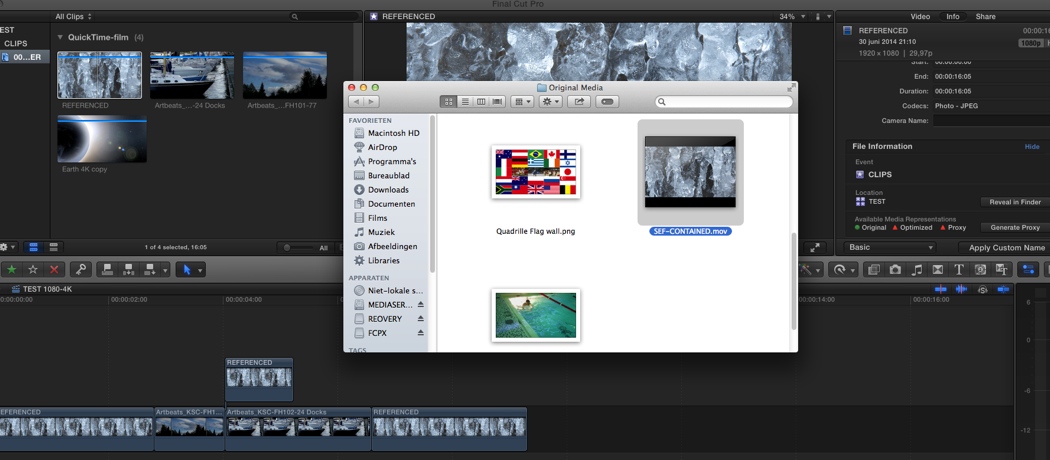
1. Here you see a reference movie called REFERENCED in my test Library. I have edited some instances of that clip into the timeline. When I select the clip in the Library and choose Reveal in Finder in the Info tab you can see that the clip points to a reference movie that has been imported into the Library:
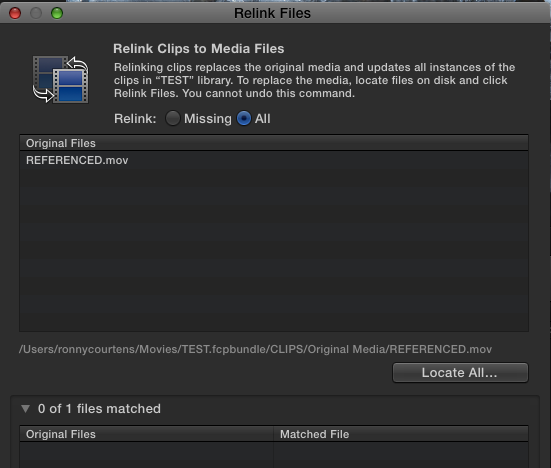
2. Now I want to relink the REFERENCED clip to the original self-contained movie and import the self-contained movie into the Library. To do this I select the REFERENCED clip in the Library and I choose File > Relink Files. The Relink window will open. In the Relink window I press the All button to reveal my selected REFERENCE clip in the window:
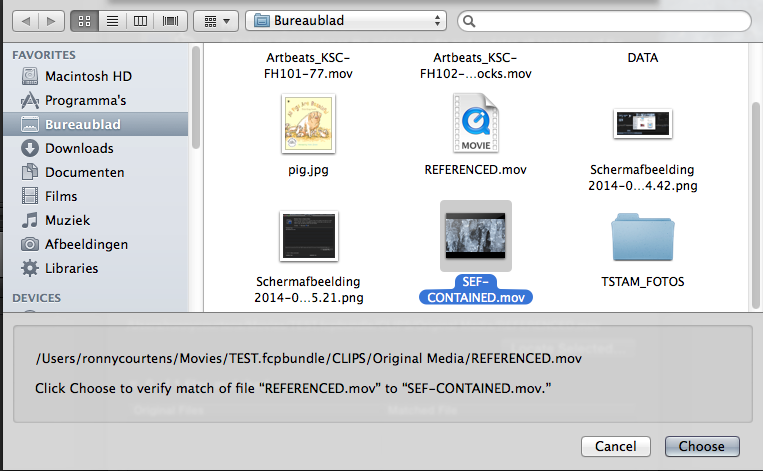
3. I select the clip in the window and I press Locate All. This will open a Finder window in which I select the SELF CONTAINED movie that is on my desktop to relink it to the REFERENCED clip and I press Choose:
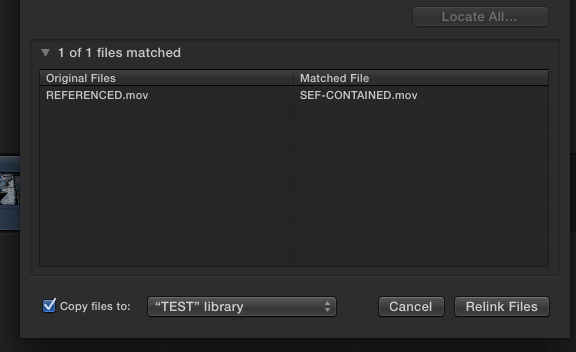
4. The Relink window shows that the SELF CONTAINED movie (Matched File) will be relinked to the REFERENCED clip (Original File). Before I press the Relink button I make sure the "Copy files to..." checkbox is checked and the relinked file will be imported into my test Library:
5. When I press the Relink button I can see that the REFERENCED clip in my Library is still called REFERENCED, but now it points to the new SELF CONTAINED movie that has been imported into my Library. All my edits have been preserved:
Actually this is a very fast and easy process.
- Ronny
1. Here you see a reference movie called REFERENCED in my test Library. I have edited some instances of that clip into the timeline. When I select the clip in the Library and choose Reveal in Finder in the Info tab you can see that the clip points to a reference movie that has been imported into the Library:
2. Now I want to relink the REFERENCED clip to the original self-contained movie and import the self-contained movie into the Library. To do this I select the REFERENCED clip in the Library and I choose File > Relink Files. The Relink window will open. In the Relink window I press the All button to reveal my selected REFERENCE clip in the window:
3. I select the clip in the window and I press Locate All. This will open a Finder window in which I select the SELF CONTAINED movie that is on my desktop to relink it to the REFERENCED clip and I press Choose:
4. The Relink window shows that the SELF CONTAINED movie (Matched File) will be relinked to the REFERENCED clip (Original File). Before I press the Relink button I make sure the "Copy files to..." checkbox is checked and the relinked file will be imported into my test Library:
5. When I press the Relink button I can see that the REFERENCED clip in my Library is still called REFERENCED, but now it points to the new SELF CONTAINED movie that has been imported into my Library. All my edits have been preserved:
Actually this is a very fast and easy process.
- Ronny
Last edit: 30 Jun 2014 20:38 by ronny courtens.
Please Log in to join the conversation.
30 Jun 2014 22:32 #48959
by victrolux
Replied by victrolux on topic Swapping out an imported reference movie with a self-contained mov
thanks Ronny! A follow up question... if the new self-contained file requires creation of optimized media, will FCPX do this after relinking?
Thank you so much for your complete explanation. I need to learn to trust the system to maintain the connections... I tend to overthink/overwork things.
~victor
Thank you so much for your complete explanation. I need to learn to trust the system to maintain the connections... I tend to overthink/overwork things.
~victor
Please Log in to join the conversation.
- ronny courtens
-
- Offline
- Moderator
-
Less
More
- Posts: 4455
- Thank you received: 962
30 Jun 2014 22:42 #48962
by ronny courtens
Replied by ronny courtens on topic Swapping out an imported reference movie with a self-contained mov
Hi Victor,
If the self-contained file is in a format that FCP X allows to optimize you will be able to convert it to ProRes inside FCP X.
- Ronny
If the self-contained file is in a format that FCP X allows to optimize you will be able to convert it to ProRes inside FCP X.
- Ronny
Please Log in to join the conversation.
