


3 Post Moderation Rule for New Boarders (25 Jan 2021)
New boarders will have their posts moderated - Don't worry if you cannot see your post immediately.
Very slow response when typing in titles


This one just isn't powerful enough for FCPX.
I edited the VO file on the timeline and compounded it there so presumably any renders would be within the project file. I deleted all the project render files when I started having problems.
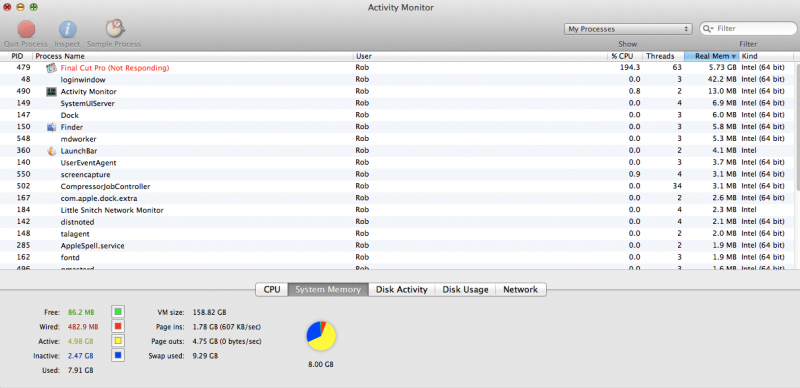
As you can hopefully see from the screenshot above nearly all the RAM on the disk is used up and the swapfile is being paged. FCPX is using 5.7GB and 2.5 GB is marked as inactive.
Thanks for the link. It's an interesting article and think I read it before starting this project. Yes FCPX is a good tool for VO but given the constraints of my system perhaps not the best choice this time.
Please Log in to join the conversation.

Please Log in to join the conversation.

Regarding the keystroke thing, it appears that is the case, however lots of apps do that something is just up in the FCP X code in my opinion.
Also did you call Apple support about this? You might give it a try.
Please Log in to join the conversation.
I think it is a memory issue. Memory management on OSX is quite complex and way above my pay grade but whatever the inactive memory is showing, when free memory is low and your paging out to the swap file, performance suffers and often the app hangs.
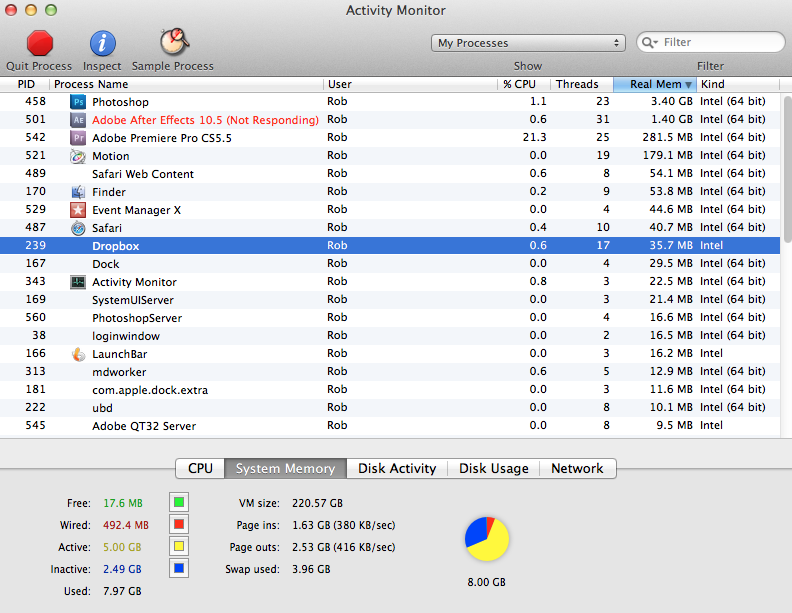
I've managed to replicate this with by opening hundred megapixel images in photoshop, loading a few other apps, then trying to load a large image into AE - see below. When approaching 8GB I have not seen inactive memory drop below 2.4GB. This may be a desirable state. There appears to a bit of debate on the apple support forums re lIons memory management.
See here for more info from Apple.
The upshot is I think you need more than 8GB of RAM using FCPX on larger projects, particularly if you have lower powered machine. I found a few examples of FCPX issues being resolved with an upgrade from 8GB to 16GB.
Please Log in to join the conversation.
Please Log in to join the conversation.
I don't understand how one 50 minute project, with no render files, swallows all available RAM.
Nor do I understand how the project file got to be 1.2GB in size. The new file created from XML is only 140MB.
Please Log in to join the conversation.
- ronny courtens
-

- Offline
- Moderator
-

- Posts: 4455
- Thank you received: 962
Just being curious: you say your project is DV and you are using stills. How many stills do you have on the timeline (approximately)and how large are these stills in pixel size at 72dpi ?
Please Log in to join the conversation.
About 20. There are some high res jpeg 10 Mpx plus and I think this might have been part of the problem. I left them full res in case I wanted to apply an extreme Ken Burns.
When creating new events yesterday i shifted all the images into a separate event as a precaution.
I've already organized a large number of stills into keyword collections so resizing may be a pain. When I find a still to use I might go out to the finder, copy, resize in preview and import. A quick test, resizing in photoshop and using a new event had FCPX reconfirm the timeline with the smaller media.
In the future probably best to resize all stills before import. If you need to zoom right in go get the original.
Dragging a raw or jpeg from Aperture via the photo browser ( or directly from the app) brings in the jpeg preview at the size you have it set. This might be a good way to resize a folder of raw images for use in FCPX.
Please Log in to join the conversation.
Did you look at the file and see if there was perhaps the text of the Bible or perhaps War & Peace?

I would scan through the XML and see if you notice anything odd. Both for the event and the project. (Export the Event XML but deselecting everything then click on the event name in the Event Library) I helped out another fellow who was having trouble with a project --- he had a bunch of clips in his event that were not behaving well and he exported the XML and we eliminated the bad clips. (It was easy to see something was wrong with them as there were weird entries in the XML for those clips.)
Please Log in to join the conversation.
The XML is around 3 MB.
Please Log in to join the conversation.
There are 18445 instances of "marker" in my xml ( half are the marker tag of course).
I have around 280 markers on the main project attached to the compound VO clip.
Because I have split this into 6 parts there are in fact 1680 references to these markers.
The compound VO clip contains the cut up original VO aiff. I placed this original aiff file on the primary storyline and used the range tool to tidy it up. I'd occasionally place a marker so I knew where I was up to. I have deleted all but 5 of these markers but there are references to them throughout the XML. I'm guessing if the marker was present when I made the edit, it is attached to the clip. I have 1260 instances of Marker 26 ( which is no longer in the project file). Divide 1260 by the same 6 compound clips and that Marker must have been present for around 200 cuts.
Here's a sample:
Crikey! As we say in NZ.
Please Log in to join the conversation.
Try it yourself.
Place marker on a clip. Cut it into 4, Export XML. There will be 4 instance of the marker.
Delete marker, export, there will still be 4 instances.
Cut into 8, export XML, 8 instances.
Create compound, cut into 4, export - 32 instances.
Works if you quit and relaunch.
This has got to be taxing something.
Please Log in to join the conversation.
- ronny courtens
-
- Offline
- Moderator
-
- Posts: 4455
- Thank you received: 962
As to your stills, yes oversized stills are a problem for any editing system. And 10MP stills surely will tax your system. So I really would reduce them as much as you can. Especially in a long project with many clips, everything you can do do take the load of your system resources will help.
Please Log in to join the conversation.
I will try to replicate the issue and test out whether the undo queue is flushed.
I'm wondering is it always flushed from the project file. My project file ballooned to 1.2GB.
It is now down to 92 MB. I revisited the XML (exported on Monday) and using a text editor removed all the temp markers. There were only about 12 markers repeated hundreds of times. Imported into FCPX and it found all the media in my new events.
Project and Events take 1 minute to load not 35. Typing titles, while still spiking cpu usage , is reasonably quick, and I can use the blade tool on the compound VO and wait 10 seconds rather than 10 minutes. 1.5 GB free memory.
So a dozen markers brought my system to a standstill. Every time I cut the compound VO clip a few thousand fields in the database had to be updated.
Graphic attached. I did export a flattened file of the compound VO clip after editing so I could have rebuilt the project, but I would have lost the 265 markers I'd put in place. As you can see I still have a bit of work left to do.

Please Log in to join the conversation.
Loaded same 60 minute VO file into new PAL DV project. Placed on primary storyline, put into compound clip, opened compound clip.
Project about 150KB in size.
Added 10 markers at 5 minute intervals. XML showing 10 markers.
Cut file into 152 clips. XML showing 1520 markers.
Deleted markers. XML showing 1520 markers. Project size about 6MB.
On primary storyline cut compound clip into 10. XML showing 15100 markers.
Project file around 60MB. XML file 1.9MB
Cut compound into 30 separate clips. 10 second beach ball each time you cut the clip. Project file now 175 MB. Takes a minute to load.
XML showing 45300 markers.
There are no markers in the project. The audio exported from the project hasn't changed.
The project file is over hundred times it's original size.
I've submitted this to Apple.
Please Log in to join the conversation.
- ronny courtens
-
- Offline
- Moderator
-
- Posts: 4455
- Thank you received: 962
Please Log in to join the conversation.
Ronny - from what I see XML is not the only problem, but the way projects are saved in general, specifically relating to markers and compound clips.
I wonder what the best way to move forward is. Not use markers? Not cut compound clips? If you think about it anytime you synchronize audio/video you are creating a compound clip.
Please Log in to join the conversation.
Quick conclusion. Duplicating or cutting compound clips of any kind, but especially those with markers, will dramatically increase DRAMATICALLY decrease performance in FCP X very quickly. This is NOT related to CPU, GPU, Memory, length of timeline or resolution.
And the "Marker Test" FCP XML was 2.5 MB and had 21,500 marker tags!
Part 1:
Part 2: (Audio Now Fixed).
Please Log in to join the conversation.
Mine went from 90 MB to 336K by breaking apart the clip items, yet it still kept the markers.
Please Log in to join the conversation.
Yes the markers attached to clips within the compound clip are maintained when you break it apart, but those attached to it in the primary storyline are not. You're getting rid of the clip the markers are attached to. Timeline markers would be useful in this case.
I haven't seen your second video so I may be repeating something you've demonstrated but
markers without compound clips could be problematic.
I placed the 60 minute audio in the primary storyline. Project size 150KB. I then added 250 markers. Project size around 500KB. Every time I bladed the clip it would increase by about 500 KB. So after dividing 34 times I had a 17MB file. The XML has references to over 8000 markers.
I don't know a quick way of getting rid of all the markers but I'm guessing all the marker info
would be retained even when you deleted them. I deleted all but one of the 34 sections, deleted the three markers off that and the XML still referenced all 250 of the original markers.
Please Log in to join the conversation.
