


- Posts: 9
- Thank you received: 1
3 Post Moderation Rule for New Boarders (25 Jan 2021)
New boarders will have their posts moderated - Don't worry if you cannot see your post immediately.
fcpx 10.1.2 Poster frame missing please HELP
28 Jun 2014 16:11 - 28 Jun 2014 16:14 #48764
by artseven
fcpx 10.1.2 Poster frame missing please HELP was created by artseven
Hi,
I have just updated to 10.1.2 and all my poster frames in the browser window or timeline are gone. All are blue like now. I can see a poster frame only if I put my mouse on the clip's icon.
Any ideea is very welcome because I am editing blind right now.
Thanks in advance,
Eugen
PS, I have attached a print screen
I have just updated to 10.1.2 and all my poster frames in the browser window or timeline are gone. All are blue like now. I can see a poster frame only if I put my mouse on the clip's icon.
Any ideea is very welcome because I am editing blind right now.
Thanks in advance,
Eugen
PS, I have attached a print screen
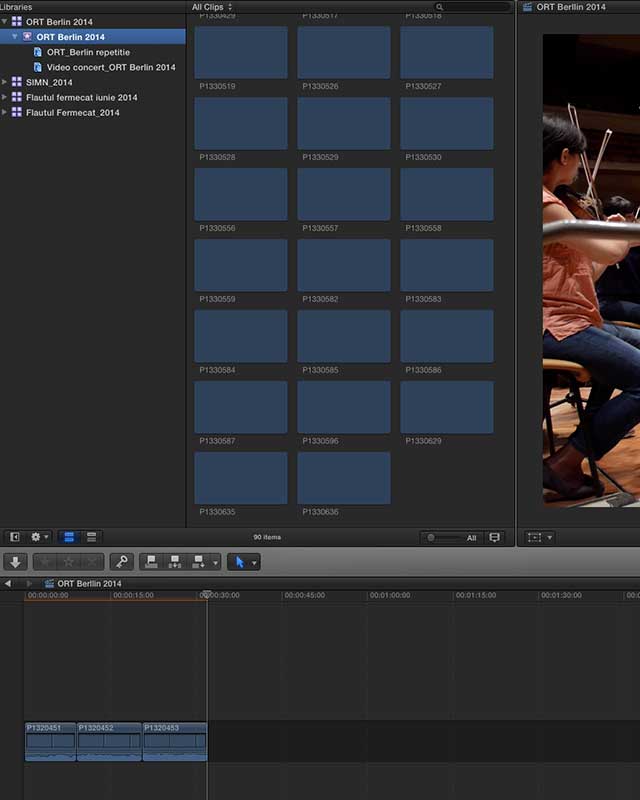
Last edit: 28 Jun 2014 16:14 by artseven. Reason: i want to attach a print screen
Please Log in to join the conversation.

28 Jun 2014 17:37 #48774
by BenB
Replied by BenB on topic fcpx 10.1.2 Poster frame missing please HELP
That is odd, never seen that before. Fill out the feedback form ASAP on this one.
Check the settings for that Library. Did you change the Cache files to be stored outside of the Library, per chance?
Check the settings for that Library. Did you change the Cache files to be stored outside of the Library, per chance?
Please Log in to join the conversation.
29 Jun 2014 11:33 #48821
by artseven
Replied by artseven on topic fcpx 10.1.2 Poster frame missing please HELP
Thank you for the answer Ben,
I have removed FCPX with appcleaner then I repaired permission and reinstalled FCPX.
Now everything looks fine, let's hope that the problem is solved
I have removed FCPX with appcleaner then I repaired permission and reinstalled FCPX.
Now everything looks fine, let's hope that the problem is solved
Please Log in to join the conversation.
- ronny courtens
-

- Offline
- Moderator
-

Less
More
- Posts: 4455
- Thank you received: 962
29 Jun 2014 12:58 #48822
by ronny courtens
Replied by ronny courtens on topic fcpx 10.1.2 Poster frame missing please HELP
Repairing permissions is a must after installing or updating any software. Glad you have found the solution.
- Ronny
- Ronny
Please Log in to join the conversation.
29 Jun 2014 15:33 #48827
by BenB
Replied by BenB on topic fcpx 10.1.2 Poster frame missing please HELP
Actually, not in several OS versions has repairing permissions been necessary. Used to be, but the modern installer handles those issues.
Please Log in to join the conversation.
