


- Posts: 929
- Thank you received: 131
3 Post Moderation Rule for New Boarders (25 Jan 2021)
New boarders will have their posts moderated - Don't worry if you cannot see your post immediately.
Dramatic FCPX UI speed difference with different drives
27 Jun 2014 17:08 - 30 Jun 2014 21:27 #48618
by tpayton
Dramatic FCPX UI speed difference with different drives was created by tpayton
I was experiencing some slowness in the UI as I was moving some clips around yesterday so I create a little test. I found that my RAID 0 made a dramatic difference in UI speed:
Check it out:
[strike]Regarding this topic, does anyone have any idea how to measure the write speed of small data chunks?[/strike]
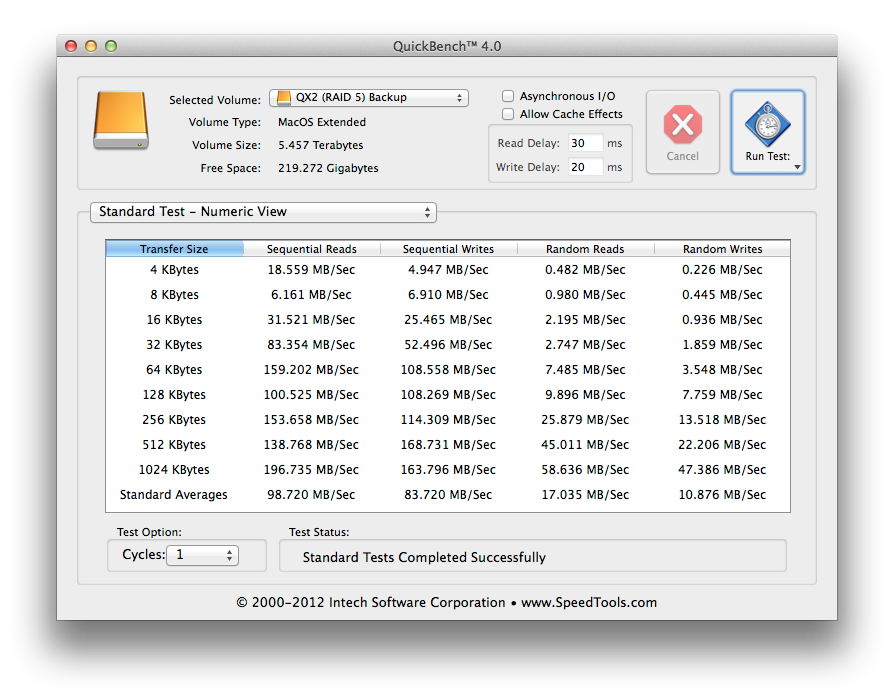
I found QuickBench which measures the Random Write speed of small chucks on data. Take a look a what the RAID 5 is reporting. Notice the .226 MB/Sec 4K write:
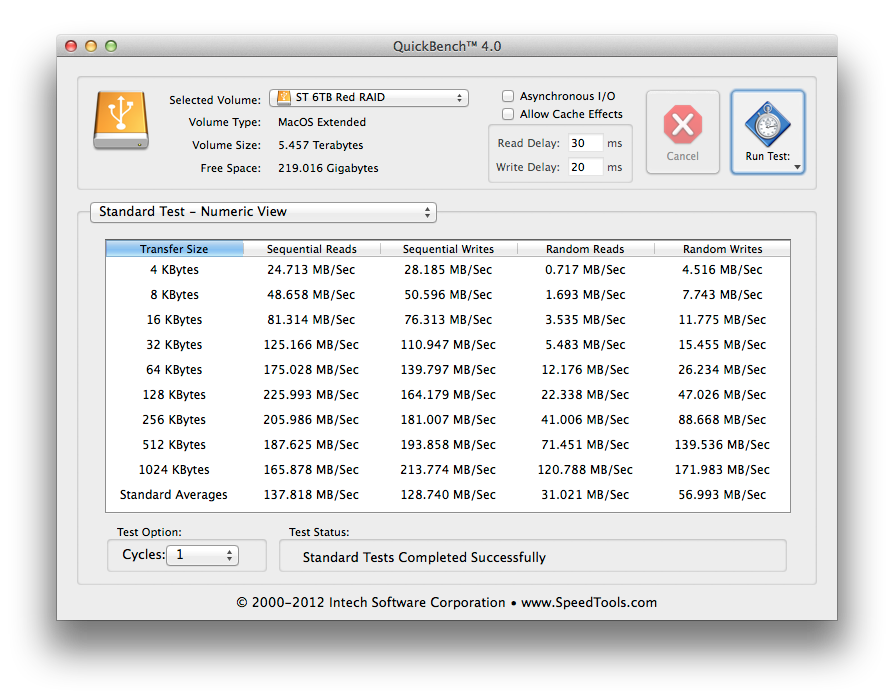
Here are results from the DIY 6GB Raid 0:
Check it out:
[strike]Regarding this topic, does anyone have any idea how to measure the write speed of small data chunks?[/strike]
I found QuickBench which measures the Random Write speed of small chucks on data. Take a look a what the RAID 5 is reporting. Notice the .226 MB/Sec 4K write:
Here are results from the DIY 6GB Raid 0:
Last edit: 30 Jun 2014 21:27 by tpayton.
Please Log in to join the conversation.
- Karsten Schlüter
-

- Offline
- Moderator
-

Less
More
- Posts: 3790
- Thank you received: 718
28 Jun 2014 08:34 #48749
by Karsten Schlüter
Replied by Karsten Schlüter on topic Dramatic FCPX UI speed difference with different drives
Thanks T for sharing, very interesting!
maybe you've seen my lil' stunt here?
www.fcp.co/forum/2-off-topic/20516-4k-mu...th-a-macmini-why-not
The observation I made: switching OFF The Angle-Viewer dramatically increases speed of the preview - it is the same MultiCam clip, but obviously FCPX shovels only the stream/track 'in need' from platters to screen.
In your observation, the actual clip you're moving is not on display that moment, but working in the timeline has the potential danger, the user wants to see that clip now => therefor data have to be shoveled from A to B ..
me no programmer, but from my childish view how things (could) work, it is a logically behavior! :silly:
maybe you've seen my lil' stunt here?
www.fcp.co/forum/2-off-topic/20516-4k-mu...th-a-macmini-why-not
The observation I made: switching OFF The Angle-Viewer dramatically increases speed of the preview - it is the same MultiCam clip, but obviously FCPX shovels only the stream/track 'in need' from platters to screen.
In your observation, the actual clip you're moving is not on display that moment, but working in the timeline has the potential danger, the user wants to see that clip now => therefor data have to be shoveled from A to B ..
me no programmer, but from my childish view how things (could) work, it is a logically behavior! :silly:
Please Log in to join the conversation.
28 Jun 2014 16:59 #48768
by tpayton
Replied by tpayton on topic Dramatic FCPX UI speed difference with different drives
Great observations about the MacMini and FCPX. We actually have a MacMini in our conference room and we can pull up libraries on our NFS and show clients projects right from it. It works surprising well.
Regarding my notes. I don't believe my test had anything to do with the viewer, as the frame showing in the viewer was the same as I was simply moving and audio clip.
I was trying to show that how fast your "Library" drive can perform small random writes is directly related to UI speed in FCPX. I haven't yet found a benchmarking utility that measures small random writes (AJA and Blackmagic just test large writes and reads), but as you can see from my results the RAID 0 was performing considerably better than my RAID 5. So when outfitting drives for FCPX, this should defiantly be a consideration.
Regarding my notes. I don't believe my test had anything to do with the viewer, as the frame showing in the viewer was the same as I was simply moving and audio clip.
I was trying to show that how fast your "Library" drive can perform small random writes is directly related to UI speed in FCPX. I haven't yet found a benchmarking utility that measures small random writes (AJA and Blackmagic just test large writes and reads), but as you can see from my results the RAID 0 was performing considerably better than my RAID 5. So when outfitting drives for FCPX, this should defiantly be a consideration.
Please Log in to join the conversation.
- Nervebroke
-

- Offline
- Elite Member
-

Less
More
- Posts: 177
- Thank you received: 12
28 Jun 2014 19:14 #48780
by Nervebroke
Replied by Nervebroke on topic Dramatic FCPX UI speed difference with different drives
This makes me happy about my OWC Mercury Elite Pro Dual. TP what screen recording software are you using? I need something other than QuickTime to help me get my questions across. I am not good at using words and screen shots.
Dave
Dave
Please Log in to join the conversation.
- Darren Roark
-
- Offline
- Platinum Member
-

28 Jun 2014 20:39 #48783
by Darren Roark
Replied by Darren Roark on topic Dramatic FCPX UI speed difference with different drives
When I was converting my libraries yesterday in 10.1.2 I had Activity monitor open. It was showing a massive resource drain while that process was running. Maxed out 32GB of RAM, 90GB of virtual memory, so it makes a lot of sense to have the library on the fastest drive you have.
I'm going to try running it on a separate SSD drive and see if that speeds things up. Library on the SSD, footage and render files on the RAID. We'll see!
Good observations as always!
I'm going to try running it on a separate SSD drive and see if that speeds things up. Library on the SSD, footage and render files on the RAID. We'll see!
Good observations as always!
Please Log in to join the conversation.
28 Jun 2014 21:31 #48786
by tpayton
I use ScreenFlow, it's on the Mac App store. It is quite excellent.
I need to do some further tests, but it seems that a RAID 0 is the way to go for a working drive, but you MUST have a backup because if one of the drives fails you are a goner.
Replied by tpayton on topic Dramatic FCPX UI speed difference with different drives
Nervebroke wrote: This makes me happy about my OWC Mercury Elite Pro Dual. TP what screen recording software are you using? I need something other than QuickTime to help me get my questions across. I am not good at using words and screen shots.
Dave
I use ScreenFlow, it's on the Mac App store. It is quite excellent.
I need to do some further tests, but it seems that a RAID 0 is the way to go for a working drive, but you MUST have a backup because if one of the drives fails you are a goner.
Please Log in to join the conversation.
- Nervebroke
-
- Offline
- Elite Member
-
Less
More
- Posts: 177
- Thank you received: 12
28 Jun 2014 21:47 #48789
by Nervebroke
Replied by Nervebroke on topic Dramatic FCPX UI speed difference with different drives
Thanks for the fast response. I have my Raid0 backed up via CCC with the workflow than BenB suggested. Also thanks for the answer about ScreenFlow.
Dave
Dave
Please Log in to join the conversation.
- Karsten Schlüter
-
- Offline
- Moderator
-
Less
More
- Posts: 3790
- Thank you received: 718
29 Jun 2014 15:14 - 29 Jun 2014 15:15 #48826
by Karsten Schlüter
that's what I tried to tell with my last paragraph 'potential danger':
in the Project timeline ANY clip has to be 'at hand' for immediate playback - I'm using my MagicTrackpad, the clip at the very end of my timeline is just a swoosh away from the actual playhead position....
So, my amateurish pov to explain a speed-optimized app as FCPX is, it holds any timeline content 'beforehand' - and then, indeed, a speedy platter is very handy. Independent wether the clip is actually shown or not.
... maybe complete wrong analogy… a bit like data in RAM vs. hard drives - the faster the delivery, the faster the processing. And although the bar your moving in the timeline is just a representation of a clip, the real clip has to be 'at hand' in the background...
Again: me no engineer, but from my childish view, your observation is surprising in its visualization, but not surprising in its 'logic' ...
Replied by Karsten Schlüter on topic Dramatic FCPX UI speed difference with different drives
I don't believe my test had anything to do with the viewer, as the frame showing in the viewer was the same as I was simply moving and audio clip.
that's what I tried to tell with my last paragraph 'potential danger':
in the Project timeline ANY clip has to be 'at hand' for immediate playback - I'm using my MagicTrackpad, the clip at the very end of my timeline is just a swoosh away from the actual playhead position....
So, my amateurish pov to explain a speed-optimized app as FCPX is, it holds any timeline content 'beforehand' - and then, indeed, a speedy platter is very handy. Independent wether the clip is actually shown or not.
... maybe complete wrong analogy… a bit like data in RAM vs. hard drives - the faster the delivery, the faster the processing. And although the bar your moving in the timeline is just a representation of a clip, the real clip has to be 'at hand' in the background...
Again: me no engineer, but from my childish view, your observation is surprising in its visualization, but not surprising in its 'logic' ...
Last edit: 29 Jun 2014 15:15 by Karsten Schlüter.
Please Log in to join the conversation.
29 Jun 2014 15:56 - 30 Jun 2014 06:43 #48829
by tpayton
Replied by tpayton on topic Dramatic FCPX UI speed difference with different drives
Just a quick update on my findings. I finally found a testing suite, Speedtools QuickBench which will do small random writes (4K, 8K, 16K, etc.) and the speed of my particular RAID 5 is glacial. About .2 MB/sec. The RAID 0 is about 25mb/sec.
I'll report back more info as I find it, [strike]but for now RAID 5 (unless it is SSD) can cause major slowdowns in the UI of FCPX.[/strike]
I'll report back more info as I find it, [strike]but for now RAID 5 (unless it is SSD) can cause major slowdowns in the UI of FCPX.[/strike]
Last edit: 30 Jun 2014 06:43 by tpayton.
Please Log in to join the conversation.

30 Jun 2014 04:57 #48869
by BenB
Replied by BenB on topic Dramatic FCPX UI speed difference with different drives
I'm running RAID 5 T'bolt and I see no performance issues at all in my daily work. As fast as it needs to be, with BMD 4K media.
Please Log in to join the conversation.
30 Jun 2014 06:44 #48871
by tpayton
Replied by tpayton on topic Dramatic FCPX UI speed difference with different drives
Great point Ben. I realize I was jumping to conclusions and have edited that last post.
So if I may ask, what thunderbolt raid 5 are you using?
So if I may ask, what thunderbolt raid 5 are you using?
Please Log in to join the conversation.
30 Jun 2014 12:12 - 30 Jun 2014 12:13 #48882
by BenB
Replied by BenB on topic Dramatic FCPX UI speed difference with different drives
Promise Pegasus P2 4 bay diskless, loaded with 4TB drives, on a nMP 8 core, 700's, 32GB RAM. I've always recommended RAID 5 for array's over 4 drives. I left mine at RAID 5 cause I was being lazy and it got great performance anyway. You hit a point where larger numbers of drives do benefit with RAID 5 or 6.
I've not run any measurement apps on it, I just go by what my experience is editing every day. I have no lag, super snappy system.
I've not run any measurement apps on it, I just go by what my experience is editing every day. I have no lag, super snappy system.
Last edit: 30 Jun 2014 12:13 by BenB.
Please Log in to join the conversation.

30 Jun 2014 17:27 #48920
by thefcpguy
Replied by thefcpguy on topic Dramatic FCPX UI speed difference with different drives
Now that 10.1.2 allows us to keep all but the project data outside the library (and presumably on a fast RAID) how do you all feel about keeping the library you're working with on local storage?
We have an Xsan here with read/write throughput of 575MB/sec sustained, and working with the library on the SAN results in lots of slowdowns, beachballs, etc. especially when the facility is busy. Our engineers tell me that the SAN is optimized for big chunks of data (video streams) and the constant tiny FCPX packets going between the workstation and the library over fibre channel bogs down.
Pre 10.1.2, I made it my practice to turn background rendering off and keep the active library on the local SSD. I avoided optimizing media if I didn't have to which was kind of a drag. Now that the option is there to offload all that data, my libraries are small and using them locally works great.
We've employed a "check out, check in" policy with project files since the FCP Classic days where projects are stored on the Xsan unless you're working with them. We almost pulled the trigger on FC Server right before they killed it. Phew!
We have an Xsan here with read/write throughput of 575MB/sec sustained, and working with the library on the SAN results in lots of slowdowns, beachballs, etc. especially when the facility is busy. Our engineers tell me that the SAN is optimized for big chunks of data (video streams) and the constant tiny FCPX packets going between the workstation and the library over fibre channel bogs down.
Pre 10.1.2, I made it my practice to turn background rendering off and keep the active library on the local SSD. I avoided optimizing media if I didn't have to which was kind of a drag. Now that the option is there to offload all that data, my libraries are small and using them locally works great.
We've employed a "check out, check in" policy with project files since the FCP Classic days where projects are stored on the Xsan unless you're working with them. We almost pulled the trigger on FC Server right before they killed it. Phew!
Please Log in to join the conversation.
30 Jun 2014 17:37 #48922
by tpayton
Replied by tpayton on topic Dramatic FCPX UI speed difference with different drives
In my case I was able to use QuickBench to isolate the problem. My particular RAID is a 4 drive unit and either something is wrong with it, or it is just horrible at small random writes (which is what FCPX does constantly to the Library DB constantly with every edit.) I just flipped my backup and working drive and now things are running so much smoother in FCPX.
Regarding your XSAN I'll bet if you ran QuickBench on that you would see that that small ramdon writes are pretty slow and hence the problem with storying libraries there.
I have thought of having libraries and media on separate drives, now that 10.1.2 makes that work really well. I'm going to get a new thunderbolt RAID 0 here soon and then I'll see how that goes.
Thanks so much for your thoughts.
Regarding your XSAN I'll bet if you ran QuickBench on that you would see that that small ramdon writes are pretty slow and hence the problem with storying libraries there.
I have thought of having libraries and media on separate drives, now that 10.1.2 makes that work really well. I'm going to get a new thunderbolt RAID 0 here soon and then I'll see how that goes.
Thanks so much for your thoughts.
Please Log in to join the conversation.
- cinemaloha
-
- Offline
- Elite Member
-
Less
More
- Posts: 163
- Thank you received: 36
30 Jun 2014 18:56 - 30 Jun 2014 18:56 #48930
by cinemaloha
Replied by cinemaloha on topic Dramatic FCPX UI speed difference with different drives
tpayton,
What is the Stripe Size & Sector Size on your Pegasus R4? For experimentation are you able to rebuild your R4 & change your Stripe Size to 64 KB and your Sector Size to 512 Bytes & then copy the media back to it?
I'm on a Pegasus R6 (TB1) with Stripe Size of 128 KB and Sector Size of 512 Bytes and I'm having ~10 sec spinning beach ball when I 'Reveal in Browser' a 6 angle (4 video/2 audio) multicam clip from the timeline. My current project used to be slow also but 10.1.2 made it workable again.
Specs: OSX 10.9.3 / FCPX 10.1.2 / 3.4Ghz i7, 2GB VRAM, 32GB RAM
What is the Stripe Size & Sector Size on your Pegasus R4? For experimentation are you able to rebuild your R4 & change your Stripe Size to 64 KB and your Sector Size to 512 Bytes & then copy the media back to it?
I'm on a Pegasus R6 (TB1) with Stripe Size of 128 KB and Sector Size of 512 Bytes and I'm having ~10 sec spinning beach ball when I 'Reveal in Browser' a 6 angle (4 video/2 audio) multicam clip from the timeline. My current project used to be slow also but 10.1.2 made it workable again.
Specs: OSX 10.9.3 / FCPX 10.1.2 / 3.4Ghz i7, 2GB VRAM, 32GB RAM
Last edit: 30 Jun 2014 18:56 by cinemaloha.
Please Log in to join the conversation.
- cinemaloha
-
- Offline
- Elite Member
-
Less
More
- Posts: 163
- Thank you received: 36
30 Jun 2014 19:23 #48933
by cinemaloha
Replied by cinemaloha on topic Dramatic FCPX UI speed difference with different drives
Maybe the following sentence is opposite for FCPX.
Source: www.anandtech.com/show/4489/promise-pega...thunderbolt-review/4File servers for photos, audio and video should, however, be operated with larger stripe sizes, as this helps to maximize sequential read performance.
Before talking about stripe size, it is important to mention the term stripe width, which equals the number of drives in a RAID array: for example, five drives equal a stripe width of five. Obviously, this value only changes if you alter the number of drives used in a RAID array; the more you add, the faster your RAID array will be, until you hit a controller or system interface bottleneck. The stripe size is the storage capacity for each individual hard drive in a RAID array, which the user can define with most RAID controllers. Be careful here: stripe size does not represent the storage capacity of an entire stripe set spanning over all used drives. A stripe set consists of all individual stripes as a whole, each of them having the selected stripe size.
A stripe is the smallest chunk of data within a RAID array that can be addressed. People often also refer to this as granularity or block size. It can be compared to the blocks (logical block addressing - LBA) on conventional hard drives. Most RAID controllers allow the user to define her or his favorite stripe size, because it alters the performance characteristics of a RAID array. Typical options are 16, 32, 64 and 128 kB, but many professional RAID controllers also offer smaller stripe sizes, and some even support sizes as large as 256 kB.
The option to alter stripe sizes with on-board RAID controllers such as the Intel Southbridges ICH7R, ICH8R and ICH9R does not make much of a difference in the desktop space. In fact, this feature is often overrated, as the performance changes are marginal on a typical gaming or office PC. However, it can be important for servers, though differences will still only be noticeable between very small and very large stripes with certain applications. A change from 32 to 64 kB can be measured, but isn’t typically noticeable.
In general, your stripe size choice has an impact on several factors:
Performance
Conventional hard drives deliver their best transfer performance when they read or write sequentially, repositioning the heads as little as possible. From this standpoint, it makes the most sense to select the largest stripe size available, especially if your hard drives are good at providing high throughput. However, this only works if the files stored or read are at least as large as an entire stripe. If you will end of storing millions of text files, Word documents, small spreadsheets or similar small files, small stripe sizes will help to distribute all files across multiple drives to keep throughput high.
Capacity Used
The stripe size also defines the amount of storage capacity that will at least be occupied on a RAID partition when you write a file. For example, if you selected a 64 kB stripe size and you store a 2 kB text file, this file will occupy 64 kB. Obviously, the stripe size defines the minimum amount of data that a RAID controller will distribute files across its hard drives, in my example, 64 kB. As long as a file can be written onto a single stripe or a single drive, you won’t have any advantage from running this particular RAID array.
If you want to create a RAID array for quick access to small files, small stripe sizes are favorable, to keep the waste of storage capacity small, and to provide high throughput thanks to a high level of data distribution across many drives. File servers for photos, audio and video should, however, be operated with larger stripe sizes, as this helps to maximize sequential read performance. In the end, the best solution is to experiment with various options: try both a small and a large stripe size and collect performance data for it. We recommend avoiding making little steps: going from 32 kB to 64 kB stripe size won’t have a significant impact.
Please Log in to join the conversation.
30 Jun 2014 20:38 - 30 Jun 2014 21:20 #48943
by tpayton
Actually, neither are Pegasus. The RAID 5 (the one with slow random write) is a OWC Mercury Elite Pro QX2. The other is are just two WD Red 3TB drives in a USB 3 drive dock with a RAID set created by Disk Utility.
Neither of these have any settings for stripe size, or even block size as far as I can tell.
Bummer to hear about your slowdown on reveal in Finder. Is it any better in 10.1.2? If you have access to QuickBench www.speedtools.com/QuickBench.html or other utility than can measure the random write speed for the smallest block size your drive can handle, that might help you troubleshoot.
Replied by tpayton on topic Dramatic FCPX UI speed difference with different drives
cinemaloha wrote: tpayton,
What is the Stripe Size & Sector Size on your Pegasus R4?
Actually, neither are Pegasus. The RAID 5 (the one with slow random write) is a OWC Mercury Elite Pro QX2. The other is are just two WD Red 3TB drives in a USB 3 drive dock with a RAID set created by Disk Utility.
Neither of these have any settings for stripe size, or even block size as far as I can tell.
Bummer to hear about your slowdown on reveal in Finder. Is it any better in 10.1.2? If you have access to QuickBench www.speedtools.com/QuickBench.html or other utility than can measure the random write speed for the smallest block size your drive can handle, that might help you troubleshoot.
Last edit: 30 Jun 2014 21:20 by tpayton.
Please Log in to join the conversation.
30 Jun 2014 21:25 #48949
by tpayton
Replied by tpayton on topic Dramatic FCPX UI speed difference with different drives
I just updated the original post with some results on both the drives from QuickBench.
www.fcp.co/fcp-forum/4-final-cut-pro-x-f...fferent-drives#48618
www.fcp.co/fcp-forum/4-final-cut-pro-x-f...fferent-drives#48618
Please Log in to join the conversation.
- cinemaloha
-
- Offline
- Elite Member
-
Less
More
- Posts: 163
- Thank you received: 36
30 Jun 2014 21:44 - 30 Jun 2014 21:47 #48950
by cinemaloha
Replied by cinemaloha on topic Dramatic FCPX UI speed difference with different drives
I misunderstood, my mistake. FCPX 10.1.2 is way better than ever but still get the occasional beach ball especially when I'm in the zone & taping away at my keyboard shortcuts & it has a CPU fart. I can't complain because now I can actually finish this project.
You're right about the low read/write on small transfers.
Here's my Quickbench screenshot:
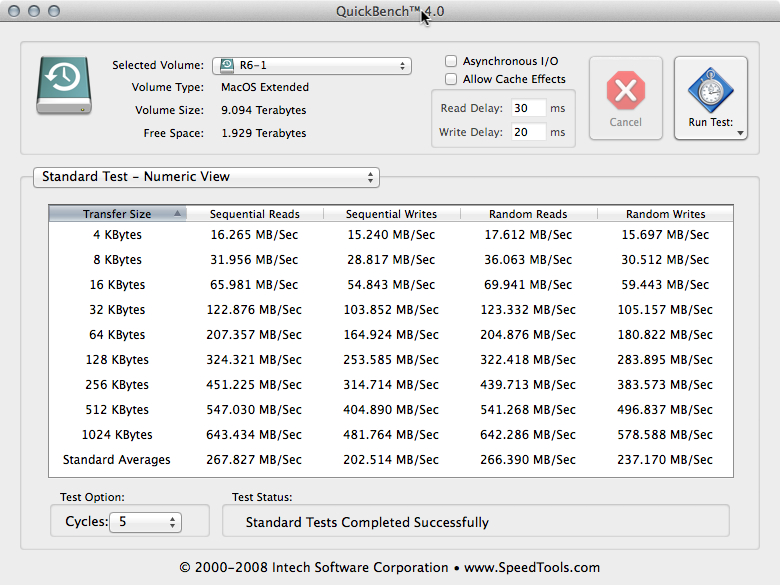
You're right about the low read/write on small transfers.
Here's my Quickbench screenshot:
Last edit: 30 Jun 2014 21:47 by cinemaloha.
Please Log in to join the conversation.
