


- Posts: 190
- Thank you received: 0
3 Post Moderation Rule for New Boarders (25 Jan 2021)
New boarders will have their posts moderated - Don't worry if you cannot see your post immediately.
Adding layers to audio in timeline?
27 Jun 2014 04:53 #48583
by Seany
Adding layers to audio in timeline? was created by Seany
Can I add layers to 2 connected clips stacked on audio thats in the primary timeline?
Appreciated.
S
Appreciated.
S
Please Log in to join the conversation.
- Betancourt
-

- Offline
- Premium Member
-

27 Jun 2014 06:19 #48585
by Betancourt
Pablo Betancourt
Replied by Betancourt on topic Adding layers to audio in timeline?
What do you mean by adding layers?
What do you want to add, audio clips or video clips?
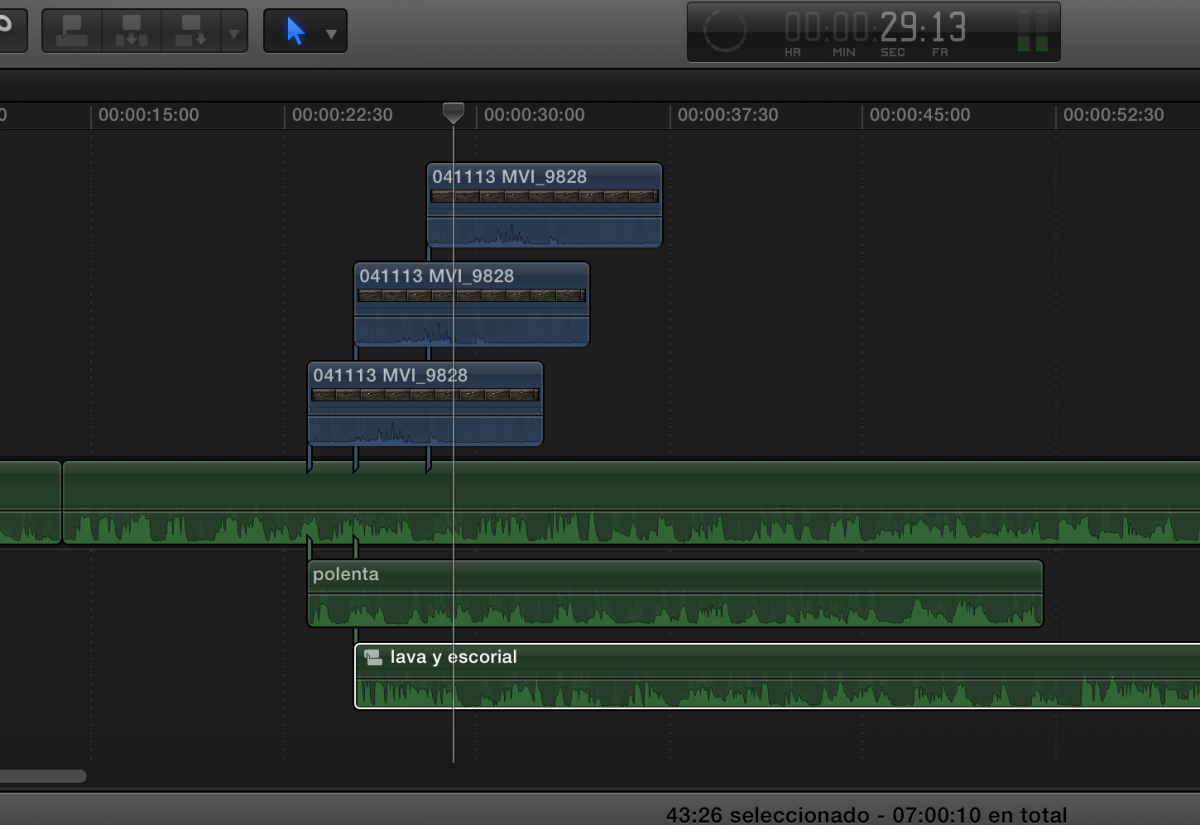
fcpx works with connected clips rather than layers, and while all of them need to be connected to the primary storyline, you can arrange connected clips as if they were layers:
What do you want to add, audio clips or video clips?
fcpx works with connected clips rather than layers, and while all of them need to be connected to the primary storyline, you can arrange connected clips as if they were layers:
Pablo Betancourt
Please Log in to join the conversation.

27 Jun 2014 06:21 #48587
by BenB
Replied by BenB on topic Adding layers to audio in timeline?
Well, we do have "layers", not "tracks".
Please Log in to join the conversation.
- Betancourt
-
- Offline
- Premium Member
-
27 Jun 2014 06:24 #48588
by Betancourt
Pablo Betancourt
Replied by Betancourt on topic Adding layers to audio in timeline?
In that case, how do you add one?
Pablo Betancourt
Please Log in to join the conversation.
27 Jun 2014 06:50 #48589
by BenB
Replied by BenB on topic Adding layers to audio in timeline?
Add a layer? Secondary storyline, connected clips, they create layers, like a cake.
Please Log in to join the conversation.
27 Jun 2014 08:37 - 27 Jun 2014 08:37 #48592
by Seany
Replied by Seany on topic Adding layers to audio in timeline?
It could be something to do with the blend mode i'm using, I have 2 clips stacked on the primary storyline which is audio, I want to blend the 2 clips togethor like 2 layers, I've tried using overlay but that just shows one clip the clip that is on top of the stack.
Last edit: 27 Jun 2014 08:37 by Seany.
Please Log in to join the conversation.
27 Jun 2014 12:04 - 27 Jun 2014 12:20 #48598
by BenB
Replied by BenB on topic Adding layers to audio in timeline?
Blend modes are set on the top of the stack, to effect how their pixels interact with everything below it. To limit the effect to only two clips in an stack (which is normal), put both in a Compound.
This section of the Motion help doc explains blend modes and working with them very well.
help.apple.com/motion/mac/5.1/#motn12be2175
Basically, the first section of them darkens, the second section lightens, the third section does a simultaneous combination of darken/lighten when blending the pixels.
Exactly what each will look like, completely depends on the content of each clips involved.
This section of the Motion help doc explains blend modes and working with them very well.
help.apple.com/motion/mac/5.1/#motn12be2175
Basically, the first section of them darkens, the second section lightens, the third section does a simultaneous combination of darken/lighten when blending the pixels.
Exactly what each will look like, completely depends on the content of each clips involved.
Last edit: 27 Jun 2014 12:20 by BenB.
Please Log in to join the conversation.
