


- Posts: 34
- Thank you received: 0
3 Post Moderation Rule for New Boarders (25 Jan 2021)
New boarders will have their posts moderated - Don't worry if you cannot see your post immediately.
Compressor 4.1.1 Settings for YouTube .mov - How to Set Streaming vs. Download?
26 Jun 2014 14:24 #48545
by SFA2013
Compressor 4.1.1 Settings for YouTube .mov - How to Set Streaming vs. Download? was created by SFA2013
As a novice with Compressor, I've RTFM, all 111 pages of it, and learning by trying out various custom settings. My goal is to make the smallest, highest quality, HD videos I can to upload to YouTube. YouTube also complains if the file is optimized for download, not streaming. Setting this up for a QuickTime video seems ridiculously complicated. Here is what I've found I need to do. I am looking to see if I am missing something. Do you have a better way?
Once you "QuickTime Settings: Change" you are presented with the following box:

The only way I've found to set for streaming is documented in the graphic. Is this really it? Does anyone have any easier way?
Once you "QuickTime Settings: Change" you are presented with the following box:
The only way I've found to set for streaming is documented in the graphic. Is this really it? Does anyone have any easier way?
Please Log in to join the conversation.
- Russ Haskell
-

- Offline
- Elite Member
-

Less
More
- Posts: 176
- Thank you received: 24
26 Jun 2014 20:44 #48573
by Russ Haskell
Replied by Russ Haskell on topic Compressor 4.1.1 Settings for YouTube .mov - How to Set Streaming vs. Download?
You're correct. That's how you do it. You duplicate the setting – make changes and save it as a custom setting.
Just to add one thing: Apple's version of H.264, while quite serviceable, comes in for some criticism for the way it holds up when aggressively compressed. So if you want the best quality at the smallest possible file sizes, consider downloading x.264. It installs into the QuickTime library and is available from the same window (from QuickTime Settings) you posted your screen shot of.
Here's an article you may find useful: www.onlinevideo.net/2012/12/final-cut-pr...er-encoding-results/
Russ
Just to add one thing: Apple's version of H.264, while quite serviceable, comes in for some criticism for the way it holds up when aggressively compressed. So if you want the best quality at the smallest possible file sizes, consider downloading x.264. It installs into the QuickTime library and is available from the same window (from QuickTime Settings) you posted your screen shot of.
Here's an article you may find useful: www.onlinevideo.net/2012/12/final-cut-pr...er-encoding-results/
Russ
Please Log in to join the conversation.
27 Jun 2014 03:42 #48582
by SFA2013
Replied by SFA2013 on topic Compressor 4.1.1 Settings for YouTube .mov - How to Set Streaming vs. Download?
Thank you. This is great. I really appreciate this as I have been trying to get Compressor to produce as good videos as I can create with Handbrake that uses x.264.
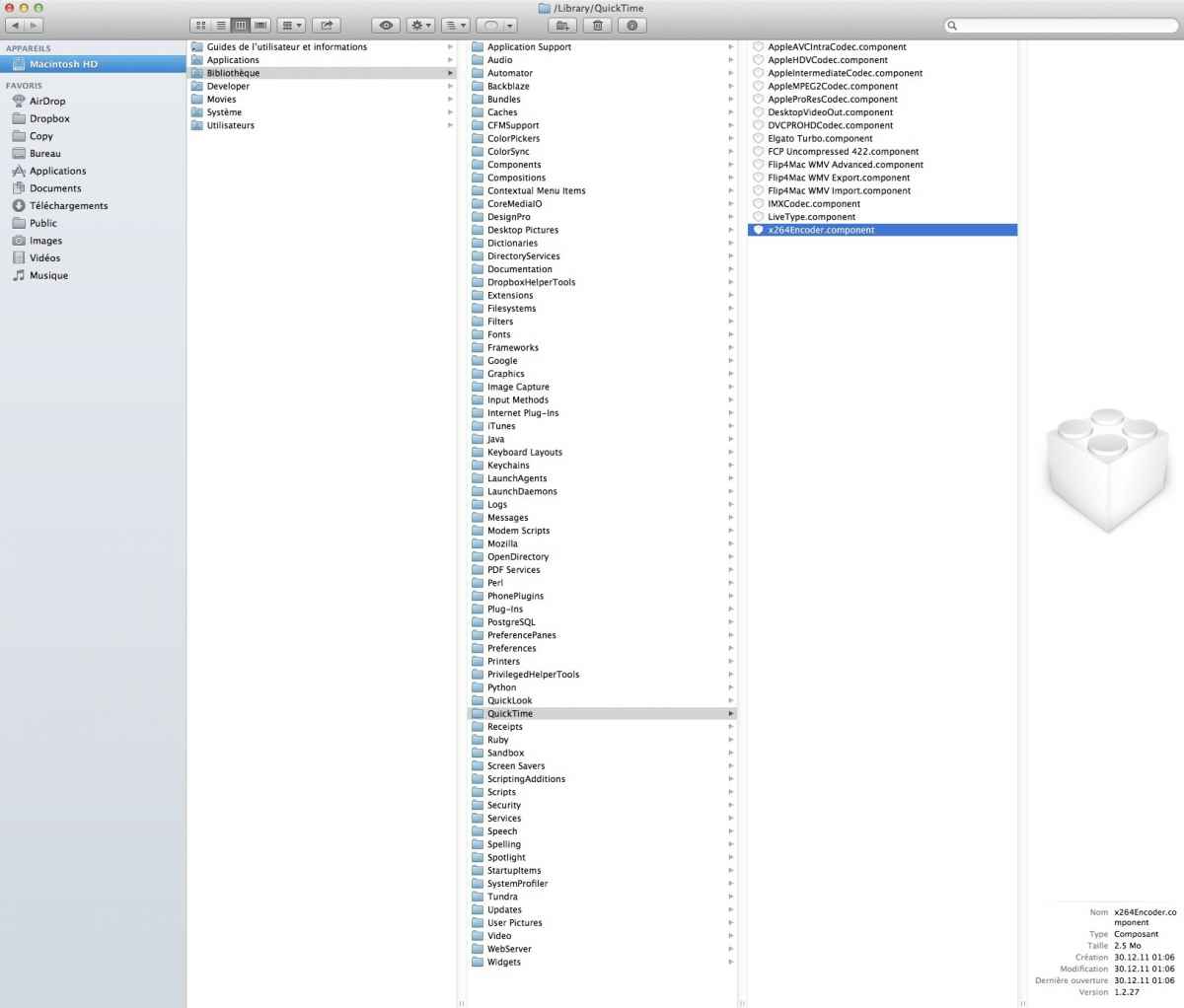
I read the guide, downloaded the file, and watched the video. I am an update freak, so everything is the latest with me, OS X 10.9.3, and I can find my Library folder, but it does not have a QuickTime folder within it. I've tried Googling for where it might me, but I cannot find it. Would you know how to find the QT folder?
I read the guide, downloaded the file, and watched the video. I am an update freak, so everything is the latest with me, OS X 10.9.3, and I can find my Library folder, but it does not have a QuickTime folder within it. I've tried Googling for where it might me, but I cannot find it. Would you know how to find the QT folder?
Russ Haskell wrote: You're correct. That's how you do it. You duplicate the setting – make changes and save it as a custom setting.
Just to add one thing: Apple's version of H.264, while quite serviceable, comes in for some criticism for the way it holds up when aggressively compressed. So if you want the best quality at the smallest possible file sizes, consider downloading x.264. It installs into the QuickTime library and is available from the same window (from QuickTime Settings) you posted your screen shot of.
Here's an article you may find useful: www.onlinevideo.net/2012/12/final-cut-pr...er-encoding-results/
Russ
Please Log in to join the conversation.
27 Jun 2014 09:58 - 27 Jun 2014 10:07 #48594
by nirna
Replied by nirna on topic Compressor 4.1.1 Settings for YouTube .mov - How to Set Streaming vs. Download?
Since Lion the Quick Time folder is in Macintosh HD/Library/Quick Time (see attached picture). Hope this helps.
Last edit: 27 Jun 2014 10:07 by nirna.
Please Log in to join the conversation.
