


- Posts: 12
- Thank you received: 0
3 Post Moderation Rule for New Boarders (25 Jan 2021)
New boarders will have their posts moderated - Don't worry if you cannot see your post immediately.
add visual timecode to Quicktime version
- jwbrooklyn
-
 Topic Author
- Offline
- New Member
-

Less
More
25 Jun 2014 21:28 #48502
by jwbrooklyn
add visual timecode to Quicktime version was created by jwbrooklyn
I imported HD footage into FCP, created a library, project ,events. I brought it into the timeline to create a single Quicktime movie of raw footage to share with transcription house. I need to send a version with visible timecode. How do I add timecode to the QT movie, then share it either to DVD or Vimeo or other?
Please Log in to join the conversation.
- Tom Wolsky
-

- Offline
- Moderator
-

25 Jun 2014 21:58 #48505
by Tom Wolsky
Replied by Tom Wolsky on topic add visual timecode to Quicktime version
There is a timecode generator in FCP that you can lay over the top of your project. You can also add a timecode overlay when you compress using Compressor.
Please Log in to join the conversation.
- ronny courtens
-

- Offline
- Moderator
-
Less
More
- Posts: 4455
- Thank you received: 962
26 Jun 2014 07:04 #48524
by ronny courtens
Replied by ronny courtens on topic add visual timecode to Quicktime version
The tc generator can be found in Generators > Elements > Timecode.
- Ronny
- Ronny
Please Log in to join the conversation.
- Marcus Samuel-Gaskin
-
- Offline
- Junior Member
-

Less
More
- Posts: 24
- Thank you received: 1
26 Jun 2014 10:17 #48532
by Marcus Samuel-Gaskin
Replied by Marcus Samuel-Gaskin on topic add visual timecode to Quicktime version
Please Log in to join the conversation.

26 Jun 2014 13:29 - 26 Jun 2014 13:30 #48538
by BenB
Replied by BenB on topic add visual timecode to Quicktime version
I prefer Compressor's, cause you already have it, quick and easy. In fact, I have a custom setting preset in Compressor I set up, with a web H.264 encode, that I have as a custom Destination in FCPX, so it is all ready to go at any moment. Huge time saver.
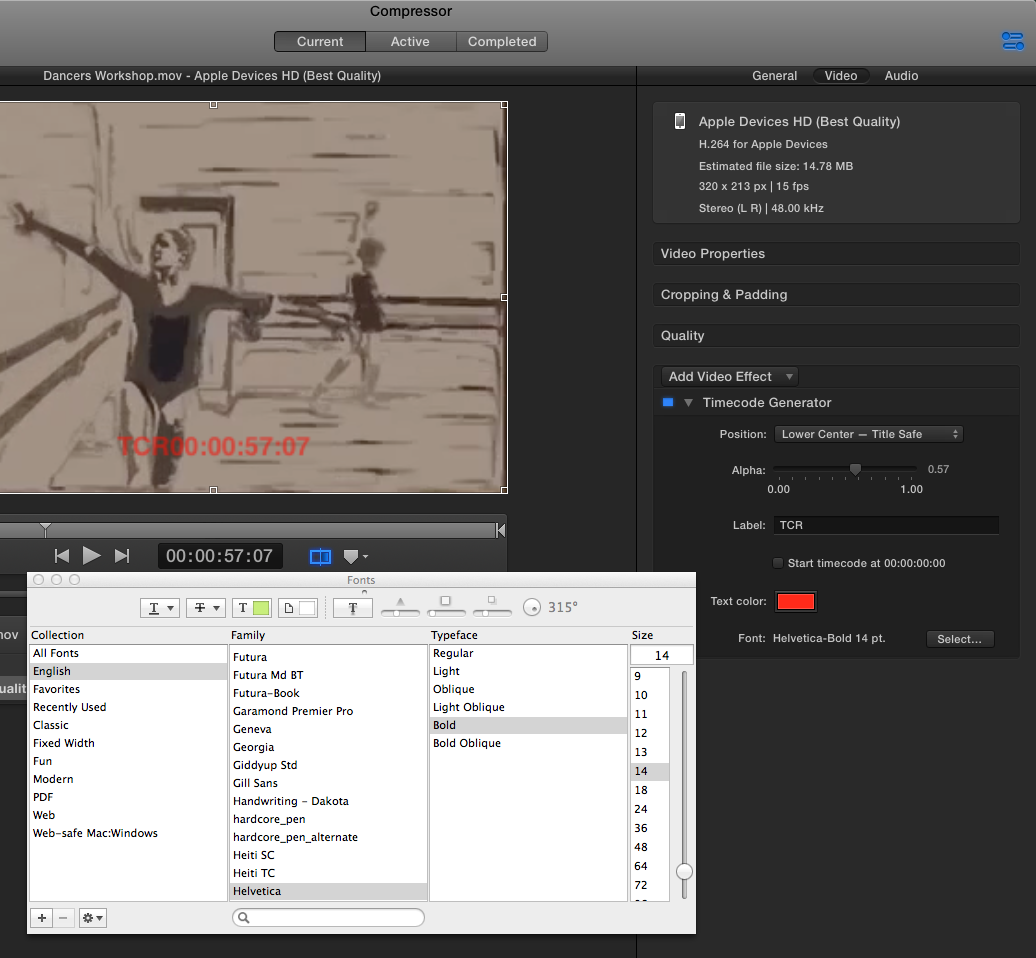
- Timecode Generator: Superimposes the clip’s timecode onto the video. The Timecode Generator effect contains the following properties:
- Position: Choose a position for the timecode overlay from the pop-up menu, such as Center, Lower Left, Lower Left–Title Safe, and so on.
- Alpha: Drag the slider to set the text opacity between 0 (completely transparent) and 1 (completely opaque). (You can also double-click the value and type a new value.)
- Label: Optionally, type text that you want to appear to the left of the timecode number.
- Start timecode at 00:00:00:00: Select this checkbox to have the timecode start at zero. When the checkbox is not selected, the timecode starts at the video’s timecode.
- Text color: Click the color well to set the text color.
- Font: Click the Select button to set the font, style, and size.
Last edit: 26 Jun 2014 13:30 by BenB.
Please Log in to join the conversation.

26 Jun 2014 14:46 #48546
by dinerdog
Replied by dinerdog on topic add visual timecode to Quicktime version
Thanks Ben. I have to do this ALL the time to send clients screening copies for notes. I've always done it directly in FCPX with the SMPTE generator, but find the render and export take a REALLY long time for an hour screening tape. My machine is a MacPro, Early 2008 2x2.8 Quad-Core Intel, 32GB Ram, Radeon HD 5870 1024 MB.
I may try a time test on the same video in FCPX and Compressor. I'd be psyched if Compressor was even a little bit faster.
I may try a time test on the same video in FCPX and Compressor. I'd be psyched if Compressor was even a little bit faster.
Please Log in to join the conversation.
