


- Posts: 4
- Thank you received: 0
3 Post Moderation Rule for New Boarders (25 Jan 2021)
New boarders will have their posts moderated - Don't worry if you cannot see your post immediately.
Referenced files don't get referenced when importing files from FCPX media browser
- defineyourgoal@gmail.com
-
 Topic Author
- Offline
- New Member
-

Less
More
19 Jun 2014 11:39 - 19 Jun 2014 11:40 #48137
by defineyourgoal@gmail.com
Referenced files don't get referenced when importing files from FCPX media browser was created by defineyourgoal@gmail.com
Hi there people! Well, I have tried to find an answer on this problem without success for weeks and now I'm turning my questioning head towards you 
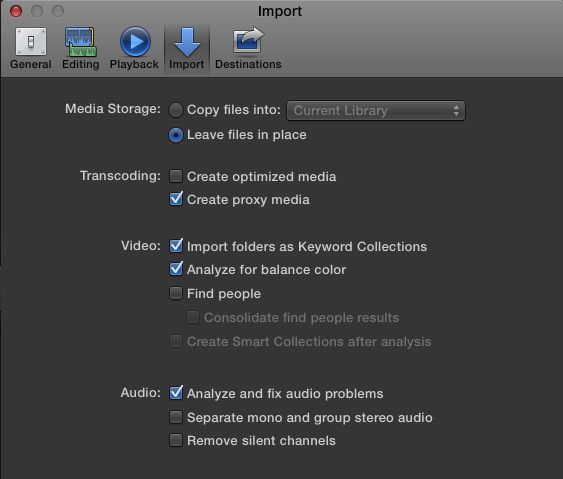
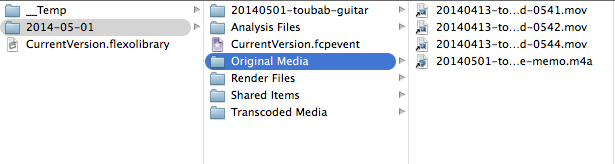
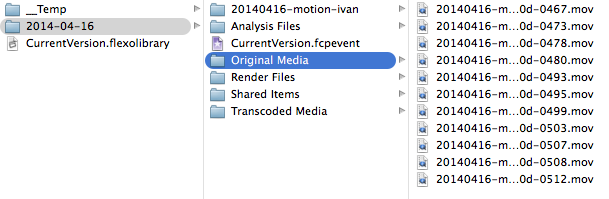
The problem: When importing Aperture media from FCPX media browser, the files gets copied into my library - even though my settings are set to "import as referenced". Why? I have checked different libraries "original media" map and the files imported via the import button is referenced (having the arrow on the icon showing it), files imported via media browser has no arrow next to it and file size is huge.
So: when importing from the import window and choosing "referenced" everything works like a sharm! From media browser - fail.
Anyone out there that has a clue what I'm doing wrong? Has it something to do with the files being referenced vs a proxy or optimized?
I have FCPX 10.1.1 and Aperture 3.5.1
All the best
Pär
The problem: When importing Aperture media from FCPX media browser, the files gets copied into my library - even though my settings are set to "import as referenced". Why? I have checked different libraries "original media" map and the files imported via the import button is referenced (having the arrow on the icon showing it), files imported via media browser has no arrow next to it and file size is huge.
So: when importing from the import window and choosing "referenced" everything works like a sharm! From media browser - fail.
Anyone out there that has a clue what I'm doing wrong? Has it something to do with the files being referenced vs a proxy or optimized?
I have FCPX 10.1.1 and Aperture 3.5.1
All the best
Pär
Last edit: 19 Jun 2014 11:40 by defineyourgoal@gmail.com.
Please Log in to join the conversation.

19 Jun 2014 13:03 - 19 Jun 2014 13:04 #48139
by BenB
Replied by BenB on topic Referenced files don't get referenced when importing files from FCPX media browser
Those preference settings only effect things that are imported via drag-and-drop from a Finder window, not the media browsers, as stated in the Help docs.
"However, if you drag media directly from the Finder into Final Cut Pro, Final Cut Pro uses the import settings you selected in the Import pane of the Final Cut Pro Preferences window."
Aperture, iTunes, etc, are "Libraries", which much copy over to the FCPX Library you're importing to. Just like between individual FCPX Libraries.
"However, if you drag media directly from the Finder into Final Cut Pro, Final Cut Pro uses the import settings you selected in the Import pane of the Final Cut Pro Preferences window."
Aperture, iTunes, etc, are "Libraries", which much copy over to the FCPX Library you're importing to. Just like between individual FCPX Libraries.
Last edit: 19 Jun 2014 13:04 by BenB.
Please Log in to join the conversation.
- defineyourgoal@gmail.com
-
Topic Author
- Offline
- New Member
-
Less
More
- Posts: 4
- Thank you received: 0
19 Jun 2014 13:40 #48140
by defineyourgoal@gmail.com
Replied by defineyourgoal@gmail.com on topic Referenced files don't get referenced when importing files from FCPX media browser
Thanks for quick reply BenB!
"Aperture, iTunes, etc, are "Libraries", which much copy over to the FCPX Library you're importing to" clarified a lot. Though in my head it doesn't really makes sense cause the Aperture library is referenced to a map on my hardrive. So when dragging files from the Media browser in FCPX, FCPX takes the referenced files in Aperture, finds the original, and copies that to the FCPX library?
I organizing my Aperture library with stars 1-5 and would like to see the stars in the import. The only way to sort them by stars is in the media browser. Is there a way to use the media browser when importing and still get the files referenced or do I have to use the import button? If I only can use the import button, is there a way to see the stars or smart albums?
"Aperture, iTunes, etc, are "Libraries", which much copy over to the FCPX Library you're importing to" clarified a lot. Though in my head it doesn't really makes sense cause the Aperture library is referenced to a map on my hardrive. So when dragging files from the Media browser in FCPX, FCPX takes the referenced files in Aperture, finds the original, and copies that to the FCPX library?
I organizing my Aperture library with stars 1-5 and would like to see the stars in the import. The only way to sort them by stars is in the media browser. Is there a way to use the media browser when importing and still get the files referenced or do I have to use the import button? If I only can use the import button, is there a way to see the stars or smart albums?
Please Log in to join the conversation.
19 Jun 2014 14:25 #48144
by BenB
Replied by BenB on topic Referenced files don't get referenced when importing files from FCPX media browser
They're separate Libraries, and can't "share" media. Don't ask me why, ask Apple why, it's their database scheme.
FCPX doesn't yet support the star ratings of Aperture or iTunes. Unless there's some field somewhere I've not been able to find.
You can not import directly from Aperture, iPhoto, etc, with the Import window. If you export from those apps, then import that file into FCPX, you still will not see the star ratings anywhere. At least that I've been able to find.
I use the star ratings in Aperture a lot, also. Would LOVE to see that in FCPX. Fill out the feedback form!
FCPX doesn't yet support the star ratings of Aperture or iTunes. Unless there's some field somewhere I've not been able to find.
You can not import directly from Aperture, iPhoto, etc, with the Import window. If you export from those apps, then import that file into FCPX, you still will not see the star ratings anywhere. At least that I've been able to find.
I use the star ratings in Aperture a lot, also. Would LOVE to see that in FCPX. Fill out the feedback form!
Please Log in to join the conversation.
- defineyourgoal@gmail.com
-
Topic Author
- Offline
- New Member
-
Less
More
- Posts: 4
- Thank you received: 0
19 Jun 2014 14:39 #48145
by defineyourgoal@gmail.com
Replied by defineyourgoal@gmail.com on topic Referenced files don't get referenced when importing files from FCPX media browser
Darn! Yeah the stars was the only reason I used the media browser, VERY convenient. Now, that era has ended. Always use the import button without knowing which videos are the best - check.
Although it's a painful process exporting the 5 star files from Aperture and then import in FCPX (yes, using the import button) but it seems to be the smartest way to skip the hassle in FCPX trying to find the best shoots you already sorted out.
" Fill out the feedback form!" Never heard about that. Did a quick search: you mean this? www.apple.com/feedback/finalcutpro.html
Although it's a painful process exporting the 5 star files from Aperture and then import in FCPX (yes, using the import button) but it seems to be the smartest way to skip the hassle in FCPX trying to find the best shoots you already sorted out.
" Fill out the feedback form!" Never heard about that. Did a quick search: you mean this? www.apple.com/feedback/finalcutpro.html
Please Log in to join the conversation.
- defineyourgoal@gmail.com
-
Topic Author
- Offline
- New Member
-
Less
More
- Posts: 4
- Thank you received: 0
19 Jun 2014 14:42 #48147
by defineyourgoal@gmail.com
Replied by defineyourgoal@gmail.com on topic Referenced files don't get referenced when importing files from FCPX media browser
Starting to think about other solutions: tagging. In Aperture, perhaps there is a way to "tag" the original files (changing color?). So when you want to import in FCPX you locate the map with the original files and then perhaps you could see the colors, knowing that they are the 5 stars.
Hm... There must be a way!
Hm... There must be a way!
Please Log in to join the conversation.

19 Jun 2014 15:41 #48149
by Bobbyco
Replied by Bobbyco on topic Referenced files don't get referenced when importing files from FCPX media browser
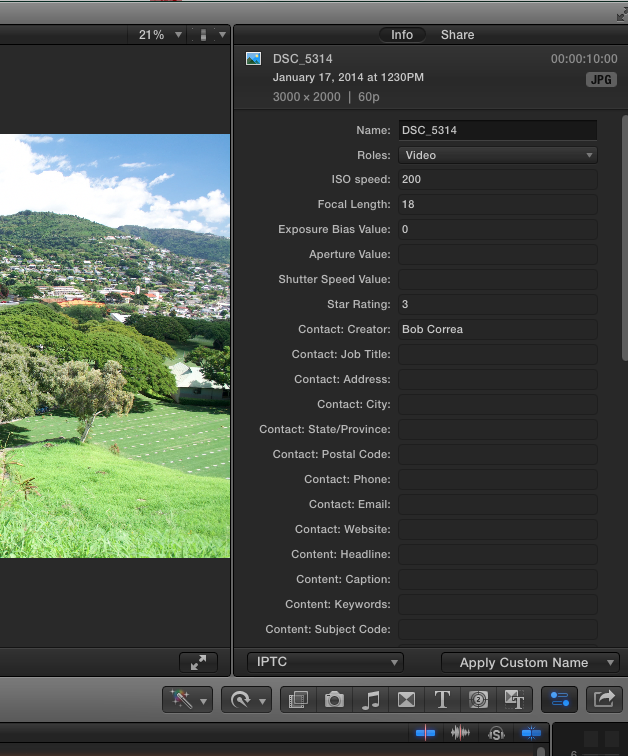
BenB wrote: FCPX doesn't yet support the star ratings of Aperture or iTunes. Unless there's some field somewhere I've not been able to find.
Ben, see the attached image. If you export images from Aperture then Import in FCPX the IPTC Metadata shows the image rating-if it/they are in fact rated.
Please Log in to join the conversation.
19 Jun 2014 16:09 - 19 Jun 2014 16:11 #48157
by BenB
Replied by BenB on topic Referenced files don't get referenced when importing files from FCPX media browser
Bobbyco, there you have it! Now I can add that field to my customized "Stills Metadata" view in the Inspector.
www.macprovideo.com/hub/final-cut/custom...iews-final-cut-pro-x
www.macprovideo.com/hub/final-cut/custom...iews-final-cut-pro-x
Last edit: 19 Jun 2014 16:11 by BenB.
Please Log in to join the conversation.
