


- Posts: 6
- Thank you received: 0
3 Post Moderation Rule for New Boarders (25 Jan 2021)
New boarders will have their posts moderated - Don't worry if you cannot see your post immediately.
Problems Uploading Generator
18 Jun 2014 20:13 #48093
by ksteele3
Problems Uploading Generator was created by ksteele3
Hello!
Could use some fast help here. I am following these instructions to make use of a custom generator created for a project I am working on. The instructions indicate:
Quit Final Cut Pro.
Drag the Brady-Fallon.zip file to your Desktop/
Double click the Brady-Fallon.zip file.
Two files will appear: another zip file and a final cut pro library file.

Double click the 9 Square BRADY.zip file to unpack the zip file.
In your Macintosh HD/Users/ your username/Movies folder, locate the Motion Templates folder. If one does not exist, create as shown in the screenshot.
Inside the Motion Templates folder, locate the Generators folder.
Inside the Generators folder, create a "Camp" folder.
Drag the 9 Square Brady folder into the Movies/Generators/Camp folder.
Locate the YL Brady Bunch library downloaded with the 9 Square BRADY.zip.
Double click the library to Open Final Cut Pro
*********From the Generators browser (right-end of toolbar), add the 9 Square BRADY generator to your project.************
This last step is the one I am having problems with. No where in my Generator browser am I seeing the custom generator I am looking for. I have followed all of the instructions up until this point. I'm not sure what the problem is, any thoughts? (Side note, I don't know if this matters, but the computer I am working on dose not have the Motion application).
Thanks for you help! Need answer as soon as possible! THANKS!
Could use some fast help here. I am following these instructions to make use of a custom generator created for a project I am working on. The instructions indicate:
Quit Final Cut Pro.
Drag the Brady-Fallon.zip file to your Desktop/
Double click the Brady-Fallon.zip file.
Two files will appear: another zip file and a final cut pro library file.

Double click the 9 Square BRADY.zip file to unpack the zip file.
In your Macintosh HD/Users/ your username/Movies folder, locate the Motion Templates folder. If one does not exist, create as shown in the screenshot.
Inside the Motion Templates folder, locate the Generators folder.
Inside the Generators folder, create a "Camp" folder.
Drag the 9 Square Brady folder into the Movies/Generators/Camp folder.
Locate the YL Brady Bunch library downloaded with the 9 Square BRADY.zip.
Double click the library to Open Final Cut Pro
*********From the Generators browser (right-end of toolbar), add the 9 Square BRADY generator to your project.************
This last step is the one I am having problems with. No where in my Generator browser am I seeing the custom generator I am looking for. I have followed all of the instructions up until this point. I'm not sure what the problem is, any thoughts? (Side note, I don't know if this matters, but the computer I am working on dose not have the Motion application).
Thanks for you help! Need answer as soon as possible! THANKS!
Please Log in to join the conversation.
18 Jun 2014 20:45 #48096
by weichsel
Replied by weichsel on topic Problems Uploading Generator
To use a Motion 5 designed Generator in a Final Cut Pro X project, you don't have to have Motion installed on the same machine.
How is the current structure of your Generators folder?
Given that your "9 Square Brady" folder contains a valid Motion 5 project, the Generator should show up in the browser of FCP X like this:
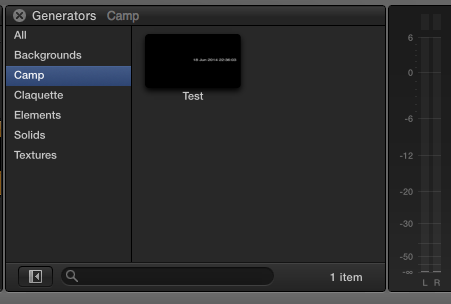
I attached simple test Generator so that you can test setting up a custom generator.
Extract the .zip and move the contained folder to
The ~ means your home directory (e.g. /Users/YourName/)
How is the current structure of your Generators folder?
Given that your "9 Square Brady" folder contains a valid Motion 5 project, the Generator should show up in the browser of FCP X like this:
I attached simple test Generator so that you can test setting up a custom generator.
Extract the .zip and move the contained folder to
Code:
~/Movies/Motion Templates.localized/Generators.localized/Camp
The ~ means your home directory (e.g. /Users/YourName/)
Please Log in to join the conversation.
18 Jun 2014 20:48 #48097
by ksteele3
Replied by ksteele3 on topic Problems Uploading Generator
Thank you so much for your quick response!
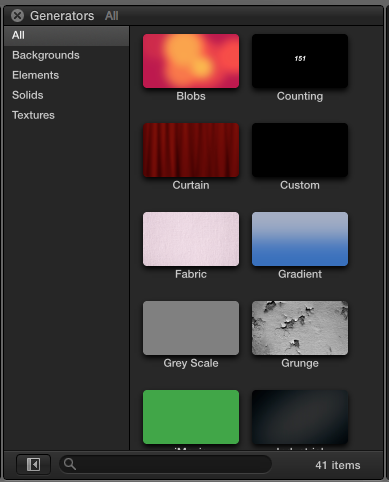
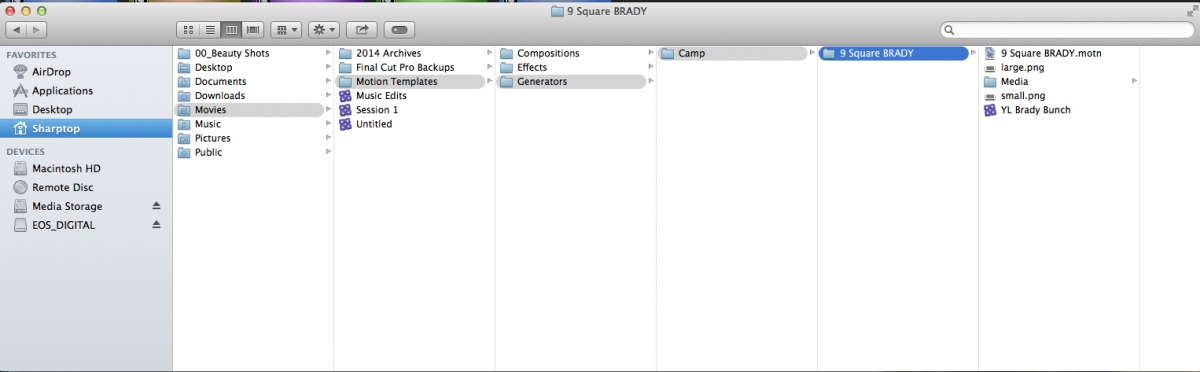
This is what my generator browser looks like, and this is the structure of the Generators folder.
This is what my generator browser looks like, and this is the structure of the Generators folder.
Please Log in to join the conversation.
18 Jun 2014 20:53 #48098
by ksteele3
Replied by ksteele3 on topic Problems Uploading Generator
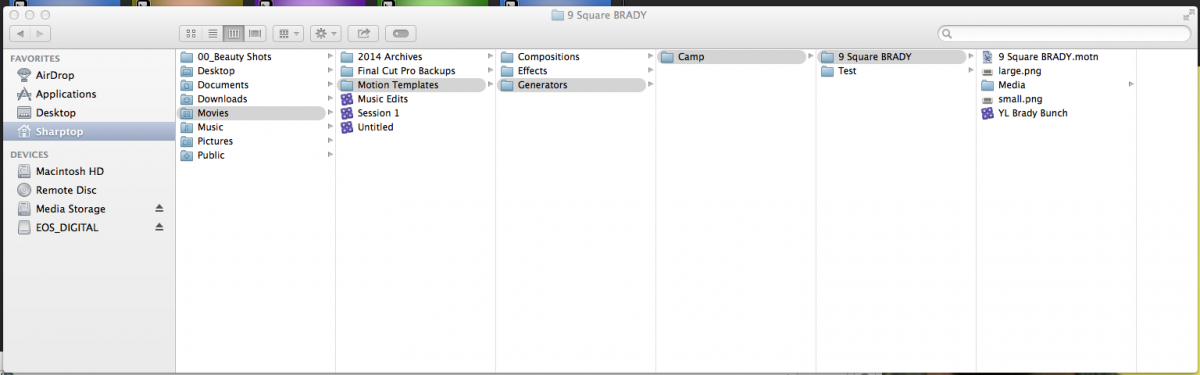
I just added the Test file you posted, and still am getting nothing in the Generators browser
Please Log in to join the conversation.
18 Jun 2014 20:59 - 18 Jun 2014 21:00 #48099
by weichsel
Replied by weichsel on topic Problems Uploading Generator
The folder structure looks correct but the icons of your .motn files look like an older Motion version is installed. I don't know if Motion 4 and below also use a localised folder name for the templates folder. Maybe that's the problem.
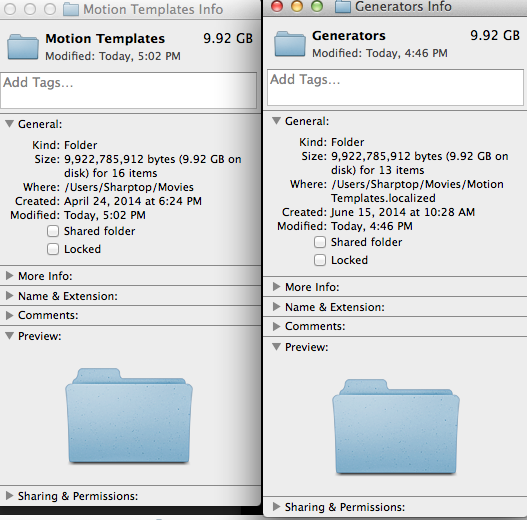
Can you inspect the "Motion Templates" folder in the Finder (cmd+i) and check the "real" path.
It should look like that:
(Note the .localized suffix)
Can you inspect the "Motion Templates" folder in the Finder (cmd+i) and check the "real" path.
It should look like that:
Code:
~/Movies/Motion Templates.localized
Last edit: 18 Jun 2014 21:00 by weichsel.
Please Log in to join the conversation.
18 Jun 2014 21:04 #48100
by ksteele3
Replied by ksteele3 on topic Problems Uploading Generator
Okay! This is what I'm seeing...
Please Log in to join the conversation.
18 Jun 2014 21:18 #48101
by weichsel
Replied by weichsel on topic Problems Uploading Generator
That path Looks good to me - I am out of ideas now 
Maybe you can backup your current Motion Templates folder and recreate it. Hopefully FCP X will pick up your new generators folder afterwards.
Maybe you can backup your current Motion Templates folder and recreate it. Hopefully FCP X will pick up your new generators folder afterwards.
Please Log in to join the conversation.


19 Jun 2014 01:47 #48110
by anickt
Replied by anickt on topic Problems Uploading Generator
Where are your Titles and Transitions folders? They should all be together in Motion Templates folder. Seems like your install may be wonky.
Please Log in to join the conversation.

19 Jun 2014 02:16 - 19 Jun 2014 02:17 #48112
by BenB
Replied by BenB on topic Problems Uploading Generator
Pull that FCPX "Library" out of the Camp generator folder, put it on your Desktop or another drive. It should not be there.
I suspect older version of Motion 5 was used, not the latest. Verify your FCPX version, please.
I suspect older version of Motion 5 was used, not the latest. Verify your FCPX version, please.
Last edit: 19 Jun 2014 02:17 by BenB.
Please Log in to join the conversation.
19 Jun 2014 03:31 #48117
by ksteele3
Replied by ksteele3 on topic Problems Uploading Generator
Thanks for the suggestions; I recreated the Motion Template folder, quit FCP and restarted and still it didn't pick it up.
And the FCP X version is 10.1.1.
And the FCP X version is 10.1.1.
Please Log in to join the conversation.
19 Jun 2014 04:23 #48119
by weichsel
Replied by weichsel on topic Problems Uploading Generator
You could try to use an OS X guest account to start with a fresh environment and create a Motion Templates folder there.
If that helps you, could look into backing up, trashing & re-installing the FCP X environment of your real user account.
If that helps you, could look into backing up, trashing & re-installing the FCP X environment of your real user account.
Please Log in to join the conversation.
19 Jun 2014 10:29 - 19 Jun 2014 10:32 #48130
by BenB
Replied by BenB on topic Problems Uploading Generator
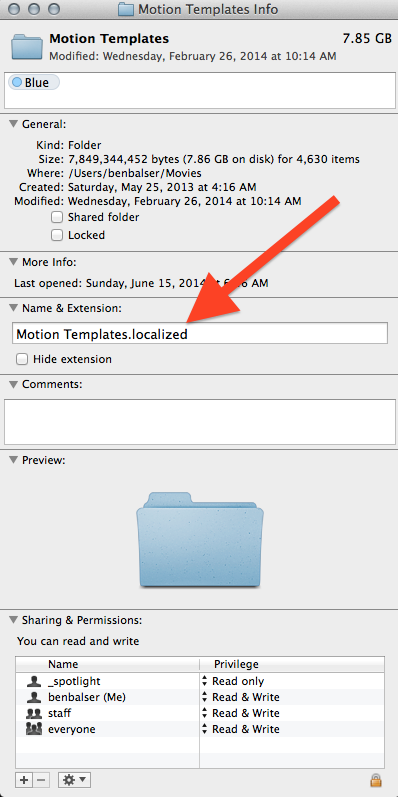
Be sure in the Get Info window, under "Names & Extensions" that .localized is appended to the name "Motion Templates".
 .
.
If that is OK, then double-click one of those added templates, and be sure it is up to date with Motion 5.1 and not an earlier version.
If that is OK, then double-click one of those added templates, and be sure it is up to date with Motion 5.1 and not an earlier version.
Last edit: 19 Jun 2014 10:32 by BenB.
Please Log in to join the conversation.
