


- Posts: 479
- Thank you received: 5
3 Post Moderation Rule for New Boarders (25 Jan 2021)
New boarders will have their posts moderated - Don't worry if you cannot see your post immediately.
multicam problem
13 Jun 2014 12:57 - 13 Jun 2014 12:58 #47772
by parkerhqj
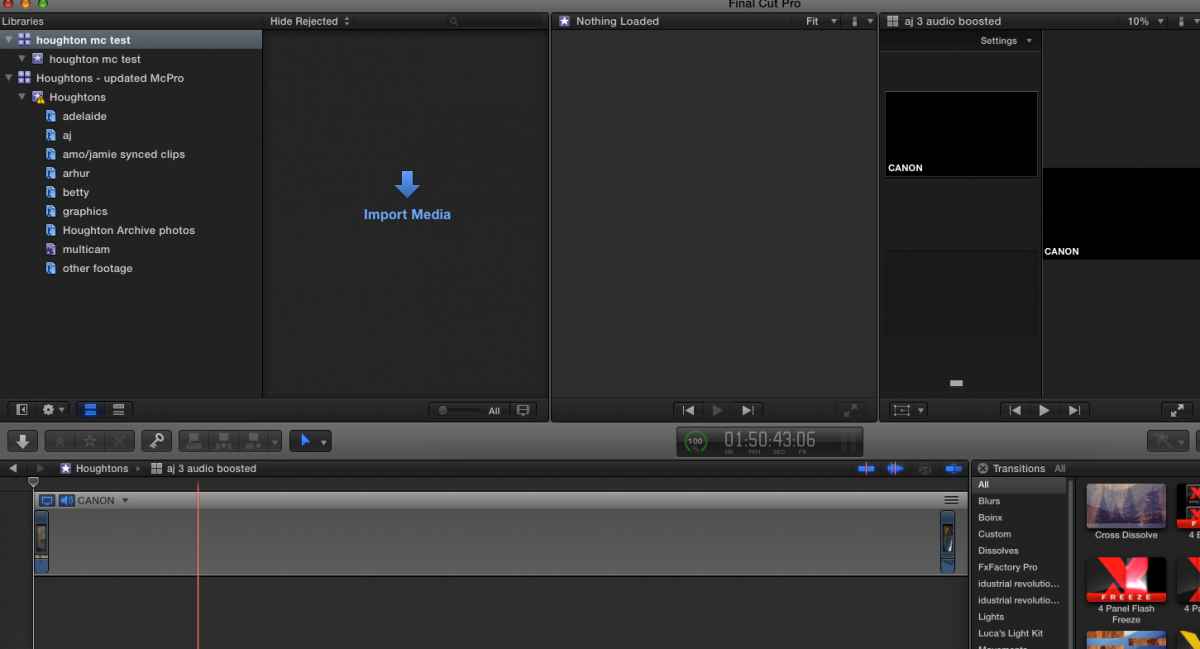
I have an interview I shot last summer with two cameras. I created synced clips of the 8 clips, 4 from each camera. I didn't use multicam at the time, nor did I edit any of it. I am now returning to the project and would like to use multi cam rather than the two clips merely stacked on each other. I have used it on other projects since with no problems. The problem now is when I click on the two clips and create a multi cam clip, it doesn't work. The clip that is generated has the two clips at either end of the timeline (see below). And that is true for all of them. The audio is sufficient enough and the clips should be syncable. I'm not sure why this is happening. Could it be that the project was created way back when and is not compatible with multi cam somehow. I don't have access to the original media (I know, shoot me) so if I wanted to start from scratch, I'd have to take the mov clips from the original media folder. I tried creating a new project and had the same results. Could I be setting this up wrong? thx
multicam problem was created by parkerhqj
I have an interview I shot last summer with two cameras. I created synced clips of the 8 clips, 4 from each camera. I didn't use multicam at the time, nor did I edit any of it. I am now returning to the project and would like to use multi cam rather than the two clips merely stacked on each other. I have used it on other projects since with no problems. The problem now is when I click on the two clips and create a multi cam clip, it doesn't work. The clip that is generated has the two clips at either end of the timeline (see below). And that is true for all of them. The audio is sufficient enough and the clips should be syncable. I'm not sure why this is happening. Could it be that the project was created way back when and is not compatible with multi cam somehow. I don't have access to the original media (I know, shoot me) so if I wanted to start from scratch, I'd have to take the mov clips from the original media folder. I tried creating a new project and had the same results. Could I be setting this up wrong? thx
Last edit: 13 Jun 2014 12:58 by parkerhqj.
Please Log in to join the conversation.

13 Jun 2014 13:53 #47776
by BenB
Replied by BenB on topic multicam problem
Screen shot of your Multiclip setup window. I think you're setting something that tells FCPX to process a configuration you don't want.
Please Log in to join the conversation.
- Daniel Rutledge
-

- Offline
- Premium Member
-

- Those that know don't tell, and those that tell don't know.
13 Jun 2014 13:53 #47777
by Daniel Rutledge
Replied by Daniel Rutledge on topic multicam problem
There is not much info to go on here, but I'll take a crack at a few obvious things. First, make sure that you identify an angle for each clip in the info tab. So all the clips from one camera are called A and all the clips from the second camera are called B. Next, get your Multicam settings right. Angle Assembly: Camera Angle. Angle Clip Ordering: Content Created. Angle synchronization: Automatic. Use Audio For Synchronization: Checked.
If this doesn't work, there is another solution. Whenever I have a problematic multi cam, I create a multi cam clip with just one clip. I then manually add the rest of the clips to that angle and space them out a little. Then add another angle. Bring the remaining clips onto the new angle and synch them one at a time . Select the clip, and then from the angle drop down menu, choose "Synch selection to monitoring angle." This usually solves any problems.
My guess with your situation is that you haven't identified angles, and FCPX thinks that the clips all came from one camera and that the reason they are so far apart is that it is using the Content Created function and that the times and dates from the two cameras don't match. Maybe before you do everything manually, arrange things like I said in the first paragraph and turn off Content Created.
If this doesn't work, there is another solution. Whenever I have a problematic multi cam, I create a multi cam clip with just one clip. I then manually add the rest of the clips to that angle and space them out a little. Then add another angle. Bring the remaining clips onto the new angle and synch them one at a time . Select the clip, and then from the angle drop down menu, choose "Synch selection to monitoring angle." This usually solves any problems.
My guess with your situation is that you haven't identified angles, and FCPX thinks that the clips all came from one camera and that the reason they are so far apart is that it is using the Content Created function and that the times and dates from the two cameras don't match. Maybe before you do everything manually, arrange things like I said in the first paragraph and turn off Content Created.
Please Log in to join the conversation.
13 Jun 2014 14:08 #47779
by parkerhqj
Replied by parkerhqj on topic multicam problem
Thanks. That's very helpful. I shot a concert using two cameras a couple of months ago without doing any of this preparation and it worked fine. Maybe I just got away with it then! I'll try these out and see how it goes. thx
Please Log in to join the conversation.
