


- Posts: 1049
- Thank you received: 404
3 Post Moderation Rule for New Boarders (25 Jan 2021)
New boarders will have their posts moderated - Don't worry if you cannot see your post immediately.
Chromakey battle results
- peteramwiggins
-
 Topic Author
- Offline
- Administrator
-

- The Administrator :)
Less
More
10 Jun 2014 05:52 - 10 Jun 2014 06:18 #47571
by peteramwiggins
Administrator
Chromakey battle results was created by peteramwiggins
All,
Please post videos or stills for the chromakey battle here!
Checkout the frontage article to find out what this is all about
Please post videos or stills for the chromakey battle here!
Checkout the frontage article to find out what this is all about
Administrator
Last edit: 10 Jun 2014 06:18 by peteramwiggins.
Please Log in to join the conversation.
- Rami Mustakim
-

- Offline
- New Member
-

Less
More
- Posts: 3
- Thank you received: 0
10 Jun 2014 12:29 #47577
by Rami Mustakim


Replied by Rami Mustakim on topic Chromakey battle results
Please Log in to join the conversation.
- joe12south
-
- Offline
- New Member
-
- Average skinny white guy
Less
More
- Posts: 1
- Thank you received: 0
10 Jun 2014 13:08 #47583
by joe12south
Replied by joe12south on topic Chromakey battle results
Nice effort restoring the motion blur and hair, but the hard edges are noticeably soft.
Please Log in to join the conversation.
- Rami Mustakim
-
- Offline
- New Member
-
Less
More
- Posts: 3
- Thank you received: 0
10 Jun 2014 13:44 #47584
by Rami Mustakim
Replied by Rami Mustakim on topic Chromakey battle results
I totally agree. Although forum image compression doesn't help 
Please Log in to join the conversation.
10 Jun 2014 14:04 #47585
by jonbelew
Replied by jonbelew on topic Chromakey battle results
Here is mine...
FCP X 10.1.1

FCP X 10.1.1
Please Log in to join the conversation.

10 Jun 2014 14:57 #47587
by tpayton
Regarding Rami's effort. To my eye the shirt that is not in motion has very clean edges as well as Alex's right cheek. The hair is a bit soft, but then again hair is.... soft. Not that I should presume to know anything about Alex's hair softness.
Replied by tpayton on topic Chromakey battle results
joe12south wrote: Nice effort restoring the motion blur and hair, but the hard edges are noticeably soft.
Regarding Rami's effort. To my eye the shirt that is not in motion has very clean edges as well as Alex's right cheek. The hair is a bit soft, but then again hair is.... soft. Not that I should presume to know anything about Alex's hair softness.
Please Log in to join the conversation.


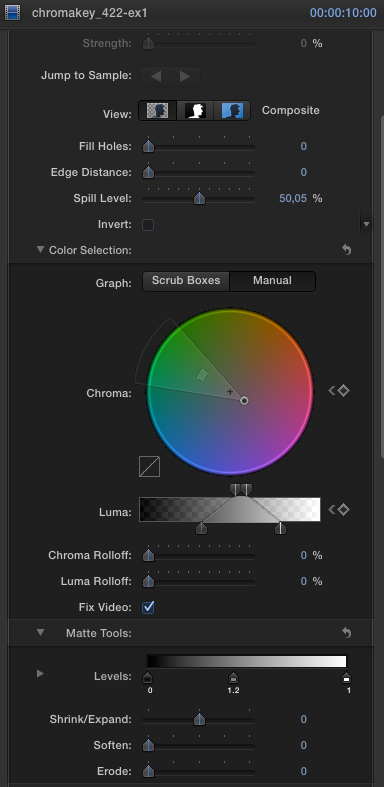
10 Jun 2014 15:15 - 10 Jun 2014 15:45 #47589
by Geoff
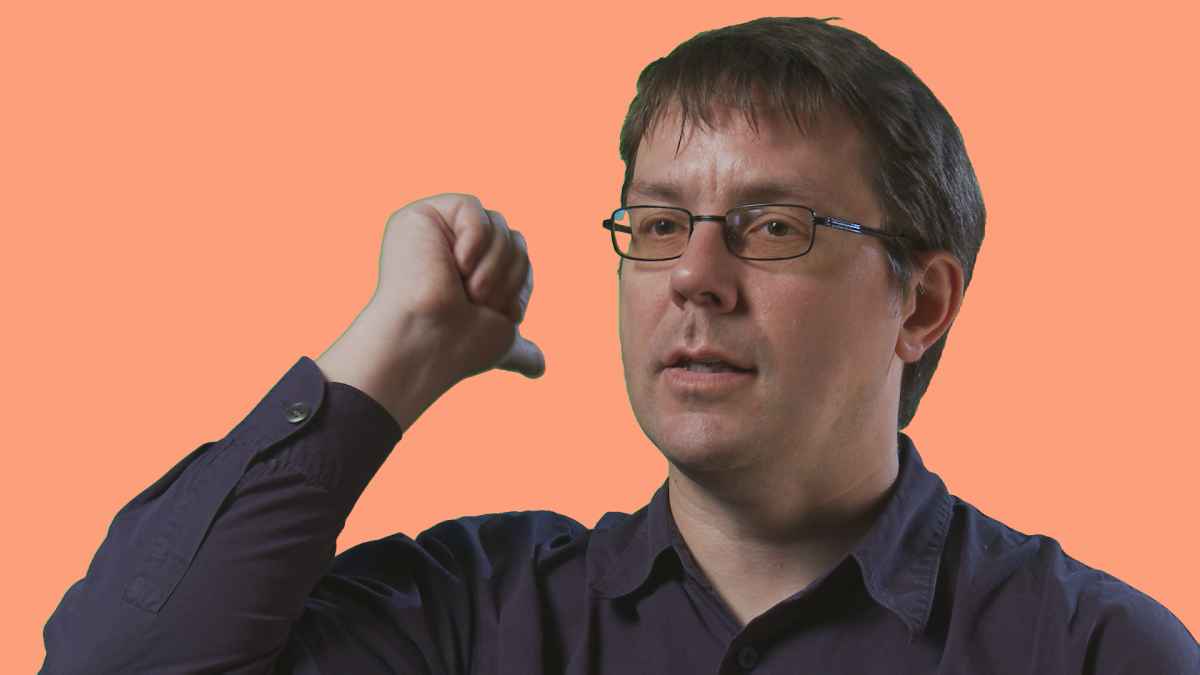
Forgive the double posting, but it seems that the original post did not include the attachment. Perhaps I will have better luck with this one!
Here is a bog standard Edius Key ie. no fine tuning:
Replied by Geoff on topic Chromakey battle results
Forgive the double posting, but it seems that the original post did not include the attachment. Perhaps I will have better luck with this one!
Here is a bog standard Edius Key ie. no fine tuning:
Last edit: 10 Jun 2014 15:45 by Geoff. Reason: Poor JPEG conversion
Please Log in to join the conversation.
- Rami Mustakim
-
- Offline
- New Member
-
Less
More
- Posts: 3
- Thank you received: 0
10 Jun 2014 15:36 #47590
by Rami Mustakim
Replied by Rami Mustakim on topic Chromakey battle results
@rjvddoes : Really good one. I like it.
Please Log in to join the conversation.
10 Jun 2014 15:40 #47591
by rjvddoes
Replied by rjvddoes on topic Chromakey battle results
Thanks. The jpg I saved fom FCPX does look even better, but as you already said, the compression to a mere 32 KB doesn't do much good. The one I exported was 290 KB
Please Log in to join the conversation.
10 Jun 2014 20:33 #47607
by LtC
Replied by LtC on topic Chromakey battle results
I used th "Neat Video" plugin first. Then, the internal keyer.

Please Log in to join the conversation.
10 Jun 2014 22:49 - 10 Jun 2014 23:28 #47619
by pja
Replied by pja on topic Chromakey battle results
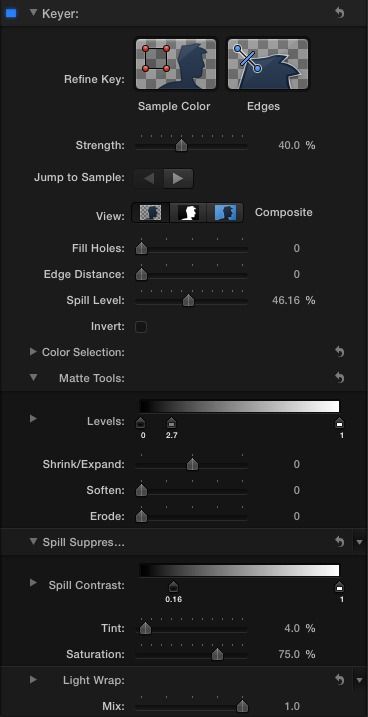
Here's a quick dirt key I did with FCPX internal Keyer on Matt Davis' green screen footage. I pulled the footage off his vimeo video. It was a Prores 422(proxy). Just wanted to see what I could do with it.
vimeo.com/97876659

Here's the settings. Normally, I would denoise the footage first but I felt it would be like cheating. But with denoising it looks even better. Anyways, thanks tpayton for the shout out.
vimeo.com/97876659
Here's the settings. Normally, I would denoise the footage first but I felt it would be like cheating. But with denoising it looks even better. Anyways, thanks tpayton for the shout out.
Last edit: 10 Jun 2014 23:28 by pja.
Please Log in to join the conversation.
10 Jun 2014 23:08 #47621
by tpayton
Replied by tpayton on topic Chromakey battle results
PJA - Great looking key. Can you post a screen shot of your inspector settings?
Please Log in to join the conversation.

11 Jun 2014 08:38 - 11 Jun 2014 09:23 #47647
by Redifer
Replied by Redifer on topic Chromakey battle results
Hey guys I'm seeing lots of shadows on the corners of your results, especially the upper-left corner that should be keyed out and perfectly clean.
EDIT: Using the cruddy MP4 that this guy uploaded to Google Docs I was able to get satisfactory results with both but Premiere was faster. Ultra key is pretty easy. The problem with the FCPX keyer is that it assumes which color you want to key out. It takes a lot of work to, say, key out his shirt INSTEAD of the green if I wanted. Sometimes I have to drop the keyer on a clip and remove it multiple times before it keys out the color I need it to.


I also decided not to cheat with a white background which could hide outlines. And actually I think I'm starting to like the FCPX key better. It's sharper.
EDIT: Using the cruddy MP4 that this guy uploaded to Google Docs I was able to get satisfactory results with both but Premiere was faster. Ultra key is pretty easy. The problem with the FCPX keyer is that it assumes which color you want to key out. It takes a lot of work to, say, key out his shirt INSTEAD of the green if I wanted. Sometimes I have to drop the keyer on a clip and remove it multiple times before it keys out the color I need it to.
I also decided not to cheat with a white background which could hide outlines. And actually I think I'm starting to like the FCPX key better. It's sharper.
Last edit: 11 Jun 2014 09:23 by Redifer.
Please Log in to join the conversation.
11 Jun 2014 09:42 #47650
by rjvddoes
Replied by rjvddoes on topic Chromakey battle results
Yeah, I noticed that a bit too late. Of course it could be easily removed with a garbage matte, preferably prior to handing it off 
Please Log in to join the conversation.
11 Jun 2014 10:31 - 31 Mar 2015 13:30 #47651
by rjvddoes
Replied by rjvddoes on topic Chromakey battle results
Recently I saw Mark Spencer's excellent 3 part tutorial on Advanced Keying Controls in FCPX.
Very clarifying on how to tweak and fine tune a difficult key.
They were published in this article on FCP.CO (the 2nd, 3rd and 4th videos on the page)
www.fcp.co/final-cut-pro/tutorials/1423-...ree-tutorial-roundup
I am doing a lot of green screen interviews at the moment. I am using a Lastolite collapsible green screen and two Arri 800W open face spots with a green gel in front to evenly light the background.
Two 300W fresnel spots as backlight with ND .6 to prevent the use of a dimmer
A 100W Dedo light as a hard key/sidelight from the interviewee's right side (almost 90 degrees)
A 1000 W Chimera Softbox as a soft key, placed just a little left of the interviewer.
Two Lastolite reflectors that blocked any green spill from the Arri lights and the one on camera right was placed in such a way that the light of the dedo on the left bounced to just lighten up the dark side of the interviewee's face.
I used an EX1 and an Atomos Samurai to record 10 bit ProRes 422.
Here a some stills of the results


And from the setup


Very clarifying on how to tweak and fine tune a difficult key.
They were published in this article on FCP.CO (the 2nd, 3rd and 4th videos on the page)
www.fcp.co/final-cut-pro/tutorials/1423-...ree-tutorial-roundup
I am doing a lot of green screen interviews at the moment. I am using a Lastolite collapsible green screen and two Arri 800W open face spots with a green gel in front to evenly light the background.
Two 300W fresnel spots as backlight with ND .6 to prevent the use of a dimmer
A 100W Dedo light as a hard key/sidelight from the interviewee's right side (almost 90 degrees)
A 1000 W Chimera Softbox as a soft key, placed just a little left of the interviewer.
Two Lastolite reflectors that blocked any green spill from the Arri lights and the one on camera right was placed in such a way that the light of the dedo on the left bounced to just lighten up the dark side of the interviewee's face.
I used an EX1 and an Atomos Samurai to record 10 bit ProRes 422.
Here a some stills of the results
And from the setup
Last edit: 31 Mar 2015 13:30 by rjvddoes.
Please Log in to join the conversation.
11 Jun 2014 14:31 #47667
by VidGreg
Replied by VidGreg on topic Chromakey battle results
Just a quick tip…
In full screen you can advance through the video posted using the arrow keys to really see the differences between the different keyers. Too fast otherwise.
Be nice to know how he used each keyer. Was it auto-key only?
Thanks rj for the interview set-up shots/info. Not sure about the chrome legs on chair though.
Hope this helps, Greg
In full screen you can advance through the video posted using the arrow keys to really see the differences between the different keyers. Too fast otherwise.
Be nice to know how he used each keyer. Was it auto-key only?
Thanks rj for the interview set-up shots/info. Not sure about the chrome legs on chair though.
Hope this helps, Greg
Please Log in to join the conversation.
11 Jun 2014 14:58 #47670
by rjvddoes
Replied by rjvddoes on topic Chromakey battle results
Hehe, it were all medium shots or closer, so no chrome tubing in the shot.
Please Log in to join the conversation.
11 Jun 2014 15:51 #47676
by lichinho
Replied by lichinho on topic Chromakey battle results
Redifer wrote: "The problem with the FCPX keyer is that it assumes which color you want to key out. It takes a lot of work to, say, key out his shirt INSTEAD of the green if I wanted. Sometimes I have to drop the keyer on a clip and remove it multiple times before it keys out the color I need it to."
Not so. Just drag the strength slider all the way to zero and you in fact renounce the color FCP X had chosen to key out. Then you can choose the colors you want.
Not so. Just drag the strength slider all the way to zero and you in fact renounce the color FCP X had chosen to key out. Then you can choose the colors you want.
Please Log in to join the conversation.

12 Jun 2014 00:50 #47697
by alex4D
Replied by alex4D on topic Chromakey battle results
By the way, if you go to that link, click the file menu to download the 124MB source file.
This more direct link worked for me (even after I'd signed out of my Google account)
docs.google.com/uc?id=0B7Oll8R1pIjyUFhrV...aQWs&export=download
By the way, my mum will be happy to see you all working with this footage.
@Alex4D
This more direct link worked for me (even after I'd signed out of my Google account)
docs.google.com/uc?id=0B7Oll8R1pIjyUFhrV...aQWs&export=download
By the way, my mum will be happy to see you all working with this footage.
@Alex4D
Please Log in to join the conversation.
